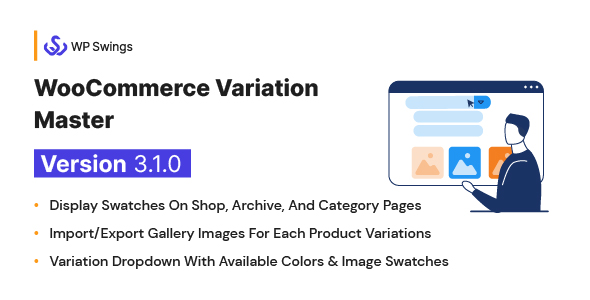
WooCommerce Variation Master - Variation Dropdown, Import/Export Gallery Image, Color & Image Swatch
Description










THE WOOCOMMERCE VARIATION PRODUCT SHOWS DIFFERENT SWATCHES ON YOUR SHOP PAGE WITH THE BEST-SELLING VARIATION MASTER PLUGIN. THIS HELPS THE MERCHANTS TO CUSTOMIZE THEIR STORE AS PER THEIR REQUIREMENTS.
WooCommerce Variation Master is amongst one of the best WooCommerce variation product plugins that lets you implement the woocommerce variation swatches plugin for your store. Using this extension, you can display product variations for your different products on your WooCommerce store. It also enables you to add image, color, and text swatches that help you present appealing product variations.
If you are looking for WooCommerce attribute swatches for your store, then the product variation plugin is the best choice for you. Variation Master comes with variation customization and offers multiple colors and image swatches.
It provides four extraordinary features which will enhance your product page display i.e. stock alert, variation gallery, product attribute swatches, cart update pop-up for variation, and product gallery slider. .
If you are searching for variation displays of variable products for your WooCommerce store, then WooCommerce Variation Master is the best suited option for you.. Variation Master comes with variation customization with a smooth facility of color and image swatches that can be edited on the cart page as well.
Additionally, it comes with product attribute import feature where the admin can import multiple images of the variations into product gallery images.

Feature Demo of WooCommerce Product Variation Plugin

Features Of WooCommerce Variation Master
Here are some of the top-quality features of the WooCommerce variations plugin liked by our clients.
Borders And WooCommerce Product Variations Attributes Text
For customers’ remarkable experience, we provide the Border on selected swatches and show the Attribute text above Swatches.
- Admin can apply the Border on selected swatches and show the Attribute text above Swatches.
- Admin can show stock left alerts on variable products. They can set the stock alert message and minimum quantity to trigger the alert.
- Increase/decrease batch count for variation creation with available product attributes. By default, it is 50.
- Admins can add multiple gallery images for each variation.
- Admins can provide color or image option swatches for attributes.
- Admin can add color and image swatches for each variation of the custom attribute.
- Admins can use both color and image swatch combination.
- Easily export/import for variation gallery images.
- Export/import attributes color and image swatches.
- Customize variation color and image swatches
- Allowed buyers to change selected variations on their cart page.
- Module control.
Variation Swatches
- Display product variations of different types.
- Show variation swatches on Shop, Archive, and Category Pages.
- Add variable products to cart from Shop, Archive and Categories Pages.
- Licensing panel for verification purpose.
WooCommerce Product Variation Customization
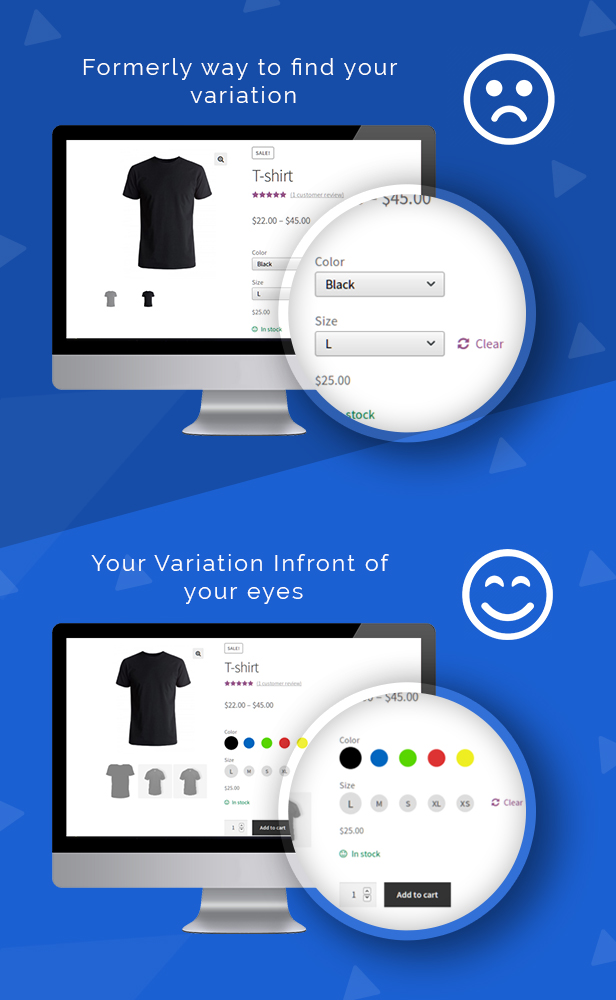
- Replace the WooCommerce variations dropdown on product detail page with color and image swatches as well as add gallery images for each variation.
- Add/Update color and image swatches for each attribute globally.
- Add/Update color and image swatches for each variable product.
- Define size for global swatch/image.
- Override swatch/image size via global swatch/image settings.
WooCommerce Variation Gallery
Add gallery images for each product variation. These images will display on the selected variation of the product detail page.
NOTE: We support all major themes. If the installed theme is not following the WooCommerce thumbnail dom structure, this feature might not work according to your theme behavior of showing gallery images. Sorry this could be inconvenient but we can’t support any custom HTML and for such cases, you can contact us for customization. If possible we would do without any charge.
Update WooCommerce Variation Product In Cart
Users can update product variations on their cart page.
Export / Import
- Export / Import attribute color and image swatches.
- Export / Import gallery images for each product variation.
Responsive Design
Flexible images/content are sized in relative units, so as to prevent them from displaying outside their containing element
Browser Compatibility
This plugin has been tested on different browsers for checking the compatibility
- Internet Explorer compatibility
- Mozilla Firefox
- Chrome
- Safari
Simple & Easy Configuration
This WooCommerce product variation swatches is easy to configure with the latest version of WordPress.
Translation Ready
Variation Master plugin also provides the language file that you can use to translate the strings of the plugin.
Theme Compatibility
This WooCommerce swatches plugin has been tested among the most popular WordPress themes and is compatible with them.
Product Gallery Slider
A slider has been provided on the variable product page which will help the customers to easily check their different variation images.

Easy Installation
Automatic installation is the easiest option as WordPress handles the file transfers itself and you don’t need to leave your web browser.
Steps are as follows:
- To perform automatic installation login to your WordPress account. Navigate to the Plugins menu and click Add New.
- Click on the Upload Plugin button.
- Then, click on the Browse button and navigate to the downloaded variation-master.zip file and click ok.
- Press Install Now.
Benefits Of WooCommerce Variation Master Plugin
- They can handle multiple gallery images for variation.
- They can display eye-catching WooCommerce variation swatches with variations in color, image, and text
- Upload images from your gallery with complete ease
- Also, they can make swatches attractive by changing their size, and showing/hiding attribute names.
- Gallery variation for each image catches more attention for the product.
- They will easily grasp WooCommerce variation products.
- Select the particular product variation of their choice.
- Gallery variation for each image grows more attention to the product which results in more chances of a sale.
- Add a border on WooCommerce attribute swatches and display the attribute text above the products.
- Display Variation Swatches WooCommerce on Shop, Archive, and Category Pages.
- Change the variations dropdown with multiple colors and image swatches.
- Add an image gallery for WooCommerce product variation.
- Let users update product variations on cart pages.
- Create and display responsive swatches.
- Import/Export gallery images as well as attribute color for variations
Live Demo
Visit demos to experience the unmatched benefits of a plugin and explore the settings.
Frontend demo of Variation Master : Click here Backend demo of Variation Master : Click here
Reviews
What Do Our Clients Say About Us? Alexvideo89 ⭐⭐⭐⭐⭐I had visualization problems probably due to compatibility with my theme, they solved everything very quickly, and they fulfilled all my requests. Kind Efficient, fast, I am more and more satisfied with my purchase
Zaidirahman ⭐⭐⭐⭐⭐Good support and easy to use plugins. this is the second plugin i bought from makewebbetter. hope to continue to produce great plugin
LinkOutz ⭐⭐⭐⭐⭐Easy to use, really installed in 10 mins and got used to it! Top plugin i recommend it to everyone!!!
Enoncie ⭐⭐⭐⭐⭐The support of this plugin by far is THE BEST I have ever had. And I have been the customer of several plugins/themes. They give good name to the professional developers. I have no doubt that our system will be in good hands.
I will buy more products from them.
Strongly recommend!!
Frequently Asked Questions
Q. Does WooCommerce Variation plugin convert the default variations to colors or sizes etc?.
A. We have built our products with two variations: color and size, and attributes.
Q. In WooCommerce variation plugin is it feasible to display colors on archive or category pages?
A. Yes, our plugin converts the default color variations or sizes drop-down into images or color swatches in a circle or square shape.
Q. Does the WooCommerce variation product swatches plugin show color or image swatches on shop and category pages?
A. Yes, there is a setting with which you can show colors on swatches and category pages.
Q. Does the WooCommerce variation gallery appears on shop and category pages?
A. Yes, there is a setting where you can show your color (swatches) on shop and category pages.
Q. How many variations can be made for each product?
A. Yes, it can be possible. You just have to set one particular variation as default and assign gallery images to that variation. The gallery section will appear once the page is loaded.
Q. How will the variation gallery image work?
- Go to the variable product edit page.
- Then navigate to variations and click on any variation.
- Add multiple images by clicking on – “Add Variation Gallery Images”
- Save changes after adding images.
Once you save the changes, the image gallery will display on that product page.

This plugin is not subjected to GDPR compliance as it does not store any sensitive data of a user. It only holds information related to software which is run by WordPress & WooCommerce of the holder.
Thank-you for your interest in WooCommerce Variation Master, WP Swings.
If our documentation doesn’t contain the solution to your problem, you can visit the WP Swings Forums Community Create and Revamp your eCommerce store with WooCommerce Services
Changelog
03.02.2023: ver-3.1.0
New:  Compatibility with latest WP/WC

20.12.2022: ver-3.0.9
New:  Compatibility with latest WP/WC

07.10.2022: ver- 3.0.8
New : Compatibility with latest WP/WC
New : compatible with php 8

20.06.2022: ver- 3.0.7
New: increase/decrease batch count for variation creation with available attributes ( by default it is 50 )
New: Remaining stock alert for variable products
New: Minor bug fixes

15.02.2022: Ver- 3.0.6
New: Change author from MakeWebBetter to WP Swings
New: Notice display of current version for WP Swings
New: Compatibility with WPML and Multisite
New: Compatibility with WP 5.8.2 and WC 5.9.0

8.12.2021: Ver- 3.0.5
New: Compatibility with WPML and Multisite
New: Compatibility with WP 5.8.2 and WC 5.9.0

21.10.2021: Ver- 3.0.4
Fix: phpcs/QA/security issues
Fix: License notification issue
Fix: License URI
New: WPML compatible
New: Tested up to WC: 5.7.1
New: Tested up to WP : 5.8.1

11.03.2021: Ver- 3.0.3
Fix: Compatible with latest WP and WC
Fix: Update language file

22.10.2020: Ver- 3.0.2
Fixed: Swatches selection issue on Safari  browser
Fixed: compatibility with Woo(4.6.1)and WP(5.5.1).

08.01.2020: Ver- 3.0.1
New: Added settings to enable/disable swatch on related products.
Fix:  Fixed issue for swatches selection in not working.
Fix:  Remove some deprecated code.

07.11.2019: Ver 3.0.0
New: Show Single Attribute on Shop Page
New: Variation image change on Mouseover on Shop page/archive/Category Pages.
New: Cross Icon on unavailable Variations
Fix: Show hide Variation on related products
Fix: Hide add to cart/quantity button from shop/related products page

22.05.2019: Ver 2.1.0
New Feature:
1.Show/Hide add to cart button and quantity button on shop/category and archive page.
2.Custom Swatch display size for Products Attribute Variations.
Fixed: compatibility with Woo(3.6.0)and WP(5.2.0).

16.02.2019: Ver 2.0.3
Fixed :License issue

04.10.2018: Ver 2.0.2
Fixed : Update Cart Button issue
Fixed : Gallery Theme Compatibility.

18.05.2018: Ver 2.0.1
New: Tweak in license

18.04.2018: Ver 2.0.0
New: Text swatch feature Added
New: Product gallery with two layouts Added
New: Auto-Update extension from dashboard Added

29.11.2017: Ver 1.3.2
Fix: Image and color issue fix

25.11.2017: Ver 1.3.1
New: Border on Selected Swatches.
New: Show Attribute text above Swatches.

20.11.2017: Ver 1.3.0
New: Display Variation Swatches on Shop, Archive and Categories Pages.
New: Adding Variable products to cart from Shop, Archive and Categories Pages.
New: Licensing panel for verification purposes.
Fix: Capitalized and multiple words/language for the custom attribute.
Fix: Default Variation on custom attributes for Variable Product.
Fix: Compatibility and designing issues with Divi Theme.

15.09.2017: Ver 1.2.0
New: Variation Swatches in Variable Product Update Cart Popup.
New: Product Gallery Slider in Variable Product Update Cart Popup.
Fix: Import Variation Gallery Images not working.

26.08.2017: Ver 1.1.0
New: Product Gallery slider.
Fix: Square shape image in a circle box.

15.06.2017: Ver 1.0.5
New: Optimized and stable version.
Fix: Compatibility issues with Avada theme.

25.04.2017: Ver 1.0.4
Fix: Compatibility issues with WooCommerce 3.0.X.

03.11.2016: Ver 1.0.3
Added: Rectangular swatch/image size support with user defined size.
Added: Attribute name display kind option to show in the middle of swatch/image or at the top of swatch/image.
Added: Added option to use variation featured image for all variation attributes.

25.10.2016: Ver 1.0.2
Added: User defined swatch/image size.
Added: Override swatch/image size by global swatch/image setting.
Fixed: Default PreetyPhoto functionality for variations.
Fixed: Theme template overriding for attribute swatch and images.

01.09.2016: Ver 1.0.1
Added: Modified variation selection to make it more user friendly and effective.
Added: Disabled product variation notification (tool-tip) on front-end(Product detail page).
Added: Only Configured global attribute swatch setting effect on front-end(Product detail page).
Updated: .mo and .po files are updated.

17.08.2016: Ver 1.0.0
Initial Release
Categories
Tags
External listing. code.market does not sell this product and does not process payment for it. Pricing, payment, delivery, licensing, refunds, and support are handled by the third-party merchant on its own website. We may earn an affiliate commission from a referral. Details.
Products of the Week.
Submit#1

upvote.club
Free Social Media Engagement that Helps Boost Your Content. Upvote Club supports 19 social networks with 100+ engagement actions in one dashboard. Add links to your posts and get free engagement from real users.
SaaS · 16,654 views · 96 clicksSaaS · Week 42 · 16,654 views · 96 clicks
#2

Seenshot App
Free, Fast, MacOS Screenshot app. Make Screenshot cmd+shift+2 and send it via link
Desktop App · 5,636 views · 109 clicksDesktop App · Week 42 · 5,636 views · 109 clicks
#3

Conversational Backlinks for Busy Founders
Place Backlink Relevant Conversation for your domain across Forums and Conversations
Website · 17,457 views · 195 clicksWebsite · Week 42 · 17,457 views · 195 clicks
#4

Substack Posting API
Onboard your Agent to Substack. Write Publish on Substack via API
SaaS · 36,444 views · 184 clicksSaaS · Week 42 · 36,444 views · 184 clicks
#5

codester.com
SocialDesk+: Omnichannel Social Commerce & Business Management Platform This is stronger than simply “Social Commerce and Messaging” because it tells buyers this is a complete business platform, not just a messaging script. Turn Social Conversations Into Sales SocialDesk+ is a complete omnichannel social commerce and business management platform built for businesses that sell and communicate with customers through social media. Instead of switching between WhatsApp, Facebook, Instagram and TikTok, businesses can manage customer conversations, comments, products, leads, follow-ups, automation, teams and business reports from one professional workspace. And because the full source code is included, developers, agencies and entrepreneurs can customize, rebrand and launch SocialDesk+ as their own business solution or SaaS platform. 🚀 Build Your Own Social Commerce Business SocialDesk+ gives you the foundation to launch: - Your own SaaS platform - A white-label social CRM - A social-commerce management system - A customer communication platform - A business messaging solution - A custom solution for clients - A multi-business subscription platform 💬 Connect Your Customers Supported social channels include: WhatsApp • Facebook • Instagram • TikTok Bring supported conversations into one centralized workspace and help businesses respond faster without constantly switching between platforms. 🛍️ More Than a Messaging Platform SocialDesk+ combines communication with the tools businesses need to manage customer opportunities: Inbox Manage customer conversations from connected channels. Comments Monitor and respond to social-media comments. Customers & Leads Organize customer information and potential buyers. Products & Catalog Manage products and give your team quick access to product information. Follow-Ups Make sure potential customers don't get forgotten. Automation Automate repetitive customer questions and responses. AI Assistant Provide AI-assisted communication when configured. Team Management Give managers and staff access to the business workspace. Reports & Analytics Track activity using business reports and analytics. The current product listing already includes these capabilities. 🔥 Why Buyers Will Want It Launch Faster Start with an already-built business platform instead of developing the entire system from zero. Customize Everything The full source code is included, allowing developers to change branding, features, workflows and integrations. Build a SaaS Create multiple business workspaces and offer SocialDesk+ as a subscription-based service. Sell to Businesses Offer it to retailers, restaurants, service businesses, online sellers, agencies and other businesses that communicate with customers through social media. Mobile + Web + Backend This isn't just a mobile UI template. It includes: - Flutter mobile application - Python / FastAPI backend - Web interface - Administration tools - Database infrastructure - API-based architecture - SQLite / PostgreSQL support - Android and iOS project structure 💼 One Platform. Multiple Business Opportunities. For SaaS Entrepreneurs Launch your own subscription platform and allow multiple businesses to operate inside separate workspaces. For Software Agencies Customize and rebrand the platform for clients instead of building an omnichannel business system from scratch. For Developers Use the complete source code as a foundation for your own social-commerce or customer-management product. For Businesses Deploy a dedicated version for your own customer-service and social-commerce operations. 🧩 What's Included Mobile - Flutter / Dart - Android - iOS project Backend - Python - FastAPI - SQLAlchemy - Alembic Database - SQLite - PostgreSQL Web - HTML5 - CSS3 - JavaScript Deployment - Docker - Docker Compose - Production configuration Business Platform - Multi-workspace architecture - Authentication - Teams - Customers - Products - Messaging - Comments - Automation - Reports - Subscriptions - Administration The current listing also documents third-party integrations such as Meta, TikTok, Stripe, Firebase, SMTP and optional OpenAI configuration. ⚡ What Makes SocialDesk+ Different? You're not buying a simple: ❌ Chat UI ❌ WhatsApp clone ❌ Flutter template ❌ Admin dashboard ❌ Basic CRM You're getting a complete business platform foundation that can be customized, branded and commercialized. Connect. Automate. Manage. Grow. SocialDesk+ Omnichannel Social Commerce & Business Management Platform One important change I'd make to the current listing The current page starts with: “A simple guide to managing your social conversations, customers, products and business activity.”
Other · 3,858 views · 32 clicksOther · Week 42 · 3,858 views · 32 clicks
#6

sandbook.app
Sandbook reads EPUB, PDF, web pages and scanned pages aloud with Kokoro TTS, an open neural voice model that runs on your iPhone, free and offline. Choose from 41 natural voices in English, Spanish, French, Italian, Brazilian Portuguese and Hindi and follow each word as it is spoken. Try the same voices in your browser first with the free Kokoro TTS online demo.
Other · 3,857 views · 13 clicksOther · Week 42 · 3,857 views · 13 clicks