Woocommerce Store Closing
Description
WooCommerce Store Closing plugin is a comprehensive and the most complete store closing system for WooCommerce. Hundreds of online stores use our Store Closing plugin to close their shops to orders for specific periods.
We started to build this plugin with a basic idea, online services need breaks. Except for a very few, most of the online stores need to be closed for certain times. With our plugin, you can close your shop right away with the one-click button. You also can set three different times a day for opening and closing. We even have an upcoming feature for future holiday dates.
RemindMe NEW FEATURE! We enabled RemindMe as a function for the WooCommerce Store Closing plugin. Customers who enter their email addresses into your notification area will receive an email from the RemindMe feature when your store reopens. Click for more details about this great feature

FEATURES
GENERAL
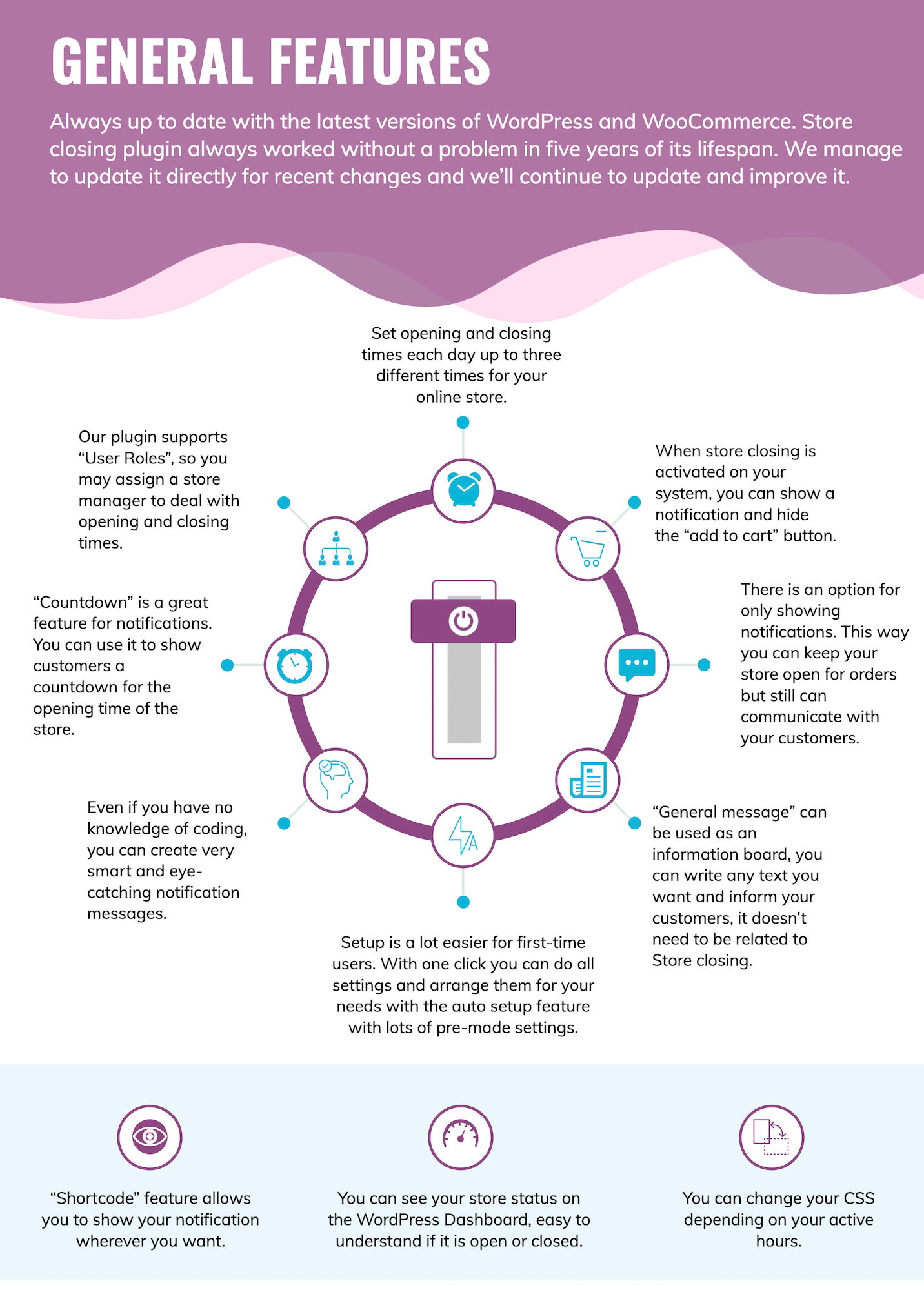
- Set opening and closing times each day up to three different times for your online store.
- When store closing is activated on your system, you can show a notification and hide the “add to cart” button.
- There is an option for only showing notifications. This way you can keep your store open for orders but still can communicate with your customers.
- “General message” can be used as an information board, you can write any text you want and inform your customers, it doesn’t need to be related to Store closing.
- You can change your CSS depending on your active hours.
- “Shortcode” feature allows you to show your notification wherever you want.
- “Countdown” is a great feature for notifications. You can use it to show customers a countdown for the opening time of the store.
- Our plugin supports “User Roles”, so you may assign a store manager to deal with opening and closing times.
- Even if you have no knowledge of coding, you can create very smart and eye-catching notification messages.
- You can see your store status on the WordPress Dashboard, easy to understand if it is open or closed.
- Setup is a lot easier for first-time users. With one click you can do all settings and arrange them for your needs with the auto setup feature with lots of pre-made settings.
- Always up to date with the latest versions of WordPress and WooCommerce. Store closing plugin always worked without a problem in five years of its lifespan. We manage to update it directly for recent changes and we’ll continue to update and improve it.
DAILY
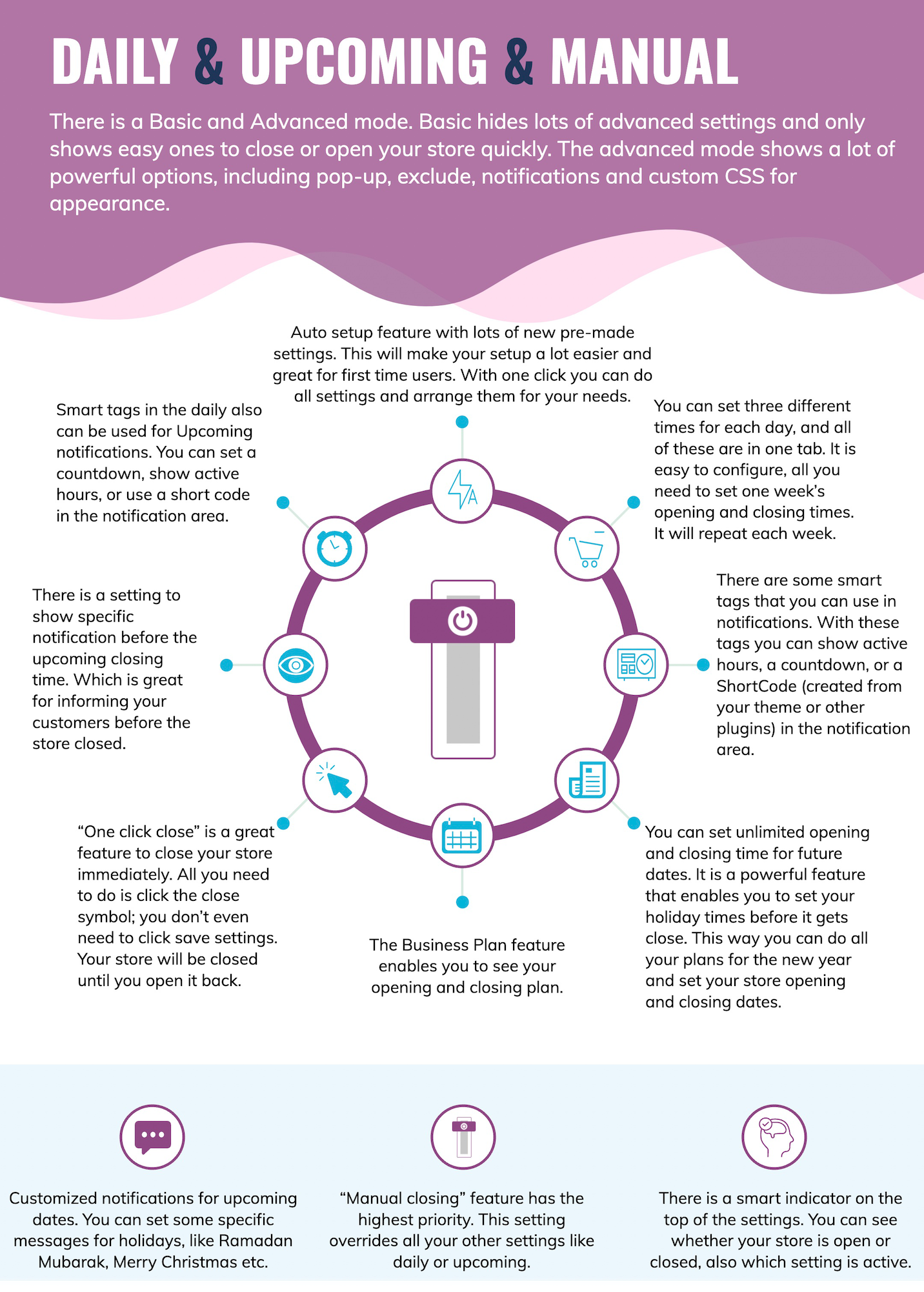
- There is a smart indicator on the top of the settings. You can see whether your store is open or closed, also which setting is active.
- There is a Basic and Advanced mode. Basic hides lots of advanced settings and only shows easy ones to close or open your store quickly. The advanced mode shows a lot of powerful options, including pop-up, exclude, notifications and custom CSS for appearance.
- Auto setup feature with lots of new pre-made settings. This will make your setup a lot easier and great for first time users. With one click you can do all settings and arrange them for your needs.
- You can set three different times for each day, and all of these are in one tab. It is easy to configure, all you need to set one week’s opening and closing times. It will repeat each week.
- There are some smart tags that you can use in notifications. With these tags you can show active hours, a countdown, or a ShortCode (created from your theme or other plugins) in the notification area.
UPCOMING
- You can set unlimited opening and closing time for future dates. It is a powerful feature that enables you to set your holiday times before it gets close. This way you can do all your plans for the new year and set your store opening and closing dates.
- Customized notifications for upcoming dates. You can set some specific messages for holidays, like Ramadan Mubarak, Merry Christmas etc.
- There is a setting to show specific notification before the upcoming closing time. Which is great for informing your customers before the store closed.
- Smart tags in the daily also can be used for Upcoming notifications. You can set a countdown, show active hours, or use a short code in the notification area.
- The Business Plan feature enables you to see your opening and closing plan.
MANUAL
- “One click close” is a great feature to close your store immediately. All you need to do is click the close symbol; you don’t even need to click save settings. Your store will be closed until you open it back.
- “Manual closing” feature has the highest priority. This setting overrides all your other settings like daily or upcoming.
POP-UP
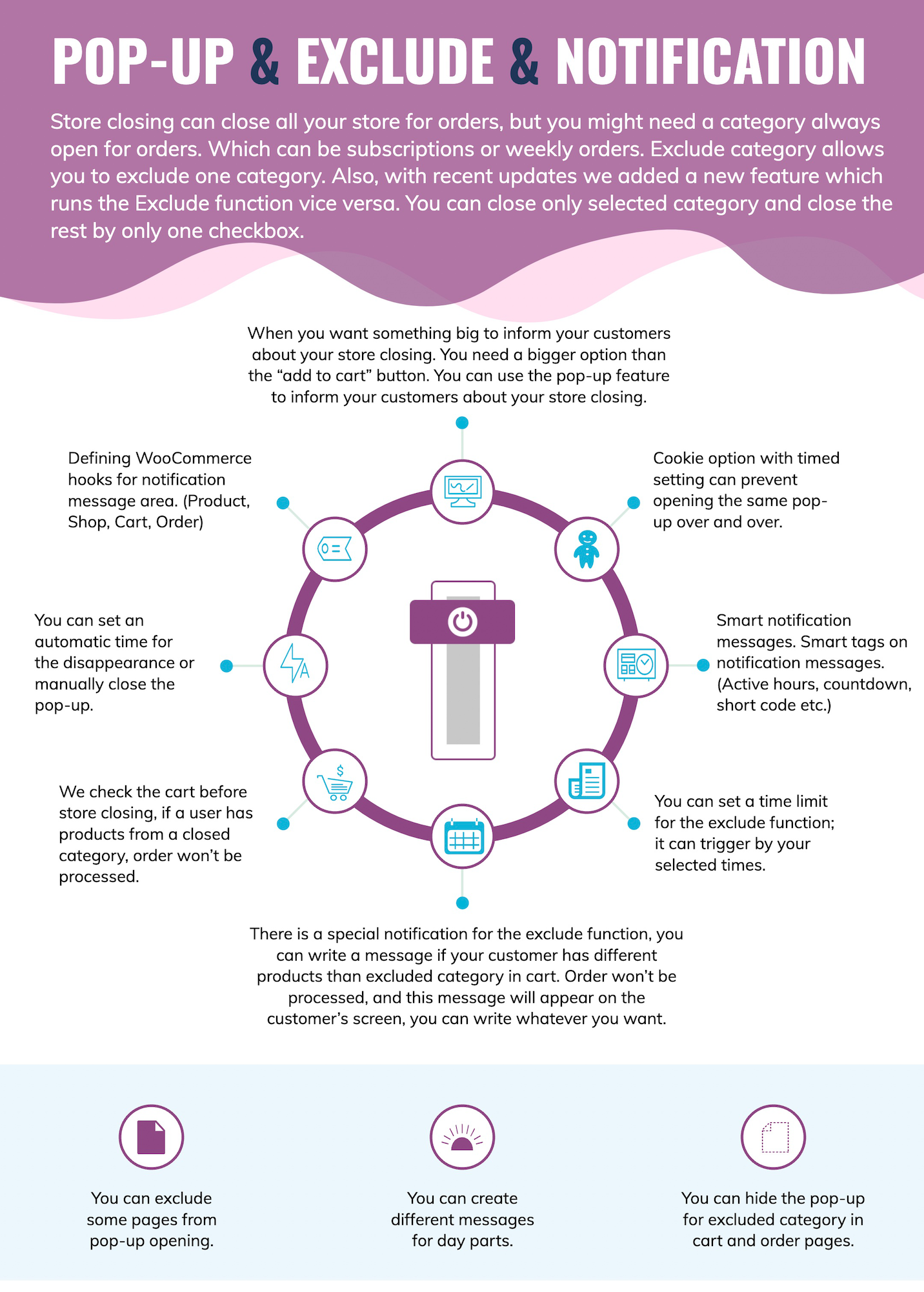
- When you want something big to inform your customers about your store closing. You need a bigger option than the “add to cart” button. You can use the pop-up feature to inform your customers about your store closing.
- You can set an automatic time for the disappearance or manually close the pop-up.
- Cookie option with timed setting can prevent opening the same pop-up over and over.
- You can exclude some pages from pop-up opening.
- There is a special CSS class for pop-up, also you can add background color and opacity for the pop-up page.
EXCLUDE
- Store closing can close all your store for orders, but you might need a category always open for orders. Which can be subscriptions or weekly orders. Exclude category allows you to exclude one category. Also, with recent updates we added a new feature which runs the Exclude function vice versa. You can close only selected category and close the rest by only one checkbox.
- You can set a time limit for the exclude function; it can trigger by your selected times.
- We check the cart before store closing, if a user has products from a closed category, order won’t be processed.
- There is a special notification for the exclude function, you can write a message if your customer has different products than excluded category in cart. Order won’t be processed, and this message will appear on the customer’s screen, you can write whatever you want.
- You can hide the pop-up for excluded category in cart and order pages.
NOTIFICATION
- Smart notification messages.
- Smart tags on notification messages. (Active hours, countdown, short code etc.)
- You can create different messages for day parts.
- Defining WooCommerce hooks for notification message area. (Product, Shop, Cart, Order)
SETTINGS
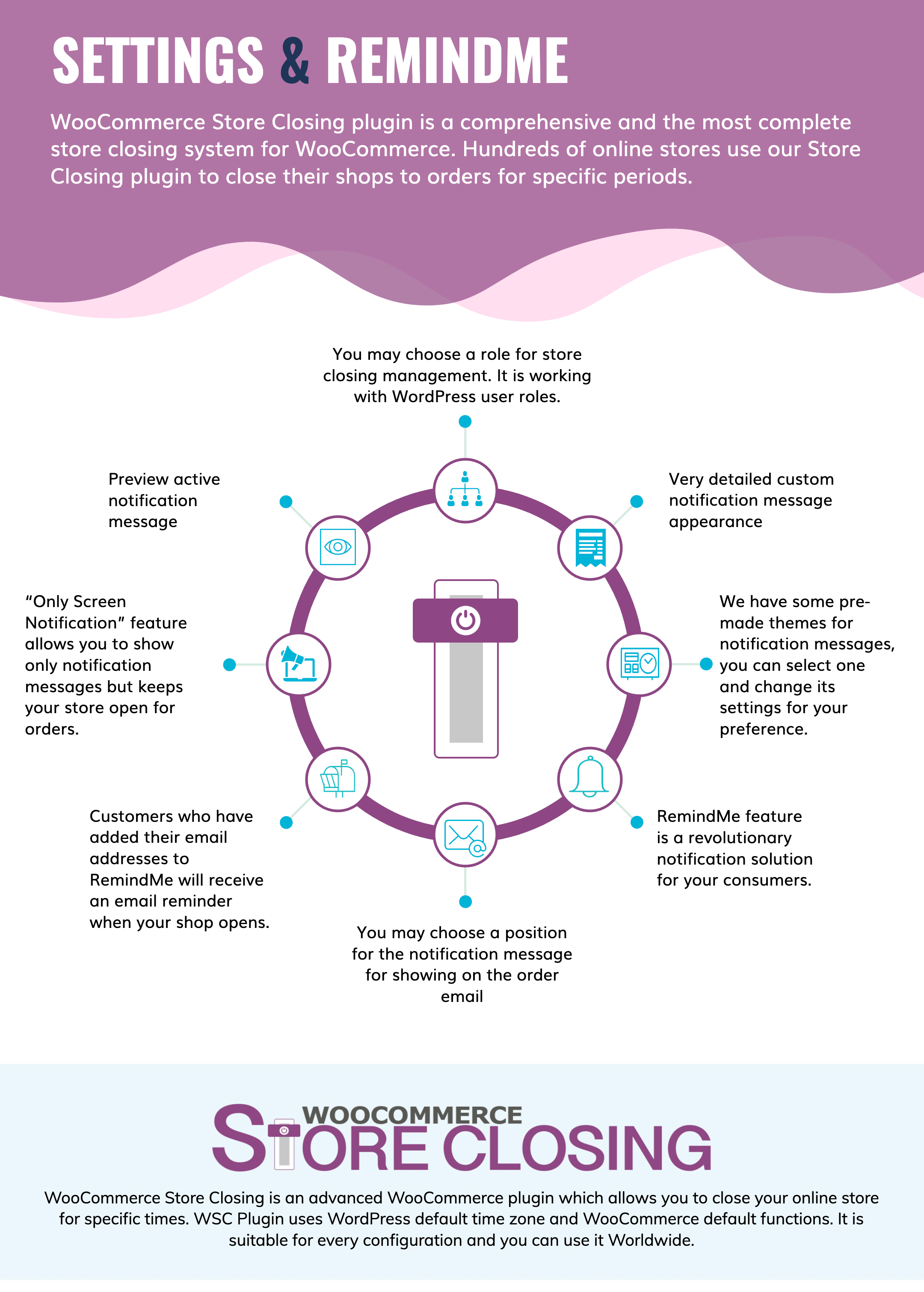
- Very detailed custom notification message appearance
- We have some pre-made themes for notification messages, you can select one and change its settings for your preference.
- “Only Screen Notification” feature allows you to show only notification messages but keeps your store open for orders.
- You may choose a role for store closing management. It is working with WordPress user roles.
- Backup and Restore settings.
- Clear all data can create a fresh start
REMINDME
- RemindMe feature is a revolutionary notification solution for your consumers.
- Adds a bell icon to your store closing notification, customers can enter their email in this area.
- Customers who have added their email address to RemindMe will receive an email reminder when your shop opens.
- You may change the wording of emails, send buttons, and success and error messages.
- You may also change the sender name, sender email, and subject lines.
More details www.woocommercestoreclosing.com
Documentation page www.woocommercestoreclosing.com/how-do-i-do/
Live Demo www.woocommercestoreclosing.com/product/woocommerce-store-closing/
Improving our plugin day by day is our priority. We added lots of new features after we made it great at the closing and opening parts. The plugin has an advanced notification feature, it is possible to use a general one, a daily one, or upcoming, different notifications for different closing types. The countdown for store opening is also a good feature. The Shortcode feature is very useful, it helps you to use a shortcode for notification areas, also if you have multiple languages in your system and your multi-language plugin supports shortcode translations, you can show our message in different languages. The pop-up feature adds a layer to your website and shows your notification about your store situation.
Some products such as subscriptions or prepaid orders need to be available 7×24 even if your store closed. We have designed an exclude system for these situations, you can select a product category to exclude them from Store Closing. This will close your website but products in this category will always be available.
We have fast and effective support for our plugin and our team is checking the latest versions of WooCommerce and WordPress at day one and responding to these changes quickly. We stick with WordPress and WooCommerce defaults, which makes our updates very fast, compatibility is almost %100 with the latest version every time. We’re always up to date and working. Feedbacks are also very important for us. We are improving our code with customer feedback and adding lots of new features with popular requests.
What we offer is more than a basic plugin. We have been developing it regularly for three years and now it is used by over 500 companies worldwide. We are opening and closing WooCommerce stores more than a thousand times every day. If you want a plugin to automatically close your store, our plugin is what you need.
Changelog CHANGELOG
Categories
Tags
External listing. code.market does not sell this product and does not process payment for it. Pricing, payment, delivery, licensing, refunds, and support are handled by the third-party merchant on its own website. We may earn an affiliate commission from a referral. Details.
Products of the Week.
Submit#1

upvote.club
Free Social Media Engagement that Helps Boost Your Content. Upvote Club supports 19 social networks with 100+ engagement actions in one dashboard. Add links to your posts and get free engagement from real users.
SaaS · 19,477 views · 97 clicksSaaS · Week 42 · 19,477 views · 97 clicks
#2

Seenshot App
Free, Fast, MacOS Screenshot app. Make Screenshot cmd+shift+2 and send it via link
Desktop App · 8,197 views · 109 clicksDesktop App · Week 42 · 8,197 views · 109 clicks
#3

Conversational Backlinks for Busy Founders
Place Backlink Relevant Conversation for your domain across Forums and Conversations
Website · 19,983 views · 197 clicksWebsite · Week 42 · 19,983 views · 197 clicks
#4

Substack Posting API
Onboard your Agent to Substack. Write Publish on Substack via API
SaaS · 38,964 views · 186 clicksSaaS · Week 42 · 38,964 views · 186 clicks
#5

codester.com
SocialDesk+: Omnichannel Social Commerce & Business Management Platform This is stronger than simply “Social Commerce and Messaging” because it tells buyers this is a complete business platform, not just a messaging script. Turn Social Conversations Into Sales SocialDesk+ is a complete omnichannel social commerce and business management platform built for businesses that sell and communicate with customers through social media. Instead of switching between WhatsApp, Facebook, Instagram and TikTok, businesses can manage customer conversations, comments, products, leads, follow-ups, automation, teams and business reports from one professional workspace. And because the full source code is included, developers, agencies and entrepreneurs can customize, rebrand and launch SocialDesk+ as their own business solution or SaaS platform. 🚀 Build Your Own Social Commerce Business SocialDesk+ gives you the foundation to launch: - Your own SaaS platform - A white-label social CRM - A social-commerce management system - A customer communication platform - A business messaging solution - A custom solution for clients - A multi-business subscription platform 💬 Connect Your Customers Supported social channels include: WhatsApp • Facebook • Instagram • TikTok Bring supported conversations into one centralized workspace and help businesses respond faster without constantly switching between platforms. 🛍️ More Than a Messaging Platform SocialDesk+ combines communication with the tools businesses need to manage customer opportunities: Inbox Manage customer conversations from connected channels. Comments Monitor and respond to social-media comments. Customers & Leads Organize customer information and potential buyers. Products & Catalog Manage products and give your team quick access to product information. Follow-Ups Make sure potential customers don't get forgotten. Automation Automate repetitive customer questions and responses. AI Assistant Provide AI-assisted communication when configured. Team Management Give managers and staff access to the business workspace. Reports & Analytics Track activity using business reports and analytics. The current product listing already includes these capabilities. 🔥 Why Buyers Will Want It Launch Faster Start with an already-built business platform instead of developing the entire system from zero. Customize Everything The full source code is included, allowing developers to change branding, features, workflows and integrations. Build a SaaS Create multiple business workspaces and offer SocialDesk+ as a subscription-based service. Sell to Businesses Offer it to retailers, restaurants, service businesses, online sellers, agencies and other businesses that communicate with customers through social media. Mobile + Web + Backend This isn't just a mobile UI template. It includes: - Flutter mobile application - Python / FastAPI backend - Web interface - Administration tools - Database infrastructure - API-based architecture - SQLite / PostgreSQL support - Android and iOS project structure 💼 One Platform. Multiple Business Opportunities. For SaaS Entrepreneurs Launch your own subscription platform and allow multiple businesses to operate inside separate workspaces. For Software Agencies Customize and rebrand the platform for clients instead of building an omnichannel business system from scratch. For Developers Use the complete source code as a foundation for your own social-commerce or customer-management product. For Businesses Deploy a dedicated version for your own customer-service and social-commerce operations. 🧩 What's Included Mobile - Flutter / Dart - Android - iOS project Backend - Python - FastAPI - SQLAlchemy - Alembic Database - SQLite - PostgreSQL Web - HTML5 - CSS3 - JavaScript Deployment - Docker - Docker Compose - Production configuration Business Platform - Multi-workspace architecture - Authentication - Teams - Customers - Products - Messaging - Comments - Automation - Reports - Subscriptions - Administration The current listing also documents third-party integrations such as Meta, TikTok, Stripe, Firebase, SMTP and optional OpenAI configuration. ⚡ What Makes SocialDesk+ Different? You're not buying a simple: ❌ Chat UI ❌ WhatsApp clone ❌ Flutter template ❌ Admin dashboard ❌ Basic CRM You're getting a complete business platform foundation that can be customized, branded and commercialized. Connect. Automate. Manage. Grow. SocialDesk+ Omnichannel Social Commerce & Business Management Platform One important change I'd make to the current listing The current page starts with: “A simple guide to managing your social conversations, customers, products and business activity.”
Other · 6,374 views · 32 clicksOther · Week 42 · 6,374 views · 32 clicks
#6

sandbook.app
Sandbook reads EPUB, PDF, web pages and scanned pages aloud with Kokoro TTS, an open neural voice model that runs on your iPhone, free and offline. Choose from 41 natural voices in English, Spanish, French, Italian, Brazilian Portuguese and Hindi and follow each word as it is spoken. Try the same voices in your browser first with the free Kokoro TTS online demo.
Other · 6,364 views · 13 clicksOther · Week 42 · 6,364 views · 13 clicks