Woocommerce csv import export plugin - orders, customers, products
Description
WooCommerce CSV Import Export plugin helps you quickly import or export products, categories, customers, or order details in bulk. You can extract a list of selected products using export filters to order in a CSV file.
You can set maximum entries to ensure importing or exporting data is within limits. WooCommerce Import products plugin, powered by a PHP Excel library, speeds up the import and export operations.
- Import/Export Products, Categories, Orders, and Customers
- Exports the Data in CSV file which is easily Customizable
- Filters to Export Specific Type of Data
- Uses PHP Excel Library for quick Import and Export
- Configure Maximum Entries to Import/Export in Each Set
- Import / Export Coupons (New)
- Import / Export Product Reviews (New)
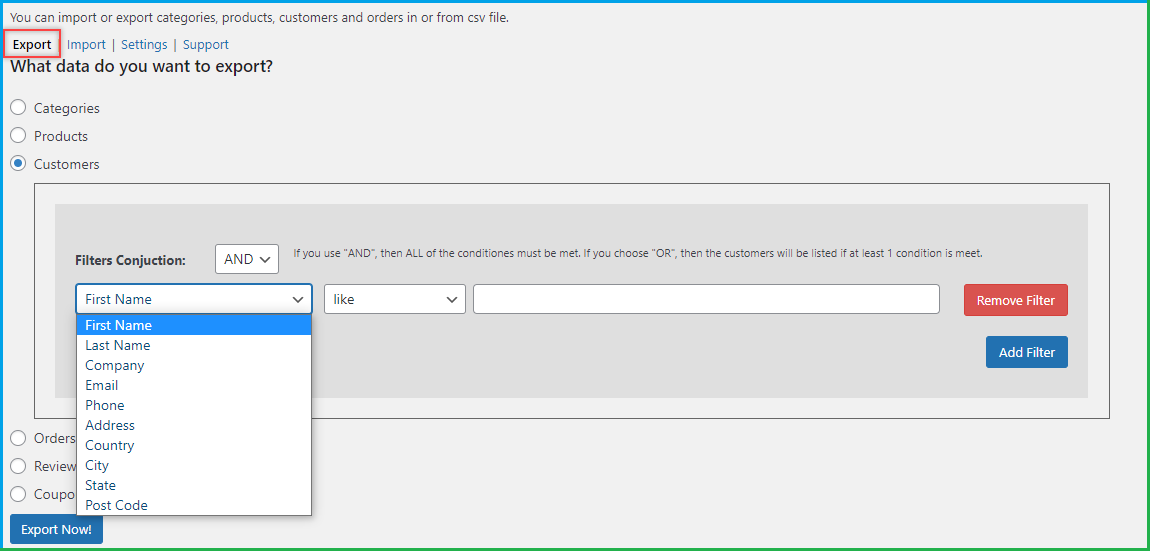
Download Required Customers’ Data with a Click
With WooCommerce export products plugin, you can download customers’ data out of your store with selective attributes. Get a complete list of customers or set filters to grab a list of customers you need the most. For example, you can extract a list of customers from a specific city, country, or common name. Add various filters like First Name, Last Name, Company, Email, Phone, Address, Country, City, State, and Post Code.
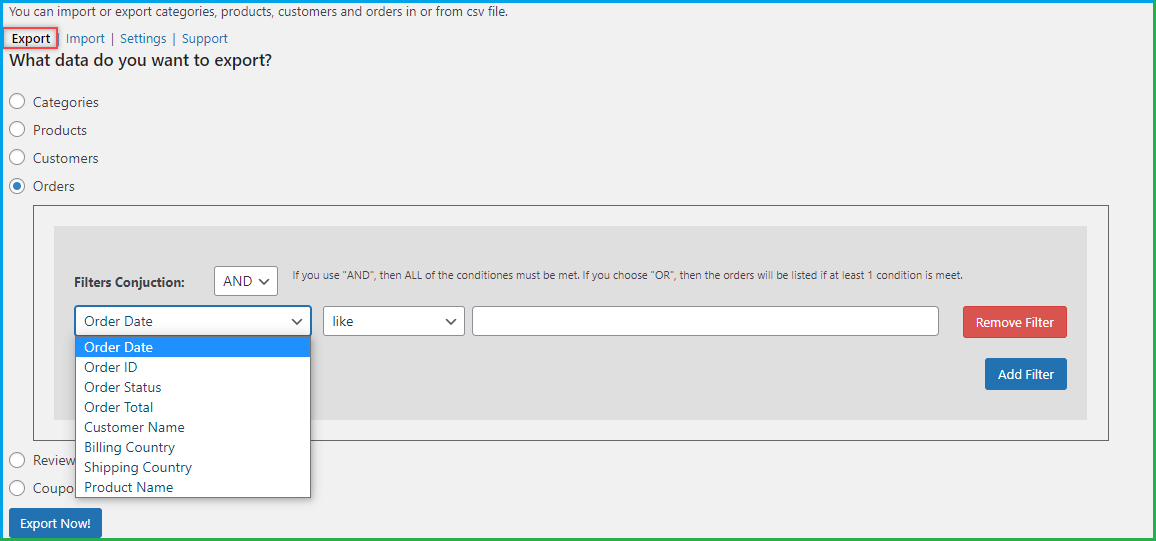
Export Orders With Respect to its Attributes
With WooCommerce CSV Import Export plugin, you can get a list of orders with respect to its attributes like pending or complete orders. You can grab a complete list of orders or filter specific orders to export. You can configure any or all of the filters including Order date, Order ID, Order Status, Order Total, Customer Name, Billing Country, Shipping Country, and Product Name.
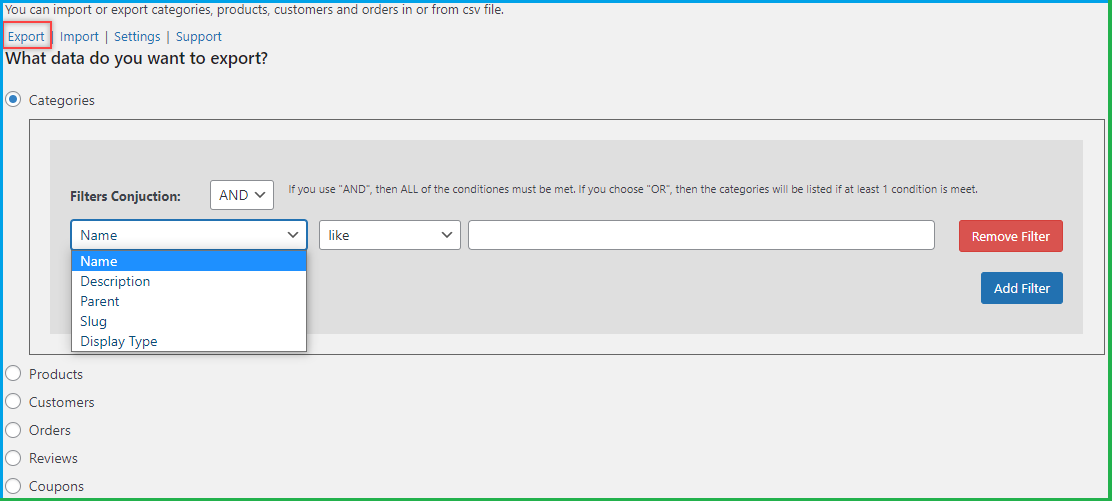
Extract All or Specific Categories with Export Filters
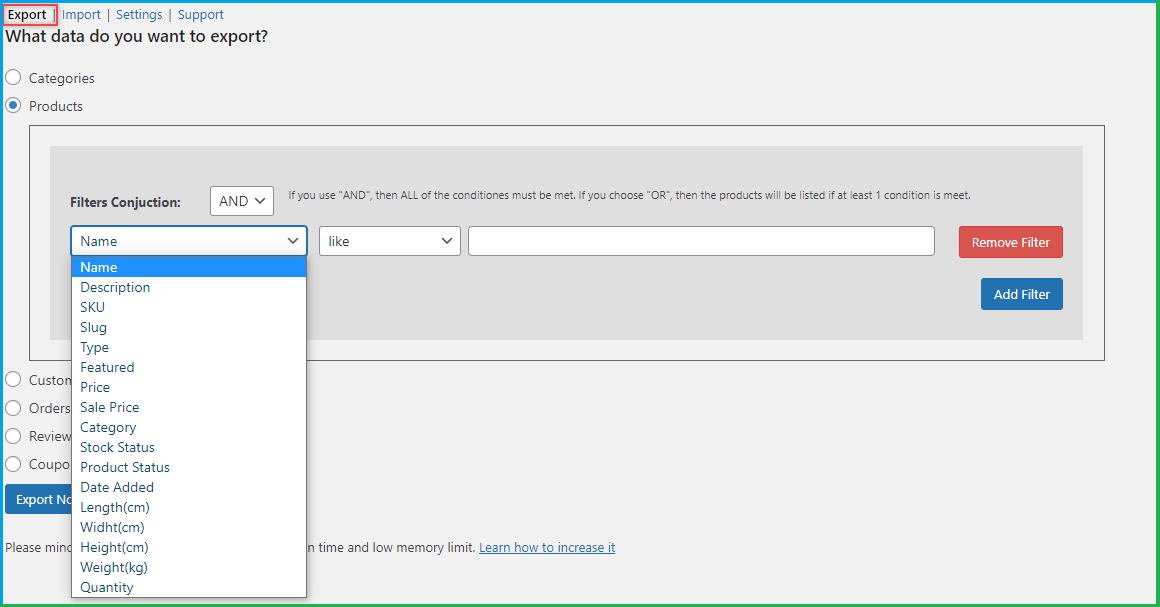
WooCommerce export orders plugin gives the freedom to export the entire catalog or set filters to extract only the required once. You can export different product information by utilizing numerous filters like name, description, parent, slug, or display type. Set as much filters as you need to get the right form of data extracted to a CSV file.
Add Filters to Export Selective Products
With the help of WooCommerce import products plugin, you can download a complete list of products to a CSV file with a click. The addition of filters empowers you to export products with specific information only. For example, you can extract products by name, type, or price. The available filters are name, description, SKU, slug, type, featured, price, sale price, category, stock status, date added, length, width, height, weight, and quantity.
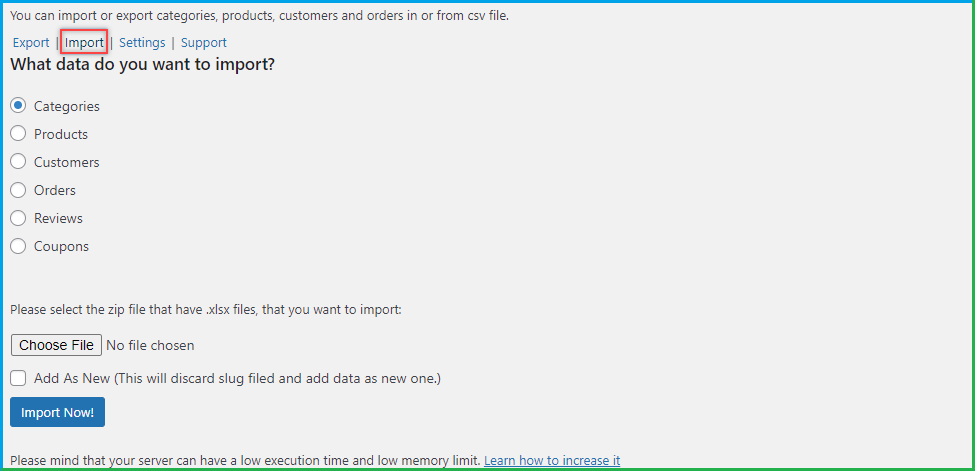
Import Products, Categories, Customers, or Orders with a Click
Bring in the entire data of products, categories, customers, or orders in parts by importing a zip file. WooCommerce export products plugin empowers you to have all the required data in your recently created online store. You can import complete products or categories in bulk to avoid committing mistakes.
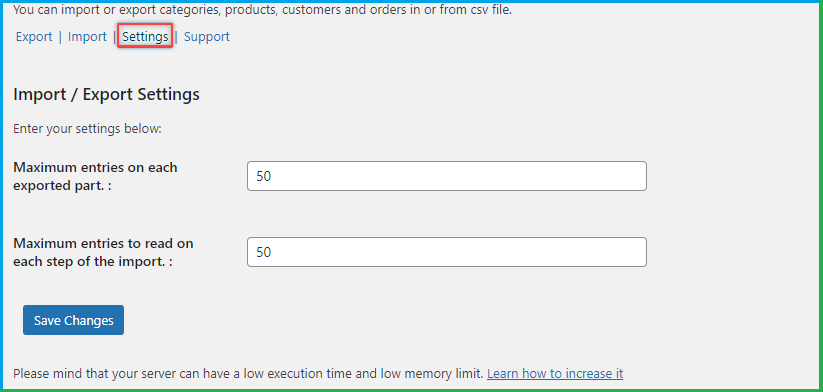
Define a limit by setting Maximum Entries to Import or Export
You can set maximum entries to import or export data in limits. It allows you to add or extract data in parts. Import a limited number of entries, review and approve them, and move on to importing more. In the same way, export product or categories in limits to ensure the data is accurate and useful.
PHP Excel library Expedites Import and Export activities
WooCommerce export orders plugin is powered by PHP Excel library which ensures adding or extracting details from your online store is fast and smooth. Whether you import products in bulk or categories, it can be done within a few clicks.
Additional Features – WooCommerce CSV Import Export
- Import or export data in bulk
- Export a customizable CSV file that is easy to edit
- Import Product or Category as new to your online store
- Import or Export products, categories, customers, and orders in parts
FAQs
1. Can we export products by categories?
Ans. Yes, you can export products by categories and following:
- Name
- Description
- Parent
- Slug
- Display type
2. Can we export orders by customer name?
Ans. Yes you can export orders by using following filters.
- Order Date
- Order ID
- Order Status
- Order Total
- Customer Name
- Billing Country
- Shipping Country
- Product Name
3. Can we export customer emails by first and last name?
Ans. Yes, you can export customers by following
- First Name
- Last Name
- Company
- Phone
- Address
- Country
- City
- State
- Post Code
4. Can we export specific categories?
Ans. Yes, you can use filters to export categories by:
- Name
- Description
- Parent
- Slug
- Display type
5. Can we export products by SKU?
Ans. Yes, you can export products by
- Name & Description
- SKU & Slug
- Type & Featured
- Price & Sale Price
- Category
- Stock & Product Status
- Date Added
- Length/Width/Height
- Weight & Quantity
Description in Dutch
WooCommerce CSV Import Export plugin helpt u snel producten, categorieën, klanten of details van Order in bulk te importeren of exporteren. Met exportfilters kunt u een lijst met selectieve producten, categorieën, klanten en Order in een CSV-bestand uitpakken. U kunt maximale invoerwaarden instellen om ervoor te zorgen dat de invoer of uitvoer van gegevens in limieten wordt beperkt. WooCommerce Import producten plugin wordt aangedreven door PHP Excel bibliotheek die de import en export versnelt.
- In- en uitvoer van producten, categorieën, Order en klanten
- Exporteert de gegevens in CSV-bestand, dat gemakkelijk aanpasbaar is.
- Filters voor de export van specifieke soorten gegevens
- Gebruikt PHP Excel-bibliotheek voor snel importeren en exporteren
- Configureer de maximale in te voeren of te exporteren gegevens in elke set
Description in French
Le plugin WooCommerce CSV Import Export vous permet d’importer ou d’exporter rapidement des produits, catégories, clients oudétails de commandé en vrac. Avec les ffiltre d’exportation, vous pouvez extraire une liste de produits, catégories, clients et commandes sélectifs dans un fichier CSV. Vous Pouvez Définir des entrées maximales pour garantir l’importation et l’exportation de données dans des limites. Le plugin WooCommerce Import est alimenté par la bibliothèque PHP Excel qui accélère les opérations d’importation et d’exportation.
- Import/Export de produits, catégories, commandes et clients
- Exporte les données dans un fichier CSV qui est facilement personnalisable.
- Filtres pour exporter un type de données spécifique
- Utilise la bibliothèque PHP Excel pour une importation et une exportation rapides
- Configurer le nombre maximum d’entrées à importer/exporter dans chaque ensemble
Description in Italian
Il plugin WooCommerce CSV Import Export consente di importare o esportare rapidamente prodotti, categorie, clienti o dettagli degli ordini in blocco. Con i filtri di esportazione, puoi estrarre un elenco di prodotti, categorie, clienti e ordini selettivi in un file CSV. È possibile impostare le voci massime per garantire l’importazione o l’esportazione di dati nei limiti. Il plugin WooCommerce per l’importazione dei prodotti è alimentato da una libreria PHP Excel che velocizza le operazioni di importazione ed esportazione.
- Importazione / esportazione di prodotti, categorie, ordini e clienti
- Esporta i dati nel file CSV che è facilmente personalizzabile
- Filtri per l’esportazione di tipi di dati specifici
- Utilizza PHP Excel Library per l’importazione e l’esportazione rapida
- Configura le voci massime da importare / esportare in ogni set
Description in Spanish
El plugin de importación/exportación CSV para WooCommerce te ayuda a importar o exportar productos, categorías, clientes o detalles de los pedidos de forma rápida y en bloque. Con los filtros de exportación, puedes extraer una lista de productos, categorías, clientes y pedidos seleccionados en un archivo CSV. Puedes establecer las entradas máximas para asegurar la importación o exportación de los datos dentro de unos límites.El plugin de importación de productos para WooCommerce utiliza la bibilioteca PHP Excel para acelerar las operaciones de importación y exportación.
- Importa/exporta productos, categorías, pedidos y clientes
- Exporta los datos en un archivo CSV fácilmente personalizable
- Aplica filtros para exportar tipos de datos específicos
- Utiliza la biblioteca PHP Excel para una importación y exportación rápida
- Configura las entradas máximas a importar/exportar en cada conjunto
Description in German
WooCommerce CSV Import Export Plugin hilft Ihnen, Produkte, Kategorien, Kunden oder Bestelldaten in großen Mengen schnell zu importieren oder zu exportieren. Mit Exportfiltern können Sie eine Liste ausgewählter Produkte, Kategorien, Kunden und Bestellungen in einer CSV-Datei extrahieren. Sie können maximale Einträge festlegen, um den Import oder Export von Daten in Limits zu gewährleisten. Das Plugin für WooCommerce Import Produkte basiert auf der PHP Excel Bibliothek, die den Import und Export beschleunigt.
- Importieren/Exportieren von Produkten, Kategorien, Bestellungen und Kunden
- Exportiert die Daten in eine CSV-Datei, die leicht anpassbar ist
- Filter zum Exportieren bestimmter Datentypen
- Verwendet PHP Excel Library für schnellen Import und Export
- Maximale Einträge für den Import/Export in jedem Set konfigurieren
Change Log
Version 2.0.2 Updated:
PHP 8 Compatible
Media Export / Import
Minor bug fixes
Version 2.0.1
Compatibility Issue resolved
Version: 2.0.0
Updated : New Feastures
Import / Export Coupons
Import / Export Product Reviews
Version 1.3.0 Updated:
Bug Fixed:
1) Issue fixed with latest version of WooCommerce.
Version 1.0.1:
Bug Fixed:
1) Fix issue with zip creation.
Version 1.0.0
Initial release of pluign
Categories
Tags
External listing. code.market does not sell this product and does not process payment for it. Pricing, payment, delivery, licensing, refunds, and support are handled by the third-party merchant on its own website. We may earn an affiliate commission from a referral. Details.
Products of the Week.
Submit#1

upvote.club
Free Social Media Engagement that Helps Boost Your Content. Upvote Club supports 19 social networks with 100+ engagement actions in one dashboard. Add links to your posts and get free engagement from real users.
SaaS · 16,237 views · 96 clicksSaaS · Week 42 · 16,237 views · 96 clicks
#2

Seenshot App
Free, Fast, MacOS Screenshot app. Make Screenshot cmd+shift+2 and send it via link
Desktop App · 5,252 views · 109 clicksDesktop App · Week 42 · 5,252 views · 109 clicks
#3

Conversational Backlinks for Busy Founders
Place Backlink Relevant Conversation for your domain across Forums and Conversations
Website · 17,080 views · 195 clicksWebsite · Week 42 · 17,080 views · 195 clicks
#4

Substack Posting API
Onboard your Agent to Substack. Write Publish on Substack via API
SaaS · 36,070 views · 184 clicksSaaS · Week 42 · 36,070 views · 184 clicks
#5

codester.com
SocialDesk+: Omnichannel Social Commerce & Business Management Platform This is stronger than simply “Social Commerce and Messaging” because it tells buyers this is a complete business platform, not just a messaging script. Turn Social Conversations Into Sales SocialDesk+ is a complete omnichannel social commerce and business management platform built for businesses that sell and communicate with customers through social media. Instead of switching between WhatsApp, Facebook, Instagram and TikTok, businesses can manage customer conversations, comments, products, leads, follow-ups, automation, teams and business reports from one professional workspace. And because the full source code is included, developers, agencies and entrepreneurs can customize, rebrand and launch SocialDesk+ as their own business solution or SaaS platform. 🚀 Build Your Own Social Commerce Business SocialDesk+ gives you the foundation to launch: - Your own SaaS platform - A white-label social CRM - A social-commerce management system - A customer communication platform - A business messaging solution - A custom solution for clients - A multi-business subscription platform 💬 Connect Your Customers Supported social channels include: WhatsApp • Facebook • Instagram • TikTok Bring supported conversations into one centralized workspace and help businesses respond faster without constantly switching between platforms. 🛍️ More Than a Messaging Platform SocialDesk+ combines communication with the tools businesses need to manage customer opportunities: Inbox Manage customer conversations from connected channels. Comments Monitor and respond to social-media comments. Customers & Leads Organize customer information and potential buyers. Products & Catalog Manage products and give your team quick access to product information. Follow-Ups Make sure potential customers don't get forgotten. Automation Automate repetitive customer questions and responses. AI Assistant Provide AI-assisted communication when configured. Team Management Give managers and staff access to the business workspace. Reports & Analytics Track activity using business reports and analytics. The current product listing already includes these capabilities. 🔥 Why Buyers Will Want It Launch Faster Start with an already-built business platform instead of developing the entire system from zero. Customize Everything The full source code is included, allowing developers to change branding, features, workflows and integrations. Build a SaaS Create multiple business workspaces and offer SocialDesk+ as a subscription-based service. Sell to Businesses Offer it to retailers, restaurants, service businesses, online sellers, agencies and other businesses that communicate with customers through social media. Mobile + Web + Backend This isn't just a mobile UI template. It includes: - Flutter mobile application - Python / FastAPI backend - Web interface - Administration tools - Database infrastructure - API-based architecture - SQLite / PostgreSQL support - Android and iOS project structure 💼 One Platform. Multiple Business Opportunities. For SaaS Entrepreneurs Launch your own subscription platform and allow multiple businesses to operate inside separate workspaces. For Software Agencies Customize and rebrand the platform for clients instead of building an omnichannel business system from scratch. For Developers Use the complete source code as a foundation for your own social-commerce or customer-management product. For Businesses Deploy a dedicated version for your own customer-service and social-commerce operations. 🧩 What's Included Mobile - Flutter / Dart - Android - iOS project Backend - Python - FastAPI - SQLAlchemy - Alembic Database - SQLite - PostgreSQL Web - HTML5 - CSS3 - JavaScript Deployment - Docker - Docker Compose - Production configuration Business Platform - Multi-workspace architecture - Authentication - Teams - Customers - Products - Messaging - Comments - Automation - Reports - Subscriptions - Administration The current listing also documents third-party integrations such as Meta, TikTok, Stripe, Firebase, SMTP and optional OpenAI configuration. ⚡ What Makes SocialDesk+ Different? You're not buying a simple: ❌ Chat UI ❌ WhatsApp clone ❌ Flutter template ❌ Admin dashboard ❌ Basic CRM You're getting a complete business platform foundation that can be customized, branded and commercialized. Connect. Automate. Manage. Grow. SocialDesk+ Omnichannel Social Commerce & Business Management Platform One important change I'd make to the current listing The current page starts with: “A simple guide to managing your social conversations, customers, products and business activity.”
Other · 3,482 views · 30 clicksOther · Week 42 · 3,482 views · 30 clicks
#6

sandbook.app
Sandbook reads EPUB, PDF, web pages and scanned pages aloud with Kokoro TTS, an open neural voice model that runs on your iPhone, free and offline. Choose from 41 natural voices in English, Spanish, French, Italian, Brazilian Portuguese and Hindi and follow each word as it is spoken. Try the same voices in your browser first with the free Kokoro TTS online demo.
Other · 3,487 views · 13 clicksOther · Week 42 · 3,487 views · 13 clicks