WhatsApp Click to Chat Plugin for WordPress
Description
A WhatsApp plugin for your customer support channel.
Ease the communication with your customers by embedding a click-to-chat WhatsApp widget on your site.
Links to demos:
- WooCommerce automatic button with a default account
- WooCommerce button with a custom account
- Shortcode examples
This WordPress WhatsApp plugin is a simple tool to show your team’s accounts in one box. It displays a list of WhatsApp accounts on your site which when clicked, will take the user to that particular account on if the user is using a desktop, or open the WhatsApp application if she is on a mobile device.
Install this plugin on your WordPress site and you’ll get all the following features:
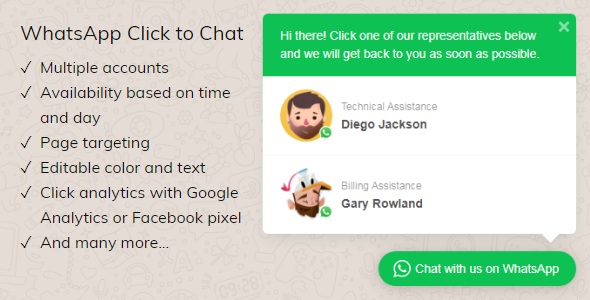
- Display multiple accounts Are you working in a team? Show each member’s account with their names and titles in a good-looking box on your site and let your visitors know who is who.
- WooCommerce Product Page Button Automatically show a contact button right before or after your Add to Cart button for every product. Just like in the floating widget, you can randomize, limit, and pin accounts for product page buttons.
- Set availability by time and days for each account What happens when your customers send a message while you’re asleep or spending the time with your family? They’ll think you’re unresponsive. With this plugin, you can set the availability of each account. If no one is around to answer, then the widget will be hidden. This will minimize the chance of letting down your customers. Also, this feature plays nice with any caching plugins. It doesn’t matter if the page is cached, it will hide and show itself accurately.
- Editable text and color Customize the colors to match your site’s theme and the text to represent your main users’ language. Make it personal. Turn your words into a call-to-action!
- WPML is supported If your site is in multi-languages, you can set the text in each of those languages via WPML string translation module. Also, hide or show accounts based on the language your user is currently viewing.
- Page targeting You can show the WhatsApp box on the whole site or specific post types or even some particular pages.
- Auto-display based on time delay, inactivity, or scroll length If your customers use wide screens, a tiny widget sitting at the corner of your page will have a hard time getting itself noticed. Draw your users’ attentions onto the widget by setting an auto-display for it to tease them. Auto-display can be set based on time-delay, inactivity, or scroll-length.
- Pre-populated text Not everyone knows how to start a conversation – even on an online chat. Help your customers by pre-populating an initial text. If they agree with the tone of your wording, it can be an icebreaker. One simple example is: “Hi Daniel, I was visiting and have a question.” Once they submit that text, your name and your URL (which displayed rather nicely on the app thanks to WhatsApp) will be kept on their chat history. It’s a win-win to both sides.
- WhatsApp link on your content using shortcodes Having a WhatsApp widget is perfect to show on the whole site. But what if you need to show a contextual WhatsApp account which refers to your business partners, friends or families? A link to those accounts with predefined text is perfect for that, and it can be done with a simple shortcode.
- Click Tracking using Google Analytics or Facebook Pixel If you have Google Analytics or Facebook Pixel (or both) installed on your WordPress, then the plugin will automatically send data to those services when user clicks a WhatsApp account.
- Compatible with GDPR A consent confirmation checkbox is provided to comply with GDPR. This is a required feature for companies based in the EU or those who collect data from individuals in the EU.
- Randomize accounts list order If you’re worry that the account on the top most will get more clicks than the others, then you can randomize the list order of the displayed accounts.
- Pin accounts Pin accounts to stay on top of the list while the other are randomized.
- Limit the accounts displayed When you have lots of accounts to display, you can limit to a number so that the list is easier for your users to scan.
Using WhatsApp as a support channel is effective and affordable. Get one for yourself with a free lifetime updates.
Change Log
3 March 2021 - v2.2.12
-    Bug fix:  and  when widget is cached
24 February 2021 - v2.2.11
-    Bug fix: Account search on WooCommerce page ddidn't show result.
10 October 2020 - v2.2.10
-    Bug fix: Changed ajaxurl to wptwa_ajax_url to prevent conflict with other plugins.
18 July 2020 - v2.2.8
-    New feature: Option to cache the widget on the browser to decrease server usage.
16 July 2020 - v2.2.7
-    Code cleaning: Changed a generic variable name into more specific one
20 June 2020 - v2.2.6
-    Code cleaning: removed some warnings when WordPress WP_DEBUG is set to true
26 January 2019 - v2.2.5
-    Bug fix: Buttons use wrong URL on desktop version of Firefox on certain condition.
-    Improvement: Remove some labels from WhatsApp list on the admin side and replaced it with something else.
17 January 2019 - v2.2.4
Note: Not an important update. No need to download if you're ok with your current version of this plugin.
-    Improvement: Remove legacy text on selected accounts for floating widget on the admin.
15 December 2018 - v2.2.3
Note: Old users should reset their WhatsApp accounts in the plugin since it uses different method for time availability.
-    New feature: Randomize and limit account list on product page.
-    Improvement: Time availability now is set differently for each day in a week.
04 December 2018 - v2.2.2
-    New feature: Pin an account to make it always on top of the list when the list is randomized.
-    Improvement: Added new methods for Google Analytics
20 November 2018 - v2.2.1
-    New feature: Limit the accounts shown on the floating widget.
-    New feature: Exclude/Include by URLs.
-    Improvement: Fix the shortcode buttons so they'll play nice with cached pages.
11 August 2018 - v2.2
-    New feature: Hide or show accounts based on a WPML language the user is currently viewing.
-    New feature: Randomize accounts list order.
-    Bug fix: Line breaks on pre-filled text not working on mobile.
19 July 2018 - v2.1.9
-    Improvement: Changed the predefined text field from a textbox to textarea. It supports line breaks now.
03 July 2018 - v2.1.8
-    Bug fix: Removed warning on WooCommerce product pages.
27 June 2018 - v2.1.7
-    Small improvement on a CSS file. The toggle's icon was automatically selected when user clicks the toggle on Android version of Firefox browser.
26 June 2018 - v2.1.6
-    New feature: Optional checkbox for consent confirmation to comply with GDPR.
06 June 2018 - v2.1.5
-    Improvement: Reduced the gap between the toggle and the box when the toggle is round.
-    Bug fix: Removed legacy code that causes widget to disappear. It only happened in some situation, so no need to update if there's nothing wrong with your current settings.
26 May 2018 - v2.1.4
-    New feature: Option to disable auto-display when no one is online.
22 April 2018 - v2.1.3
-    Improvement: Added prefixes to ajax actions to prevent conflict with other plugins.
21 April 2018 - v2.1.2
-    Improvement: Added versioning to CSS and JS reference to make sure that clients have the latest code.
18 April 2018 - v2.1.1
-    New feature: Auto display on small screen.
-    New feature: Option to keep showing the account even if it's offline but with a message.
16 April 2018 - v2.1
-    Bug fix: Current day is not properly checked.
09 April 2018 - v2.0
Major Update. Please consult the documentation on
-    Integrated with Facebook Pixel and Google Analytics for account clicks.
-    New and better version of shortcode button. Old shortcode will still work, but it's recommended to use the new one.
-    Time and day availability now works on in-page button too.
-    In-page button can be hidden based on screen size.
-    In-page button can display an avatar. If no image used, the plugin will use WhatsApp logo instead.
-    Page targeting can be used per account, not on the whole widget. Now you can show a different account on different pages in the floating widget.
20 March 2018 - v1.7
-    Bug fix: WPML not displaying correctly.
-    Improvement: WooCommerce button can also show permalink automatically using the  shortcode.
03 March 2018 - v.1.6
-    Bug fix: Russian cyrillic not displaying correctly.
-    Bug fix: Widget is displayed via AJAX to make sure the time availability is accurate when users have a caching plugin in their WordPress.
09 February 2018 - v.1.4
-    New feature to automatically show a contact button on WooCommerce product pages.
-    New option to show a rounded toggle on mobile device only or desktop only, or both.
08 November 2017 - v.1.3
-    Support for WPML plugin.
03 November 2017 - v.1.2
-    Improvement: An ajax search to find specific pages to be included or excluded from page targeting.
04 October 2017 - v.1.1.2
-    New feature: Added a button to move accounts up or down in the list. Now it's easier to rearrange the queue.
23 September 2017 - v.1.1.1
-    Bug Fix: Fixed link on Safari browser.
15 September 2017 - v.1.1
-    New feature: Exclude certain pages from the selected post types from showing the widget.
25 August 2017 v.1.0.7
-    New feature: Other than phone number, you can also insert an invitation URL to your group chat.
19 August 2017 v.1.0.6
-    Bug Fix: Stop JS execution when WhatsApp box is offline.
04 August 2017 v.1.0.5
-    Bug Fix: Remove browser sniffing to make sure that the plugin works on all devices.
-    Bug Fix: Remove non-numeric characters from phone numbers to make sure that the links are correct.
-    New Feature: Add an option to hide the widget based on the width of the screen. Detecting mobile device is too risky.
29 July 2017 v.1.0.3
-    New Feature: Shortcode to make a Click to Chat button on page and on in text widgets
-    Bug Fix: Time availability not accurate because timezone is not set yet.
15 July 2017 v.1.0.2
-    New Feature: Pre-populated text for each account
10 July 2017 v.1.0.1
-    Bug fix: Account not saved on some conditions
-    Improvement: Adding z-index to WhatsApp box to make sure that it's on top of other elements.
5 July 2017
-    Initial Release
Categories
Tags
External listing. code.market does not sell this product and does not process payment for it. Pricing, payment, delivery, licensing, refunds, and support are handled by the third-party merchant on its own website. We may earn an affiliate commission from a referral. Details.
Products of the Week.
Submit#1

upvote.club
Free Social Media Engagement that Helps Boost Your Content. Upvote Club supports 19 social networks with 100+ engagement actions in one dashboard. Add links to your posts and get free engagement from real users.
SaaS · 16,240 views · 96 clicksSaaS · Week 42 · 16,240 views · 96 clicks
#2

Seenshot App
Free, Fast, MacOS Screenshot app. Make Screenshot cmd+shift+2 and send it via link
Desktop App · 5,255 views · 109 clicksDesktop App · Week 42 · 5,255 views · 109 clicks
#3

Conversational Backlinks for Busy Founders
Place Backlink Relevant Conversation for your domain across Forums and Conversations
Website · 17,083 views · 195 clicksWebsite · Week 42 · 17,083 views · 195 clicks
#4

Substack Posting API
Onboard your Agent to Substack. Write Publish on Substack via API
SaaS · 36,073 views · 184 clicksSaaS · Week 42 · 36,073 views · 184 clicks
#5

codester.com
SocialDesk+: Omnichannel Social Commerce & Business Management Platform This is stronger than simply “Social Commerce and Messaging” because it tells buyers this is a complete business platform, not just a messaging script. Turn Social Conversations Into Sales SocialDesk+ is a complete omnichannel social commerce and business management platform built for businesses that sell and communicate with customers through social media. Instead of switching between WhatsApp, Facebook, Instagram and TikTok, businesses can manage customer conversations, comments, products, leads, follow-ups, automation, teams and business reports from one professional workspace. And because the full source code is included, developers, agencies and entrepreneurs can customize, rebrand and launch SocialDesk+ as their own business solution or SaaS platform. 🚀 Build Your Own Social Commerce Business SocialDesk+ gives you the foundation to launch: - Your own SaaS platform - A white-label social CRM - A social-commerce management system - A customer communication platform - A business messaging solution - A custom solution for clients - A multi-business subscription platform 💬 Connect Your Customers Supported social channels include: WhatsApp • Facebook • Instagram • TikTok Bring supported conversations into one centralized workspace and help businesses respond faster without constantly switching between platforms. 🛍️ More Than a Messaging Platform SocialDesk+ combines communication with the tools businesses need to manage customer opportunities: Inbox Manage customer conversations from connected channels. Comments Monitor and respond to social-media comments. Customers & Leads Organize customer information and potential buyers. Products & Catalog Manage products and give your team quick access to product information. Follow-Ups Make sure potential customers don't get forgotten. Automation Automate repetitive customer questions and responses. AI Assistant Provide AI-assisted communication when configured. Team Management Give managers and staff access to the business workspace. Reports & Analytics Track activity using business reports and analytics. The current product listing already includes these capabilities. 🔥 Why Buyers Will Want It Launch Faster Start with an already-built business platform instead of developing the entire system from zero. Customize Everything The full source code is included, allowing developers to change branding, features, workflows and integrations. Build a SaaS Create multiple business workspaces and offer SocialDesk+ as a subscription-based service. Sell to Businesses Offer it to retailers, restaurants, service businesses, online sellers, agencies and other businesses that communicate with customers through social media. Mobile + Web + Backend This isn't just a mobile UI template. It includes: - Flutter mobile application - Python / FastAPI backend - Web interface - Administration tools - Database infrastructure - API-based architecture - SQLite / PostgreSQL support - Android and iOS project structure 💼 One Platform. Multiple Business Opportunities. For SaaS Entrepreneurs Launch your own subscription platform and allow multiple businesses to operate inside separate workspaces. For Software Agencies Customize and rebrand the platform for clients instead of building an omnichannel business system from scratch. For Developers Use the complete source code as a foundation for your own social-commerce or customer-management product. For Businesses Deploy a dedicated version for your own customer-service and social-commerce operations. 🧩 What's Included Mobile - Flutter / Dart - Android - iOS project Backend - Python - FastAPI - SQLAlchemy - Alembic Database - SQLite - PostgreSQL Web - HTML5 - CSS3 - JavaScript Deployment - Docker - Docker Compose - Production configuration Business Platform - Multi-workspace architecture - Authentication - Teams - Customers - Products - Messaging - Comments - Automation - Reports - Subscriptions - Administration The current listing also documents third-party integrations such as Meta, TikTok, Stripe, Firebase, SMTP and optional OpenAI configuration. ⚡ What Makes SocialDesk+ Different? You're not buying a simple: ❌ Chat UI ❌ WhatsApp clone ❌ Flutter template ❌ Admin dashboard ❌ Basic CRM You're getting a complete business platform foundation that can be customized, branded and commercialized. Connect. Automate. Manage. Grow. SocialDesk+ Omnichannel Social Commerce & Business Management Platform One important change I'd make to the current listing The current page starts with: “A simple guide to managing your social conversations, customers, products and business activity.”
Other · 3,485 views · 30 clicksOther · Week 42 · 3,485 views · 30 clicks
#6

sandbook.app
Sandbook reads EPUB, PDF, web pages and scanned pages aloud with Kokoro TTS, an open neural voice model that runs on your iPhone, free and offline. Choose from 41 natural voices in English, Spanish, French, Italian, Brazilian Portuguese and Hindi and follow each word as it is spoken. Try the same voices in your browser first with the free Kokoro TTS online demo.
Other · 3,490 views · 13 clicksOther · Week 42 · 3,490 views · 13 clicks