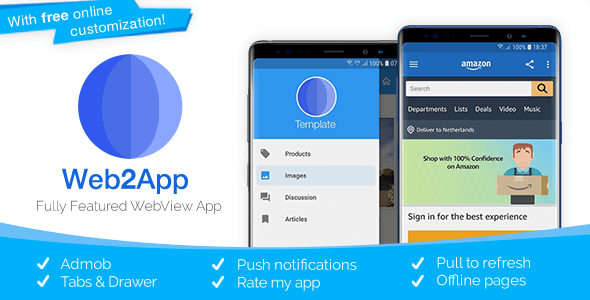
Web2App - Quickest Feature-Rich Android Webview
Description

Template Features
Easily turn your mobile or responsive website into a mobile app within minutes. In addition to transforming your site into an app, Web2App can do much more! Explore the many useful options & features we offer below.- Powerfull customization Choose from over 7 layout options. And define your own color theme to style your app. Create your own unique app layout combination.
- Tab bar Optionally use tabs to add all your webpages to your WebView and let your users enjoy amazing fluent navigation and tab switching.
- Navigation Drawer Optionally use the navigation drawer to add all your webpages to your WebView app and allowing new level of branding.
- Hideable Toolbar More screen space with the hideable toolbar. This familiar navigation pattern can also be seen in Chrome for Android. Scroll down to hide the toolbar and scroll up to show it!
- Pull-to-refresh Choose to refresh your pages with just a swipe gesture. You can also use this stylish layout to indicate page loading.
- Push notifications with OneSignal Notify your users about new content with push notifications from OneSignal!
- Admob Monetize your app in seconds. Show banner ads throughout your application, and/or show interstitial ads when users navigate your app and website.
- Rate my App A smart rate my app dialog that will display after x days or x launches. An easy way to get reviews on Google Play.
- Splash Screen Display a SplashScreen while your website is loading on the background.
- Firebase Analytics Track your app, find out at how many installs you have, what day of the week you have to most users and even more.
- HTML video Display HTML 5 video (Including youtube) fullscreen and get your users’ location with HTML5 geolocation.
- Build in download manager Use download functions in your application. We use the download manager to download files and show the process as we do it. Downloads can be managed using the ‘Downloads’ app.
- File uploads Compatible with the file upload forms so you can let your users’ upload data to your site. Optionally let users upload images directly from the camera.
- Permissions Support Define permissions such as Location, Microphone and Camera access for your site.
- Fast & Powerful Chromium WebView Chromium based WebView engine is used on all the latest devices to give an optimal web browsing experience. Technologies like JavaScript, Cookies, CSS, HTML5 are all supported.
- Open external apps (Youtube, Store, Mail, etc.) from Webview or Drawer Open apps and perform intents from your webview or drawer. For example let your users open the email app, call a number, open a Play Store Product page or a Youtube video in the native app, etc.
- Local & offline webpages Show local webpages in your app. Perfect for web based mobile applications like IONIC and JQuery Mobile, allowing you to store all resource files locally. Optionally redirect users to local webpages when users have no internet connection.
- Loading indicator A loading bar is shown to indicate progress, this will hide when the page is done. You can choose to show this loading bar as well as a Pull-To-Refresh indicator.
- About dialog An native about dialog, with HTML support for markup.
- Integrated social features Share a custom text to spread the word about your app.
- No internet connection page Show a beautifully designed no connection screen or define a local webpage that will load when no connection is available.
- Material Design The app follows the official Android UI guidelines, and uses libraries like Material Design for the drawer and toolbar.
- Easy to use The online builder make setting up your app a breeze. No need to edit any code or follow any complex steps. Just click, drag, and drop to customise and configure your app.
- Cloud Compile After you have configured your app, you can use our online build service to compile your app into an executable APK that you can run on your phone, or deploy to the Google Play Store. No need to install any software, just click ‘build’ and download your app.
- Source-code access Want to make custom changes, or prefer to build your app manually? You can always download the customised source code from the online app builder. This allows you to quickly setup your app in the builder, while still being able to make changes in Android Studio as you need. The best of both worlds!
- Easier updates Web2App Builder remembers your previously entered details, allowing you to update your app to newer template versions blazingly fast. Updating your app was never this easy.
- Comprehensive documentation Prefer not to use the builder. We provide step-by-step instructions for setting up your pc, importing and publishing. It’s all described in our rich documentation.
- Premium support If you can not find your answer in the Documentation or our Community FAQ, we will be there for personal support.
Online App Builder Included!
You can optionally choose to customise & configure your app using our App Builder at no extra costs. This way, there is no need to use Android Studio, or to make any code edits manually. Just use our easy to use, drag & drop interface to create & build your app faster!Builder Terms & Conditions
Our online builders grants lifetime access to configure and customise one app (end product) per license. That means that it is always free to use our builder to customise your app, create updates, and generate your custom template to build in Android Studio. Additionally, we offer a completely optional service that allows you to compile your custom template in the cloud (on our servers) into an executable APK. One month of unlimited access to this online build service is included in your purchase. After this month, you can always update, customise and generate your custom template in our builder, to build it in Android Studio. The online customisation service advertised is limited to the customisation options offered in the builder, and does not include any further customisations that are not covered by the Envato Support Policy.Compatibility
This template supports Android 4.0 and up. Custom status bar colors work on Lollipop and up. WebView behavior and API’s available might vary for devices with Android 4.4 or lower. File upload is not available on devices with Android 4.4. Chromium WebView Engine is used from Android 5.0 and up. Designed for Android Studio 2.0 and up.Questions & Support
Still having some questions? Just leave a comment. Would you like support? Visit our Support Center.

Changelog
V3.4.2
- Google Firebase support
- Migrated to AndroidX
- Newer versions & performance improvements

V3.4.1
- Option to use logo in toolbar
- Splash screen dismissed faster
- Performance optimizations & fixes

V3.4
- New white theme
- New drawer design
- Targeting Android Pie, and latest support and gradle versions
- Option to upload from camera (requires image type, and storage permission)

V3.3
- Android Studio 3.0 Support and target Android 8.1
- Bugfixes and performance optimisations
- Easier and better 'offline' setup
- Option to disable 'home' button in toolbar

V3.2
- Drawer now uses NavigationView
- Revamped default screen for no connection & errors
- Library updates and stability improvements
- Web2App Panel now resizes your icons and allows you to upload menu icons!

V3.1
- Admob Interstitial
- OneSignal V3
- Option to hide actions from Toolbar
- Open apps, intents, etc from Drawer.

V3.0.1
- Updated to latest libraries
- Implemented permissions system
- Bugfixes

V3.0
- Navigation Drawer
- OneSignal push notifications
- Easier configuration for offline action and pages that should load outside the WebView
- Support for Icons in tabs & drawer.
- Ability to localize tab/drawer text.
- Intent Filter support
- Option to support 3rd party login, like Facebook
- Android Studio V2 with Instant Run

V2.0
- Support for tabs bar
- New WebView engine
- Pull to refresh
- New hide-able ToolBar
- More built-in customization options
- Optimizations

V1.2
- Material design
- Android Studio
- File upload (lollipop)
- New & Easier navigation modes
- Bug fixes and stability improvements.

V1.1
- Lollipop increased compatibility
- Updated Parse SDK
- Now separate update receiver (so you can send data).
Icons used in the Demo and Promotional Images are retrieved from icons8.com and are not distributed with the template.
Categories
Tags
External listing. code.market does not sell this product and does not process payment for it. Pricing, payment, delivery, licensing, refunds, and support are handled by the third-party merchant on its own website. We may earn an affiliate commission from a referral. Details.
Products of the Week.
Submit#1

upvote.club
Free Social Media Engagement that Helps Boost Your Content. Upvote Club supports 19 social networks with 100+ engagement actions in one dashboard. Add links to your posts and get free engagement from real users.
SaaS · 15,449 views · 96 clicksSaaS · Week 42 · 15,449 views · 96 clicks
#2

Seenshot App
Free, Fast, MacOS Screenshot app. Make Screenshot cmd+shift+2 and send it via link
Desktop App · 4,528 views · 109 clicksDesktop App · Week 42 · 4,528 views · 109 clicks
#3

Conversational Backlinks for Busy Founders
Place Backlink Relevant Conversation for your domain across Forums and Conversations
Website · 16,359 views · 195 clicksWebsite · Week 42 · 16,359 views · 195 clicks
#4

Substack Posting API
Onboard your Agent to Substack. Write Publish on Substack via API
SaaS · 35,356 views · 184 clicksSaaS · Week 42 · 35,356 views · 184 clicks
#5

codester.com
SocialDesk+: Omnichannel Social Commerce & Business Management Platform This is stronger than simply “Social Commerce and Messaging” because it tells buyers this is a complete business platform, not just a messaging script. Turn Social Conversations Into Sales SocialDesk+ is a complete omnichannel social commerce and business management platform built for businesses that sell and communicate with customers through social media. Instead of switching between WhatsApp, Facebook, Instagram and TikTok, businesses can manage customer conversations, comments, products, leads, follow-ups, automation, teams and business reports from one professional workspace. And because the full source code is included, developers, agencies and entrepreneurs can customize, rebrand and launch SocialDesk+ as their own business solution or SaaS platform. 🚀 Build Your Own Social Commerce Business SocialDesk+ gives you the foundation to launch: - Your own SaaS platform - A white-label social CRM - A social-commerce management system - A customer communication platform - A business messaging solution - A custom solution for clients - A multi-business subscription platform 💬 Connect Your Customers Supported social channels include: WhatsApp • Facebook • Instagram • TikTok Bring supported conversations into one centralized workspace and help businesses respond faster without constantly switching between platforms. 🛍️ More Than a Messaging Platform SocialDesk+ combines communication with the tools businesses need to manage customer opportunities: Inbox Manage customer conversations from connected channels. Comments Monitor and respond to social-media comments. Customers & Leads Organize customer information and potential buyers. Products & Catalog Manage products and give your team quick access to product information. Follow-Ups Make sure potential customers don't get forgotten. Automation Automate repetitive customer questions and responses. AI Assistant Provide AI-assisted communication when configured. Team Management Give managers and staff access to the business workspace. Reports & Analytics Track activity using business reports and analytics. The current product listing already includes these capabilities. 🔥 Why Buyers Will Want It Launch Faster Start with an already-built business platform instead of developing the entire system from zero. Customize Everything The full source code is included, allowing developers to change branding, features, workflows and integrations. Build a SaaS Create multiple business workspaces and offer SocialDesk+ as a subscription-based service. Sell to Businesses Offer it to retailers, restaurants, service businesses, online sellers, agencies and other businesses that communicate with customers through social media. Mobile + Web + Backend This isn't just a mobile UI template. It includes: - Flutter mobile application - Python / FastAPI backend - Web interface - Administration tools - Database infrastructure - API-based architecture - SQLite / PostgreSQL support - Android and iOS project structure 💼 One Platform. Multiple Business Opportunities. For SaaS Entrepreneurs Launch your own subscription platform and allow multiple businesses to operate inside separate workspaces. For Software Agencies Customize and rebrand the platform for clients instead of building an omnichannel business system from scratch. For Developers Use the complete source code as a foundation for your own social-commerce or customer-management product. For Businesses Deploy a dedicated version for your own customer-service and social-commerce operations. 🧩 What's Included Mobile - Flutter / Dart - Android - iOS project Backend - Python - FastAPI - SQLAlchemy - Alembic Database - SQLite - PostgreSQL Web - HTML5 - CSS3 - JavaScript Deployment - Docker - Docker Compose - Production configuration Business Platform - Multi-workspace architecture - Authentication - Teams - Customers - Products - Messaging - Comments - Automation - Reports - Subscriptions - Administration The current listing also documents third-party integrations such as Meta, TikTok, Stripe, Firebase, SMTP and optional OpenAI configuration. ⚡ What Makes SocialDesk+ Different? You're not buying a simple: ❌ Chat UI ❌ WhatsApp clone ❌ Flutter template ❌ Admin dashboard ❌ Basic CRM You're getting a complete business platform foundation that can be customized, branded and commercialized. Connect. Automate. Manage. Grow. SocialDesk+ Omnichannel Social Commerce & Business Management Platform One important change I'd make to the current listing The current page starts with: “A simple guide to managing your social conversations, customers, products and business activity.”
Other · 2,767 views · 30 clicksOther · Week 42 · 2,767 views · 30 clicks
#6

sandbook.app
Sandbook reads EPUB, PDF, web pages and scanned pages aloud with Kokoro TTS, an open neural voice model that runs on your iPhone, free and offline. Choose from 41 natural voices in English, Spanish, French, Italian, Brazilian Portuguese and Hindi and follow each word as it is spoken. Try the same voices in your browser first with the free Kokoro TTS online demo.
Other · 2,774 views · 13 clicksOther · Week 42 · 2,774 views · 13 clicks