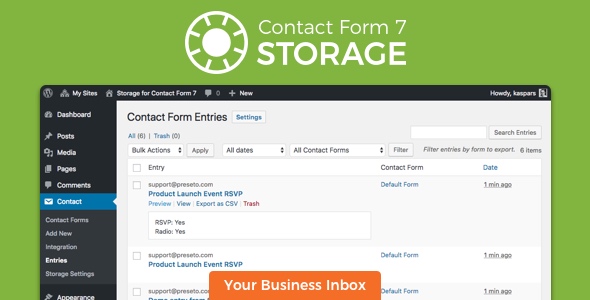
Storage for Contact Form CF7
Description
Contact Form 7 Storage stores all Contact Form 7 submissions (including attachments) in your WordPress database (DB). All contact form entries and business leads are stored safely even if the e-mail notifications go missing or get deleted.
Latest version 2.1.3 fixes uploaded file URLs replacement logic in confirmation emails.
GDPR Compliance
While this plugin doesn’t guarantee GDPR compliance, it offers the following functionality to help with that:
- Easily delete form entry data, meta information and uploaded attachments.
- Disable storing user IP address and browser information.
Amazing Support

This plugin is developed and maintained by Kaspars Dambis who is a WordPress core contributor and professional WordPress developer since 2007. All support requests are handled by the plugin author.
Features
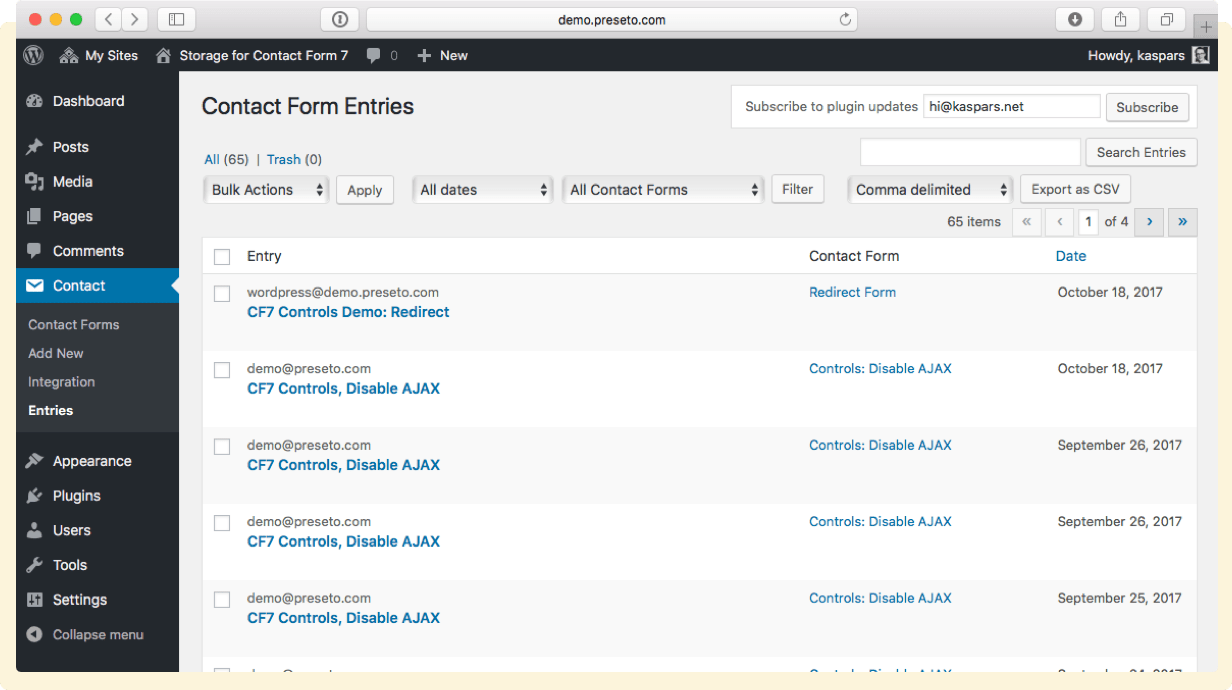
All form submissions are stored in the WordPress backend in addition to being sent via e-mail. E-mail delivery is never 100% reliable and having a backup of all contact entries will ensure you never miss a lead or inquiry.
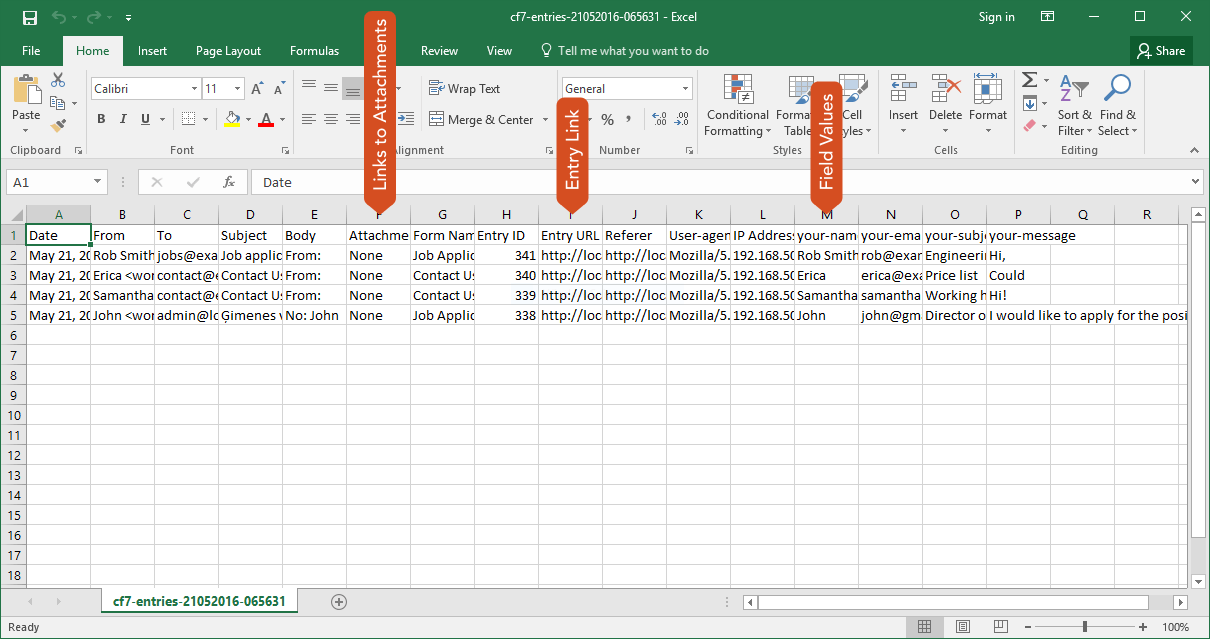
Export form submissions as CSV for Excel. Export all submissions or use the date and form filters to select which entries you want to export. Export also includes links to entry attachments.

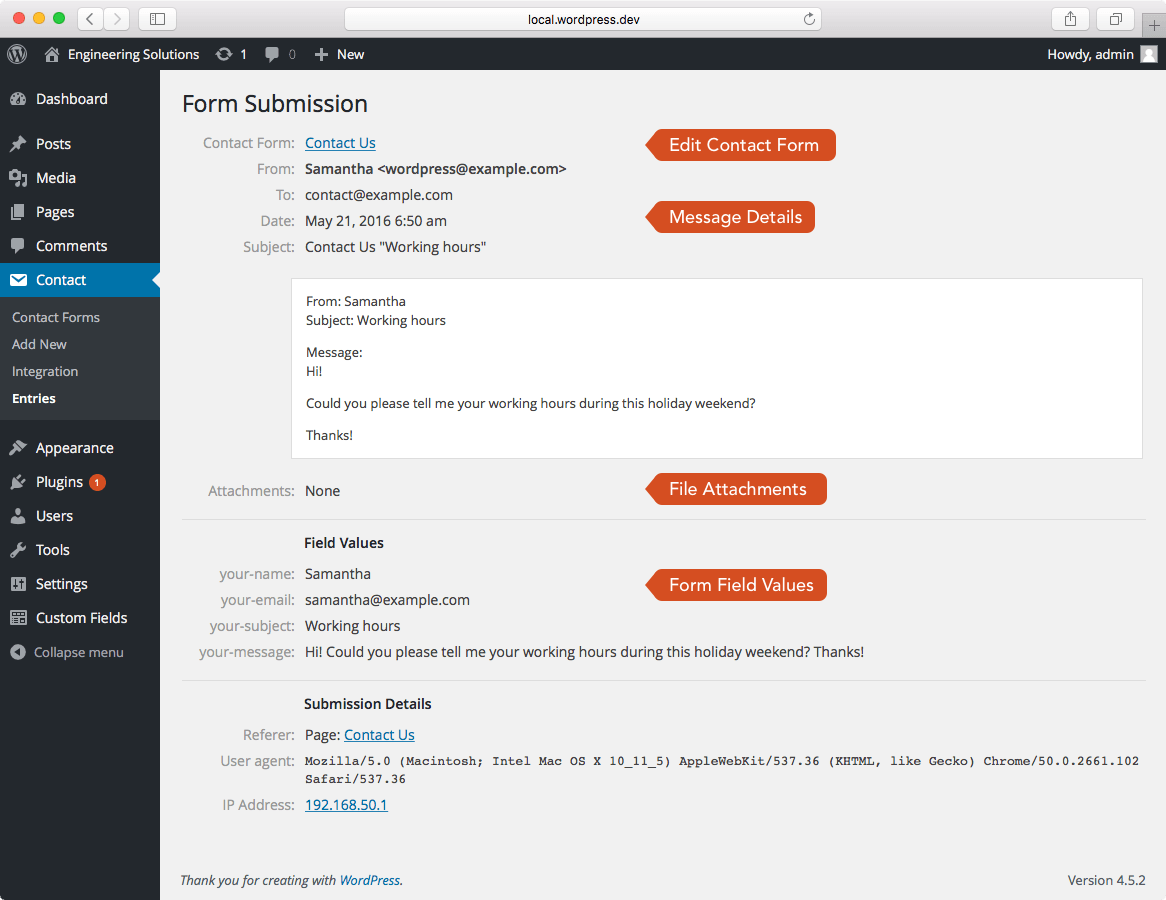
Each entry stores the following details about the submission:
- Individual input field values (also available as individual columns in the exported CSV files).
- All attachments uploaded to the contact form.
- Time and date of the entry.
- E-mail address of the contact form recipient.
- Subject line of the e-mail that was sent to the contact form recipient.
- Post or page URL where the contact form was submitted (referrer).
- IP address, browser and device information (user-agent) of the submission.
- Link to the configuration page for the contact form that was used for submission.
Storing user IP address and device information can be disabled in the plugin settings.

Automatic Updates
Install the Envato Market plugin to enable automatic updates of this plugin right from your WordPress dashboard. Remember to specify your API Token in the Envato Market settings page.
Bonus Plugin: Contact Form 7 Controls
Get our companion plugin for Contact Form 7 for free!
Installation
- Go to “Plugins → Add New” in the main menu in your WordPress dashboard.
- Select the “Upload” tab at the top of the page.
- Select the
cf7-storage.zipfile for the upload and click “Upload”. - Be sure to activate the plugin once it has been uploaded.
Usage
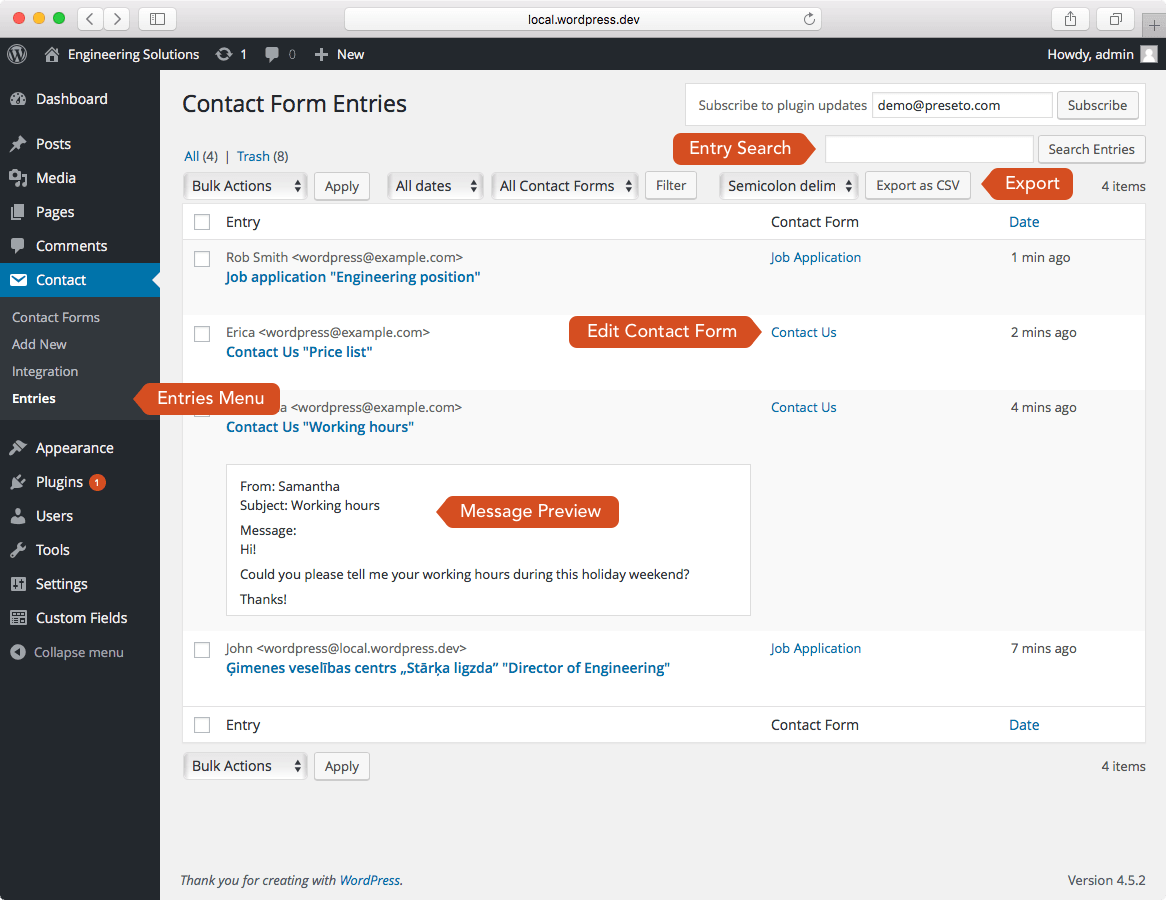
This plugin adds a new section called “Entries” under the “Contact” menu in the WordPress dashboard which lists all of the contact form submissions in a reverse chronological order. Quick preview of each entry to avoid extra clicks.
Dropdown selectors at the top of the list provide filtering and sorting of the contact form entries by the contact form used for submission and the date of submission.
Export entries as CSV by using the “Export as CSV” button at the top of the form entry list. Use the contact form filter or the bulk action dropdown to select which submissions to export. Specify the CSV delimiter character (comma, semicolon or tab) for quickly opening the file in MS Excel.
Individual form storage settings to exclude fields from being added to the CSV export.
Free form text search is available for finding specific entries.
File attachment shortcode automatically links to the uploaded file in the notification email instead of just displaying the filename of the uploaded file.
Reference entry ID and entry URL in the e-mails that get sent to the admin:
- is replaced with a unique entry ID such as 3212, and
- generates a link to the entry in the backend accessible only to registered users.
Please note that Contact Form 7 doesn’t support wrapping variables in square brackets [] such as []. Please use another set of characters (for example {} or ()).
Requirements
- Contact Form 7 plugin.
- Tested up to WordPress 6.0.
- Requires at least WordPress 3.2 and PHP 5.6.20.
Screenshots
Support
Please use the dedicated support section on CodeCanyon</a>.
Changelog
2.1.3 (June 21, 2022)
- Bugfix: ensure file URLs are correctly replaced in emails sent.
- Mark as tested with the latest version 6.0 of WordPress.
2.1.2 (March 22, 2022)
- Mark as tested with the latest version 5.9 of WordPress.
- Make the plugin compatible with PHP 5.4.
2.1.1 (May 5, 2021)
- Update admin Javascript to use this strict mode and the latest jQuery APIs.
2.1.0 (March 5, 2021)
- Bugfix: support for the file upload API changes introduced in version 5.4 of Contact Form 7.
- Tested with WordPress 5.7.
2.0.3 (April 18, 2019)
- Bugfix: support for local file references in mail attachments.
- Tested with WordPress 5.2.
2.0.2 (February 18, 2019)
- Security fix: Escape all form field data in the admin output. Thanks to Patrick Samuel for reporting the issue.
- Tested with WordPress 5.1.
2.0.1 (November 15, 2018)
- Replace upload file URLs in confirmation emails even when uploads are not attached to email.
- Tested with WordPress 5.0.
2.0.0 (September 8, 2018)
- Introduce plugin and form settings pages.
- Mark as tested with WordPress 4.9.8.
1.7.0 (July 30, 2018)
- Mark as tested with WordPress 4.9.7.
- Reformat code according to the WordPress coding standards.
1.6.1 (December 17, 2017)
- Mark as tested with WordPress 4.9.1.
- Silence errors when creating the uploads directory.
- Added developer tools to enforce coding standards.
1.6.0 (March 2, 2017)
- New: Add Spanish and Catalan translations. Thank you Albert Parera!
- New: File attachment fields such as are automatically replaced with file URLs in the email notifications.
- New: Added a filter
cf7_storage_skip_captureto disable capturing form submission. The second parameter is an instance ofWPCF7_ContactForm. - Bugfix: Delete the attachment files when a form entry is deleted.
1.5.5 (February 18, 2017)
- Bugfix: Store “piped” checkbox labels instead of just values.
1.5.4 (June 3, 2016)
- Bugfix: Fix the mail tag URL.
1.5.3 (June 1, 2016)
- Bugfix: Check for the field type before adding the piped field label.
- Bugfix: Allow export of the selected entries only.
1.5.2 (May 21, 2016)
- New feature: Added a subscription form for plugin update notifications.
- New feature: Added a link to form entries to the plugin list next to the “Activate” button.
1.5.1 (May 10, 2016)
- New feature: Add field values from the pipped fields to the CSV export with a
-pipe-labelfield name suffix. - Bugfix: Ensure that bulk trash/delete/untrash works as expected after changing the
WP_List_Tabledefinition.
1.5.0 (May 4, 2016)
- Added CSV delimiter selector for better Excel support out of the box.
- Bugfix: The length of the URL no longer increases between searches.
1.4.5 (December 10, 2015)
- Export CSV now includes the remote IP address by default.
- Bugfix:
cf7_storage_csv_columnsfilter is now applied after the individual form field value columns have been added to the export array.
1.4.4 (September 6, 2015)
- Bugfix: Don’t cast entry ID to integer during
get_post()call. - Add a filter
cf7_storage_csv_delimiterto enable custom CSV delimiters. Use ”;” as the default column delimiter in CSV export files (for Microsoft Excel compatability). - Exported CSV files should now open correctly in Excel by default.
1.4.3
- Add form input field names as column headers in the CSV export.
1.4.2
- Add support for fields with multiple values (checkboxes, radio) to CSV export too.
1.4.1
- Add support for fields with multiple values (checkboxes, radio) in the entry view.
1.4
- Enable and mail tags.
- Fix issue with upload filename backslashes being removed on Windows servers.
1.3.8
- Don’t store the mail 2 which is usually sent as a receipt to the user.
1.3.7
- Include automatic update library which was missing in 1.3.6.
1.3.6
- Show uploaded files in the backend even if they were not mailed.
1.3.4
- More reliable automatic updates.
1.3.3
- Bugfix: Include all available contact forms in the drop-down filter.
1.3.2
- Style table columns in the admin index view.
1.3.1
- Include entry subject in the admin index view.
- Enable quick preview of entry content from the admin index view.
1.3
- Enable automatic updates via the Envato WordPress Toolkit plugin.
1.2
- Support for Contact Form 7 version 3.9.
1.1.0
- Add entry export functionality.
1.0.3
- Add support for localization.
- Add Latvian translation.
1.0.1
- Simplify the readme file.
1.0
- Initial release.
Icon “Happy” by sandra under Creative Commons.
Categories
Tags
External listing. code.market does not sell this product and does not process payment for it. Pricing, payment, delivery, licensing, refunds, and support are handled by the third-party merchant on its own website. We may earn an affiliate commission from a referral. Details.
Products of the Week.
Submit#1

upvote.club
Free Social Media Engagement that Helps Boost Your Content. Upvote Club supports 19 social networks with 100+ engagement actions in one dashboard. Add links to your posts and get free engagement from real users.
SaaS · 16,239 views · 96 clicksSaaS · Week 42 · 16,239 views · 96 clicks
#2

Seenshot App
Free, Fast, MacOS Screenshot app. Make Screenshot cmd+shift+2 and send it via link
Desktop App · 5,254 views · 109 clicksDesktop App · Week 42 · 5,254 views · 109 clicks
#3

Conversational Backlinks for Busy Founders
Place Backlink Relevant Conversation for your domain across Forums and Conversations
Website · 17,082 views · 195 clicksWebsite · Week 42 · 17,082 views · 195 clicks
#4

Substack Posting API
Onboard your Agent to Substack. Write Publish on Substack via API
SaaS · 36,072 views · 184 clicksSaaS · Week 42 · 36,072 views · 184 clicks
#5

codester.com
SocialDesk+: Omnichannel Social Commerce & Business Management Platform This is stronger than simply “Social Commerce and Messaging” because it tells buyers this is a complete business platform, not just a messaging script. Turn Social Conversations Into Sales SocialDesk+ is a complete omnichannel social commerce and business management platform built for businesses that sell and communicate with customers through social media. Instead of switching between WhatsApp, Facebook, Instagram and TikTok, businesses can manage customer conversations, comments, products, leads, follow-ups, automation, teams and business reports from one professional workspace. And because the full source code is included, developers, agencies and entrepreneurs can customize, rebrand and launch SocialDesk+ as their own business solution or SaaS platform. 🚀 Build Your Own Social Commerce Business SocialDesk+ gives you the foundation to launch: - Your own SaaS platform - A white-label social CRM - A social-commerce management system - A customer communication platform - A business messaging solution - A custom solution for clients - A multi-business subscription platform 💬 Connect Your Customers Supported social channels include: WhatsApp • Facebook • Instagram • TikTok Bring supported conversations into one centralized workspace and help businesses respond faster without constantly switching between platforms. 🛍️ More Than a Messaging Platform SocialDesk+ combines communication with the tools businesses need to manage customer opportunities: Inbox Manage customer conversations from connected channels. Comments Monitor and respond to social-media comments. Customers & Leads Organize customer information and potential buyers. Products & Catalog Manage products and give your team quick access to product information. Follow-Ups Make sure potential customers don't get forgotten. Automation Automate repetitive customer questions and responses. AI Assistant Provide AI-assisted communication when configured. Team Management Give managers and staff access to the business workspace. Reports & Analytics Track activity using business reports and analytics. The current product listing already includes these capabilities. 🔥 Why Buyers Will Want It Launch Faster Start with an already-built business platform instead of developing the entire system from zero. Customize Everything The full source code is included, allowing developers to change branding, features, workflows and integrations. Build a SaaS Create multiple business workspaces and offer SocialDesk+ as a subscription-based service. Sell to Businesses Offer it to retailers, restaurants, service businesses, online sellers, agencies and other businesses that communicate with customers through social media. Mobile + Web + Backend This isn't just a mobile UI template. It includes: - Flutter mobile application - Python / FastAPI backend - Web interface - Administration tools - Database infrastructure - API-based architecture - SQLite / PostgreSQL support - Android and iOS project structure 💼 One Platform. Multiple Business Opportunities. For SaaS Entrepreneurs Launch your own subscription platform and allow multiple businesses to operate inside separate workspaces. For Software Agencies Customize and rebrand the platform for clients instead of building an omnichannel business system from scratch. For Developers Use the complete source code as a foundation for your own social-commerce or customer-management product. For Businesses Deploy a dedicated version for your own customer-service and social-commerce operations. 🧩 What's Included Mobile - Flutter / Dart - Android - iOS project Backend - Python - FastAPI - SQLAlchemy - Alembic Database - SQLite - PostgreSQL Web - HTML5 - CSS3 - JavaScript Deployment - Docker - Docker Compose - Production configuration Business Platform - Multi-workspace architecture - Authentication - Teams - Customers - Products - Messaging - Comments - Automation - Reports - Subscriptions - Administration The current listing also documents third-party integrations such as Meta, TikTok, Stripe, Firebase, SMTP and optional OpenAI configuration. ⚡ What Makes SocialDesk+ Different? You're not buying a simple: ❌ Chat UI ❌ WhatsApp clone ❌ Flutter template ❌ Admin dashboard ❌ Basic CRM You're getting a complete business platform foundation that can be customized, branded and commercialized. Connect. Automate. Manage. Grow. SocialDesk+ Omnichannel Social Commerce & Business Management Platform One important change I'd make to the current listing The current page starts with: “A simple guide to managing your social conversations, customers, products and business activity.”
Other · 3,484 views · 30 clicksOther · Week 42 · 3,484 views · 30 clicks
#6

sandbook.app
Sandbook reads EPUB, PDF, web pages and scanned pages aloud with Kokoro TTS, an open neural voice model that runs on your iPhone, free and offline. Choose from 41 natural voices in English, Spanish, French, Italian, Brazilian Portuguese and Hindi and follow each word as it is spoken. Try the same voices in your browser first with the free Kokoro TTS online demo.
Other · 3,489 views · 13 clicksOther · Week 42 · 3,489 views · 13 clicks