Snapback | iOS iPhone Custom Cameras Application + In-App Purchase
Description


Overview
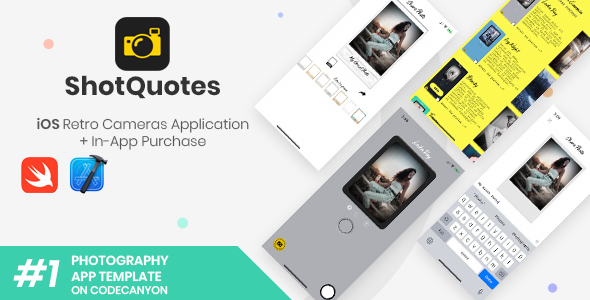
Snapback is a great solution for those who need to quickly make a mobile app that processes vintage live photo effects to embed into nice polaroid frames and share works on social networks
Description
Snapback is a full-working template (UI + Source Code) that offers a large selection of custom cameras and various photo effects. It’s based on the GPUImage2 framework The app automatically saves taken pictures into a custom folder of the iPhone’s Photo Library and allows you to tap the last taken photo’s preview and share it to social network apps, email, and SMS. Attach a caption to your works and select a photo frame to enhance your artistic pictures. The design is clean, code is commented and project folders and files are well organized in the package. This application includes the necessary In-App Purchase code to unlock Pro Cameras – the first 2 cameras are free. • Check out the Features section below to see what this app does. • Read the online Documentation to learn how to configure the template’s features and the database (Parse Dashboard). • Keep an eye to the Change Log on the bottom of this page when an update gets released.Extended license
As per Envato Marketplace Terms, the Extended License applies to all applications that charge money to their users, which may be either via IAP or by publishing this app as a PAID app on the App Store. IMPORTANT: You are NOT allowed to sell or share the original source code of this template anywhere, due to copyright infringement.Features
iOS Swift language – Native Xcode project – Edit the template as you wish with the power of Xcode and Swift. Storyboard, iOS 11.0 and above, iPhone only – Run your app on all iOS iPhones (it doesn’t work on iPads) GPUImage2 framework – Enjoy the power of the Brad Larson’s GPUImage library and create your own new filters and cameras In-App Purchase to unlock all Pro Cameras – Get some revenue from IAP Create as many cameras and photo frames as you want – Offer your clients the opportunity to have fun with different photo effects and camera designs Share pictures with frame on social network installed apps, Mail and SMS – Show your art to the world, enjoy the app with your friends Add a caption to your photos – Personalize your pictures with some text on the bottom of the photo frame (it feels like 80’s) Front/Back camera switch and Flash (in torch mode) – Take advantage of the classic camera features to make selfies like a pro Modern, clean design – The UI has been carefully crafted to offer the best user experience to your clients. Online Documentation – Read the extensive guide of this template to be able to configure it properly. PSD icons included in the package – App and buttons icons are stored into a PSD folder, for easy image replacement.Requirements
The latest official version of Xcode – Beta versions of an IDE usually never work 100% properly, and the code of this app has been written using the latest official version of Xcode and you can download it from the Mac App Store. You must use it and avoid Betas. An Apple Mac computer, updated to its latest OS version – It’s always good to keep your macOS up to date, technology keeps growing and I follow its changes, as well as updating my templates every time a new OS gets released. An Apple Developer Account with an active iOS Development Program – This is needed for you to publish apps on the iTunes App Store. You can still edit this template on code without that account, but you won’t be able to run it on your real iOS device since you’ll need a Team ID. Basic knowledge of Xcode and Swift language – You don’t need to be a skilled or professional developer, anyway it’s recommended to have at least the basic knowledge of what you’re dealing with, in order to be able to customize this template and publish your applications on the App Store. An Active Paid Apps Agreement in your App Store Connect account – Without this agreement, you won’t be able to create and configure In-App Purchases for your own version of this app. A real device to test the app before submitting it to the App Store – iOS Simulators may fail during tests, they are not reliable as a real device is, so I strongly recommend you to always run this application on a real phone/tablet. This is also suggested by Apple’s official Guidelines.Change log
Jan 28, 2022
- Updated to XCode 13.2.1
September 28, 2020
- Updated to Xcode 12
November 11, 2019
Added this code into the 'Info.plist' file, in order to force Light Mode for the app even when the device is on Dark Mode:
    <key>UIUserInterfaceStyle</key>
    <string>Light</string>

NOTE: You can right-click on the Info.plist file and select 'Open As -> Source Code', then paste that code anywhere
September 24, 2019
- Updated to Xcode 11, iOS 13
- Added a 'Launch Screen.storyboard' file to the project and customized it with an ImageView that contains the 'launch_screen' ImageSet - which was added into the 'Assets.xcassets' folder
- Assigned the 'Launch Screen' storyboard file to the 'Launch Screen File' field in the General tab
- Removed the BrandAssets folder from the Assets.xcassets one
- Removed the row called 'Asset Catalog Compiler Launch Image Name - Brand Assets' from Build Settings
- Added this line of code above all instances of 'present(vc, animated: true, completion: nil)' due to iOS 13 new Modal system:
    vc.modalPresentationStyle = .fullScreen

** PLEASE NOTE: You may see a bunch of Buildtime warnings while running the app on your device via Xcode, saying:
"Auto Layout Localization: Views without any layout constraints may clip their content or overlap other views".
 Do not worry about it, just ignore those warnings - they aren't errors - and the app will still work perfectly and the design won't get messed up.
August 22, 2019
- Updated to Xcode 10.3
May 25, 2019
- First release, iOS 10.0 and above
- Native Xcode project, GPUImage2, Swift language
- Compatible with all iPhones
Support
For any support requests, please contact me through my Profile’s Contact FormRate my Work
Your support is always greatly appreciated, from comments to product’s reviews, so please click here to rate your purchases!Categories
Tags
External listing. code.market does not sell this product and does not process payment for it. Pricing, payment, delivery, licensing, refunds, and support are handled by the third-party merchant on its own website. We may earn an affiliate commission from a referral. Details.
Products of the Week.
Submit#1

upvote.club
Free Social Media Engagement that Helps Boost Your Content. Upvote Club supports 19 social networks with 100+ engagement actions in one dashboard. Add links to your posts and get free engagement from real users.
SaaS · 14,000 views · 94 clicksSaaS · Week 42 · 14,000 views · 94 clicks
#2

Seenshot App
Free, Fast, MacOS Screenshot app. Make Screenshot cmd+shift+2 and send it via link
Desktop App · 3,182 views · 107 clicksDesktop App · Week 42 · 3,182 views · 107 clicks
#3

Conversational Backlinks for Busy Founders
Place Backlink Relevant Conversation for your domain across Forums and Conversations
Website · 15,027 views · 192 clicksWebsite · Week 42 · 15,027 views · 192 clicks
#4

Substack Posting API
Onboard your Agent to Substack. Write Publish on Substack via API
SaaS · 34,028 views · 182 clicksSaaS · Week 42 · 34,028 views · 182 clicks
#5

codester.com
SocialDesk+: Omnichannel Social Commerce & Business Management Platform This is stronger than simply “Social Commerce and Messaging” because it tells buyers this is a complete business platform, not just a messaging script. Turn Social Conversations Into Sales SocialDesk+ is a complete omnichannel social commerce and business management platform built for businesses that sell and communicate with customers through social media. Instead of switching between WhatsApp, Facebook, Instagram and TikTok, businesses can manage customer conversations, comments, products, leads, follow-ups, automation, teams and business reports from one professional workspace. And because the full source code is included, developers, agencies and entrepreneurs can customize, rebrand and launch SocialDesk+ as their own business solution or SaaS platform. 🚀 Build Your Own Social Commerce Business SocialDesk+ gives you the foundation to launch: - Your own SaaS platform - A white-label social CRM - A social-commerce management system - A customer communication platform - A business messaging solution - A custom solution for clients - A multi-business subscription platform 💬 Connect Your Customers Supported social channels include: WhatsApp • Facebook • Instagram • TikTok Bring supported conversations into one centralized workspace and help businesses respond faster without constantly switching between platforms. 🛍️ More Than a Messaging Platform SocialDesk+ combines communication with the tools businesses need to manage customer opportunities: Inbox Manage customer conversations from connected channels. Comments Monitor and respond to social-media comments. Customers & Leads Organize customer information and potential buyers. Products & Catalog Manage products and give your team quick access to product information. Follow-Ups Make sure potential customers don't get forgotten. Automation Automate repetitive customer questions and responses. AI Assistant Provide AI-assisted communication when configured. Team Management Give managers and staff access to the business workspace. Reports & Analytics Track activity using business reports and analytics. The current product listing already includes these capabilities. 🔥 Why Buyers Will Want It Launch Faster Start with an already-built business platform instead of developing the entire system from zero. Customize Everything The full source code is included, allowing developers to change branding, features, workflows and integrations. Build a SaaS Create multiple business workspaces and offer SocialDesk+ as a subscription-based service. Sell to Businesses Offer it to retailers, restaurants, service businesses, online sellers, agencies and other businesses that communicate with customers through social media. Mobile + Web + Backend This isn't just a mobile UI template. It includes: - Flutter mobile application - Python / FastAPI backend - Web interface - Administration tools - Database infrastructure - API-based architecture - SQLite / PostgreSQL support - Android and iOS project structure 💼 One Platform. Multiple Business Opportunities. For SaaS Entrepreneurs Launch your own subscription platform and allow multiple businesses to operate inside separate workspaces. For Software Agencies Customize and rebrand the platform for clients instead of building an omnichannel business system from scratch. For Developers Use the complete source code as a foundation for your own social-commerce or customer-management product. For Businesses Deploy a dedicated version for your own customer-service and social-commerce operations. 🧩 What's Included Mobile - Flutter / Dart - Android - iOS project Backend - Python - FastAPI - SQLAlchemy - Alembic Database - SQLite - PostgreSQL Web - HTML5 - CSS3 - JavaScript Deployment - Docker - Docker Compose - Production configuration Business Platform - Multi-workspace architecture - Authentication - Teams - Customers - Products - Messaging - Comments - Automation - Reports - Subscriptions - Administration The current listing also documents third-party integrations such as Meta, TikTok, Stripe, Firebase, SMTP and optional OpenAI configuration. ⚡ What Makes SocialDesk+ Different? You're not buying a simple: ❌ Chat UI ❌ WhatsApp clone ❌ Flutter template ❌ Admin dashboard ❌ Basic CRM You're getting a complete business platform foundation that can be customized, branded and commercialized. Connect. Automate. Manage. Grow. SocialDesk+ Omnichannel Social Commerce & Business Management Platform One important change I'd make to the current listing The current page starts with: “A simple guide to managing your social conversations, customers, products and business activity.”
Other · 1,438 views · 27 clicksOther · Week 42 · 1,438 views · 27 clicks
#6

sandbook.app
Sandbook reads EPUB, PDF, web pages and scanned pages aloud with Kokoro TTS, an open neural voice model that runs on your iPhone, free and offline. Choose from 41 natural voices in English, Spanish, French, Italian, Brazilian Portuguese and Hindi and follow each word as it is spoken. Try the same voices in your browser first with the free Kokoro TTS online demo.
Other · 1,446 views · 10 clicksOther · Week 42 · 1,446 views · 10 clicks