Smart Sections Theme Builder - WPBakery Page Builder Addon
Description
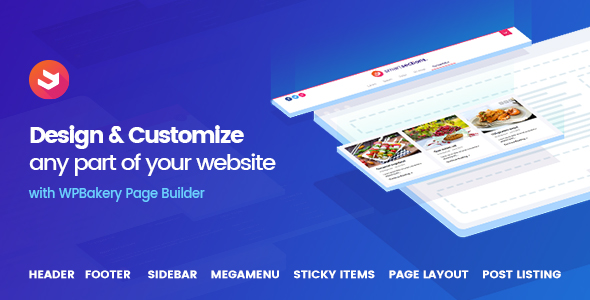
Smart Sections Theme Builder is a WordPress Plug-in that you can visually edit and customize any part of your website with WPBakery Page Builder. You can create new horizontal or vertical headers for your website and replace it with your default theme header. You can also create footers, sidebars, mega menus, sticky items, mobile menus and layouts for content pages. You can even create listing card design templates for post grids or your archive pages.


Note:WPBakery page builder is not bundled inside this plug-in. Make sure that you have copy of an unmodified version of WPBakery Page Builder or bundled with your theme inside of it.





Take Control of Your Entire WordPress Website
Thanks to Smart Sections, you can design any section of your website with WPBakery Page Builder. You can create a new header for your website horizontally or vertically and replace it with your default theme header. You can also create footers, sidebars, mega menus, sticky items, mobile menus and layout for content pages. You can even create listing card designs for your archive pages.
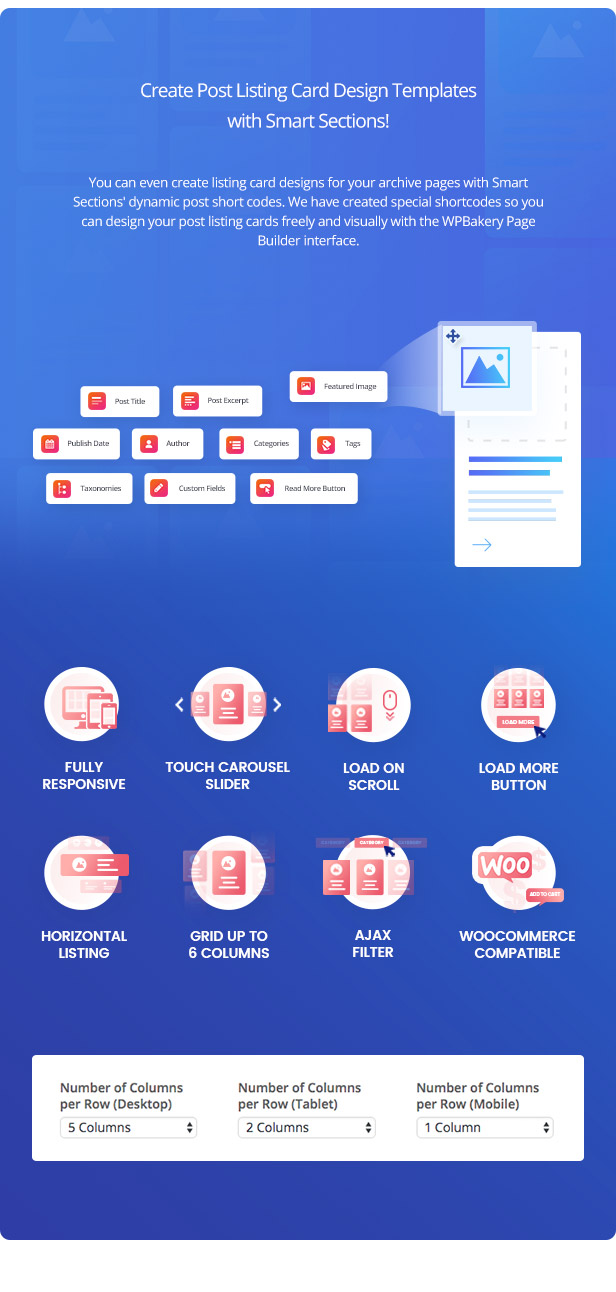
Create Post Listing Card Design Templates with Smart Sections and Add to Any Page with a VC Element Shortcode!
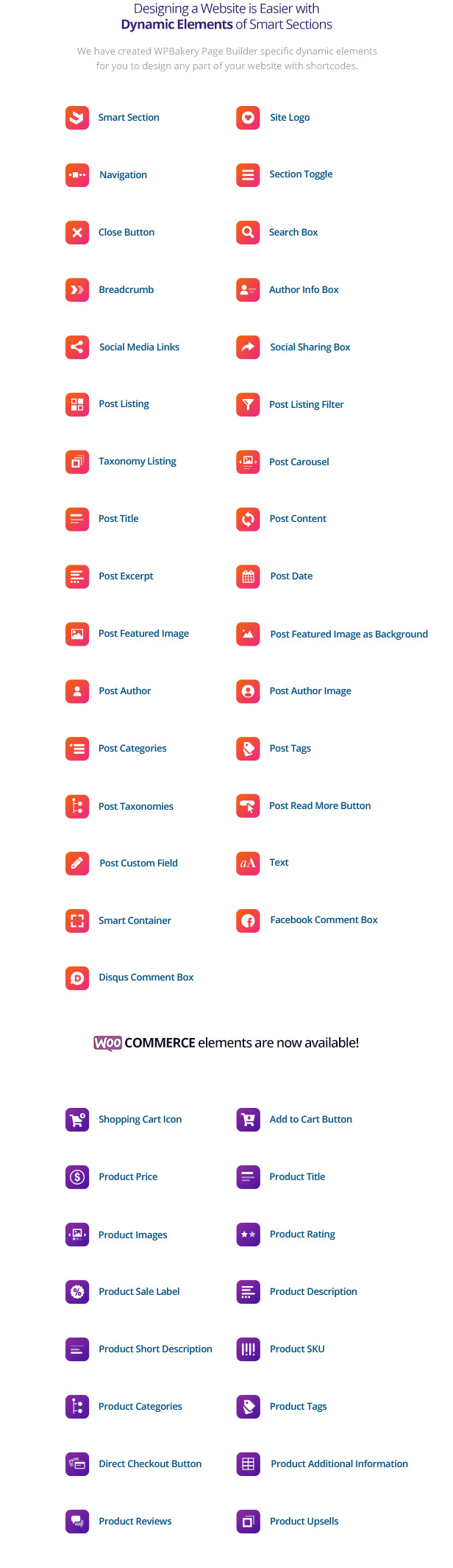
You can even create listing card designs for your archive pages with Smart Sections’ dynamic post short codes. We have created special VC element shortcodes so you can design your post listing cards freely and visually with the WPBakery Page Builder interface.
With the ‘Post Listing’ shortcode, you can create masonry post listings with a load more button or infinite scroll with an advanced data options.
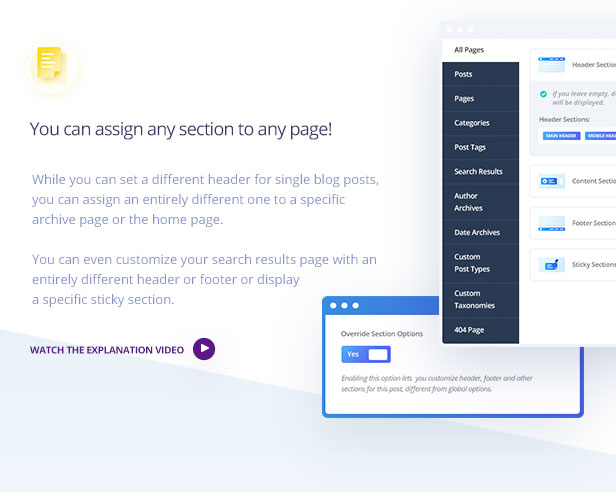
You can assign any section to any page!
While you can set a different header for single blog posts, you can assign an entirely different one to a specific archive page or the home page. You can even customize your search results page with an entirely different header or footer or display a specific sticky section.
You can easily make any section sticky!
From headers to sidebars, you can display a sticky section anywhere on your pages, like a sticky social sharing box at the left side or a sticky contact form at the corner. Or what about creating sticky headers.
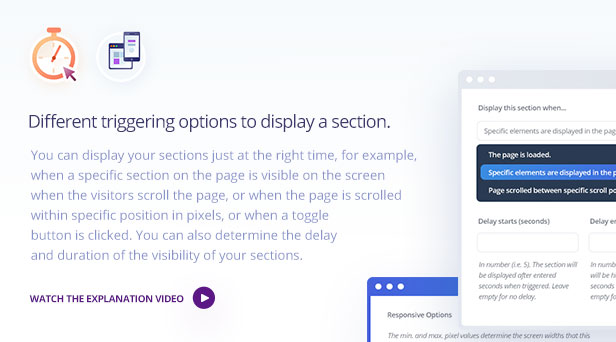
Different triggering options to display a section.
You can display your sections just at the right time, for example, when a specific section on the page is visible on the screen when the visitors scroll the page, or when the page is scrolled within specific position in pixels, or when a toggle button is clicked. You can also determine the delay and duration of the visibility of your sections.
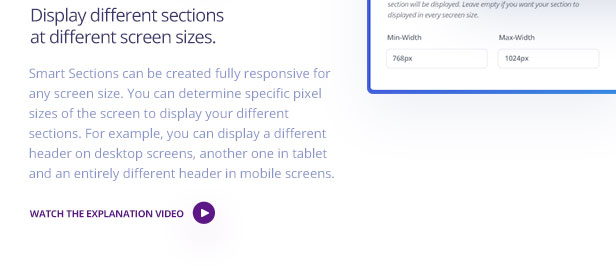
Display different sections at different screen sizes.
Smart Sections can be created fully responsive for any screen size. You can determine specific pixel sizes of the screen to display your different sections. For example, you can display a different header on desktop screens, another one in tablet and an entirely different header in mobile screens.
Unlimited Style Options with Smart Styles
With ‘Smart Styles’, you can customize our Smart Sections elements within a comprehensive detail. You can style your elements with every styling field of WPBakery Page Builder’s ‘Design Options’ plus with additions such as Box Shadow and custom Border Radius for every corner. We have also included single color or gradient overlays for every element. Smart Style comes with a text style editor for all dynamic shortcode elements. You can style not only the container elements but also every internal part of it. One other groundbreaking feature is that you can add different styles for the elements when hovered or when the element is active.
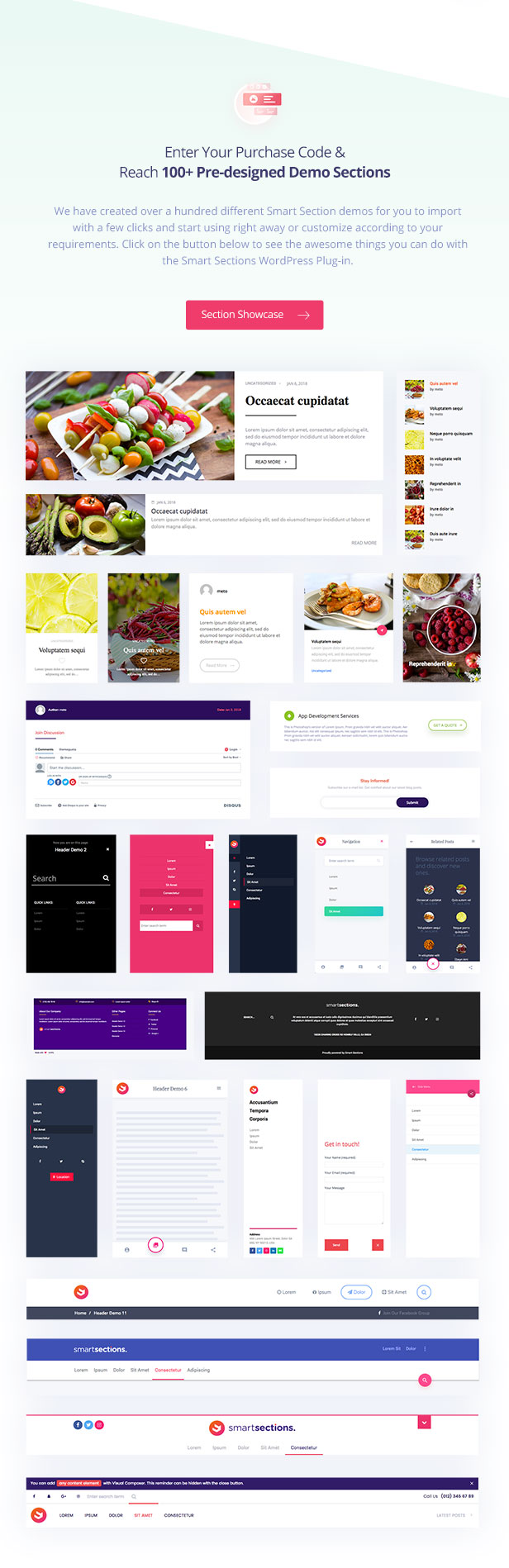
Enter Your Purchase Code & Reach 100+ Pre-designed Demo Sections
We have created over a hundred different Smart Section demos for you to import with a few clicks and start using right away or customize according to your requirements. Click on the button below to see the awesome things you can do with the Smart Sections WordPress Plug-in.
Changelog
Version 1.7.6 January 12th, 2023
# Fixed: Fatal error: Cannot declare class OCDI_Plugin, because the name is already in use in wp-contentpluginsvisucom-smart-sectionsincludesone-click-demo-importone-click-demo-import.php on line 22

Version 1.7.5 November 28, 2022
# Updated: One-Click-Demo-Import plugin for importing demos
# Fixed: The magic method OCDIOneClickDemoImport::__wakeup() must have public visibility in /public_www/wp-content/plugins/visucom-ss-grid-builder/one-click-demo-import/inc/OneClickDemoImport.php on line 128

Version 1.7.4 November 11, 2022
# Fixed: Call to a member function get_cart_contents_count () on null in gusta_cart_icon.php

Version 1.7.3 November 11, 2022
# Added: Post Listing Element sorting with custom field
# Added: Hide Sticky Sections when a specific element is display on page
# Added: Show Sticky Sections when cursor moves out of the window
# Fixed: Conflict issues with several plugins

Version 1.7.2 November 11, 2022
# Added: Word limit feature in Post Title element

Version 1.7.1 March 6, 2022
# Fixed: Warning: Undefined variable $product

Version 1.7.0 - December 25, 2021
# Fixed: Undefined index 'icon_position' in includes/css.php
# Fixed: __wakeup() must have public visibility

Version 1.6.9 - December 4, 2021
# Fixed: Site Logo element does not post the selected image

Version 1.6.8 - November 19, 2021
# Fixed: Warning: Trying to access array offset on value of type bool (vc_elements/gusta_site_logo.php)
# Fixed: Warning: Undefined variable $enable_scroll (includes/js.php)
# Fixed: Term Title not visible on Taxonomy Listing element (gusta_post_title.php)
# Added: Advanced Card Design in Post Filter element (gusta_post_filter.php)
# Fixed: Uncaught error with "smooth-scroll" class

Version 1.6.9 - November 5, 2021
# Fixed: Site Logo element does not post the selected image

Version 1.6.8 - November 5, 2021
# Fixed: Warning: Trying to access array offset on value of type bool (vc_elements/gusta_site_logo.php)
# Fixed: Warning: Undefined variable $enable_scroll (includes/js.php)
# Fixed: Term Title not visible on Taxonomy Listing element (gusta_post_title.php)
# Added: Advanced Card Design in Post Filter element (gusta_post_filter.php)
# Fixed: Uncaught error with "smooth-scroll" class

Version 1.6.7 - 21 June 2021
# Fixed: Responsive font-size not working on a few elements
# Fixed: Unnecessary <p> tag at the beginning of post listing grid elements
# Fixed: WPBakery conflicts in CSS (assets/css/style.css)
# Fixed: Sticky Posts option not working correctly
# Added: Sticky Posts option to Post Carousel element
# Added: "No Posts Found" text option in Post Listing and Post Carousel elements
# Added: Show primary categories (or other taxonomies) first (if the Yoast SEO plugin is activated)
# Fixed: target="_blank" issues in links with no title (includes/wp.php)
# Fixed: No posts shown in default query when Smart Sections is assigned in archive pages (vc_elements/gusta_post_listing.php)
# Fixed: Post Filter not working with some taxonomies (includes/load-more.php)

Version 1.6.6 - 28 April 2021
# Added: class to category items in Post Categories element
# Fixed: Conflict with Contact Form 7 AJAX form submit
# Fixed: Disabled scroll on the section toggle element
# Fixed: Home active text in Breadcrumb element when custom array is selected

Version 1.6.5 - 27 March 2021
# Fixed: Section Toggle not working (assets/js/scripts.js)

Version 1.6.4 - 22 March 2021
# Fixed: Error: The plugin does not have a valid header on activation.

Version 1.6.3 - 18 March 2021
# Fixed: Menu item stays active when the mega menu is hovered outside.
# Fixed warnings and notices on "property_exists" in vc_elements/gusta_post_listing.php

Version 1.6.2 - 18 March 2021
# Fixed: Search Results does not display correct posts (vc_elements/gusta_post_listing.php)

Version 1.6.1 - 16 March 2021
# Fixed: Notice: Undefined variable: css_class in vc_elements/gusta_social_sharing_box.php
# Fixed: Smart Styles not working due to no unique ID in elements.
# Fixed: Menu items acting weird on hover and hover out (assets/js/scripts.js)
# Fixed: Trying to get property 'display_name' of non-object in vc_elements/gusta_post_author.php
# Fixed: Trying to get property 'ID' of non-object in vc_elements/gusta_post_featured_image_as_background.php
# Fixed: Trying to get property 'post_author' of non-object in vc_elements/gusta_post_author.php
# Fixed: Custom post type archives not working properly

Version 1.6.0 - 6 March 2021
# Added: A new class "gusta-child-term" to child taxonomies in the "Post Filter" element (vc_elements/gusta_post_filter.php).
# Added: Feature to select multiple post listing elements that are being triggered by the post filter element.
# Added: Update notice feature in the Plugins page.
# Added: Envato Market Plugin implemented inside the plugin to receive updates directly.

Version 1.5.9 - 28 December 2020
# Fixed: Parent categories do not show up in the breadcrumb element (vc_elements/gusta_breadcrumb.php)

Version 1.5.8 - 27 December 2020
# Fixed: Lightbox issue on Featured Image as Background (vc_elements/gusta_post_featured_image_as_background.php, includes/vc.php)
# Fixed: Breadcrumb element issue in WooCommerce pages (vc_elements/gusta_breadcrumb.php)
# Added: Show / Hide Shop page link & product category in breadcrumb element (vc_elements/gusta_breadcrumb.php)

Version 1.5.7 - 2 November 2020
# Fixed: Post Excerpt element showing wrong data in product categories (vc_elements/gusta_post_excert.php)

Version 1.5.6 - 24 October 2020
# Fixed:  PHP Notice:  Undefined index: s in vc_elements/gusta_search_box.php on line 71
# Fixed: PHP Notice:  Trying to get property 'name' of non-object in vc_elements/gusta_post_title.php on line 63
# Fixed: Breadcrumb element not showing the right values in archive pages (vc_elements/gusta_breadcrumb.php)
# Added: You can now show only sticky posts or remove the query in the “Post Listing” element (vc_elements/gusta_post_listing.php)
# Added: You can now add Smart Sections files inside your theme to the “smart-sections” folder to customize the files. Visit the following URL for details:

Version 1.5.5 - 25 September 2020
# Fixed: Post Featured Image animation not working
# Fixed: Above Content Section not visible in archive pages
# Fixed: Migrate Plugin error: ‘ready’ function depreciated
# Fixed: Migrate Plugin error: jQuery.fn.load() is deprecated
# Edited: Section Toggle element text field now supports HTML

Version 1.5.4 - 28 July 2020
# Fixed: Megamenu issue with autocomplete fields

Version 1.5.3 -  23 June 2020
# Updated: ACF Pro to Version 5.8.12

Version 1.5.2 - 18 June 2020
# Fixed: Post Listing in taxonomy “Archives” displayed posts from child terms as well. We fixed it, so it only shows post from that specific term.

Version 1.5.1 - 26 May 2020
# Added: Include or exclude specific terms in the “Post Listing Filter” element
# Added: Do shortcodes in post custom field element

Version 1.5.0 - 2 May 2020
# Fixed: Dropdown filter javascript error
# Fixed: Post Title bringing post title in Archive pages

Version 1.4.9 - 15 April 2020
# Fixed: “All” text in dropdown post filter

Version 1.4.8 - 11 March 2020
# Fixed: Scroll functions in sticky sections

Version 1.4.7 - 8 January 2020
# Fixed: Data restriction does not stay in effect when using post filters
# Fixed: Dynamic CSS for Post Taxonomies element
# Fixed: Sticky sections with offset settings transparency issue
# Added: Archive child taxonomies in Taxonomy Listing element

Version 1.4.6 - 26 October 2019
# Fixed: Fonts function gusta_get_google_font_subsets

Version 1.4.5 - 5 September 2019
# Added: ‘All Text’ field inside Post Listing Filter element.

Version 1.4.4 - 12 August 2019
# Added: Custom link to Site Logo element
# Fixed: Row alignment issues in Jupiter and Bridge child themes

Version 1.4.3 - 30 July 2019
# Added: Previous / Next Post usage in post listing element
# Fixed: Smart Style issue in the Post Tags element

Version 1.4.2 - 24 July 2019
# Fixed: Javascript error: undefined index “page”.
# Fixed: Post Listing Data Filter issue when post types have common taxonomies
# Fixed: Post Listing fails to initialize the masonry grid (JS error: jQuery.load_more is not a function)

Version 1.4.1 - 8 July 2019
# Fixed: Archive pages or search results now return the default WP query with altered data filtering
# Fixed: Post Listing jQuery error: jQuery.load_more

Version 1.4.0 - 8 June 2019
# Fixed: Shortcode elements loading too early
# Fixed: The structure of post tags, categories, taxonomies and custom field elements

Version 1.3.9 - 4 June 2019
#Fixed: Social Media Links outputs an array

Version 1.3.8 - 4 June 2019
#Fixed: Elements missing in WPBakery interface after WPBakery 6.0.3 update

Version 1.3.7 - 30 May 2019
# Fixed: One Click Demo Conflict Issue: Fatal error: Cannot declare class OCDI_Plugin
# Fixed: High number of queries with a high number of users
# Fixed: Owl Carousel conflict with other plugins/themes
# Added: Shortcode capability to post custom field element
# Fixed: Ignore sticky posts in Post Listing element query
# Fixed: Featured Image as Background link
# Fixed: “Plugin does not have a valid header”

Version 1.3.6 - 30 May 2019
# CSS Fix: Moana CF7 editor overlapping meta box

Version 1.3.5 - 6 March 2019
# Changed the NavWalker class name to Gusta_Nav_Walker…
# Added: Array support for Post Custom Field element
# Fixed: Link to Post Custom Field as Image
# Fixed: Colorpicker incompatibility
# Fixed: Load more on scroll script issues

Version 1.3.1 - 10 December 2018
# Wordpress v5.0 Update
# Updated: ACF v5.7.8 Pro
# Fixed: Archive area sections in term edit pages not saving data

Version 1.3.0 - 27 November 2018
# Fixed: Fatal error: Uncaught Error: gusta_post_featured_image.php
# Fixed: Post Listing error in product post type other than WooCommerce

Version 1.2.9 - 26 November 2018
# Added: Post filter element which works with the post listing element
# Added: Taxonomy Listing

Version 1.2.8 - 26 November 2018
# Added: Toggle Section on Hover feature

Version 1.2.7 - 26 November 2018
# Fixed: Product Object support in shortcake elements

Version 1.2.6  - 21 September 2018
# Added: Post type support, now you can assign layouts to every post type

Version 1.2.5 - 10 September 2018
# Fixed: Mobile alignment issue in Section Toggle element
# Fixed: Style overriding .select2
# Fixed: Notice: Undefined variable section
# Added: Sticky Column Feature

Version 1.2.4 - 1 September 2018
# Fixed: Notice: Undefined property: WP_Post_Type::$term_id in includes/options.php on line 134

Version 1.2.3 - 27 August 2018
# Fixed: CSS vertical header not being displayed properly
# Fixed: Megamenu not visible
# Fixed: Sub-menus in the navigation not being displayed properly

Version 1.2.2 - 26 August 2018
# Upgrade: CSS improvements

Version 1.2.1 - 21 August 2018
# Upgrade: CSS improvements
# Fixed: JS error on load more button in the post listing
# Added: Updated Date support for Post Date Element
# Added: Support for WooCommerce Product, Product Categories, and Product Tags in Assigning Sections
# Fixed: Function error when Polylang plugin is installed
# Fixed: Load more button / Infinite scroll not working

Version 1.2.0 - 28 July 2018
# Fixed: Mega Menu notice: gusta_mega_menu_added
# Fixed: DevTools failed to parse SourceMap: bootstrap-colorpicker.min.js.map
# Added: Post Carousel element
# Added: Add to Cart Button element
# Added: Cart Icon element
# Added: Product Price element
# Added: Smart Container element
# Added: Element tag to post custom field element
# Added: Close Button element
# Upgrade: Reduced the number of queries
# Fixed: Breadcrumb custom array style issue
# Fixed: WPML support issues on assigning sections
# Fixed: Site Logo element height issue in Chrome
# Added: Image support for Post Custom Field element

Version 1.1.4 - 7 June 2018
# Added 25 more post listing demos
# Fixed: Language files missing (pot, po)
# Fixed: Cover row / column in post listing load more
# Fixed: Megamenu not working in some menus
# Fixed: General Content Template in Custom Post Types not working
# Fixed Notice: Undefined variable: $the_title

Version 1.1.1 - 8 May 2018
# Fixed: Mega Menu not working on themes with custom menus.
# Fixed: Color picker compatibility issues (replaced with another color picker)
# Added: Post Carousel Element
# Added: Container Element
# Upgraded to ACF Pro 5.6.10
# Fixed minor CSS compatibility issues with ACF Pro 5.6.10
# Added: Section Category Taxonomy & Filter on Admin

Version 1.0.3 - 18 April 2018
# Fixed style conflict between cloned Smart Sections Elements with the same vc_id
# Fixed override issues in all posts or archives
# Fixed navigation menu CSS bug where the child items were not being displayed properly.

Version 1.0.2 - 17 April 2018
# Fixed the issue when the margin between paragraphs was lost (wpautop).
# Fixed Notice: Undefined index...
# Fixed Tag Link issue in Post Tag Element
# Fixed Several structural CSS issues in Smart Sections elements.

Version 1.0.1 - 13 April 2018
# Fixed issue where the header was removed right after activaton in "The 7 Theme"
# Fixed Notice: Undefined variable align_stds...
# Fixed Notice: Deprecated: Function create_function() is deprecated...
# Fixed Fatal Error: Call to undefined function vc_pixel_icon()... This error occurs in the older versions of WPBakery Page Builder where it does not support Pixel Icons.
</p>
Image Credits
Note: Images are used only for display purpose. They are not included in the plug-in.

Categories
Tags
External listing. code.market does not sell this product and does not process payment for it. Pricing, payment, delivery, licensing, refunds, and support are handled by the third-party merchant on its own website. We may earn an affiliate commission from a referral. Details.
Products of the Week.
Submit#1

upvote.club
Free Social Media Engagement that Helps Boost Your Content. Upvote Club supports 19 social networks with 100+ engagement actions in one dashboard. Add links to your posts and get free engagement from real users.
SaaS · 15,713 views · 96 clicksSaaS · Week 42 · 15,713 views · 96 clicks
#2

Seenshot App
Free, Fast, MacOS Screenshot app. Make Screenshot cmd+shift+2 and send it via link
Desktop App · 4,772 views · 109 clicksDesktop App · Week 42 · 4,772 views · 109 clicks
#3

Conversational Backlinks for Busy Founders
Place Backlink Relevant Conversation for your domain across Forums and Conversations
Website · 16,600 views · 195 clicksWebsite · Week 42 · 16,600 views · 195 clicks
#4

Substack Posting API
Onboard your Agent to Substack. Write Publish on Substack via API
SaaS · 35,595 views · 184 clicksSaaS · Week 42 · 35,595 views · 184 clicks
#5

codester.com
SocialDesk+: Omnichannel Social Commerce & Business Management Platform This is stronger than simply “Social Commerce and Messaging” because it tells buyers this is a complete business platform, not just a messaging script. Turn Social Conversations Into Sales SocialDesk+ is a complete omnichannel social commerce and business management platform built for businesses that sell and communicate with customers through social media. Instead of switching between WhatsApp, Facebook, Instagram and TikTok, businesses can manage customer conversations, comments, products, leads, follow-ups, automation, teams and business reports from one professional workspace. And because the full source code is included, developers, agencies and entrepreneurs can customize, rebrand and launch SocialDesk+ as their own business solution or SaaS platform. 🚀 Build Your Own Social Commerce Business SocialDesk+ gives you the foundation to launch: - Your own SaaS platform - A white-label social CRM - A social-commerce management system - A customer communication platform - A business messaging solution - A custom solution for clients - A multi-business subscription platform 💬 Connect Your Customers Supported social channels include: WhatsApp • Facebook • Instagram • TikTok Bring supported conversations into one centralized workspace and help businesses respond faster without constantly switching between platforms. 🛍️ More Than a Messaging Platform SocialDesk+ combines communication with the tools businesses need to manage customer opportunities: Inbox Manage customer conversations from connected channels. Comments Monitor and respond to social-media comments. Customers & Leads Organize customer information and potential buyers. Products & Catalog Manage products and give your team quick access to product information. Follow-Ups Make sure potential customers don't get forgotten. Automation Automate repetitive customer questions and responses. AI Assistant Provide AI-assisted communication when configured. Team Management Give managers and staff access to the business workspace. Reports & Analytics Track activity using business reports and analytics. The current product listing already includes these capabilities. 🔥 Why Buyers Will Want It Launch Faster Start with an already-built business platform instead of developing the entire system from zero. Customize Everything The full source code is included, allowing developers to change branding, features, workflows and integrations. Build a SaaS Create multiple business workspaces and offer SocialDesk+ as a subscription-based service. Sell to Businesses Offer it to retailers, restaurants, service businesses, online sellers, agencies and other businesses that communicate with customers through social media. Mobile + Web + Backend This isn't just a mobile UI template. It includes: - Flutter mobile application - Python / FastAPI backend - Web interface - Administration tools - Database infrastructure - API-based architecture - SQLite / PostgreSQL support - Android and iOS project structure 💼 One Platform. Multiple Business Opportunities. For SaaS Entrepreneurs Launch your own subscription platform and allow multiple businesses to operate inside separate workspaces. For Software Agencies Customize and rebrand the platform for clients instead of building an omnichannel business system from scratch. For Developers Use the complete source code as a foundation for your own social-commerce or customer-management product. For Businesses Deploy a dedicated version for your own customer-service and social-commerce operations. 🧩 What's Included Mobile - Flutter / Dart - Android - iOS project Backend - Python - FastAPI - SQLAlchemy - Alembic Database - SQLite - PostgreSQL Web - HTML5 - CSS3 - JavaScript Deployment - Docker - Docker Compose - Production configuration Business Platform - Multi-workspace architecture - Authentication - Teams - Customers - Products - Messaging - Comments - Automation - Reports - Subscriptions - Administration The current listing also documents third-party integrations such as Meta, TikTok, Stripe, Firebase, SMTP and optional OpenAI configuration. ⚡ What Makes SocialDesk+ Different? You're not buying a simple: ❌ Chat UI ❌ WhatsApp clone ❌ Flutter template ❌ Admin dashboard ❌ Basic CRM You're getting a complete business platform foundation that can be customized, branded and commercialized. Connect. Automate. Manage. Grow. SocialDesk+ Omnichannel Social Commerce & Business Management Platform One important change I'd make to the current listing The current page starts with: “A simple guide to managing your social conversations, customers, products and business activity.”
Other · 3,006 views · 30 clicksOther · Week 42 · 3,006 views · 30 clicks
#6

sandbook.app
Sandbook reads EPUB, PDF, web pages and scanned pages aloud with Kokoro TTS, an open neural voice model that runs on your iPhone, free and offline. Choose from 41 natural voices in English, Spanish, French, Italian, Brazilian Portuguese and Hindi and follow each word as it is spoken. Try the same voices in your browser first with the free Kokoro TTS online demo.
Other · 3,012 views · 13 clicksOther · Week 42 · 3,012 views · 13 clicks