
Responsive Portfolio Website by NavodCaldera
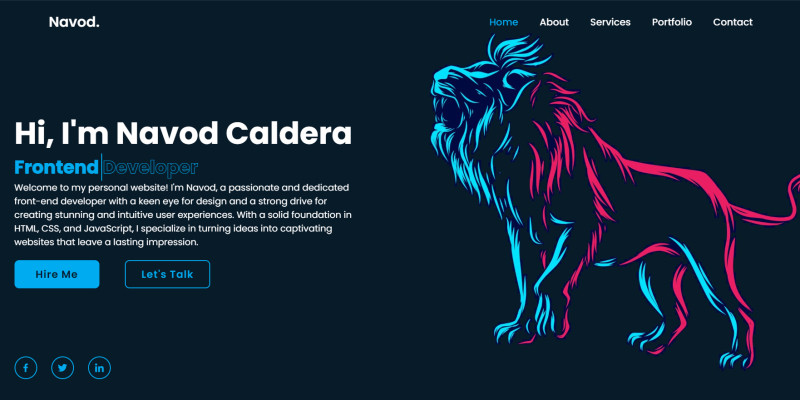
Description
Key features of this template include:
- Responsive Design: The template is optimized to work seamlessly across various devices and screen sizes, ensuring a consistent user experience for visitors accessing the website from different platforms.
- Navigation: The header includes a navigation menu with smooth scrolling functionality, allowing users to easily navigate between different sections of the website.
- Introduction Section: The home section introduces the individual with a personalized greeting, role description, and brief bio. It also includes buttons for actions like hiring and social media icons for connecting with the individual on various platforms.
- About Section: This section provides detailed information about the individual, including their role, skills, personal details, and contact information. It also includes a spinning circle effect for visual appeal.
- Education and Experience: The template includes sections for showcasing the individual's education background and professional experience, organized in a structured format with dates and descriptions.
- Skills Section: The skills section highlights the individual's coding and professional skills, along with progress bars indicating proficiency levels.
- Services Section: The template includes a section for listing the services offered by the individual, with brief descriptions and buttons for more information.
- Portfolio Section: The portfolio section showcases the individual's latest projects with images, descriptions, and links for more details.
- Testimonial Section: This section features testimonials from satisfied clients or collaborators, presented in a visually appealing manner with images and text.
- Contact Section: The contact section includes a form for visitors to get in touch with the individual, with fields for name, email, phone number, subject, and message.
- Footer: The footer contains copyright information and a "Back to Top" button for easy navigation to the top of the page.
Features
- Responsive design for compatibility across devices.
- Navigation menu for easy access to different sections.
- Introduction section with personalized greeting and bio.
- About section detailing the individual's role, skills, and contact information.
- Education and experience sections with structured information.
- Skills section showcasing coding and professional abilities.
- Services section listing offered services with descriptions.
- Portfolio section displaying latest projects with descriptions.
- Testimonial section featuring client testimonials.
- Contact section with a form for user inquiries.
- Footer with copyright information and a "Back to Top" button.
Instructions
- Download the Template: Download the HTML template files from the source.
- Extract Files: Extract the contents of the downloaded ZIP file to your desired location on your computer.
- Open in Text Editor: Open the extracted folder and locate the
index.htmlfile. Open this file in a text editor of your choice (e.g., Visual Studio Code, Sublime Text, Notepad++). - Customize Content: Customize the content of each section according to your preferences. Replace the placeholder text, images, and links with your own information, projects, and contact details.
- Update Links: Update any links (e.g., social media links, portfolio project links) to point to your own profiles or projects.
- Modify Styles (Optional): If desired, modify the CSS styles in the
style.cssfile to customize the appearance of the website further. - Add/Remove Sections (Optional): Modify the HTML structure to add or remove sections based on your needs. Be sure to update corresponding CSS styles if you make structural changes.
- Preview: Open the
index.htmlfile in a web browser to preview your changes locally. Ensure that everything appears as expected and that all links and functionalities work correctly. - Deploy: Once you're satisfied with your changes, deploy the website to your hosting provider or web server. Upload all the HTML, CSS, and image files to the appropriate directories on your server.
| Author | NavodCaldera |
|---|---|
| Category | Themes / HTML / Portfolio |
| Price | $9 |
| Extended License | $27 |
| First Release | Feb 8, 2024 |
| Last Update | Feb 8, 2024 |
| Files included | .css, .html, JavaScript .js |
Categories
Tags
External listing. code.market does not sell this product and does not process payment for it. Pricing, payment, delivery, licensing, refunds, and support are handled by the third-party merchant on its own website. We may earn an affiliate commission from a referral. Details.
Products of the Week.
Submit🥇

STOP GUESSING WHAT TO POST
AI that learns your brand voice and builds a month of consistent, on-brand social content: carousels, posts and hooks that sound like you, not like everyone else's AI.
SaaS · 3,288 views · 28 clicksSaaS · Week 45 · 3,288 views · 28 clicks
🥈

Conversational Backlinks for Busy Founders
Place Backlink Relevant Conversation for your domain across Forums and Conversations
Website · 40,703 views · 218 clicksWebsite · Week 45 · 40,703 views · 218 clicks
🥉

upvote.club
Free Social Media Engagement that Helps Boost Your Content. Upvote Club supports 19 social networks with 100+ engagement actions in one dashboard. Add links to your posts and get free engagement from real users.
SaaS · 38,808 views · 112 clicksSaaS · Week 45 · 38,808 views · 112 clicks
#4

Substack Posting API
Onboard your Agent to Substack. Write Publish on Substack via API
SaaS · 57,835 views · 197 clicksSaaS · Week 45 · 57,835 views · 197 clicks
#5

Seenshot App
Free, Fast, MacOS Screenshot app. Make Screenshot cmd+shift+2 and send it via link
Desktop App · 27,240 views · 120 clicksDesktop App · Week 45 · 27,240 views · 120 clicks
#6

Hand-Placed Backlinks $9.99 per link. Flat rate.
Buy hand-placed forum, Q-A and directory backlinks. Flat $9.99 per link, no subscriptions — you only pay for approved listings.
Website · 3,141 views · 18 clicksWebsite · Week 45 · 3,141 views · 18 clicks
#7

Free Invoice Generator - PDF Invoices in Your Browser, No Sign-Up
A free invoice maker for freelancers and small businesses: fill in the invoice, check the live preview, and download a PDF that looks exactly like it. Any currency, tax per item, three templates, no sign-up, and nothing leaves your device.
1,834 views · 16 clicksWeek 45 · 1,834 views · 16 clicks
#8

Merge PDF Files Free - Combine PDFs in Your Browser, No Upload
A free PDF merger for office workers, students, and freelancers: combine PDFs and images into one file in the browser, reorder files and pages, pick page ranges, keep bookmarks, and open password-protected PDFs. Nothing is uploaded, no sign-up, no watermark.
1,701 views · 13 clicksWeek 45 · 1,701 views · 13 clicks