PAYPAL CURRENCY CONVERTER PRO FOR WOOCOMMERCE
Description
Convert any currency to allowed PayPal currencies for PayPal’s Payment Gateway “PayPal Standard” within WooCommerce
Attention: before you make a purchase, please make sure your Wordpress and WooCommerce Versions are supported!This plugin is for WooCommerce shops with a shop currency not in this list: “AUD, BRL, CAD, CZK, DKK, EUR, HKD, HUF, ILS, JPY, MYR, MXN, NOK, NZD, PHP, PLN, GBP, SGD, SEK, CHF, TWD, THB, USD”, or want to convert into a different PayPal currency to avoid conversion fees by PayPal. Or simply want to forward PayPal fees to your customer.
Currently running with:
- Wordpress 6.1.1
- WooCommerce 7.4.0
- PHP Version 8.2.0
FEATURES
- Convert any given WooCommerce shop currency to allowed PayPal currencies for PayPal’s Payment Gateway “PayPal Standard (legacy)” within WooCommerce on checkout.
- Recommended PayPal Payment Gateways
- Express Checkout via PayPal for WooCommerce
- PayPal Standard (legacy version will be available on activation of this plugin)
- Supports customized version of:
- PayPal Digital Goods gateway
- PayPal Advanced.
- Social Deals Engine
- get in touch for quotes and alternate payment gateways
- Converts Shopping cart total.
- Converts Tax
- Converts shipping costs Important Note for versions 3.2.1 or older: shippment does not appear correct in the Payment description on checkout, but only when shippment is based on country and is changed on checkout. Is fixed in the version 3.3.
- Converts handling fees
- Custom Currency setup available
- Show the Cart Total, Shipping Total, Handling fee, Order Total Tax, Order Total inclusive Tax, and Conversion Rate in PayPal related payment gateways descriptions
- Allows setting of additional handling fees on fixed or percentage base.
- Automatically update the currency exchange rate between your shop currency and the desired PayPal currency with WP-crontrol (or any other cron plugin), your hosting servers cron job, or a 3rd party cron job service.
- Actual Currency Exchange Rates will be retrieved from “Open Exchange Rates API”, Xignite, Currency Converter API, Apilayer API, or European Central Bank.
- Display of Google’s exchange rates history chart of the last 5 years for information purpose.
- Have your virtual product orders automatically completed after checkout!
- Have your non virtual product orders automatically completed after checkout!
- Have your standard product orders automatically processed after checkout!
- Add a note to the order email adding information about currency exchange rate and converted order total.
- Optionally supress Order OnHold Emails.
- Sends notification email to the admin’s email address when the exchange rate has been updated.
- Logs the actions into a log file.
- Tool-tip help on every item.
- Translation Ready
- Easy to Setup
- Gives warning for unsupported php.ini settings.
- Detailed Documentation Included
- Subscriptions (support only for “WooCoommerce Subscriptions”)
MANDATORY SETTINGS
- Find the settings page in WooCommerce’s sub menu.
- First time only: Select your target Currency
- Save your settings.
- Go to the 2nd tab and choose your favorite exchange rate provider, register a valid API ID and activate it with the radio button.
- Save your settings.
- Accept the suggested exchange rate shown in the button.
- Save your settings.
OPTIONAL SETTINGS
EXCHANGE RATE PROVIDER SELECTION
Go to the 2nd tab and choose your favorite exchange rate provider other than the preselected one. Recommended: register a valid API ID and activate it with the radio button.
CUSTOM CURRENCY
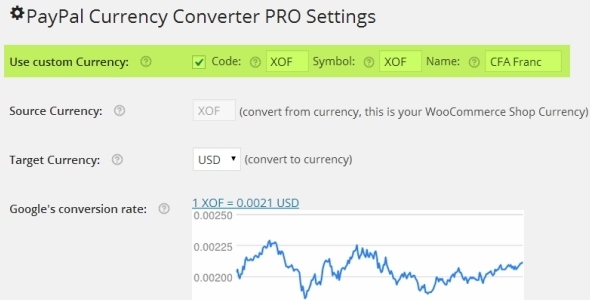
If you need a custom currency,check the check-box “Use Custom Currency” on top of the 1st tab, then you will see 3 new text input fields called Code, Symbol, and Name. Fill this out with the appropriate settings. For example: Code=”XOF”, Symbol=”XOF”, Name= “CFA Franc” Save your settings and navigate to WooCommerce’s settings page where you should find your new custom currency. Select it and save your settings. Navigate back to PayPal Currency Converter Pro settings page to check if everything is set.
HANDLING FEES
You can set a fixed amount and a calculated fee based on a percentage. You can decide if the handling fee should be taxed or not, and you can decide if the percentage calculation should as well be calculated including the shipping total. Furthermore you may name your handling fee resp. how it is shown in your order details. As soon as the amount or percentage is greater than zero, it will be added and as a part of the order total be converted as well. So you can forward the PayPal charge to your customer. 
ORDER AUTO COMPLETION
This settings are on by default. Override PayPal’s Validation error on “amount comparison” or “PayPal currencies do not match”. Orders for virtual (downloadable) products will be completed when checked! Non virtual product orders will be set to processing and stock will be reduced.
AUTOMATIC EXR UPDATES
For automatic updates you have three options. One option is to use a suitable Cron-Job plugin like “WP-Crontrol” and register the hook “ppcc_cexr_update” for your desired update frequency. Another option is to call the given AJAX url ( from your hosting servers cron job or an online cron job service like EASYCRON.COM for a hassle free solution. (This ensures an accurate timing for the upates.)
LOG / EMAIL NOTIFICATION
If the checkbox “log” is checked an email notification will be sent to the admin’s email address every time the exchange rate is updated with date, time, and exchange rate value. Furthermore the log file will be populated with every action the plugin does. The log file can be found and viewed in the indicated location while using your FTP client. For additional convenience you can open the log-file in a pop up window. To make this work add: “Allow from <your servers ID will be indicated in the plugin>” to the .htaccess file inside ”../plugins/woocommerce/logs/”
How can I show the converted total, tax, and conversion rate on the checkout page?
Sample payment description content:
Cart Total: <br />
Shipping Total: <br />
Handling % plus fixed.<br />
Handling total: <br />
Order Total Tax: <br />
Order Total inclusive Tax: <br />
Conversion Rate:
History
- Version 3.6 establishes a Custom API and takes care of the WooCommerce Backward Compatability for PayPal Standard Gateway by adding
add_filter( 'woocommerce_should_load_paypal_standard', '__return_true' );to your functions.php and use Paypal standard More info here. - Version 3.4.2 supports WooCommerce Subscriptions, tested with Wordpress 5.8 & WooCommerce 5.5.2 & WooCommerce Subscriptions Version 3.1.3
- Version 3.4 offers the option to suppress the order on hold email send by woocommerce when the amount payed differs from the amount ordered (due to conversion), and there is a new section in the info tab showing all plugin option settings at a glance.
- Version 3.3.3 addresses the API change of pro currencyconverterapi.com, because of different URL and object
- Version 3.3.1 addresses the API change of free.currencyconverterapi.com, since ther V6, a API ID is mandatory.
- Version 3.3 changed the handling of the Payment Description values.
- Since Version 3.0 you may enjoy a tabbed and reorganized backend page.
- Watch a demo of PAYPAL CURRENCY CONVERTER PRO FOR WOOCOMMERCE Ver. 2.2.3 on Youtube.
- Version 2.2.4 comes with a bunch of new currency exchange rate provider!
- Version 2.2.3 comes with the new awaited feature “Handling fees” and is now available. It allows you to add handling fees on a percentage base and/or fixed amount base!
- Version 2.1.7 addresses the problem with allow_url_fopen which is not supported by certain ISPs. Thus CURL is now used.
- Version 2.1.6 addresses an issue with the deprecated function wp_get_sites().
- Since version 2.1: Rate precision can now be settled by choosing the numbers of digits to round to. Improved precison for YAHOO exchangerates through cross currency calculation. Custom currency exchange rate. can be enabled.
- Since version 2.0: You may now add an email complete order note showing the currency conversion rate and the converted total. Sample code:
This order is payed with PayPal, converted with the currency exchange rate <em>%s%s/%s</em>.<br />Billed Total: <strong>%s</strong>Auto completion for virtual orders and auto processing for normal orders can be enabled in the backend. Works with PayPal Express - Since version 1.7 a new exchange rate provider (National Bank of Romania) is added especially for RON.
- Since version 1.6 you may use span tags with specific ids to pull the total, the tax, and the conversion rate inside a supported payment gateway description. Example Description: Order Total
<strong> <span id="ppcc_total" /> (Includes <span id="ppcc_tax" /> Tax)</strong> (Currency conversion rate = <span id="ppcc_cr" />) - Since version 1.5 PayPal Currency Converter Pro for WooCommerce also supports PayPal Digital Goods gateway. Ask me for a quote to help with the set up of your PayPal Digital Goods gateway.
Categories
Tags
External listing. code.market does not sell this product and does not process payment for it. Pricing, payment, delivery, licensing, refunds, and support are handled by the third-party merchant on its own website. We may earn an affiliate commission from a referral. Details.
Products of the Week.
Submit#1

upvote.club
Free Social Media Engagement that Helps Boost Your Content. Upvote Club supports 19 social networks with 100+ engagement actions in one dashboard. Add links to your posts and get free engagement from real users.
SaaS · 16,451 views · 96 clicksSaaS · Week 42 · 16,451 views · 96 clicks
#2

Seenshot App
Free, Fast, MacOS Screenshot app. Make Screenshot cmd+shift+2 and send it via link
Desktop App · 5,440 views · 109 clicksDesktop App · Week 42 · 5,440 views · 109 clicks
#3

Conversational Backlinks for Busy Founders
Place Backlink Relevant Conversation for your domain across Forums and Conversations
Website · 17,263 views · 195 clicksWebsite · Week 42 · 17,263 views · 195 clicks
#4

Substack Posting API
Onboard your Agent to Substack. Write Publish on Substack via API
SaaS · 36,257 views · 184 clicksSaaS · Week 42 · 36,257 views · 184 clicks
#5

codester.com
SocialDesk+: Omnichannel Social Commerce & Business Management Platform This is stronger than simply “Social Commerce and Messaging” because it tells buyers this is a complete business platform, not just a messaging script. Turn Social Conversations Into Sales SocialDesk+ is a complete omnichannel social commerce and business management platform built for businesses that sell and communicate with customers through social media. Instead of switching between WhatsApp, Facebook, Instagram and TikTok, businesses can manage customer conversations, comments, products, leads, follow-ups, automation, teams and business reports from one professional workspace. And because the full source code is included, developers, agencies and entrepreneurs can customize, rebrand and launch SocialDesk+ as their own business solution or SaaS platform. 🚀 Build Your Own Social Commerce Business SocialDesk+ gives you the foundation to launch: - Your own SaaS platform - A white-label social CRM - A social-commerce management system - A customer communication platform - A business messaging solution - A custom solution for clients - A multi-business subscription platform 💬 Connect Your Customers Supported social channels include: WhatsApp • Facebook • Instagram • TikTok Bring supported conversations into one centralized workspace and help businesses respond faster without constantly switching between platforms. 🛍️ More Than a Messaging Platform SocialDesk+ combines communication with the tools businesses need to manage customer opportunities: Inbox Manage customer conversations from connected channels. Comments Monitor and respond to social-media comments. Customers & Leads Organize customer information and potential buyers. Products & Catalog Manage products and give your team quick access to product information. Follow-Ups Make sure potential customers don't get forgotten. Automation Automate repetitive customer questions and responses. AI Assistant Provide AI-assisted communication when configured. Team Management Give managers and staff access to the business workspace. Reports & Analytics Track activity using business reports and analytics. The current product listing already includes these capabilities. 🔥 Why Buyers Will Want It Launch Faster Start with an already-built business platform instead of developing the entire system from zero. Customize Everything The full source code is included, allowing developers to change branding, features, workflows and integrations. Build a SaaS Create multiple business workspaces and offer SocialDesk+ as a subscription-based service. Sell to Businesses Offer it to retailers, restaurants, service businesses, online sellers, agencies and other businesses that communicate with customers through social media. Mobile + Web + Backend This isn't just a mobile UI template. It includes: - Flutter mobile application - Python / FastAPI backend - Web interface - Administration tools - Database infrastructure - API-based architecture - SQLite / PostgreSQL support - Android and iOS project structure 💼 One Platform. Multiple Business Opportunities. For SaaS Entrepreneurs Launch your own subscription platform and allow multiple businesses to operate inside separate workspaces. For Software Agencies Customize and rebrand the platform for clients instead of building an omnichannel business system from scratch. For Developers Use the complete source code as a foundation for your own social-commerce or customer-management product. For Businesses Deploy a dedicated version for your own customer-service and social-commerce operations. 🧩 What's Included Mobile - Flutter / Dart - Android - iOS project Backend - Python - FastAPI - SQLAlchemy - Alembic Database - SQLite - PostgreSQL Web - HTML5 - CSS3 - JavaScript Deployment - Docker - Docker Compose - Production configuration Business Platform - Multi-workspace architecture - Authentication - Teams - Customers - Products - Messaging - Comments - Automation - Reports - Subscriptions - Administration The current listing also documents third-party integrations such as Meta, TikTok, Stripe, Firebase, SMTP and optional OpenAI configuration. ⚡ What Makes SocialDesk+ Different? You're not buying a simple: ❌ Chat UI ❌ WhatsApp clone ❌ Flutter template ❌ Admin dashboard ❌ Basic CRM You're getting a complete business platform foundation that can be customized, branded and commercialized. Connect. Automate. Manage. Grow. SocialDesk+ Omnichannel Social Commerce & Business Management Platform One important change I'd make to the current listing The current page starts with: “A simple guide to managing your social conversations, customers, products and business activity.”
Other · 3,666 views · 31 clicksOther · Week 42 · 3,666 views · 31 clicks
#6

sandbook.app
Sandbook reads EPUB, PDF, web pages and scanned pages aloud with Kokoro TTS, an open neural voice model that runs on your iPhone, free and offline. Choose from 41 natural voices in English, Spanish, French, Italian, Brazilian Portuguese and Hindi and follow each word as it is spoken. Try the same voices in your browser first with the free Kokoro TTS online demo.
Other · 3,670 views · 13 clicksOther · Week 42 · 3,670 views · 13 clicks