
OptionKit Add-ons for WooCommerce Product Options

Description
 007AJ
OptionKit Add-ons
Extra product options and add-ons for WooCommerce, with swatches, formula pricing and live totals
Let customers choose a colour, type an engraving, upload a photo, pick toppings or enter a size, and see the price change as they go. Build option groups once, assign them to products, categories or tags, and every choice follows the item through the cart, the checkout, order emails and the order screen.
Fully licensed version — use on your own sites Requires WooCommerce 8.0+ Fully licensed
use on your own sites
WooCommerce 8.0+
required
Blocks and HPOS
Cart, Checkout and order storage
Standalone
WordPress 6.3+, PHP 7.4+
WooCommerce 8.0 or newer is required. OptionKit Add-ons is an extension for WooCommerce and does nothing on its own. If WooCommerce is missing or switched off, it shows a notice and waits.
ON THE PRODUCT PAGEOptions customers enjoy picking
Swatches, buttons, text, uploads and sliders, with the price updating as they choose.
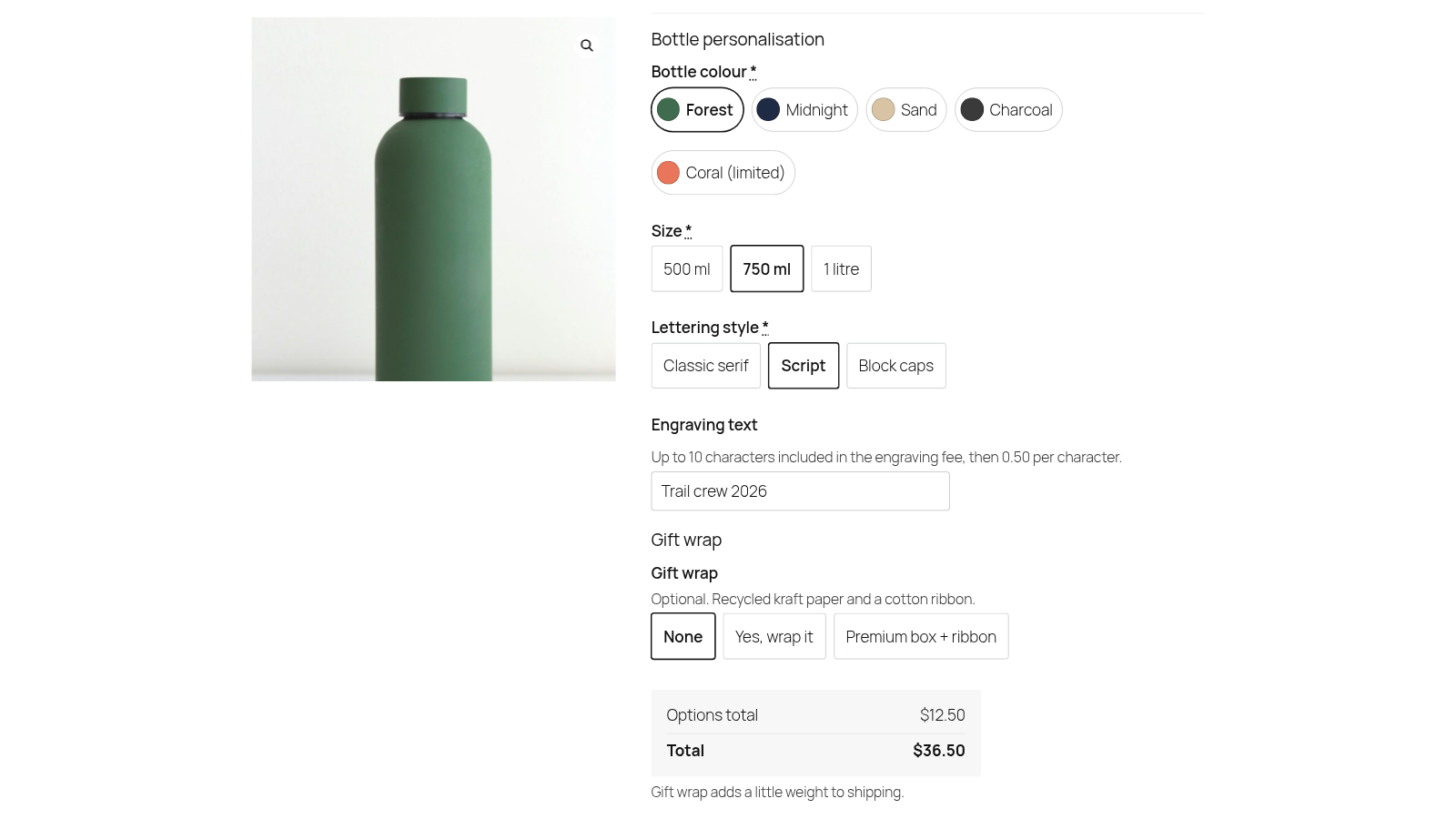 Colour swatches, size and lettering buttons, engraving text and gift wrap, with a live options total. Screenshot from a test store with sample products.
10 field types
Text, textarea, number, select, radio, checkbox, range slider, date, file upload and calculated fee, plus signature pad, shortcode/HTML and repeater fields.
Buttons and swatches
Show select, radio and checkbox choices as buttons, colour swatches or image swatches. Swatches are real radio buttons and checkboxes underneath.
Live totals
An Options total and Total box updates as customers pick. The server works every price out again, so the cart always matches the rules.
Five layouts
Show a group stacked, as an accordion, in tabs, as steps, or behind a button in a popup. Pick a layout per group.
Repeater fields
Customers add 1 to 20 entries of the same small set of fields, such as a name, number and size per team shirt, with free entries and a price per extra entry.
Accessible storefront
Real labels, grouped choices, keyboard-friendly swatches, tabs and accordions, totals announced to screen readers and inline error messages.
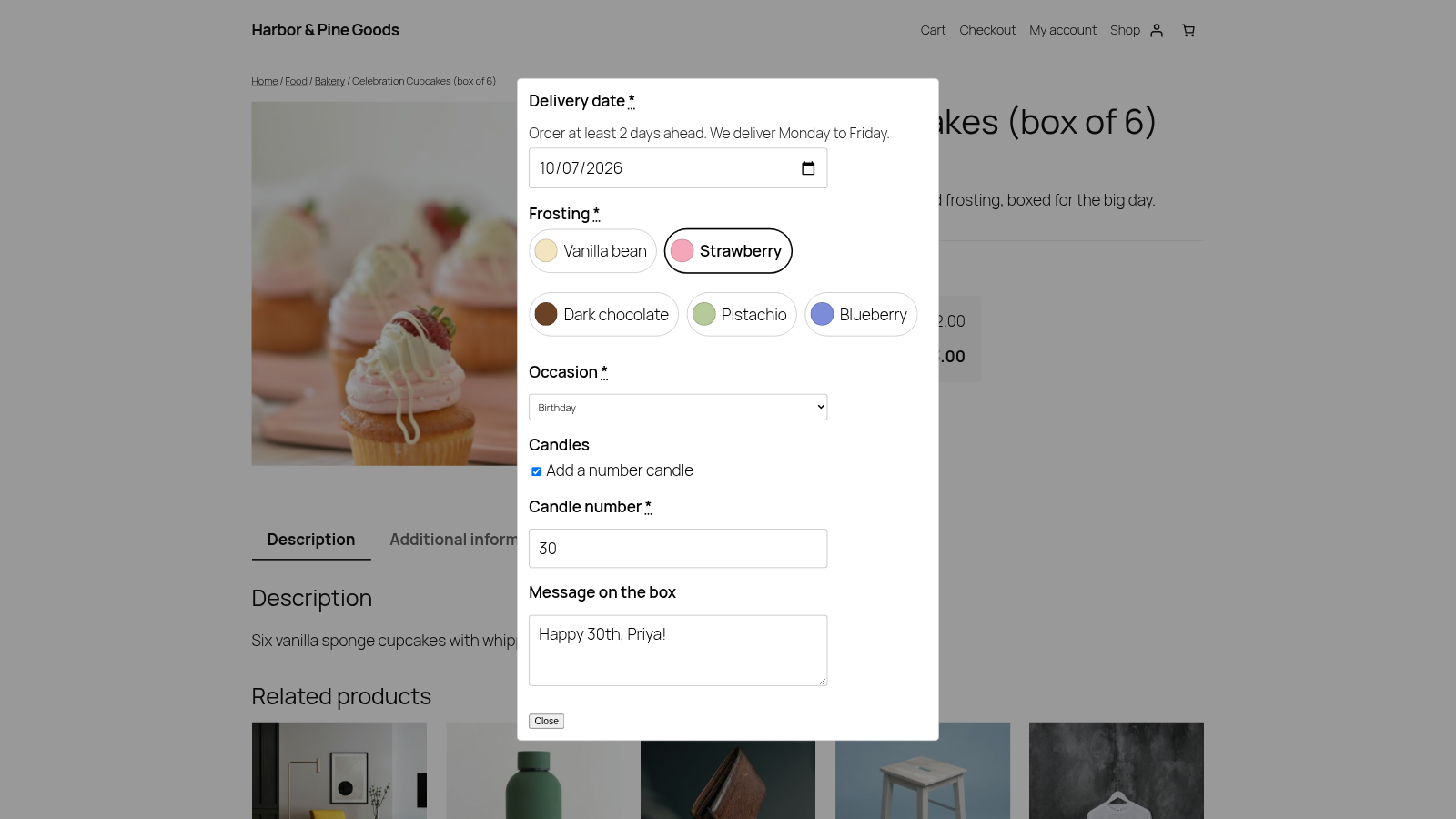 Popup layout: the options open in a dialog from a single button.
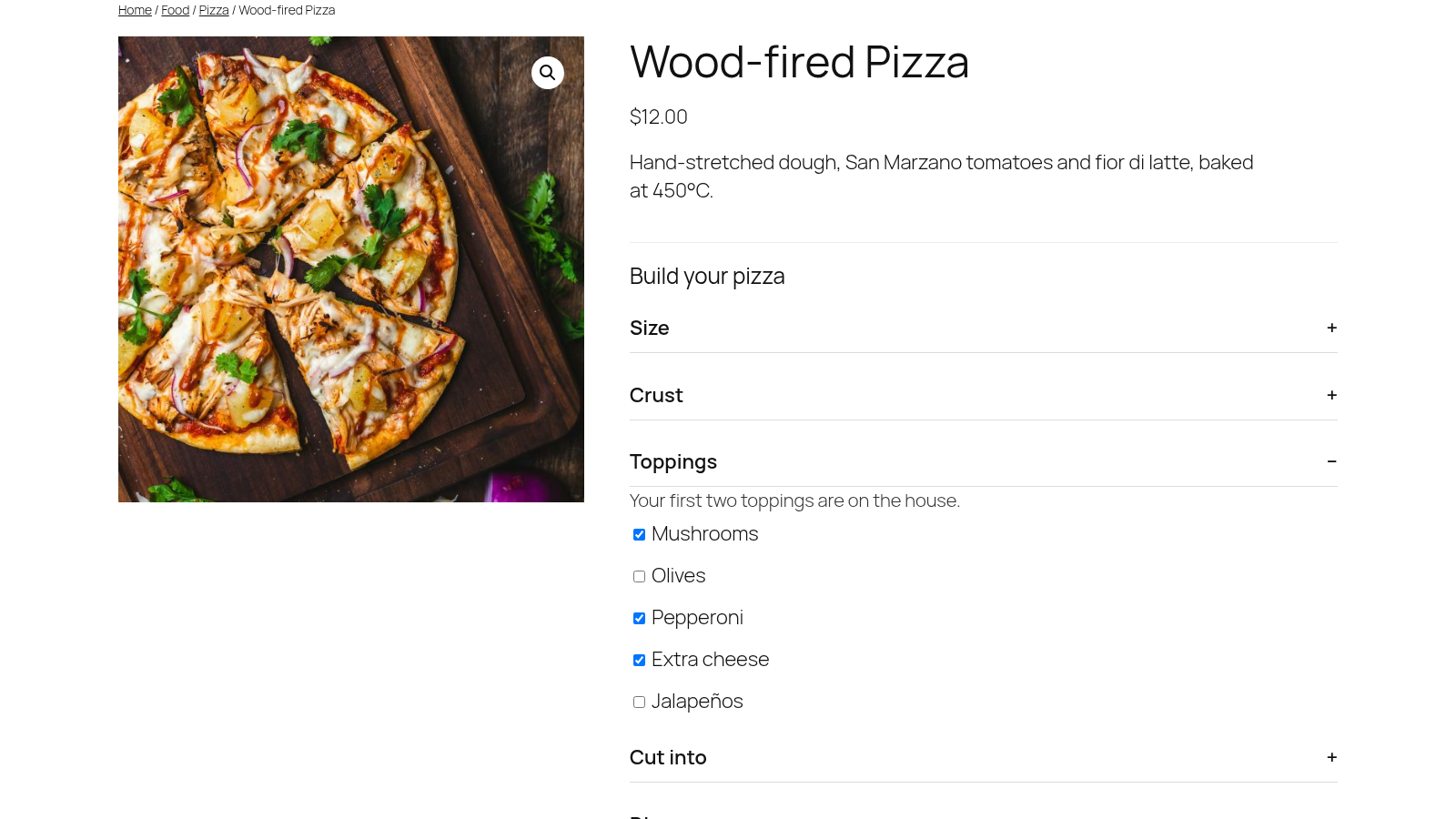 Accordion layout with the first two toppings free.
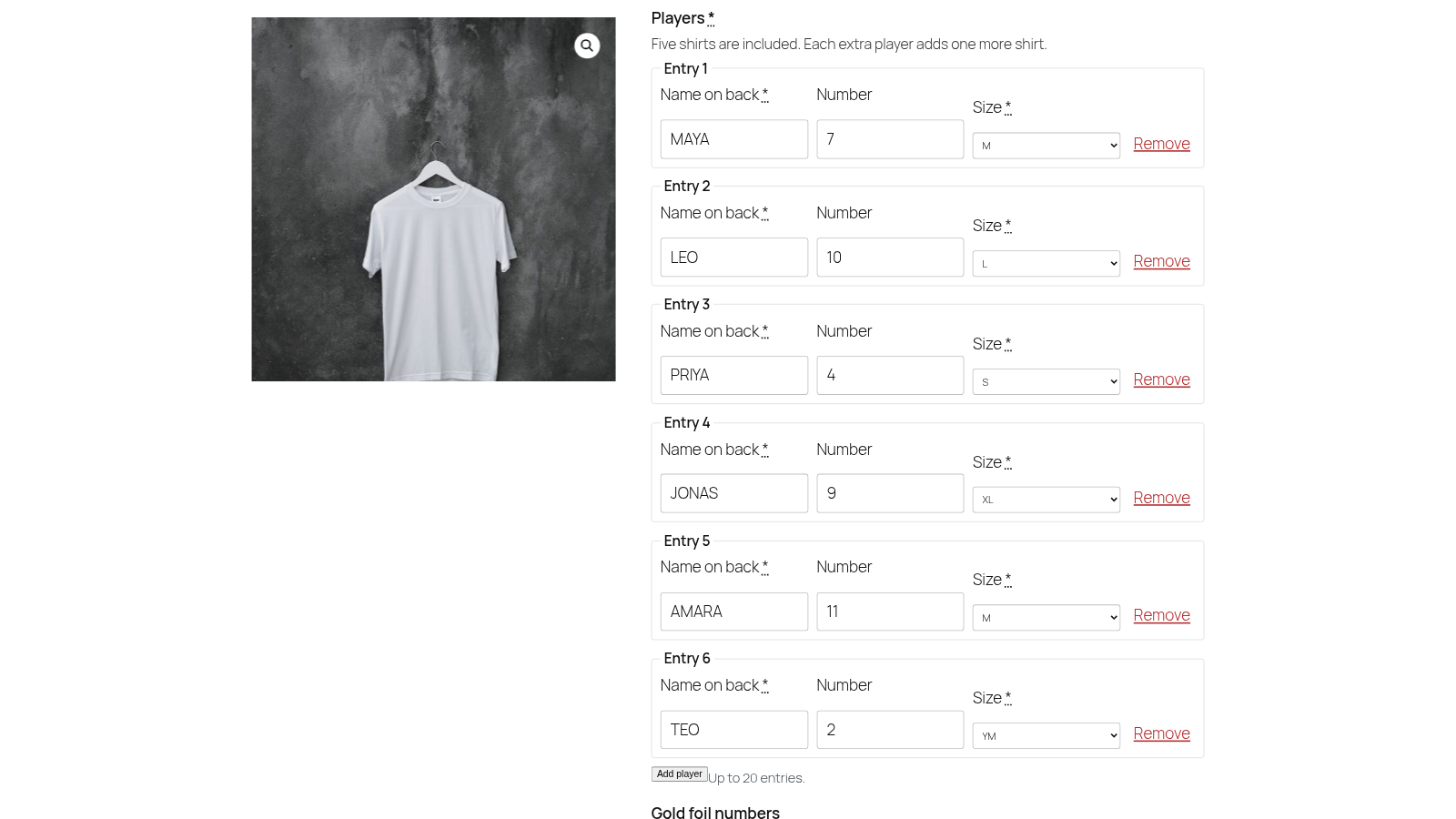 A repeater collects one row per player.
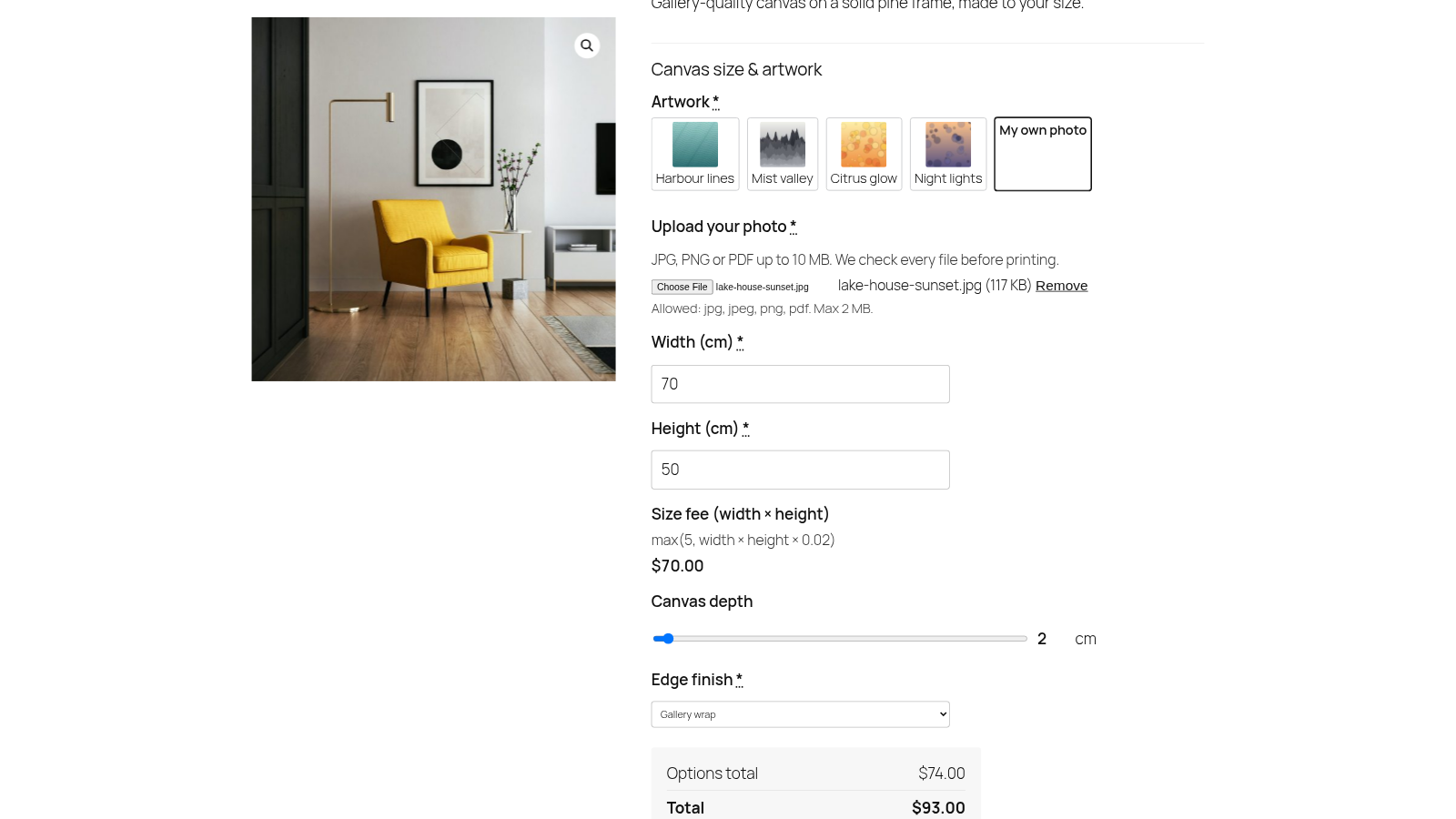 Choosing My own photo reveals the upload field.
Screenshot from a test store with sample products. Tabs and steps layouts are also included.
PRICINGPrice options the way you sell them
From a simple flat fee to a size worked out from width and height, the live total and the server use the same rules.
Five price types
Flat amount, percentage of the product price, per quantity, a one-time fee per cart line, or a formula. Set prices on a field or on each choice.
Formula prices
Use the product price, quantity, the field’s value, character count, choices picked and other fields, with min, max, round, ceil, floor, abs, clamp and if.
Lookup and matrix tables
Price from a table with one or two axes, such as size × frame. Paste the table as CSV and edit it again any time.
First choices free
Make the first few picks free, for example two toppings on the house, and charge for the rest.
Role-based amounts
Give a choice a different amount for a user role, such as a lower engraving fee for wholesale customers.
Weight for shipping
Fields and choices can add weight to the cart line, so heavier options can change the shipping cost.
EXAMPLE FORMULASmax(5, width * height * 0.02)
if(len > 12, len * 0.4, 5)
A size fee from two number fields, and an engraving fee that switches to a per-character price after twelve characters.
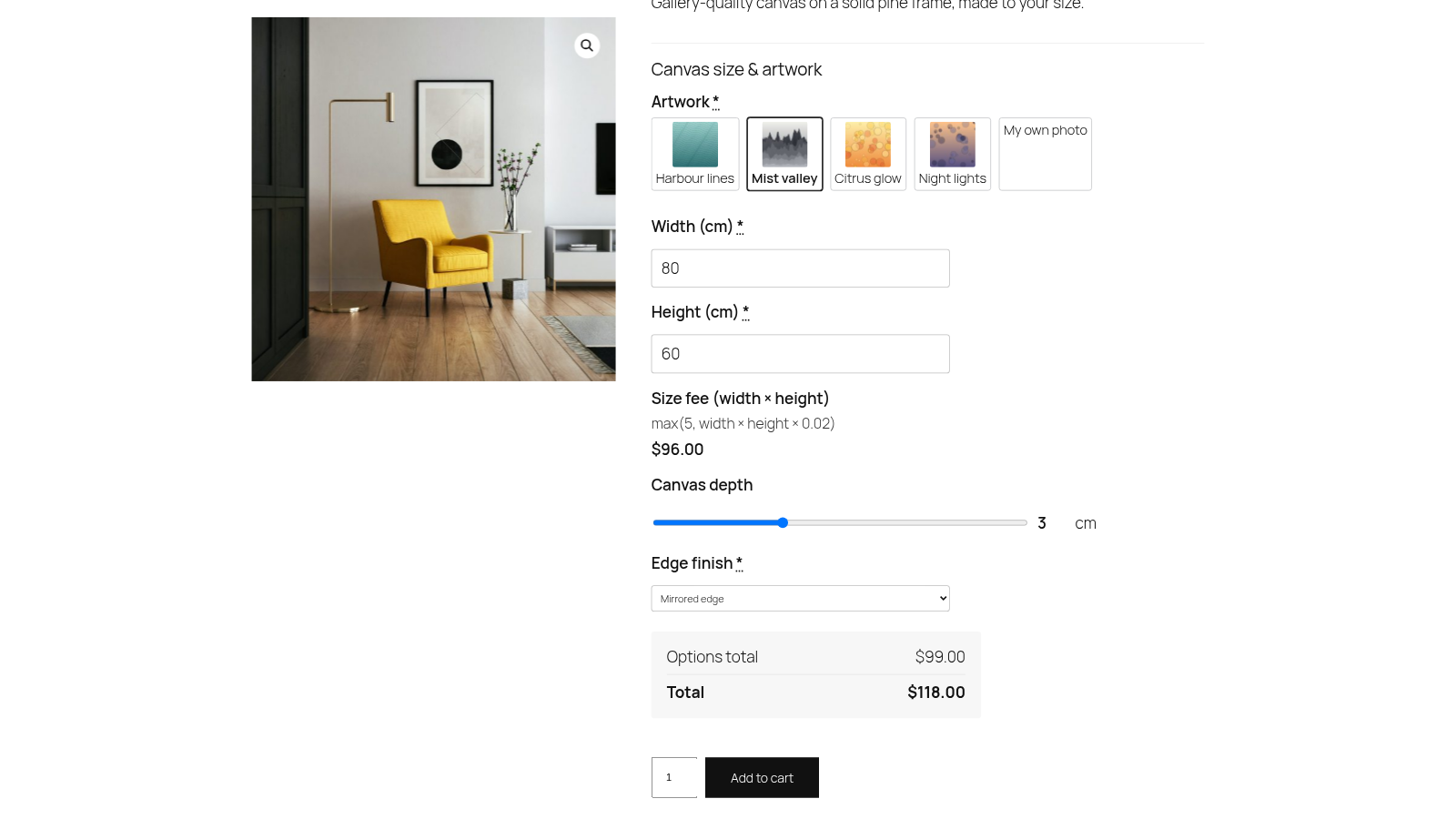 A canvas size fee worked out by formula from width and height.
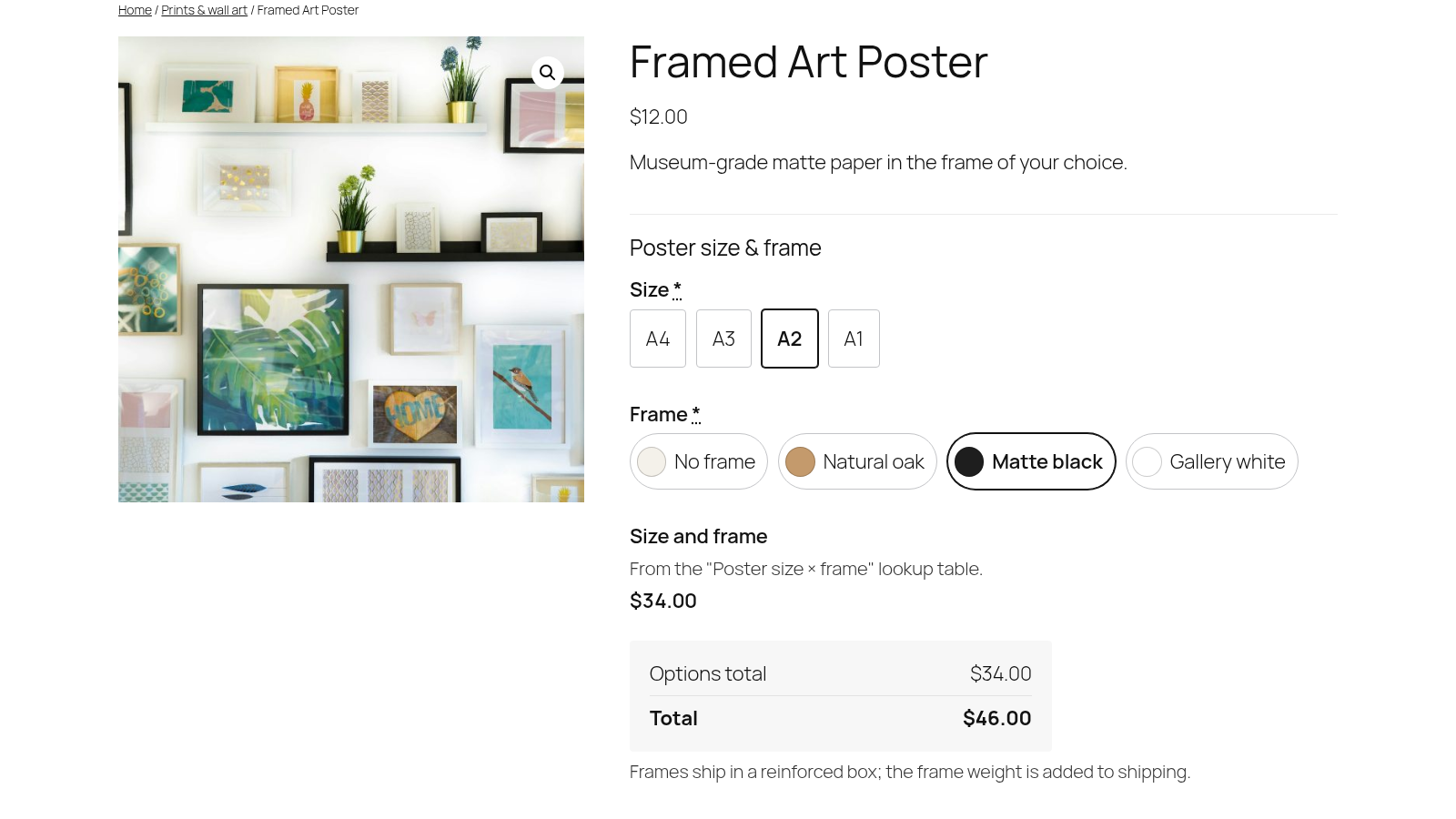 A poster priced from a size × frame lookup table.
RULES
The right options on the right products
Assign groups by product, category or tag, and show fields only when they make sense.
Assignment rules
Assign a group to all products, chosen products, categories or tags, with excludes and a priority. A category also covers its subcategories.
AND/OR conditions
Show or hide a field when all of its conditions match (AND) or any of them match (OR). Add as many condition rows as you need.
Hidden means hidden
The product page, cart and order use the same rules. Fields that are hidden are never priced or required.
Groups on one product
Attach a group to a single product from its edit screen when it doesn’t belong in a shared rule.
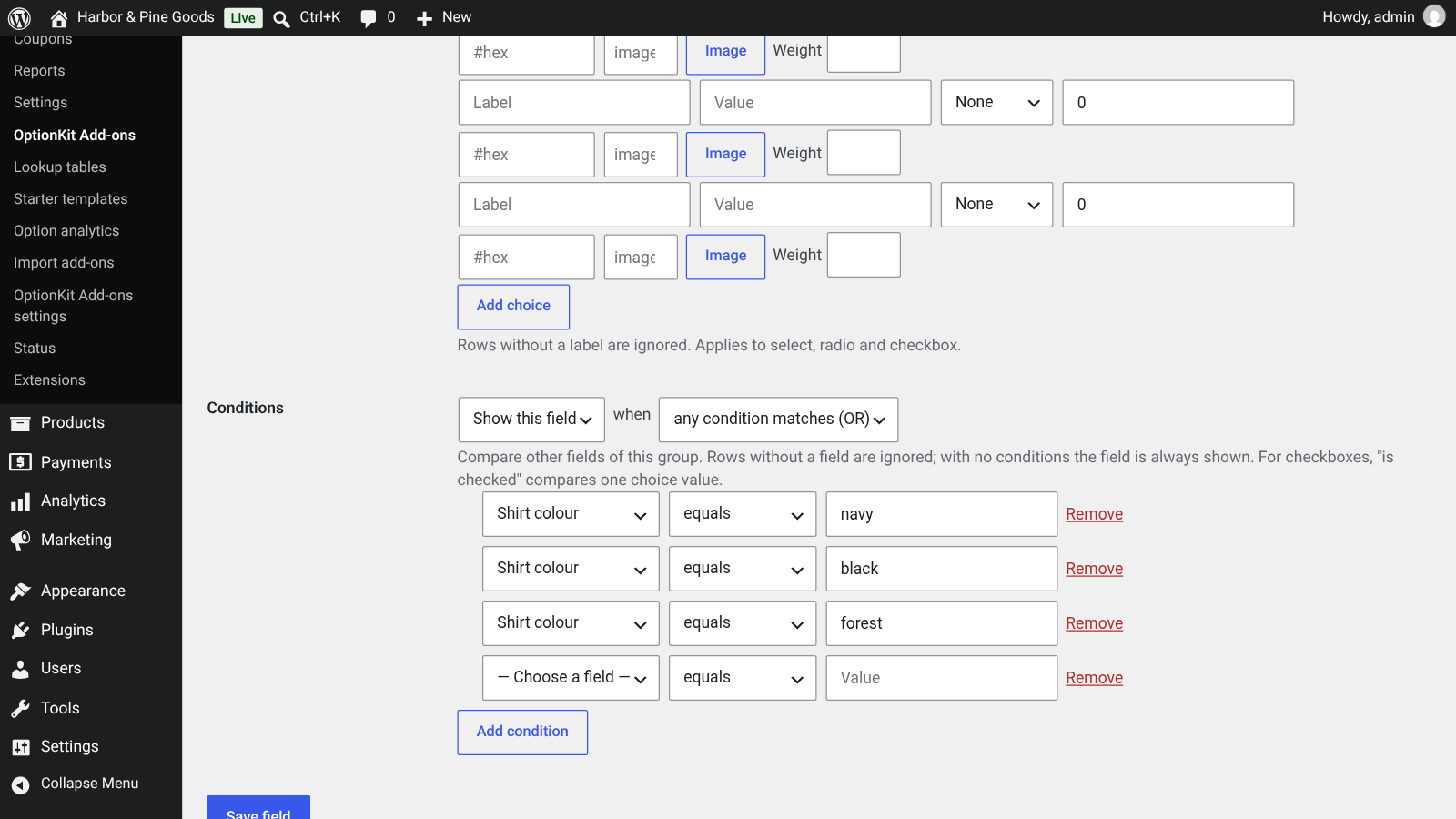 Conditions in the field editor: any condition matches (OR), or switch to all (AND).
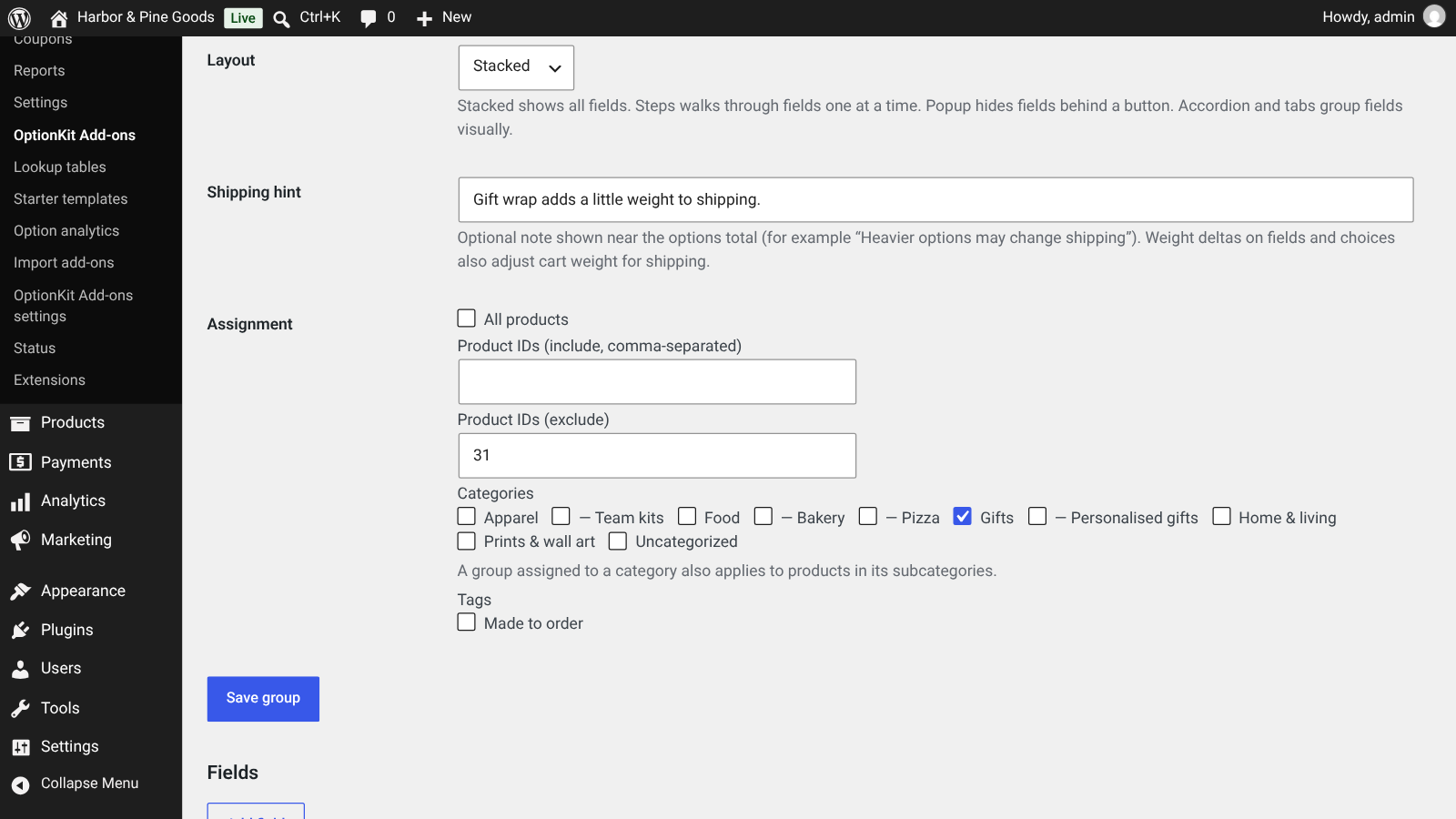 Assignment with a category tree, an excluded product and a shipping hint.
CART, CHECKOUT AND ORDERS
Every choice follows the item
Customers can fix a choice in the cart, and you see everything on the order.
Edit options from the cart
An Edit options link on each line of the classic cart and the Cart block opens the same fields in a dialog and updates the line with new prices.
Cart and Checkout blocks
Selections show in the Cart and Checkout blocks through the Store API, as well as the classic cart and checkout.
Orders and emails
Every choice is saved with the order item and shown in order emails and on the order screen, with HPOS or the older order storage.
Secure file uploads
Images, PDF and plain text only (never SVG, HTML or scripts), with content checks and a size limit. Files are renamed and kept out of the media library.
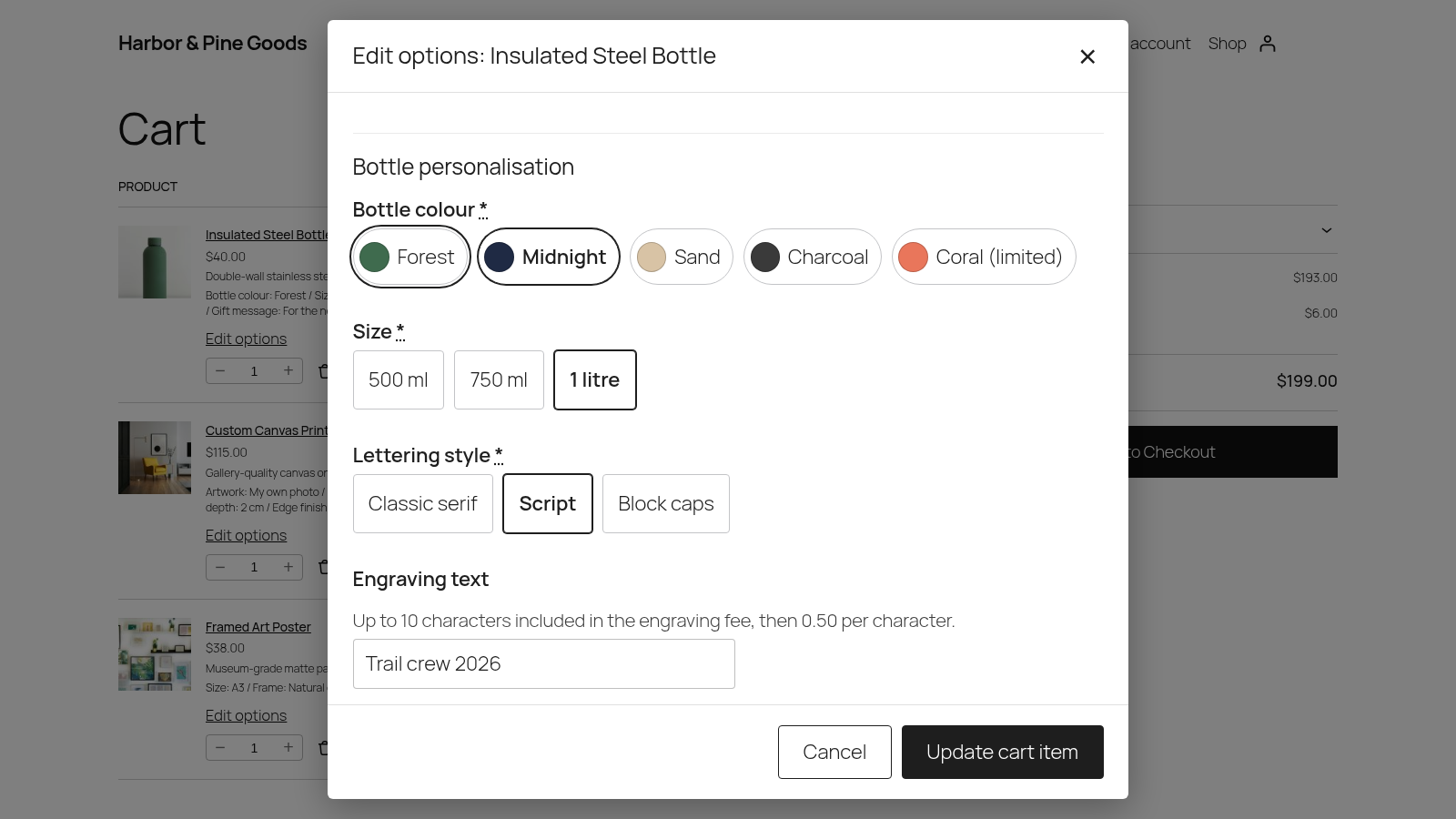 Edit options from the Cart block, without going back to the product page. Screenshot from a test store with sample products.
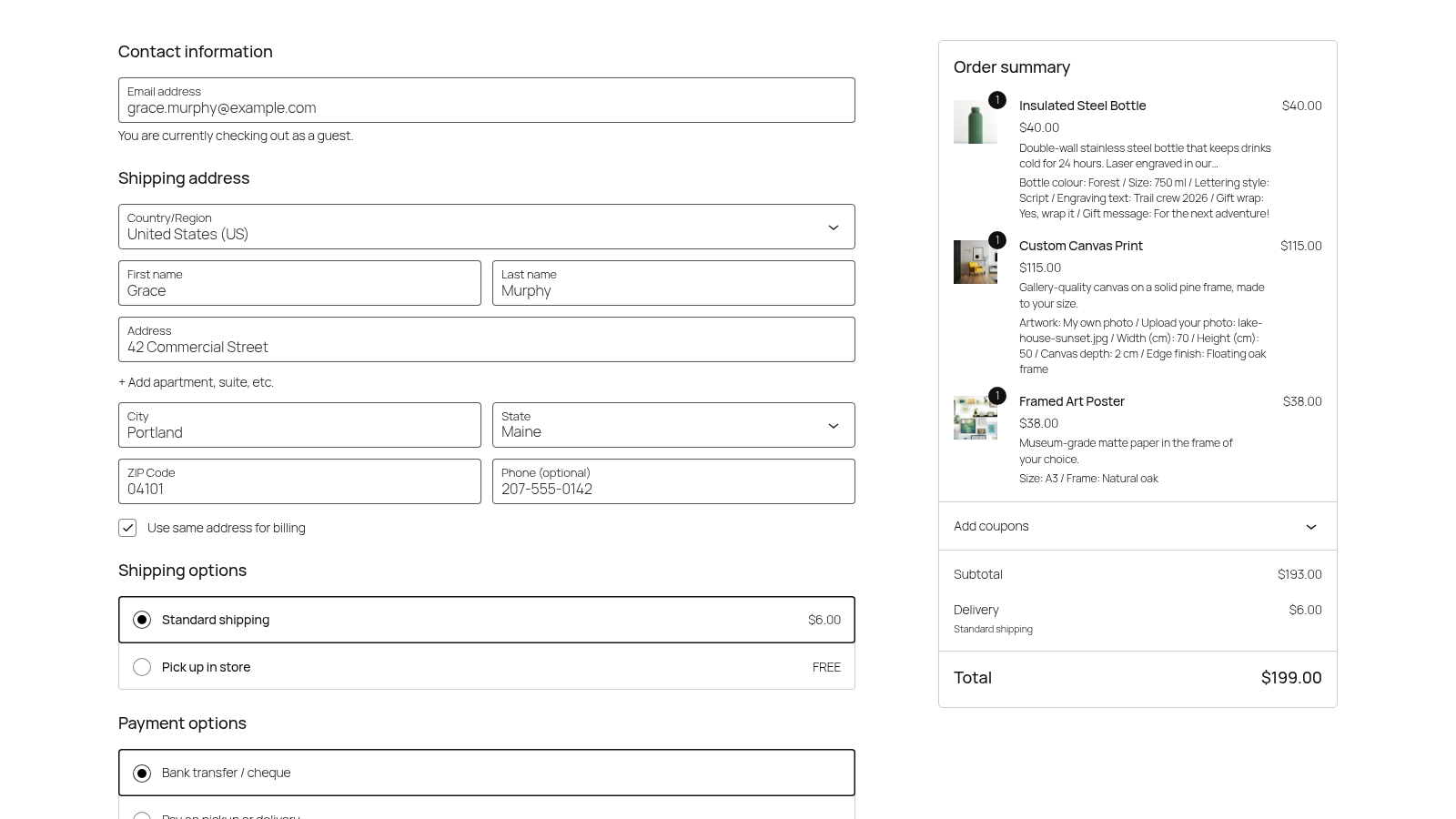 Chosen options in the Checkout block order summary.
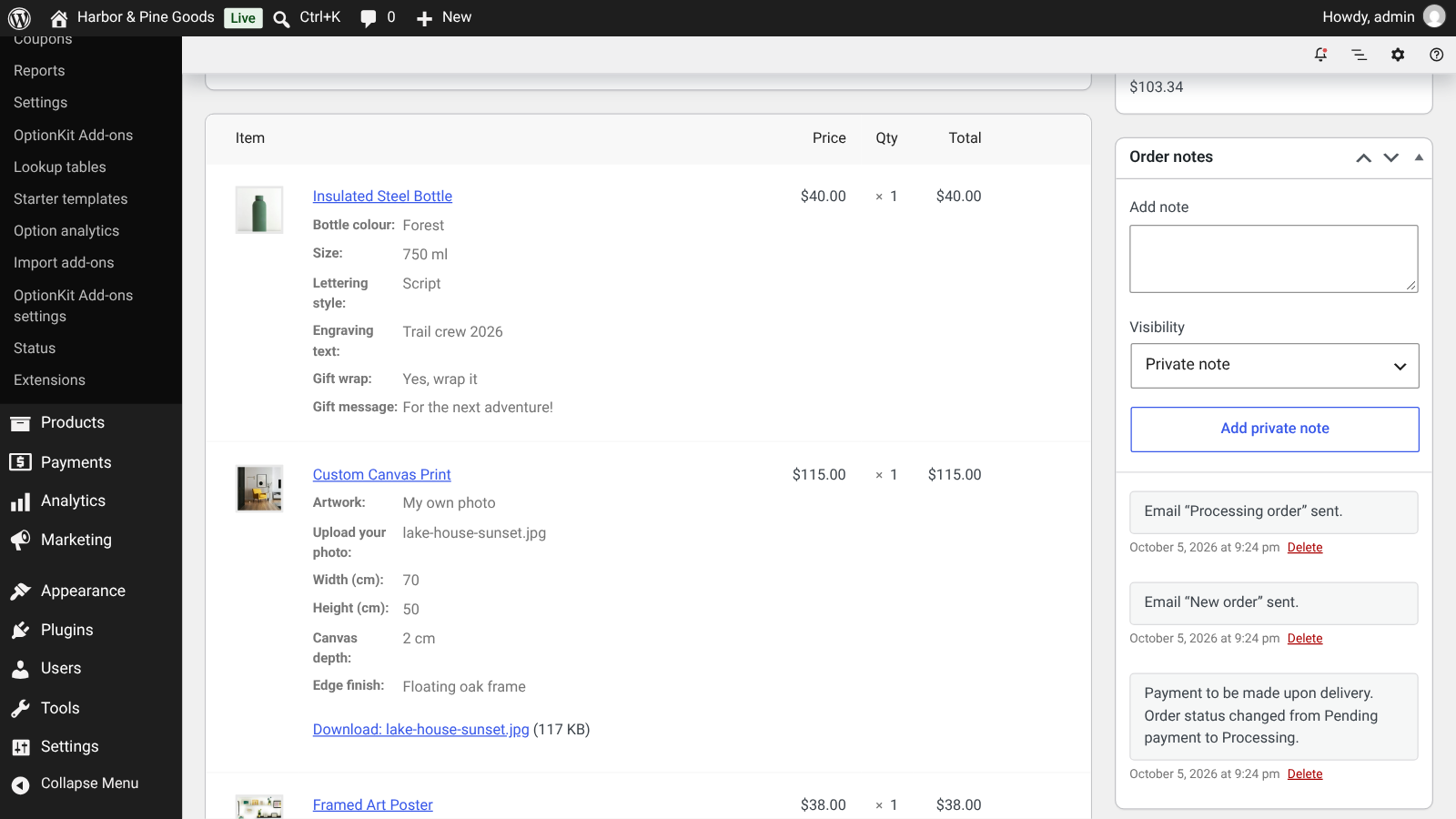 The order screen with each option and a download link for the customer’s photo.
STORE OWNER TOOLS
Set up fast, then learn what sells
Templates and imports to get started, and analytics to see which options earn their place.
Starter templates
Engraving, gift wrap, pizza toppings with free first choices, and measurement. Each one installs as a draft group you can change.
JSON export and import
Export any group as JSON and import it on another store. Conditions and settings come along.
Import from other add-on plugins
Dry-run, then import option data stored by WooCommerce Product Add-Ons, PPOM or ThemeComplete Extra Product Options.
Option analytics
Most-picked options and choices, attachment rate, revenue from options and average line value with and without options, per product.
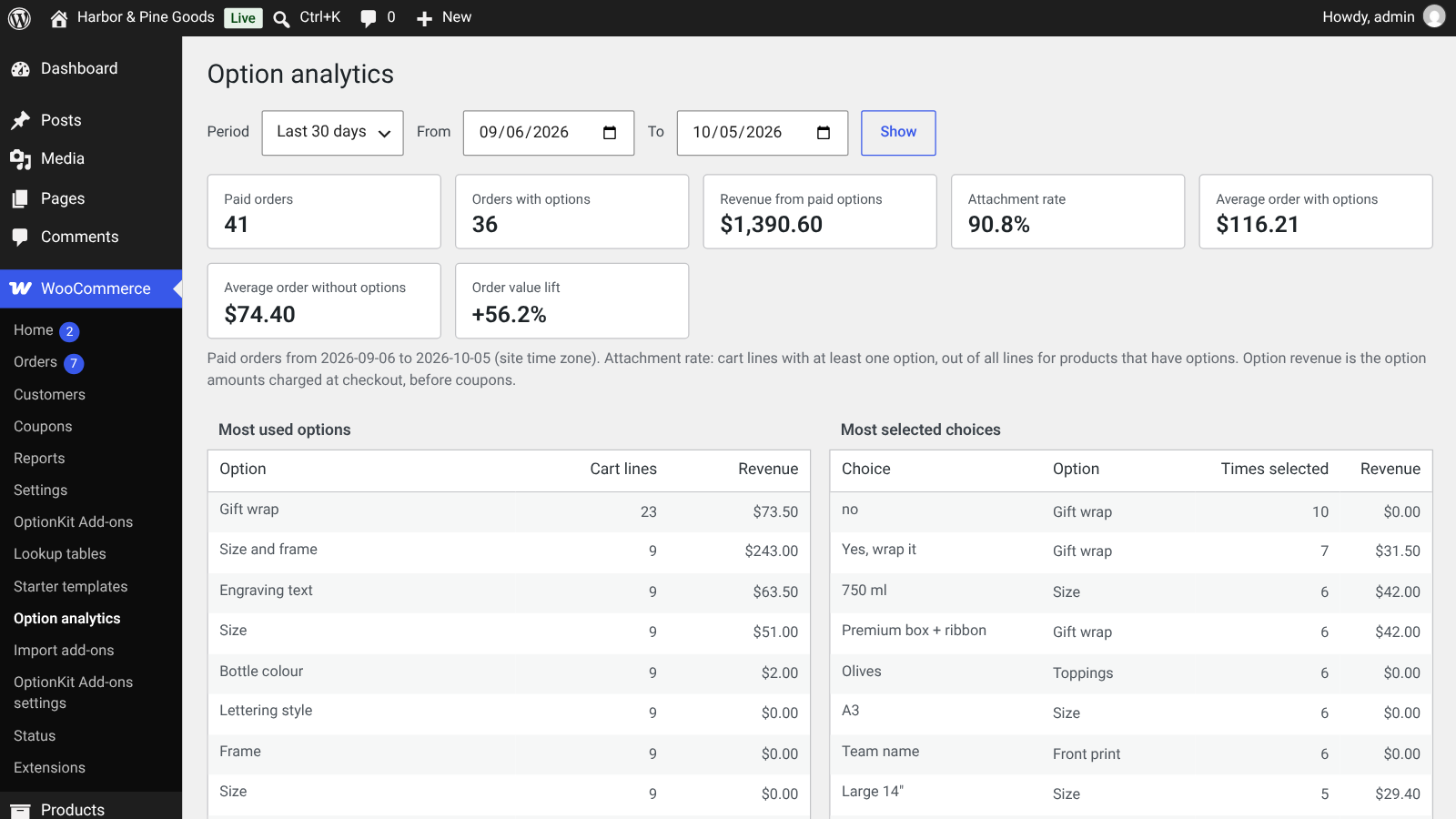 Option analytics: attachment rate, revenue from options and the most picked choices. Screenshot from a test store with sample products.
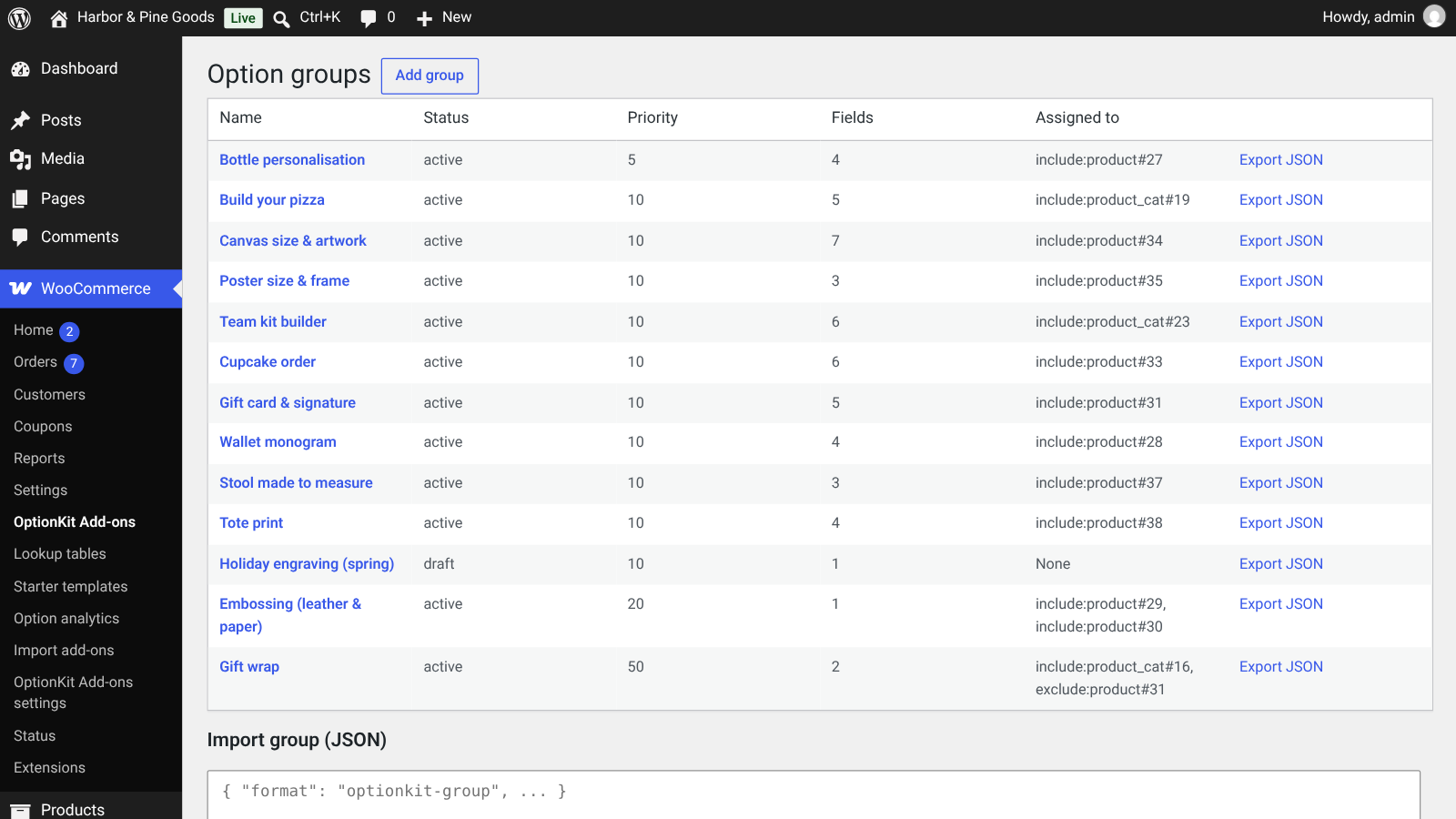 All option groups at a glance.
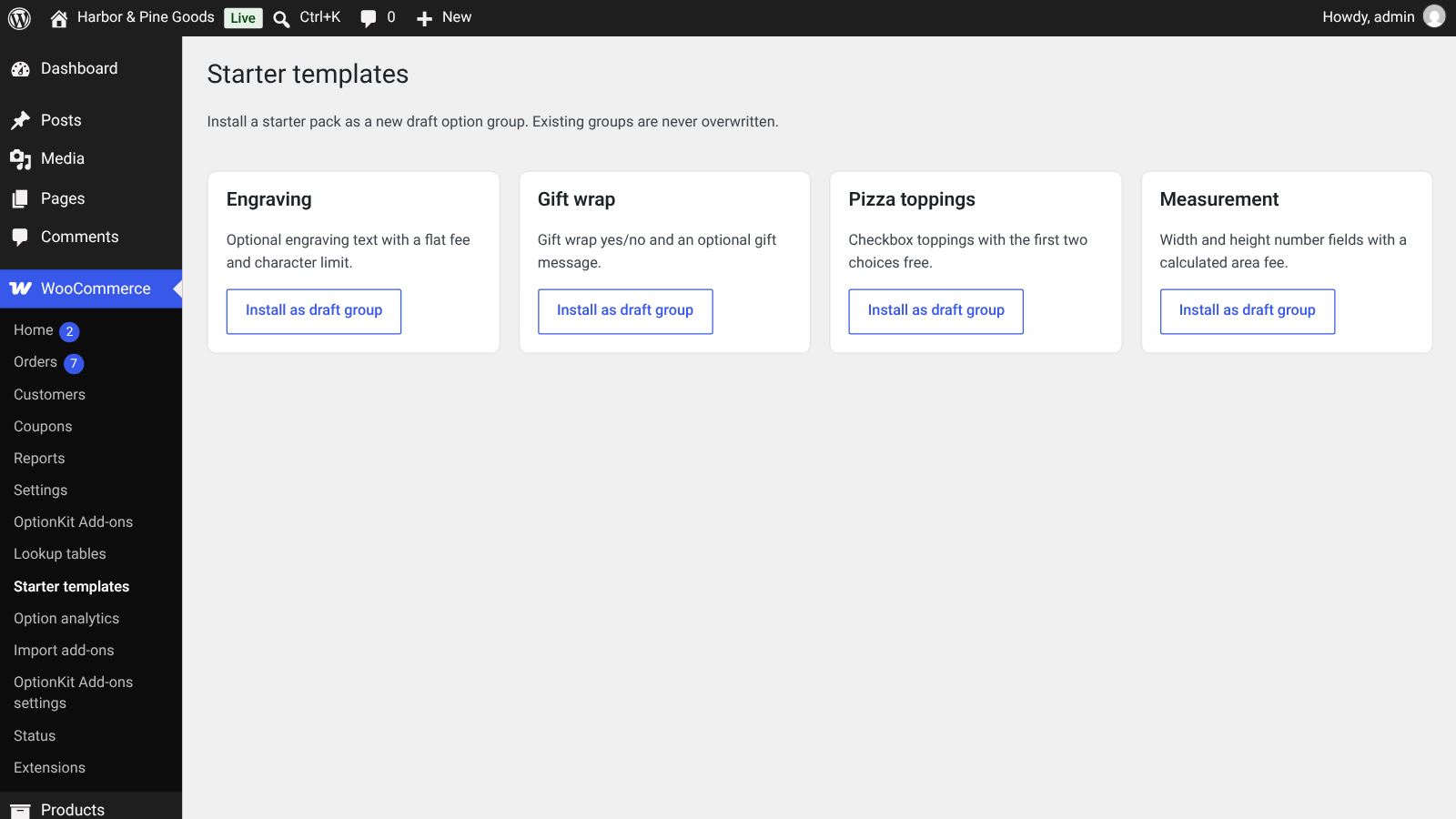 Four starter templates.
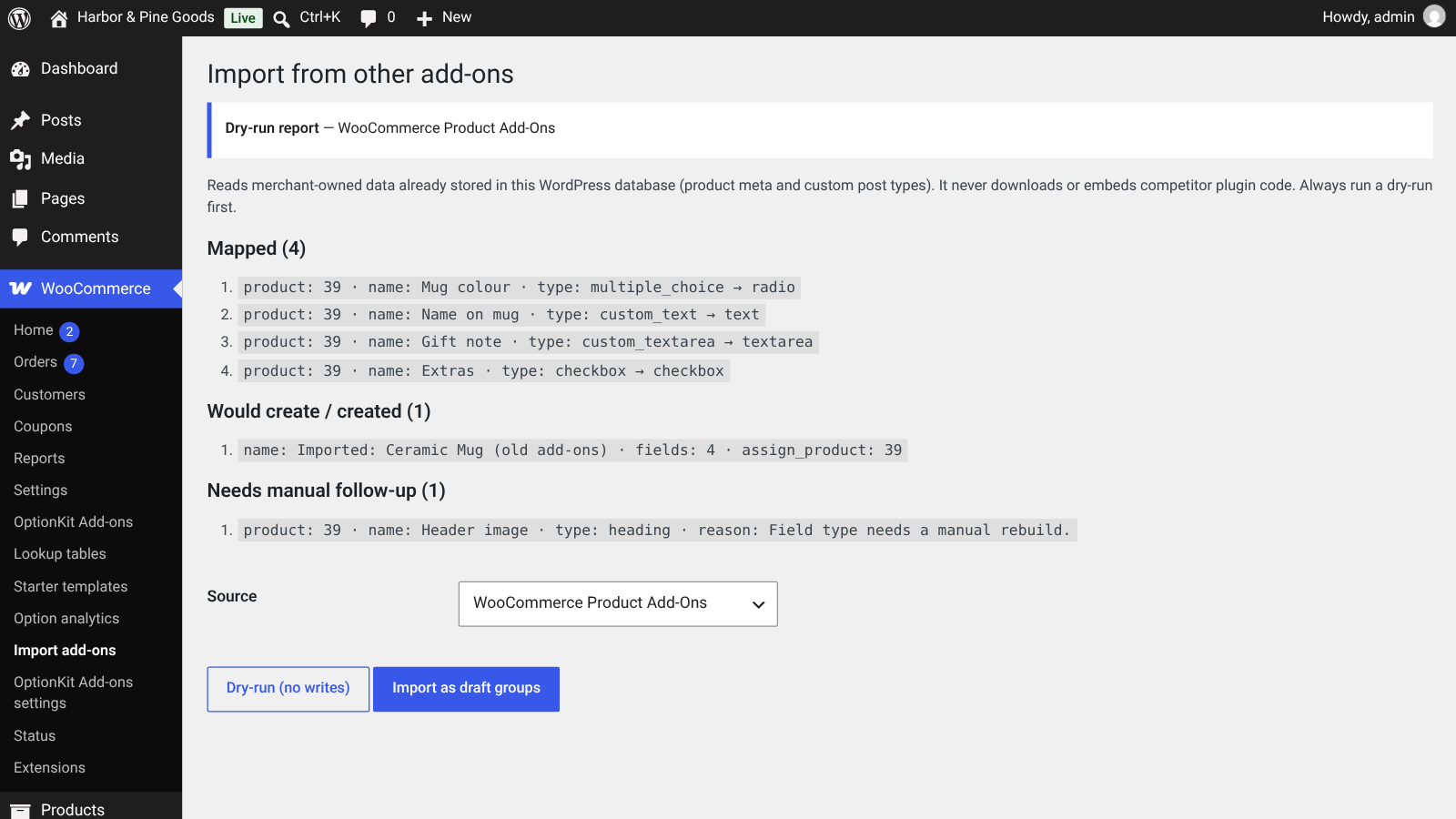 A dry-run before importing.
BUILT FOR MODERN WOOCOMMERCE
Fast, current and careful
Made for the way WooCommerce stores run today.
- HPOS compatible, and works with the Cart and Checkout blocks (Store API)
- “Select options” button in shop lists for products that have options, so nobody adds them to the cart half-finished
- No scripts or styles on pages without option fields; upload, layout and repeater scripts load only on products that use them
- Prices are always worked out again on the server with the same rules as the live total
- Formulas run in a small built-in calculator and are never run as PHP or JavaScript code
- No connections to outside services and no usage tracking
Careful with customer data
Uploads and statistics are handled with care by default.
Private uploads
Only store managers can download customer files, from the order screen. Files that are never ordered are deleted after 7 days.
Upload folder check
A Check now button tests whether the upload folder can be reached by direct URL, with an nginx rule and a wp-config option if it can.
Privacy tools
Option values are included in the WordPress personal data export and erase tools, and suggested privacy policy text is added for you.
Totals, not tracking
Option analytics stores daily totals only, with no names, emails, IP addresses or typed-in text, and a retention setting.
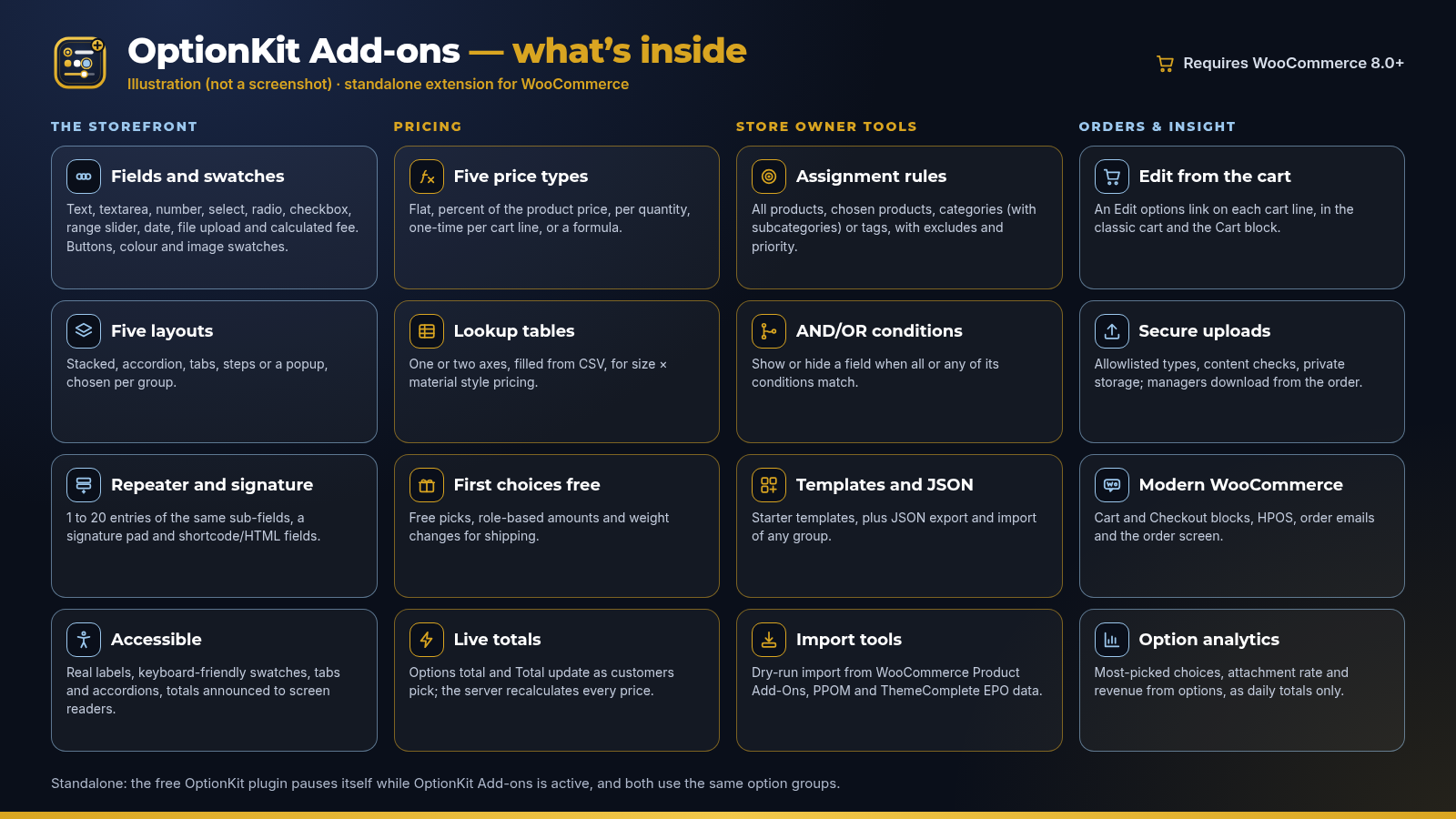 Illustration, not a screenshot.
How it works
From upload to your first product with options in four steps.
1Have WooCommerce 8.0+ ready
OptionKit Add-ons is a WooCommerce extension, so WooCommerce must be installed and switched on first.
2Upload OptionKit Add-ons
Upload the plugin under Plugins → Add New → Upload Plugin and switch it on. Its screens appear under WooCommerce.
3Start from a template
Install a starter template, import a group from JSON or another add-ons plugin, or build a group from scratch.
4Assign and check
Assign the group to products, categories or tags, then open a product page and try the options and live total.
Standalone, and friendly with the free OptionKit plugin
OptionKit Add-ons doesn’t need any other add-ons plugin. If the free OptionKit plugin is also switched on, it pauses itself, and both use the same option groups, so groups you already built stay in place.
Made for stores that sell choices
Anything customers personalise, size, combine or add to.
Engraved and personalised giftsPizza, bakery and food ordersMade-to-measure prints and canvasesTeam kits and printed apparelFurniture and made-to-order goodsGift wrap and cardsPrint shops and signagePhoto productsGood to know
- Formulas use a small built-in calculator with a fixed set of functions (min, max, round, ceil, floor, abs, clamp and if); they can’t call your own code
- The import tools read option data already stored in your WordPress database. They don’t copy other plugins’ code or settings screens
- On nginx or other servers that ignore .htaccess, protect the upload folder with the rule shown in the settings, or move it outside the web root
- The signature pad needs a pointer: a mouse, touch screen or pen
Fully licensed version
Fully licensed version — use on your own sites. You get the complete OptionKit Add-ons plugin with every feature described on this page.
Requirements
- WooCommerce 8.0 or newer (required)
- WordPress 6.3 or newer
- PHP 7.4 or newer
- Works with block themes and classic themes; screenshots were taken with WordPress 7.1, WooCommerce 11.1 and the Twenty Twenty-Five theme
Frequently asked questions
What licence do I get?A fully licensed copy of OptionKit Add-ons for use on your own sites, with every feature described on this page.
Does it need WooCommerce?Yes. WooCommerce 8.0 or newer must be installed and switched on. Without it, OptionKit Add-ons shows a notice and waits.
Do I also need the free OptionKit plugin?No. OptionKit Add-ons is standalone. If the free OptionKit plugin is also switched on, it pauses itself, and both use the same option groups, so your groups stay where they are.
How do formulas work?Give fields short names such as width and height, then choose the Formula price on another field or add a Calculated fee field, for example max(5, width * height * 0.02). You can use the product price, quantity, the field’s own value, character count, choices picked and other fields. A formula with a mistake is flagged in the field editor and priced at zero.
Can a field depend on more than one other field?Yes. Under Conditions in the field editor, choose Show this field or Hide this field, then all conditions match (AND) or any condition matches (OR), and add one row per condition.
Does a group assigned to a category cover its subcategories?Yes, at any depth. Excludes work the same way.
Can customers change their options after adding to the cart?Yes. Each cart line gets an Edit options link, in the classic cart and the Cart block. The dialog shows the same fields and updates the line with recalculated prices.
Does it work with the Cart and Checkout blocks and HPOS?Yes. Selections appear in the Cart and Checkout blocks, orders, order emails and the order screen, with HPOS or the older order storage.
Where are uploaded files stored?In a private folder inside wp-content/uploads with Apache and IIS deny rules, or in any folder outside the web root that you set in wp-config.php. Store managers download files from the order screen.
I use nginx. How do I protect the upload folder?nginx ignores .htaccess files, so add the location rule shown under Upload folder protection in the settings, or move the folder outside the web root. Then click Check now.
Can I bring options over from another add-ons plugin?Yes, for option data stored by WooCommerce Product Add-Ons, PPOM or ThemeComplete Extra Product Options. Run a dry-run first to see what would be created, then import the groups as drafts.
What does Option analytics record?Daily totals per product, field and choice when an order is paid: lines, quantity, line value and option value. Cancelled, refunded and failed orders are taken out again. No customer details or typed-in text are stored, and old totals are deleted after the retention period you choose.
Is it accessible?The product page fields aim at WCAG 2.2 AA: labelled fields, grouped choices, keyboard-friendly swatches and tabs, politely announced totals, and inline messages that move focus to the first missing option.
What happens to my data if I delete the plugin?By default, settings, option groups and statistics are kept. Tick Delete data on uninstall in the settings to remove them. Options already saved on orders are never removed.
Does it contact any outside service?No. It sends nothing to 007AJ or anyone else. The only request it makes is to your own site, when you click Check now for the upload folder.
007AJ
OptionKit Add-ons by 007AJ. Screenshots are from a test store with sample products and orders; the store name, products and the prices shown inside the screenshots are fictional. The graphic labelled “Illustration” is not a screenshot. WooCommerce, WooCommerce Product Add-Ons, PPOM and ThemeComplete Extra Product Options are trademarks of their respective owners and are named only to describe compatibility and the import tool; OptionKit Add-ons is not affiliated with them.| Author | 0007AJ |
|---|---|
| Category | Plugins / WordPress / eCommerce |
| Price | $25 |
| Extended License | $75 |
| First Release | Oct 12, 2026 |
| Last Update | Oct 12, 2026 |
| Supported cms | WordPress 5.9, WordPress 6.0, WordPress 6.1, WordPress 6.2, WordPress 6.3, WordPress 6.4, WordPress 6.5, WordPress 6.6, WordPress 6.7, WordPress 6.8, WordPress 6.9, WordPress 7.0, WordPress 7.1 |
Categories
Tags
External listing. code.market does not sell this product and does not process payment for it. Pricing, payment, delivery, licensing, refunds, and support are handled by the third-party merchant on its own website. We may earn an affiliate commission from a referral. Details.
Products of the Week.
Submit🥇

STOP GUESSING WHAT TO POST
AI that learns your brand voice and builds a month of consistent, on-brand social content: carousels, posts and hooks that sound like you, not like everyone else's AI.
SaaS · 3,256 views · 28 clicksSaaS · Week 45 · 3,256 views · 28 clicks
🥈

Conversational Backlinks for Busy Founders
Place Backlink Relevant Conversation for your domain across Forums and Conversations
Website · 40,668 views · 217 clicksWebsite · Week 45 · 40,668 views · 217 clicks
🥉

upvote.club
Free Social Media Engagement that Helps Boost Your Content. Upvote Club supports 19 social networks with 100+ engagement actions in one dashboard. Add links to your posts and get free engagement from real users.
SaaS · 38,767 views · 111 clicksSaaS · Week 45 · 38,767 views · 111 clicks
#4

Substack Posting API
Onboard your Agent to Substack. Write Publish on Substack via API
SaaS · 57,800 views · 197 clicksSaaS · Week 45 · 57,800 views · 197 clicks
#5

Seenshot App
Free, Fast, MacOS Screenshot app. Make Screenshot cmd+shift+2 and send it via link
Desktop App · 27,205 views · 119 clicksDesktop App · Week 45 · 27,205 views · 119 clicks
#6

Hand-Placed Backlinks $9.99 per link. Flat rate.
Buy hand-placed forum, Q-A and directory backlinks. Flat $9.99 per link, no subscriptions — you only pay for approved listings.
Website · 3,111 views · 18 clicksWebsite · Week 45 · 3,111 views · 18 clicks
#7

Free Invoice Generator - PDF Invoices in Your Browser, No Sign-Up
A free invoice maker for freelancers and small businesses: fill in the invoice, check the live preview, and download a PDF that looks exactly like it. Any currency, tax per item, three templates, no sign-up, and nothing leaves your device.
1,801 views · 16 clicksWeek 45 · 1,801 views · 16 clicks
#8

Merge PDF Files Free - Combine PDFs in Your Browser, No Upload
A free PDF merger for office workers, students, and freelancers: combine PDFs and images into one file in the browser, reorder files and pages, pick page ranges, keep bookmarks, and open password-protected PDFs. Nothing is uploaded, no sign-up, no watermark.
1,670 views · 13 clicksWeek 45 · 1,670 views · 13 clicks