Noo Timetable - Responsive Calendar & Auto Sync WordPress Plugin
Description
Latest Version 2.0.6.2 – May 5,2020 – view changelog WordPress 5.4 Ready





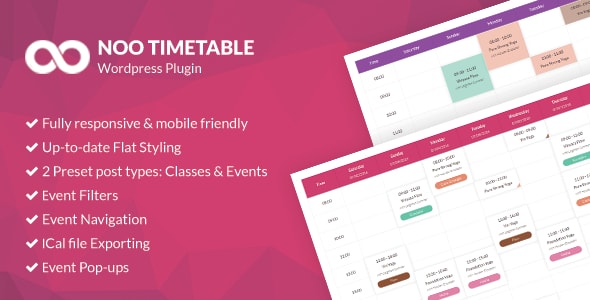
NOO Timetable is a super flexible schedule plugin for WordPress, with fully responsive interface and fascinating UI. It is absolutely suitable for fitness, yoga, dance classes, medical departments, any kind of event calendars and so on.
NOO Timetable helps you easily create a timetable with custom data just in a few minutes. All classes/events will be shown visually in both weekly and monthly timetable and filtered by category as well. NOO Timetable is packed with tons of marvelous features which make it the ideal choice for your class/event schedule. Up-to-date Flat Styling, Fully Responsive, Super Flexible, Multiple View Options, Event Filters, Event Navigation, iCal file Exporting, Event Pop-ups, 2 Preset post types: Class & Event and many more are included in this plugin.
It has a clean and elegant layout that could be simply customized. It is also a totally versatile plugin, that can be used by lots of different businesses. Scroll down for more feature details!

NOO Timetable – Full Features List
- Fully responsive and mobile friendly
NOO Timetable is fully responsive and mobile friendly. It will be displayed perfectly on any mobile device.
- Up-to-date Flat Styling
This plugin has modern and flat interface. All colors can manually be customized, both calendar and item?s color.
- Super Flexible
Especially, classes/events will be displayed in a very flexible way: classes/events with the same date and time will still be shown beautifully on the schedule.
- Auto Sync from public resources
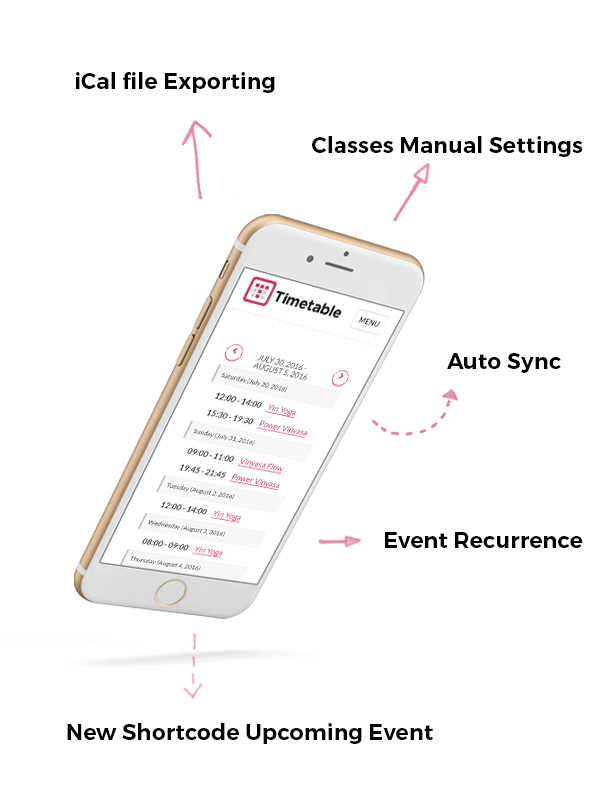
Noo Timetable can be auto synced from several public sources, such as Google Calendar and Apple Calendar. Moreover, on the Import Type section, it has Save Recurrence option which has synchronized function. When you create classes/events on Apple Calendar, after a certain period of time, it will be automatically updated on the website’s schedule based on the inputted link.
- Classes Manual Settings
This feature helps you create classes based on specific days. When you check this box, you will no longer be able to use Advanced Schedule (Advanced Schedule will automatically create classes based on the number of weeks and weekdays).
- Event Recurrence
Noo Timetable allows you to set the class/event to be repeated weekly, monthly or annual on the schedule based on detailed and specific options like the last Tuesday of the Month, etc.
- Additional Shortcode: Upcoming Event
It helps you display upcoming events on the schedule. The upcoming events are arranged by actual time.
- Multiple View Options
All classes/events will be shown visually in both daily, weekly and monthly timetable and filtered by category as well
- Event Filters
Our plugin is ready for schedules with a lot of classes, hence powerful filters are essential. You can allow various filters, like Category, Instructor, Location, Day or Time of the Day.
- Event Navigation
With event navigation feature, NOO Timetable makes it more easily to navigate to the next of previous week on the schedule.
- iCal file Exporting & Importing
NOO Timetable plugin allows user to export schedule to iCalendar file and import classes and events from Apple Calendar conveniently with no effort.
- Event Pop-ups
- Multi-schedule on page
It allows multiple schedules on each page. Build your class or event schedules in minutes.
- 2 Preset post types: Classes and Events
Classes and Events are 2 preset post types of NOO Timetable. Create classes and events within seconds.
- WPBakery Page Builder compatible
Our plugin is compatible with WPBakery Page Builder. In case you already installed WPBakery Page Builder, it still supports shortcode creating.
- Default Shortcode Supported
The plugin also supports default shortcode. However, it would still supports shortcode normally if users installed WPBakery Page Builder.
- Unlimited Colors
You can choose from multiple colors to customize schedule’s color (calendar, time slots, etc)
- RLT Supported
Noo Timetable supports right to left languages and repositions elements when necessary.
- One Click Demo
Importing demo data has never been easier. With just one click, demo data will be imported.
- Automatic Update
No more wasting your time updating theme and plugins manually. The plugin can be easily updated automatically with just one click.
- Comprehensive Document
We included in plugin package dedicated document file to guide you step by step installing and customizing the plugin. You also can find the detailed online guide on our support center here.
- Regular Update
We keep updating the plugin regularly with more addon features and minor bug fixed. Just one time payment, you will get the update lifetime for free.
- Free premium support
In addition to dedicated documentation, the senior developers of the plugin will support you. We are happy to support you to build your amazing website.
A schedule should display only the important info, but you might have a lot of other useful details for your visitors. Therefore, each class accepts individual text and images, that can be displayed in a pop-up window. Moreover, we include in this plugin 16 pop-up styles for your own use.
Support
All support is handled in our Support Center. We encourage you to post all your questions concerning our template there as your questions may have already been answered or may be of help to other people that have also purchased the template.
Change log
2.0.6.2 |May 5,2020|
    -  The class is not displayed by category when clicking next and prev on Mobile.
2.0.6.1 |April 8,2020|
    -  Show/hide Class meta option.
    -  Class Holiday.
    -  PHP 7.4.
2.0.6.0 |Jun 11,2019|
    -  Slider layout for Noo Class, Not Upcoming class, Noo Event, Not Upcoming Event shortcode.
    -  Widget class/event slider issue.
    -  The holiday description display in the schedule issue.
    -  Hide past event doesn't work.
    -  HTML content and Shortcode for Event popup in the schedule.
    -  Category color can't update when changing color.
2.0.5.4 |Mar 23,2019|
    -  jQuery error.$ is not function issue.
    -  missing date time when importing the class.
    -  date picker for Croatian language.
    -  Event config - order by issue.
    -  Schedule setting when showing the weekend.
    -  Show category on the mobile.
2.0.5.3 |Feb 21,2019|
    -  Classes subcategory color issue.
    -  Translate some keyword.
    -  Event schedule color issue.
2.0.5.2 |Feb 1,2019|
    -  Mobile schedule display issue.
    -  Popup thumbnail image display issue.
2.0.5.1 |Jan 25,2019|
    -  Event repeat issue.
    -  Timetable class background color style issue.
2.0.5.0 |Jan 12, 2019|
    -  Escape title issue in the schedule.
    -  Sync & import delete issue.
    -  Class holiday display issue.
    -  Repeat events, classes issue in the schedule.
2.0.4.9 |Dec 10,2018|
    -  The issue with WP 5.0 and Gutenberg.
2.0.4.8 |Dec 06,2018|
    -  Hide time range issue.
2.0.4.7 |Nov 17,2018|
    -  Add more organizer for single event.
    -  Dropdown select for categories filter on the mobile and desktop.
    -  Open Time, close Time manual input for the class details.
    -  Loading time for schedule timetable.
    -  Filter level for the class schedule.
    -  The first loading category for the schedule.
    -  The config to show all items for the monthly schedule layout.
    -  List layout for the schedule.
    -  Sync & Import category saving issue.
2.0.4.6 |Aug 15,2018|
    -  Noo Event shortcode slider layout issue.
    -  Class page meta on the single class issue.
    -  Number week display 1 in the single class page issue.
    -  Holiday color option for the schedule.
    -  Level info to single class, class listing and class schedule.
2.0.4.5 |Mar 27,2018|
    -  Schedule event on the mobile device.
2.0.4.4 |Mar 23,2018|
    -  Next/Prev date time issue on the mobile device of the Schedule.
2.0.4.3 |Mar 07,2018|
    -  Register modal popup on the Schedule.
    -  Duplicate day of the week on the mobile device of the Schedule.
    -  Auto update issue.
2.0.4.2 |21th Dec 2017|
    -  Repeat Event display on the Schedule.
    -  Hover class/ event info on the Schedule.
2.0.4.1 |11th Dec 2017|
    -  Display Event on the Schedule with custom date time.
2.0.4 |8th, Dec 2017|
    -  Display Class/ Event info for the Schedule on the mobile.
    -  Style issue.
2.0.3 |21th Nov 2017|
    -  Filter for Classes Archived and Events Archived page.
    -  Show/hide option for All tab filter on the schedule.
    -  Options to show/hide popup info.
    -  Display Class/ Event info for the Schedule on the mobile.
    -  Style issue.
2.0.2 |13th Sep 2017|
    -  Broken layout in theme.
    -  Register Link on the Class Popup
    -  Improve CSS style.
2.0.1 | 26th April 2017|
    -  Shortcode builder.
    -  Schedule on the mobile screen.
    -  Fix bug query for past events.
    -  Improve CSS & JS files.
    -  Various minor bugs fixed.
2.0.0 | 28th December 2016 |
    -  Add function for Auto Sync from public resources such as Google Calendar or Apple Calendar.
    -  Add function to import from iCal files.
    -  Add recurring function for Event.
    -  Add option to manually adding date for Class.
    -  Add option to order by Start Date or Current Date ( the current date of Recurring event ) for Events.
    -  Add new shortcode Upcoming Events.
    -  Support WordPress 4.7.
    -  Update some style on mobile
    -  Fix bug of slow admin page on sites with the Yoast SEO plugin.
    -  Fix bug not showing End time on the monthly schedule.
    -  Fix some issue when using the datetimepicker in some languages.
    -  Various minor bugs fixed.
1.2.0 | 7th November 2016 |
    -  Add support for multiple trainers on a time slot.
    -  Add option to show/hide Class's time, trainer or address.
    -  Add the new widget Upcoming class slider
    -  Add the new shortcode, Upcoming Class
    -  Add a new option to custom the link of the schedule's items. You can use an External Registration link or just disable all the URL.
    -  Add description text to display on the Holiday days.
    -  Add new option for showing Class/Event's excerpt on the schedule.
    -  Show the next date on the class detail page.
    -  Add Pagination to the Class or Event shortcode.
    -  Add Lithuanian schedule language.
    -  Fix an issue with some special date format.
    -  Fix an issue with showing date time on the mobile.
    -  Improve some style of Schedule.
1.1.1 | 1st October 2016 |
    -  Fix format date for schedule heading.
    -  Fix bug can't clear selected value of Multiple select fields on the meta-box.
    -  Fix bug can't change holidays settings.
    -  Fix error of duplicating Sunday and Trainer on the class page.
    -  Other minor bug fixed.
1.1.0 | 7th September 2016 |
    -  Add Google Map settings for the event ( default Latitude, Longitude, and Zoom level ).
    -  Support changing language on the Schedule.
    -  Update some Russia text for the Schedule.
    -  Fix error of showing wrong Event date when not input.
    -  Fix an error of displaying Schedule on the mobile device.
    -  Fix some styling issues.
    -  Other minor bug fixed.
1.0.1 | 24th August 2016 |
    -  Fix some small bugs
1.0.0 | 17th August 2016 |
    - First stable release
Keep In Touch With Us
Keep updated with our latest news and releases by subscribing to our newsletter at Blog NooTheme or follow us via social networks




Categories
Tags
External listing. code.market does not sell this product and does not process payment for it. Pricing, payment, delivery, licensing, refunds, and support are handled by the third-party merchant on its own website. We may earn an affiliate commission from a referral. Details.
Products of the Week.
Submit#1

upvote.club
Free Social Media Engagement that Helps Boost Your Content. Upvote Club supports 19 social networks with 100+ engagement actions in one dashboard. Add links to your posts and get free engagement from real users.
SaaS · 15,449 views · 96 clicksSaaS · Week 42 · 15,449 views · 96 clicks
#2

Seenshot App
Free, Fast, MacOS Screenshot app. Make Screenshot cmd+shift+2 and send it via link
Desktop App · 4,528 views · 109 clicksDesktop App · Week 42 · 4,528 views · 109 clicks
#3

Conversational Backlinks for Busy Founders
Place Backlink Relevant Conversation for your domain across Forums and Conversations
Website · 16,359 views · 195 clicksWebsite · Week 42 · 16,359 views · 195 clicks
#4

Substack Posting API
Onboard your Agent to Substack. Write Publish on Substack via API
SaaS · 35,356 views · 184 clicksSaaS · Week 42 · 35,356 views · 184 clicks
#5

codester.com
SocialDesk+: Omnichannel Social Commerce & Business Management Platform This is stronger than simply “Social Commerce and Messaging” because it tells buyers this is a complete business platform, not just a messaging script. Turn Social Conversations Into Sales SocialDesk+ is a complete omnichannel social commerce and business management platform built for businesses that sell and communicate with customers through social media. Instead of switching between WhatsApp, Facebook, Instagram and TikTok, businesses can manage customer conversations, comments, products, leads, follow-ups, automation, teams and business reports from one professional workspace. And because the full source code is included, developers, agencies and entrepreneurs can customize, rebrand and launch SocialDesk+ as their own business solution or SaaS platform. 🚀 Build Your Own Social Commerce Business SocialDesk+ gives you the foundation to launch: - Your own SaaS platform - A white-label social CRM - A social-commerce management system - A customer communication platform - A business messaging solution - A custom solution for clients - A multi-business subscription platform 💬 Connect Your Customers Supported social channels include: WhatsApp • Facebook • Instagram • TikTok Bring supported conversations into one centralized workspace and help businesses respond faster without constantly switching between platforms. 🛍️ More Than a Messaging Platform SocialDesk+ combines communication with the tools businesses need to manage customer opportunities: Inbox Manage customer conversations from connected channels. Comments Monitor and respond to social-media comments. Customers & Leads Organize customer information and potential buyers. Products & Catalog Manage products and give your team quick access to product information. Follow-Ups Make sure potential customers don't get forgotten. Automation Automate repetitive customer questions and responses. AI Assistant Provide AI-assisted communication when configured. Team Management Give managers and staff access to the business workspace. Reports & Analytics Track activity using business reports and analytics. The current product listing already includes these capabilities. 🔥 Why Buyers Will Want It Launch Faster Start with an already-built business platform instead of developing the entire system from zero. Customize Everything The full source code is included, allowing developers to change branding, features, workflows and integrations. Build a SaaS Create multiple business workspaces and offer SocialDesk+ as a subscription-based service. Sell to Businesses Offer it to retailers, restaurants, service businesses, online sellers, agencies and other businesses that communicate with customers through social media. Mobile + Web + Backend This isn't just a mobile UI template. It includes: - Flutter mobile application - Python / FastAPI backend - Web interface - Administration tools - Database infrastructure - API-based architecture - SQLite / PostgreSQL support - Android and iOS project structure 💼 One Platform. Multiple Business Opportunities. For SaaS Entrepreneurs Launch your own subscription platform and allow multiple businesses to operate inside separate workspaces. For Software Agencies Customize and rebrand the platform for clients instead of building an omnichannel business system from scratch. For Developers Use the complete source code as a foundation for your own social-commerce or customer-management product. For Businesses Deploy a dedicated version for your own customer-service and social-commerce operations. 🧩 What's Included Mobile - Flutter / Dart - Android - iOS project Backend - Python - FastAPI - SQLAlchemy - Alembic Database - SQLite - PostgreSQL Web - HTML5 - CSS3 - JavaScript Deployment - Docker - Docker Compose - Production configuration Business Platform - Multi-workspace architecture - Authentication - Teams - Customers - Products - Messaging - Comments - Automation - Reports - Subscriptions - Administration The current listing also documents third-party integrations such as Meta, TikTok, Stripe, Firebase, SMTP and optional OpenAI configuration. ⚡ What Makes SocialDesk+ Different? You're not buying a simple: ❌ Chat UI ❌ WhatsApp clone ❌ Flutter template ❌ Admin dashboard ❌ Basic CRM You're getting a complete business platform foundation that can be customized, branded and commercialized. Connect. Automate. Manage. Grow. SocialDesk+ Omnichannel Social Commerce & Business Management Platform One important change I'd make to the current listing The current page starts with: “A simple guide to managing your social conversations, customers, products and business activity.”
Other · 2,767 views · 30 clicksOther · Week 42 · 2,767 views · 30 clicks
#6

sandbook.app
Sandbook reads EPUB, PDF, web pages and scanned pages aloud with Kokoro TTS, an open neural voice model that runs on your iPhone, free and offline. Choose from 41 natural voices in English, Spanish, French, Italian, Brazilian Portuguese and Hindi and follow each word as it is spoken. Try the same voices in your browser first with the free Kokoro TTS online demo.
Other · 2,774 views · 13 clicksOther · Week 42 · 2,774 views · 13 clicks