
Multi Product Express Order Form Content Plugin

Description
Virtuemart Multi Product Express Order Form Content Plugin
The Express Form enables Virtuemart Multiple items adding to your shopping cart only by one click “add to cart” button.
Main features: - allows you to embed Virtuemart product information directly into a Joomla article and to make it multi product adding form;
- it can calculate the total price of the products in same page;
- adds virtuemart multiple products to shopping cart in just one form;
- it shows product images, the prices and quantity in table form;
- the css style of the table can be changed;
- the quantity of the products can increased pr decreased on the fly;
- simple usage of the plugin;
- it is now updated to work for Joomla 2.5 and Virtuemart 2 and latest version of Joomla 3 and virtuemart 3.0.X
It now has very useful and popular functionality developed by request of the clients.
The usage of the plugin:
This plugin is used in article as content plugin.
please download unzipfi.zip archived plugin files. it has several zipped plugin archives for diferent version of virtuemart. and install desired plugin for your site.
you can install it by using joomla extensions manager in Joomla administrator backend and enable it.
please go to the plugin manager and find plugin with name “plg_content_vmproductmultisnapshots”
and go to the admin backend setting see the image for change the setting of the plugin
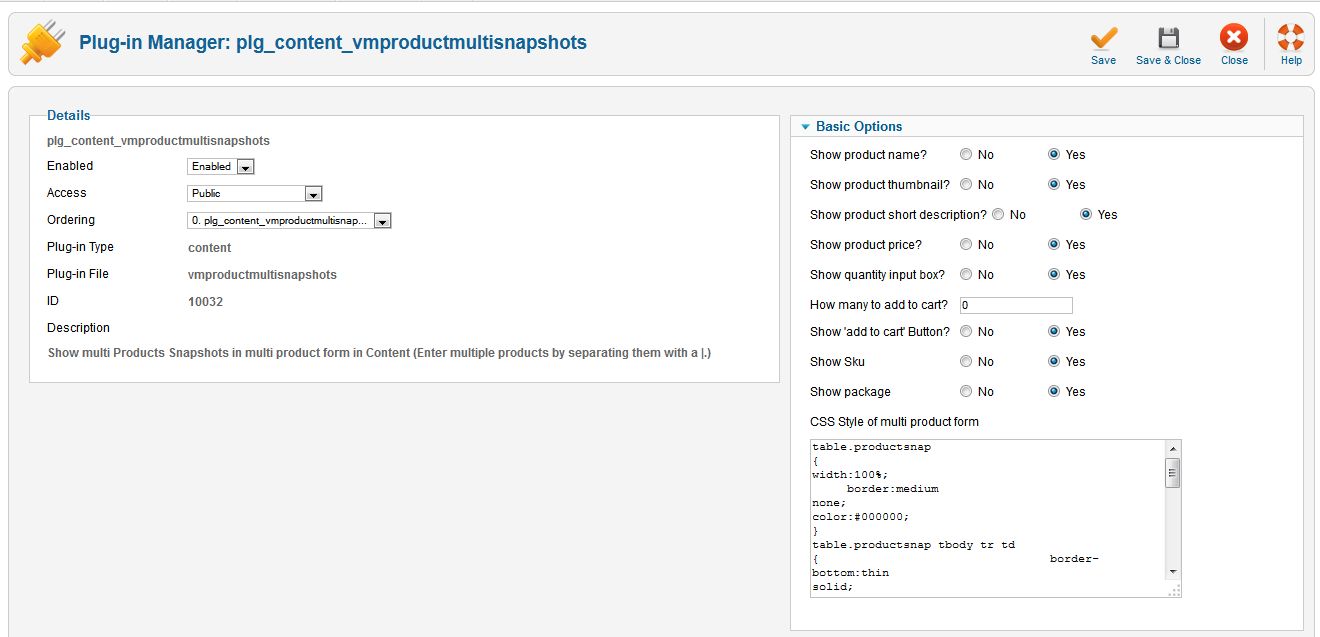
there you find the Basic Options settings for the plguin work:
- Show product name? No/Yes – Defines whether or not to show the name of the product
- Show product thumbnail? No/Yes – Defines whether or not to show the thumbnail of the product
- Show product short description? No/Yes – Defines whether or not to show the short description of the product
- Show product price? No/Yes – Defines whether or not to show the price of the product
- Show quantity input box? No/Yes – Defines whether or not to show the quantity inputbox of the product
- How many to add to cart? – Used when showaddtocart equals y
- Show ‘add to cart’ Button? No/Yes – Defines whether or not to show add to cart button
- Show Sku No/Yes – Defines whether or not to show SKU
- Show package No/Yes – Defines whether or not to show package
and textarea input field of CSS Style of multi product form
” table.productsnap {width:100%;
border:medium none;color:#000000;}table.productsnap tbody tr td { border-bottom:thin solid; }table.productsnap tbody tr th {
background-color:#E4F1FB;border-bottom:3px solid green;border-top:3px solid green;}
.addtocart_button {
-moz-background-clip:border;-moz-background-inline-policy:continuous;-moz-background-origin:padding;background:transparent url(../images/addtocart.jpg) no-repeat scroll 0 0;height:25px; width:160px; }"to use the plugin functionality in joomla article component
please put in the article content as example the following code {product_multi_snapshot:id=1|2|3}
id is product id.
please see image for article content adding code

and you will get virtuemart multi product price calculator and multi product shopping cart adding form
please see following image and visit demo page and visit detailed video instruction the

See documents Joomla/Virtuemart content Plugin Docs here
| Type | VirtueMart Extension |
|---|---|
| Author | proga100 |
| Category | Plugins / Virtuemart |
| Price | $5 |
| Sales | 16 |
| Published | May 8, 2015 |
| Last Update | Feb 16, 2016 |
| Compatible Browsers | IE7, IE8, IE9, IE10, IE11, Firefox, Safari, Opera, Chrome |
| Compatible Software | VirtueMart 3.0.x, VirtueMart 2.9.x |
| Source Files Included | HTML, CSS, PHP |
| Video Preview Resolution | 300x600 |
Categories
Tags
External listing. code.market does not sell this product and does not process payment for it. Pricing, payment, delivery, licensing, refunds, and support are handled by the third-party merchant on its own website. We may earn an affiliate commission from a referral. Details.
Products of the Week.
Submit🥇

STOP GUESSING WHAT TO POST
AI that learns your brand voice and builds a month of consistent, on-brand social content: carousels, posts and hooks that sound like you, not like everyone else's AI.
SaaS · 3,260 views · 28 clicksSaaS · Week 45 · 3,260 views · 28 clicks
🥈

Conversational Backlinks for Busy Founders
Place Backlink Relevant Conversation for your domain across Forums and Conversations
Website · 40,673 views · 217 clicksWebsite · Week 45 · 40,673 views · 217 clicks
🥉

upvote.club
Free Social Media Engagement that Helps Boost Your Content. Upvote Club supports 19 social networks with 100+ engagement actions in one dashboard. Add links to your posts and get free engagement from real users.
SaaS · 38,773 views · 111 clicksSaaS · Week 45 · 38,773 views · 111 clicks
#4

Substack Posting API
Onboard your Agent to Substack. Write Publish on Substack via API
SaaS · 57,806 views · 197 clicksSaaS · Week 45 · 57,806 views · 197 clicks
#5

Seenshot App
Free, Fast, MacOS Screenshot app. Make Screenshot cmd+shift+2 and send it via link
Desktop App · 27,212 views · 119 clicksDesktop App · Week 45 · 27,212 views · 119 clicks
#6

Hand-Placed Backlinks $9.99 per link. Flat rate.
Buy hand-placed forum, Q-A and directory backlinks. Flat $9.99 per link, no subscriptions — you only pay for approved listings.
Website · 3,116 views · 18 clicksWebsite · Week 45 · 3,116 views · 18 clicks
#7

Free Invoice Generator - PDF Invoices in Your Browser, No Sign-Up
A free invoice maker for freelancers and small businesses: fill in the invoice, check the live preview, and download a PDF that looks exactly like it. Any currency, tax per item, three templates, no sign-up, and nothing leaves your device.
1,806 views · 16 clicksWeek 45 · 1,806 views · 16 clicks
#8

Merge PDF Files Free - Combine PDFs in Your Browser, No Upload
A free PDF merger for office workers, students, and freelancers: combine PDFs and images into one file in the browser, reorder files and pages, pick page ranges, keep bookmarks, and open password-protected PDFs. Nothing is uploaded, no sign-up, no watermark.
1,675 views · 13 clicksWeek 45 · 1,675 views · 13 clicks