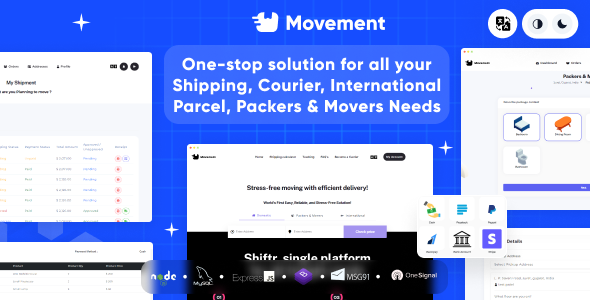
Movement - Your one-stop for your logistics needs House Shifting, Domestic and International Courier
Description



Move with Ease: Your Comprehensive Logistics Solution
Movement offers a seamless solution for all your logistics needs, specializing in house shifting(Packer & Movers), domestic, and international courier services. Whether you’re relocating your home or sending packages across borders, trust Movement to deliver efficiency, reliability, and peace of mind every step of the way

Main Website & Login Link:
Website Link: Admin Login: log_inWhy Choose Movement
- Quality verified by Envato
- Complete Node.js & MySQL DB Source Code
- Easy for installation and easy can update
- Regular updates
- Multilanguage
- Fully responsive
- Fully customizable
- Dark/White Mode
- Live Notification
- Free future updates
- Welcome for suggestions
Top Features
The admin role holds the highest level of authority within the system. Admins manage and oversee all operations of the logistics platform. Their responsibilities include user management, system configuration, monitoring performance metrics, resolving escalated issues, and ensuring compliance with regulations and company policies.
Customer: Customers are the end-users of the logistics services provided by your platform. They interact with the system to request quotes, schedule pickups and deliveries, track shipments, and manage payments. Customers may also provide feedback and reviews based on their experience with the service.
Carrier: Carriers are the entities responsible for transporting goods from one location to another. In your logistics platform, carriers register and manage their profiles, including their fleet information, service areas, pricing structures, and availability. They receive job requests from customers, negotiate contracts, coordinate logistics, and update shipment statuses in real-time.
Driver: Drivers are individuals employed by carriers to physically transport goods from pickup to delivery locations. As part of their role, drivers access the platform to view assigned jobs, navigate routes, confirm pickups and deliveries, update shipment statuses, and communicate with customers and carriers regarding any issues or delays.
Role Management: This role is responsible for overseeing the access and permissions granted to users within the system. Role management ensures that each user is assigned appropriate roles and permissions based on their responsibilities and authority levels. They handle user authentication, authorization, role assignment, and access control to maintain system security and integrity.
Admin User Management:
Customer Management:- Admin has the authority to add new customers and carriers directly within the system.
- Additionally, customers and carriers have the option to sign up from the website, providing their necessary details for registration.
Customer Registration:
- Customers can register on the website by providing essential information such as name, contact details, and address.
- Upon registration, customers gain access to features like requesting quotes, scheduling shipments, tracking deliveries, and managing their accounts.
Carrier Registration:
- Carriers interested in joining the logistics platform can sign up through the website.
- During registration, carriers are required to submit their business details, including company name, contact information, and other relevant credentials.
- Upon submission, carrier accounts undergo a verification process by the master admin to ensure the legitimacy and reliability of the carrier’s business operations.
- Once verified, carriers gain access to features such as viewing and accepting shipment assignments, updating shipment statuses, and managing their carrier profiles.
Master Admin Approval:
- The master admin reviews and verifies the business details provided by carriers during registration.
- Upon verification, the master admin approves the carrier accounts, granting them access to the platform’s functionalities.
- This approval process helps maintain the quality and integrity of carrier services offered through the logistics platform.
Category & Sub Category management
Category and sub-category management for Domestic, Packers & Movers, and International modules help organize shipments effectively.Packers & Movers Setting
Product Add and Pricing Details:- Admins categorize items based on their characteristics and handling requirements.
- For each item category, admins specify the pricing details for pickup and drop-off services.
- Pricing details may include base rates, additional charges for extra services (e.g., packing materials, assembly/disassembly), and any applicable taxes or surcharges.
- When customers book packers and movers services, they have the option to select the number of personnel they require for the task.
- Typical options may include a 2-man team, 3-man team, or custom team size based on the complexity and size of the job.
- Customers can choose from available time slots based on their preferences and convenience.
- The platform may offer flexible scheduling options, such as morning, afternoon, and evening slots, to accommodate diverse customer needs.
Delivery Types and Pricing
- Within each module, users have the ability to choose delivery types based on their specific needs and requirements.
- admin can define different delivery options, such as standard, express, or specialized services, tailored to the nature of the module.
Breakdown of each feature for pricing
Setting for L x B x H / Amount:
- This feature calculates the weight of the shipment based on the dimensions (Length, Breadth, Height) entered.
- The weight is determined using the formula (L x B x H) / Amount, representing the space the shipment occupies in the carrier.
- Our formula: (LxBxH)/Amount
- Total Cost calculation involves two price tiers based on distance:
- Our formula: (Minimum Distance Price x Minimum Distance) + (Maximum Distance Price x (Total Distance – Minimum Distance)).
- This pricing structure accounts for distance variations in the delivery process.
- Admins can set prices corresponding to weight ranges from Minimum Weight to Maximum Weight.
- This feature allows for customizable pricing based on the weight of the shipment.
- Offers pricing differentiation based on the number of floors involved in loading and unloading.
- Pricing may vary depending on the accessibility and complexity of navigating through multiple floors.
- Elevator usage during loading or unloading incurs additional charges.
- Admins can set specific pricing structures for instances where elevators are utilized for transport.
- Provides flexible pricing options based on the selected delivery date:
- Today, Tomorrow, Day After Tomorrow.
- Dynamic date pricing accounts for urgency and scheduling preferences, allowing for tailored pricing strategies.
Distance-Based Weight Range Pricing:
This feature empowers admins to customize pricing structures based on geographical parameters, weight ranges, and city-specific rates, thereby enhancing pricing accuracy and transparency for customers across different shipping routes. Geographical Parameters:- Origin: Country, State, City
- Destination: Country, State, City
- Start Weight Range: The minimum weight threshold for pricing to begin.
- Ending Weight Range: The maximum weight threshold for pricing to end.
- Rate Price: Admins assign specific rate prices for each defined weight range.
Package Insurance
By offering comprehensive package insurance management, the platform enhances customer confidence and provides valuable protection against unforeseen loss or damage during transit. Insurance Parameters:- Start Price: The minimum value at which insurance coverage begins.
- End Price: The maximum value up to which insurance coverage applies.
- Premium Charged Is Percentage (Default Fix): Admins can choose whether the premium charged for insurance is calculated as a percentage of the declared value of the package or a fixed amount.
- If Percentage: The premium is calculated as a percentage of the declared value of the package.
- If Default Fix: The premium remains a fixed amount regardless of the declared value.
- Loss/Damage Payout Is Percentage (Default Fix): Admins can select whether the payout for loss or damage is calculated as a percentage of the declared value of the package or a fixed amount.
- If Percentage: The payout is a percentage of the declared value.
- If Default Fix: The payout remains a fixed amount irrespective of the declared value.
Shipping Status Management
Admins possess the capability to manage shipping statuses within the platform, facilitating effective tracking and communication throughout the shipping process. Status Definition:- Admins define various shipping statuses to reflect different stages of the shipping journey.
- Examples of shipping statuses may include “Order Received,” “In Transit,” “Out for Delivery,” and “Delivered.”
- Throughout the shipping process, admins or carrier or driver update the status of each shipment based on its progress.
- They have the authority to change the status manually
- Automatically notifications sent to customers and carrier or driver based on specific shipping statuses.
- Notifications may include SMS messages, or in-app notifications to keep recipients informed of shipment progress.
Coupon/Offer Management
The coupon management feature allows administrators to create, manage, and track coupon codes within the platform, providing promotional opportunities and incentives for customers.Zone Management
The zone management feature enables administrators to define service zones for different modules such as Domestic, Packers & Movers, and International within the platform. Here’s how this feature works: Module-Specific Zones:- Administrators can create distinct zones for each module, including Domestic, Packers & Movers, and International.
- Each zone represents a geographic area where the corresponding module’s services are available.
- Admins specify the boundaries and characteristics of each zone based on factors such as location, postal codes, regions, or countries.
- Zones can be defined at various levels of granularity, from city-wide coverage to nationwide or international service areas.
- For each zone, administrators determine whether the corresponding module’s services are available or not.
- This flexibility allows for targeted service offerings based on geographic demand and operational capabilities.
- Administrators have the flexibility to customize service availability and features for each zone independently.
- They can enable or disable specific services, set pricing structures, and define service-level agreements tailored to each zone’s requirements.
Module Management
The module management feature empowers the master admin to enable or disable specific modules within the platform according to convenience and operational requirements. Here’s how this feature operates: Module Selection:- The platform offers distinct modules such as Domestic, Packers & Movers, and International for different types of logistics services.
- The master admin possesses the authority to manage module accessibility across the platform.
- They can enable or disable modules based on business needs, market trends, or strategic considerations.
- Master admin can dynamically enable or disable modules in response to changing business conditions, customer demand, or internal resources.
- The platform provides an intuitive administrative interface where the master admin can toggle module settings with ease.
- Clear visualization and straightforward controls facilitate efficient management of module configurations.
- Enabling or disabling modules directly impacts the user experience for both administrators and end-users.
- Users will only see and interact with modules that are enabled, streamlining their navigation and reducing clutter.
Payment Method Management
The payment method management feature allows administrators to configure and manage various payment methods accepted on the platform. Here’s an overview of this feature:- The platform supports multiple payment methods like Cash, Paystack, Paypal, Razorpay, Bank Account & Stripe.
- Admins can configure each payment method according to the platform’s integration capabilities and business needs.
- Each payment method can be set to active or inactive based on its availability and readiness for use.
- Active payment methods are displayed to customers during the checkout process.
Payout Management
The payout management feature allows carriers to request payouts based on predefined criteria set by the master admin, particularly the Wallet Minimum Balance for Withdrawal ($) as configured in the settings page. Here’s how this feature operates: Payout Request Submission:- Carriers can submit payout requests through the platform’s interface.
- The payout request functionality becomes available when the carrier’s wallet balance reaches or exceeds the minimum threshold set by the master admin.
- The master admin defines the minimum wallet balance required for carriers to be eligible to request payouts.
- This threshold ensures that carriers maintain a sufficient balance before initiating withdrawal transactions.
- The master admin configures the Wallet Minimum Balance for Withdrawal parameter in the platform’s settings page.
- Admins can adjust this value as needed to align with business requirements and financial considerations.
- Once a carrier submits a payout request and meets the minimum balance requirement, the request enters the processing queue.
- Admins review and approve eligible payout requests for further processing.
- Approved payout requests are executed through the designated payment gateway or financial institution.
- The platform facilitates seamless transaction processing to transfer funds from the carrier’s wallet to their designated payout account.
Reporting System
The reporting system offers various reports to provide insights and analytics into different aspects of the platform’s operations. Here are the key reports included:
Daily Report:
- The daily report offers a snapshot of platform activities and performance metrics for a specific day.
- It includes key indicators such as the number of orders processed, total sales revenue, payment transactions, and other relevant data.
- The order report provides detailed information about individual orders placed on the platform.
- It includes order numbers, customer details, order status, items purchased, order values, and any additional notes or comments associated with each order.
- The sales report offers insights into the platform’s sales performance over a defined period.
- It includes metrics such as total sales revenue, average order value, sales trends over time, top-selling products or services, and geographic sales distribution.
- The payment report provides an overview of payment transactions processed through the platform.
- It includes details such as payment amounts, transaction dates, payment methods used, transaction statuses, and any associated fees or charges.
- Customization Options: Admins can customize report parameters such as date ranges, filters, and data visualization options to tailor reports to specific needs.
- Export Functionality: Reports can be exported in various formats such as CSV, Excel, or PDF for further analysis or sharing with stakeholders.
Content Management System (CMS)
The Content Management System (CMS) empowers administrators to update and manage various pages displayed on the frontend website, enhancing customer experience and ensuring content accuracyMaster Setting
Here’s a breakdown of each setting and configuration feature that the master admin can set up: Light Logo: Master admin can upload the light version of the platform’s logo, typically used against light backgrounds.Dark Logo: Master admin can upload the dark version of the platform’s logo, typically used against dark backgrounds.
Site Title: Master admin can specify the title of the website or platform.
Currency: Master admin can select the default currency used for transactions on the platform.
Timezone: Master admin can set the default timezone for the platform, ensuring consistency in time-related operations and notifications.
Currency Symbol Placement: Master admin can specify whether the currency symbol appears on the right or left side of the currency value.
Thousands Separator: Master admin can define the character used as a thousands separator in numeric values.
Google Map Key: Master admin can input the Google Maps API key for integrating maps and location services into the platform.
Carrier Commission (%): Master admin can set the percentage of commission earned by carriers for each transaction or service provided.
Wallet Min Balance For Withdraw ($): Master admin can define the minimum balance required in a carrier’s wallet before they can request a withdrawal.
Carrier Auto Approved Toggle: Master admin can enable or disable the automatic approval of carrier accounts upon registration.
Notification Settings (OneSignal):
- OneSignal App ID: Master admin can input the OneSignal App ID for sending push notifications to users.
- OneSignal API Key: Master admin can input the OneSignal API Key for authenticating communication with the OneSignal service.
- MSG91 Auth Key: Master admin can input the MSG91 authentication key for sending SMS messages.
- MSG91 OTP Template Id: Master admin can specify the template ID used for OTP (one-time password) verification.
- MSG91 SMS Template Id: Master admin can specify the template ID used for general SMS notifications.
- Host: Master admin can specify the email host for sending verification emails.
- Port: Master admin can specify the port used for email communication.
- Email: Master admin can input the email address used for sending verification emails.
- Password: Master admin can input the password associated with the email account.
Weight Units: Master admin can define the units used for measuring weight, such as kilograms (kg) or pounds (lb).
Assigning Orders to Carriers Automatically: Master admin can toggle the option to automatically assign orders to carriers based on predefined criteria or algorithms.
User Workflow:
Domestic
- First do login or signup
- Pickup Address: Surat, Gujarat, India (check the screenshot:
- Drop address: Rajkot, Gujarat, India (check the screenshot:
- Address details for Pickup Address: (test patel, L. P. Savani road, surat, gujarat, india within 24h to 48h of the order they were received.
- We suggest, while our team reviews your support request, please read the documentation that comes in the zip file of Codecanyon. You can download it from Codecanyon:
- We are in IST+5:30 timezone. We address all the support queries in 5 days (Saturday & Sunday off).
- If any support ticket has no response from the item owner for 7 days, the ticket will be considered closed. If you need further assistance you can Feel free to contact us on skype for any kind of pre-sale inquiries or support for the product. Click here to connect on Skype.
- Have pre-sales questions or concerns, please write to us via our Mail Mail
- If you like our product and support then please drop a rate and write a review at
Categories
Tags
External listing. code.market does not sell this product and does not process payment for it. Pricing, payment, delivery, licensing, refunds, and support are handled by the third-party merchant on its own website. We may earn an affiliate commission from a referral. Details.
Products of the Week.
Submit#1

upvote.club
Free Social Media Engagement that Helps Boost Your Content. Upvote Club supports 19 social networks with 100+ engagement actions in one dashboard. Add links to your posts and get free engagement from real users.
SaaS · 16,655 views · 96 clicksSaaS · Week 42 · 16,655 views · 96 clicks
#2

Seenshot App
Free, Fast, MacOS Screenshot app. Make Screenshot cmd+shift+2 and send it via link
Desktop App · 5,636 views · 109 clicksDesktop App · Week 42 · 5,636 views · 109 clicks
#3

Conversational Backlinks for Busy Founders
Place Backlink Relevant Conversation for your domain across Forums and Conversations
Website · 17,457 views · 195 clicksWebsite · Week 42 · 17,457 views · 195 clicks
#4

Substack Posting API
Onboard your Agent to Substack. Write Publish on Substack via API
SaaS · 36,444 views · 184 clicksSaaS · Week 42 · 36,444 views · 184 clicks
#5

codester.com
SocialDesk+: Omnichannel Social Commerce & Business Management Platform This is stronger than simply “Social Commerce and Messaging” because it tells buyers this is a complete business platform, not just a messaging script. Turn Social Conversations Into Sales SocialDesk+ is a complete omnichannel social commerce and business management platform built for businesses that sell and communicate with customers through social media. Instead of switching between WhatsApp, Facebook, Instagram and TikTok, businesses can manage customer conversations, comments, products, leads, follow-ups, automation, teams and business reports from one professional workspace. And because the full source code is included, developers, agencies and entrepreneurs can customize, rebrand and launch SocialDesk+ as their own business solution or SaaS platform. 🚀 Build Your Own Social Commerce Business SocialDesk+ gives you the foundation to launch: - Your own SaaS platform - A white-label social CRM - A social-commerce management system - A customer communication platform - A business messaging solution - A custom solution for clients - A multi-business subscription platform 💬 Connect Your Customers Supported social channels include: WhatsApp • Facebook • Instagram • TikTok Bring supported conversations into one centralized workspace and help businesses respond faster without constantly switching between platforms. 🛍️ More Than a Messaging Platform SocialDesk+ combines communication with the tools businesses need to manage customer opportunities: Inbox Manage customer conversations from connected channels. Comments Monitor and respond to social-media comments. Customers & Leads Organize customer information and potential buyers. Products & Catalog Manage products and give your team quick access to product information. Follow-Ups Make sure potential customers don't get forgotten. Automation Automate repetitive customer questions and responses. AI Assistant Provide AI-assisted communication when configured. Team Management Give managers and staff access to the business workspace. Reports & Analytics Track activity using business reports and analytics. The current product listing already includes these capabilities. 🔥 Why Buyers Will Want It Launch Faster Start with an already-built business platform instead of developing the entire system from zero. Customize Everything The full source code is included, allowing developers to change branding, features, workflows and integrations. Build a SaaS Create multiple business workspaces and offer SocialDesk+ as a subscription-based service. Sell to Businesses Offer it to retailers, restaurants, service businesses, online sellers, agencies and other businesses that communicate with customers through social media. Mobile + Web + Backend This isn't just a mobile UI template. It includes: - Flutter mobile application - Python / FastAPI backend - Web interface - Administration tools - Database infrastructure - API-based architecture - SQLite / PostgreSQL support - Android and iOS project structure 💼 One Platform. Multiple Business Opportunities. For SaaS Entrepreneurs Launch your own subscription platform and allow multiple businesses to operate inside separate workspaces. For Software Agencies Customize and rebrand the platform for clients instead of building an omnichannel business system from scratch. For Developers Use the complete source code as a foundation for your own social-commerce or customer-management product. For Businesses Deploy a dedicated version for your own customer-service and social-commerce operations. 🧩 What's Included Mobile - Flutter / Dart - Android - iOS project Backend - Python - FastAPI - SQLAlchemy - Alembic Database - SQLite - PostgreSQL Web - HTML5 - CSS3 - JavaScript Deployment - Docker - Docker Compose - Production configuration Business Platform - Multi-workspace architecture - Authentication - Teams - Customers - Products - Messaging - Comments - Automation - Reports - Subscriptions - Administration The current listing also documents third-party integrations such as Meta, TikTok, Stripe, Firebase, SMTP and optional OpenAI configuration. ⚡ What Makes SocialDesk+ Different? You're not buying a simple: ❌ Chat UI ❌ WhatsApp clone ❌ Flutter template ❌ Admin dashboard ❌ Basic CRM You're getting a complete business platform foundation that can be customized, branded and commercialized. Connect. Automate. Manage. Grow. SocialDesk+ Omnichannel Social Commerce & Business Management Platform One important change I'd make to the current listing The current page starts with: “A simple guide to managing your social conversations, customers, products and business activity.”
Other · 3,858 views · 32 clicksOther · Week 42 · 3,858 views · 32 clicks
#6

sandbook.app
Sandbook reads EPUB, PDF, web pages and scanned pages aloud with Kokoro TTS, an open neural voice model that runs on your iPhone, free and offline. Choose from 41 natural voices in English, Spanish, French, Italian, Brazilian Portuguese and Hindi and follow each word as it is spoken. Try the same voices in your browser first with the free Kokoro TTS online demo.
Other · 3,857 views · 13 clicksOther · Week 42 · 3,857 views · 13 clicks