
Mega Main Menu - WordPress Menu Plugin
Description








Awesome responsive menu plugin. Features: icons, sticky, mega dropdowns variations, custom color scheme, fully customizable. You can place any content in dropdowns: links, text, images, widgets and shortcodes. Custom dropdowns so easy with “Mega Main Menu”.
FEATURES OVERVIEW:
Amazing Capabilities. Sticky menu, icons, awesome dropdowns, logo and search – may be present in one menu. These capabilities will look great on any website.
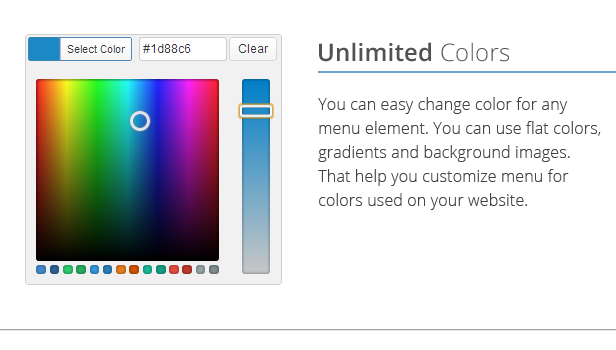
Unlimited Colors Variations. You can easy change color for any menu element. You can use flat colors, gradients and background images. That help you customize menu for colors used on your website.
Dropdowns: 10+ combinations. Customise dropdown so easy with Mega Main Menu. You can place any content in dropdowns: menu links, text, images, widgets and shortcodes.
1600+ Vector Icons. Use 1600+ icons in your menu and website. Vector icons are sharp graphics which will look great on any devices with any resolution.
600+ Google Fonts. You can choose from more that 600 google fonts for your menu. Change font very easy from your admin dashboard.
WPML Compatible. Tested and approved by WPML team. Compatible with multilingual sites and RTL supported. Configure your WPML plugin and Mega Main Menu will work with it automatically.
Friendly Support. Our support very friendly. We usually come back to you in less than 24 hours. Our support staff would be happy to help you solve any issues and listens to your wishes.
Instructions for Update
Updates history
2.2.2 (2022.05.31) – requires to setting only those options that did not exist previously.
- Fixed compatibility errors related to WordPress 6.0.
- Fixed compatibility errors related to PHP 8.x.
2.2.1 (2020.09.23) – requires to setting only those options that did not exist previously.
- Added "Post List" type of dropdown.
- Improved compatibility with Avada Theme.
- Improved Auto-Update feature.
- Improved admin settings page loading speed.
- Improved framework.
- Fixed a few small CSS bugs.
2.2.0 (2019.06.27) – requires to setting only those options that did not exist previously.
- Added option to add MMM to the page content with help of Blocks (Gutenberg).
- Improved "RU" Russian translation.
- Improved framework.
- Fixed few small HTML bugs.
- Fixed few small CSS bugs.
2.1.8 (2019.03.22) – requires to setting only those options that did not exist previously.
- Added "FontAwesome v5" (3000+ icons).
- Added option "Logo link".
- Added ability to use Google Fonts that were selected in the plugin settings in the TinyMCE (classic) editor.
- Improved framework. Better function for detection of all taxonomies (post types).
- Improved "RU" russian translation.
- The closing PHP-tag has been removed in all PHP-files i.e "?>".
- Removed "FontAwesome v4" (400+ icons).
- Fixed the problem of the "background gradient generator".
- Fixed PHP-error on "Customize" page.
- Fixed few small CSS bugs.
2.1.7 (2018.04.03) – requires to setting only those options that did not exist previously.
- Added predefined skins.
- Added 12 color schemes.
- Added option to hide/show menu items depending on user role.
- Added ability to select different logos for each menu (You may need to configure logo again).
- Added ability to display logo only for Sticky or Desktop or Mobile.
- Added option 1200px for "Responsive Resolution".
- Improved framework.
- Improved ARIA accessibility.
- Fixed small PHP-error in common functions.
- Fixed few small CSS bugs.
2.1.6 (2018.03.07) – requires to setting only those options that did not exist previously.
- Important change!!!: CSS selector "#mega_main_menu" is longer available in primary container. You will need to chnage CSS from "#mega_main_menu" to ".mega_main_menu" in all your custom CSS codes.
- Added ability to translate plugin with help of .PO and .MO files. We are offer free plugin from our portfolio for quality translations to other languages.
- Added Russian language translation.
- Updated list of Google Fonts. 900+ fonts are available.
- Improved general compatibility with some Themes.
- Improved JS-functions that related to editing menu structure.
- Improved WooCommerce Cart, now shows up number of items in the cart.
- Improved mobile menu compatibility.
- Fixed few small CSS bugs.
2.1.5 (2017.06.16) – requires to setting only those options that did not exist previously.
- Added opportunity to reset plugin configuration.
- Added "Linearicons-Free" set of icons.
- Improved compatibility with latest version of BuddyPress
- Fixed issue with file selection from Media Library.
- Fixed few small CSS bugs.
2.1.4 (2017.03.07) – requires to setting only those options that did not exist previously.
- Fixed few bugs related to layout and skins.
- Improve and optimized the framework.
2.1.3 (2016.10.28) – requires to setting only those options that did not exist previously.
- Improved compatibility with WP 4.6.x.
- Improved compatibility with PHP 7.x.
- Improved compatibility with Themes that built on Bootstrap framework.
- Compatible with "Nav Menu Roles".
- Improved Documentation.
2.1.2 (2016.04.19) – requires to setting only those options that did not exist previously.
- Improved compatibility with WP 4.5.
2.1.1 (2015.09.09) – requires to setting only those options that did not exist previously.
- Fixed JavaScript bug that occurs in previous version.
2.1.0 (2015.08.24) – requires to setting only those options that did not exist previously.
- Improved compatibility with WP 4.3.
- Improved compatibility with different versions of PHP.
- Fixed problem with "Widgets.
- The content of the "searchform.php" is moved to the "handler.php".
- Fixed few small CSS bugs.
2.0.9 (2015.06.26) – requires to setting only those options that did not exist previously.
- Fixed problem with "Tabs" type of dropdown.
- Fixed few PHP bugs that related to the skin.php.
- Fixed problem with detection of custom post types.
- Fixed few small CSS bugs.
- Updated "PrettyPhoto" sources.
2.0.8 (2015.05.19) – requires to setting only those options that did not exist previously.
- Added the ability to "Auto Update".
- Fixed few small CSS bugs.
2.0.7 (2015.04.25) – requires to setting only those options that did not exist previously.
- Fixed problem with "Mobile Mode" (responsiveness).
- Fixed problem with "add_query_arg" and "remove_query_arg" functions.
2.0.6 (2015.03.14) – requires to setting only those options that did not exist previously.
- Added ability to show menu in the website content using .
- Added option to select "Trigger" for dropdowns (Click, Hover).
- Added option "Push Content Down" when the dropdown is visible.
- Improved BuddyPress compatibility (added link to the sign up page).
2.0.5 (2015.02.21) – requires to setting only those options that did not exist previously.
- Added another set of icons (Bootstrap Glyphicons 400+).
- Added option to select sets of icons you want to use (Specific Options).
- Added option to show recent posts from all sites in the Multisite Network.
- Added ability to use  in the Navigation label.
- Improved caching function (solved problem of the allow_url_fopen).
- Fixed few small CSS bugs.
2.0.4 (2015.01.14) – requires to setting only those options that did not exist previously.
- Improve and optimized the framework.
- Added field to select image for the "Custom Icon" on the "hover" status.
- Changed structure of directories and inner files.
- Fixed a problem of the duplication of submenus in some cases.
- Fixed few small CSS bugs.
2.0.3 (2014.10.22) – requires to setting only those options that did not exist previously.
- Added layout of the dropdown menu with tabs.
- Added settings of the dropdowns for all menu levels.
- Added option to pull the menu item to the other side.
- Using the section "Settings of the Structure" you can remove icons files from the load.
- Fixed few small CSS bugs.
2.0.2 (2014.07.15) – requires to setting only those options that did not exist previously.
- Added few "hooks" <a href=" developers</a>.
- Added justified alignment.
- Updated Bootstrap sources.
- Fixed few small CSS bugs.
2.0.1 (2014.05.10) – requires to setting only those options that did not exist previously.
- Added option "Responsive Resolution" (768px, 1024px ...).
- Added option "Full Width Initial Container".
- Fixed a problem of the "Additional Styles".
- Fixed a problem of the "Icons Modal Windows".
- Fixed a problem of the "Saving Plugin Settings".
- Fixed a problem of the default plugin configuration.
- Fixed a problem of the "Colorpicker" in WP 3.9.
- Fixed few small CSS bugs.
2.0.0 (2014.04.29) – requires to setting only those options that did not exist previously.
- Absolutely new improved framework!
- Changed structure of directories and inner files.
- Added option "Add WPML switcher in menu".
- Improved accessibility to all menu items using the "tab" key.
- Fixed a problem of the "Modal Windows" in WP 3.9.
- Fixed a problem of the vertical alignment in the first level items.
- Fixed a problem of the contact forms inside dropdowns.
1.1.4 (2014.04.16) – requires to setting only those options that did not exist previously.
- Added the ability to change the menu "Primary style".
- Added option "Description of the Menu Item".
- Added "Visibility Control" option (Visible Only to Registered Users).
- Added option "Size of the Icons in the dropdown menus".
- Removed the option "Hide Icon of This Item". NEW: set empty value to hide icon.
- Improved CSS caching function.
- Improved image cropping function.
- Improved some CSS rules.
1.1.3 (2014.04.01) – requires to setting only those options that did not exist previously.
- Added option "Add BuddyPress toolbar in menu".
- Added support of the "Right To Left" sites (RTL).
- Added option to set height of the first level items when menu is sticky (or mobile).
- Improved a few CSS rules.
- Improved responsive mode.
- Fixed a problem of the "Sorting of the Menu Structure".
1.1.2 (2014.03.10) – requires to setting only those options that did not exist previously.
- Added option to select any custom taxonomy in "Recent Posts Dropdown".
- Added capability to globally disable some structure settings.
- Added "Smooth Scroll" effect for anchor links.
- Added capability to change color of the plain text in dropdowns.
- Improved behavior of the "Sticky menus".
1.1.1 (2014.02.25) – requires to setting only those options that did not exist previously.
- Improved Sidebar Menu (any number menus on one page).
- Improved compatibility with Network (WP Multisites).
- Improved compatibility with some templates (inclusive Ultimatum).
- Improved WooCart, AJAX instead statick cart.
- Improved functions that process the description of the post.
- Fixed option "Background image of the primary container".
- Fixed link on backup file with plugin settings.
1.1.0 (2014.02.13) – requires to setting only those options that did not exist previously.
- Added function for import/export of the settings.
- Added option "Add WooCart in menu".
- Improved compatibility with some templates.
- Improved compatibility with WP-multisites.
- Changed behavior of the menu on handheld devices.
- Changed the names of some CSS classes.
- Fixed a problem of the custom icons in modal window.
1.0.9 (2014.01.23) – requires to setting only those options that did not exist previously.
- Added feature to disable icons globally.
- Added a few additional icons.
- Fixed a problem of the some CSS styles.
- Fixed a problem of the link on logo.
- Fixed a problem of the "Modal Window of Icon Selection".
1.0.8 (2014.01.13) – requires to setting only those options that did not exist previously.
- Added "Mega Main Sidebar Menu" widget.
- Improved compatibility with different templates (inclusive Artisteer).
- Changed functionality to create dropdown with the widgets (multiple widget areas).
- Fixed a problem of the colorpicker in the "Additional styles".
1.0.7 (2013.12.25) – requires to setting only those options that did not exist previously.
- Added animation effects.
- Changed the names of some CSS classes.
- Fixed a problem of notifications about strict standards in WP_DEBUG mode.
1.0.6 (2013.12.17) – requires to setting only those options that did not exist previously.
- Added option to customize the colors for search box.
- Improved caching CSS styles.
- Changed colorpiker from "standard WP" to "Bootstrap colorpiker 2.0".
- Changed the names of some CSS classes.
- Fixed a problem of the "Modal Window of Icon Selection" in WP 3.8.
1.0.5 (2013.12.09) – requires to setting only those options that did not exist previously.
- Added ability to create menu with the vertical direction (for sidebars).
- Added ability to enable/disable "Menu Minimization on Handheld Devices".
- Changed widgets dropdowns settings. Now two areas for widgets instead of one (in each area can be a different set of widgets).
- Changed the names of some CSS classes.
- Fixed a problems of the dropdown menus on handheld devices.
1.0.4 (2013.12.02) – requires full plugin settings.
- Added ability to assign a color scheme for each menu item.
- Added ability to upload custom raster icons.
- Added ability to select any Google fonts for the menu.
- Added field for "Castom CSS".
- Added option to enable/disable responsiveness on handheld devices.
- Changed the structure of the admin interface for the plugin.
- Changed "Submenu Columns" option, now has the ability to select columns from 1 to 10.
- Changed the names of some CSS classes.
- Fixed a problem of the transfer of the last menu item on a new line in FireFox.
1.0.3 (2013.11.24) – requires to setting only those options that did not exist previously.
- Added ability to select "Drop to Center" value for "Side of dropdown elements" option.
- Fixed a problem of correct displaying of the item for which set the options "Hide Icon of This Item" and "Hide Text of This Item".
Categories
Tags
External listing. code.market does not sell this product and does not process payment for it. Pricing, payment, delivery, licensing, refunds, and support are handled by the third-party merchant on its own website. We may earn an affiliate commission from a referral. Details.
Products of the Week.
Submit#1

upvote.club
Free Social Media Engagement that Helps Boost Your Content. Upvote Club supports 19 social networks with 100+ engagement actions in one dashboard. Add links to your posts and get free engagement from real users.
SaaS · 16,179 views · 96 clicksSaaS · Week 42 · 16,179 views · 96 clicks
#2

Seenshot App
Free, Fast, MacOS Screenshot app. Make Screenshot cmd+shift+2 and send it via link
Desktop App · 5,197 views · 109 clicksDesktop App · Week 42 · 5,197 views · 109 clicks
#3

Conversational Backlinks for Busy Founders
Place Backlink Relevant Conversation for your domain across Forums and Conversations
Website · 17,025 views · 195 clicksWebsite · Week 42 · 17,025 views · 195 clicks
#4

Substack Posting API
Onboard your Agent to Substack. Write Publish on Substack via API
SaaS · 36,017 views · 184 clicksSaaS · Week 42 · 36,017 views · 184 clicks
#5

codester.com
SocialDesk+: Omnichannel Social Commerce & Business Management Platform This is stronger than simply “Social Commerce and Messaging” because it tells buyers this is a complete business platform, not just a messaging script. Turn Social Conversations Into Sales SocialDesk+ is a complete omnichannel social commerce and business management platform built for businesses that sell and communicate with customers through social media. Instead of switching between WhatsApp, Facebook, Instagram and TikTok, businesses can manage customer conversations, comments, products, leads, follow-ups, automation, teams and business reports from one professional workspace. And because the full source code is included, developers, agencies and entrepreneurs can customize, rebrand and launch SocialDesk+ as their own business solution or SaaS platform. 🚀 Build Your Own Social Commerce Business SocialDesk+ gives you the foundation to launch: - Your own SaaS platform - A white-label social CRM - A social-commerce management system - A customer communication platform - A business messaging solution - A custom solution for clients - A multi-business subscription platform 💬 Connect Your Customers Supported social channels include: WhatsApp • Facebook • Instagram • TikTok Bring supported conversations into one centralized workspace and help businesses respond faster without constantly switching between platforms. 🛍️ More Than a Messaging Platform SocialDesk+ combines communication with the tools businesses need to manage customer opportunities: Inbox Manage customer conversations from connected channels. Comments Monitor and respond to social-media comments. Customers & Leads Organize customer information and potential buyers. Products & Catalog Manage products and give your team quick access to product information. Follow-Ups Make sure potential customers don't get forgotten. Automation Automate repetitive customer questions and responses. AI Assistant Provide AI-assisted communication when configured. Team Management Give managers and staff access to the business workspace. Reports & Analytics Track activity using business reports and analytics. The current product listing already includes these capabilities. 🔥 Why Buyers Will Want It Launch Faster Start with an already-built business platform instead of developing the entire system from zero. Customize Everything The full source code is included, allowing developers to change branding, features, workflows and integrations. Build a SaaS Create multiple business workspaces and offer SocialDesk+ as a subscription-based service. Sell to Businesses Offer it to retailers, restaurants, service businesses, online sellers, agencies and other businesses that communicate with customers through social media. Mobile + Web + Backend This isn't just a mobile UI template. It includes: - Flutter mobile application - Python / FastAPI backend - Web interface - Administration tools - Database infrastructure - API-based architecture - SQLite / PostgreSQL support - Android and iOS project structure 💼 One Platform. Multiple Business Opportunities. For SaaS Entrepreneurs Launch your own subscription platform and allow multiple businesses to operate inside separate workspaces. For Software Agencies Customize and rebrand the platform for clients instead of building an omnichannel business system from scratch. For Developers Use the complete source code as a foundation for your own social-commerce or customer-management product. For Businesses Deploy a dedicated version for your own customer-service and social-commerce operations. 🧩 What's Included Mobile - Flutter / Dart - Android - iOS project Backend - Python - FastAPI - SQLAlchemy - Alembic Database - SQLite - PostgreSQL Web - HTML5 - CSS3 - JavaScript Deployment - Docker - Docker Compose - Production configuration Business Platform - Multi-workspace architecture - Authentication - Teams - Customers - Products - Messaging - Comments - Automation - Reports - Subscriptions - Administration The current listing also documents third-party integrations such as Meta, TikTok, Stripe, Firebase, SMTP and optional OpenAI configuration. ⚡ What Makes SocialDesk+ Different? You're not buying a simple: ❌ Chat UI ❌ WhatsApp clone ❌ Flutter template ❌ Admin dashboard ❌ Basic CRM You're getting a complete business platform foundation that can be customized, branded and commercialized. Connect. Automate. Manage. Grow. SocialDesk+ Omnichannel Social Commerce & Business Management Platform One important change I'd make to the current listing The current page starts with: “A simple guide to managing your social conversations, customers, products and business activity.”
Other · 3,429 views · 30 clicksOther · Week 42 · 3,429 views · 30 clicks
#6

sandbook.app
Sandbook reads EPUB, PDF, web pages and scanned pages aloud with Kokoro TTS, an open neural voice model that runs on your iPhone, free and offline. Choose from 41 natural voices in English, Spanish, French, Italian, Brazilian Portuguese and Hindi and follow each word as it is spoken. Try the same voices in your browser first with the free Kokoro TTS online demo.
Other · 3,433 views · 13 clicksOther · Week 42 · 3,433 views · 13 clicks