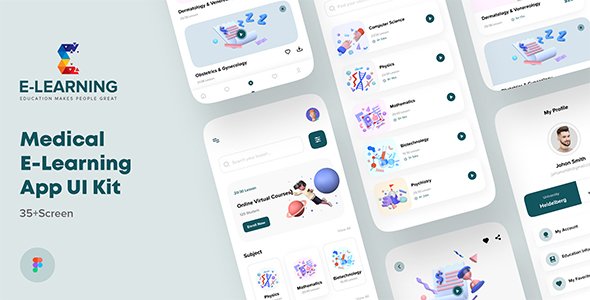
Medical e-Learning Online Course App UI kit For Figma
Description
Medical e-learning online course app UI kit. If you are suffering from anxiety as a medical student then end your worries here. We have brought e-learning medical apps for you. It is divided into each section, you can read the subject you want to read in the section, there is a video, you can watch without any hassle. There are exam arrangements in this course. You can participate here to check your merit. Our e-learning medical online course apps have everything a medical student needs and you can take these apps without any hesitation. You can easily change any design. It’s easy to customize and also well documented.
File included in Fig –
- 01. Splash Screen 01
- 02. Splash Screen 02
- 03. Onboarding Page 01
- 04. Onboarding Page 02
- 05. Onboarding Page 03
- 06. Onboarding Page 04
- 07. Welcome Screen
- 08. Login Page
- 09. Forgot Password
- 10. Check Email
- 11. Verify Email
- 12. Verified Page
- 13. Sign Up Page
- 14. Phone Number
- 15. Birthday
- 16. Country
- 17. Mine Page
- 18. Subject
- 19. Courses
- 20. Video Courses
- 21. Course Details
- 22. Course Filter
- 23. Payment Mathod
- 24. Payment Done
- 25. Exam Date
- 26. My Exam
- 27. Dental Scinces
- 28. Answer Sheet
- 29. Exam Complate
- 30. Exam Result
- 31. Exam Subscription
- 32. Notification
- 33. My Profile
- 34. Edit Profile
- 35. Chat
- 36. Chat Message
- 37. Audio Call
- 38. Video Call
Features –
- 38 High Quality iOS & Android Screens
- Clean, unique and modern style
- Symbol & well layer organized
- 100% Vector and Customizable
- Well Organized Layers and Groups
- Easy customizable fig files
- Pixel Perfect Design
- File named layers and groups
- 24/7 great support
- Free google font and Icon used
- Designed in Figma
The fig include –
- Documentation
- fig files
HOW TO EDIT:
In order to edit the file, you need to have figma installed on your system, and the fonts mentioned in the credits installed. As you can see on the right, the layers are well organized and grouped into folders, which make editing very easy. So, all you have to do is select the layer from the right, and then edit it with figma
Font used
Icons Used
Note –
If you need any help, Please contact us
Categories
Tags
External listing. code.market does not sell this product and does not process payment for it. Pricing, payment, delivery, licensing, refunds, and support are handled by the third-party merchant on its own website. We may earn an affiliate commission from a referral. Details.
Products of the Week.
Submit#1

Substack Posting API
Onboard your Agent to Substack. Write Publish on Substack via API
29,280 views · 176 clicksWeek 41 · 29,280 views · 176 clicks
#2

appstackbuilder.com
appstackbuilder solves the problem of scattered, time-consuming tech research by helping users generate tailored tech stacks and discover relevant AI, SaaS, and developer tools in one place. It’s built for founders, developers, indie hackers, and startup teams planning new products or comparing software options.
Other · 13,113 views · 40 clicksOther · Week 41 · 13,113 views · 40 clicks
#3

productshotai.app
Create ecommerce product photos from one upload with ProductShot AI. Make white-background, studio, lifestyle, and marketplace images for Amazon, Shopify, and Etsy.
Other · 13,255 views · 27 clicksOther · Week 41 · 13,255 views · 27 clicks
#4

aiproductads.app
AIProductAds is an AI Product Ad Generator that turns product photos into video ads and product images for ecommerce on aiproductads.app.
Other · 13,004 views · 26 clicksOther · Week 41 · 13,004 views · 26 clicks