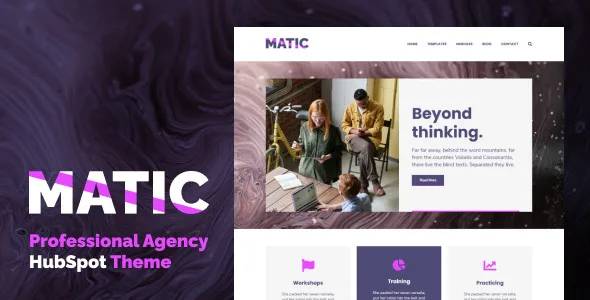
Matic - Professional Agency HubSpot Theme
Description
Matic is a professional HubSpot theme which lets you create clean and modern pages for your website. With its carefully designed modules and templates, you can save your time with designing and focus on your content.
Corporate companies and agencies can get the most out of Matic theme.
Templates
Matic has 8 ready-to-use page templates for you:
- Home: A classy homepage which you can find most of the modules the Matic has.
- About: A two columned area for about text which combined by an Accordion module for frequently asked questions as well as the Team section.
- Services: A professional atmosphere for the facilities you provide, a Testimonial module for your client’s reviews and finally a pricing section.
- Contact: A simple template for your contact information and a message form to let your visitors get in touch with you.
- Blog: A clean view of your blog posts with featured images and post titles.
- Blog Post: Impress your visitors with a big title and featured image. Then let them focus on your content with this well-planned blog post template.
- Landing: A catchy “first look” for your website. You can use this template to welcome your visitors and then redirect them to the sections you may want to promote.
- Blank: A blank template for a fresh start. If you’d like to see an empty page which you can create any design with it, just use this one.
System Pages
- 404
- 505
- Backup Unsubscribe
- Membership Login
- Membership Register
- Reset Password Request
- Reset Password
- Password Prompt
- Search Results
- Subscription Preferences
- Subscriptions Confirmation
Modules
Matic has 15 ready-to-use modules for you:
- Accordion: You can create questions & answers section with this module. When you click on the title, the box expands and an additional text appears.
- Banner: A bold section to create wow effect. More impressive when used at the top of the page. The image is optional and you can select the header size from H1 to H6.
- Calendar: A sleek list for your events which includes a title, date and a button which you can redirect to any link.
- Call-to-Action Section: Attract your visitors with this useful module. When you need to call your visitors to action, we recommend to use it.
- Fancy Header: If you want to use a heading a bit different from the default ones, you can use this module. It allows you to choose from H1 to H6 as usual.
- Icon Card Set: A boxed module with a Font Awesome icon, title and some text. Very handy if you’re planning to add a section to inform your visitors with your services, features etc.
- List: A handy module to list some important features.
- Menu Section: A menu to use in your Header section. The menu you see on our demo site is created with this very module.
- Pricing Card: If you have some different tiers for your products or services, you can use this module to list their features and prices.
- Quote: Some sentences require special treatment. Use this module if you’d like to pop out an important sentence or quote. You can add a name at the bottom of the module, if you wish.
- Single Letter/Number: A module for only 1 letter or number. Useful when you need to create a list of steps or options from A to F maybe.
- Social Accounts: A module to add your popular social accounts to your site. We recommend you to use this module on your footer.
- Team Members: When you need to introduce your team members or some fellows, just use this module. You can add member cards as many as you wish.
- Testimonial: It’s very important to let your visitors know about your current clients’ thoughts in today’s world. With this module, you can insert the reviews in a modern slider. Don’t forget to add some images for each slide for a better impression.
- Vertical Spacer: Just a module for adding some free vertical space when needed. You can adjust the height of the empty space.
Support
Your purchase includes 6 months of theme support and lifetime free updates. And we love to help people! You can drop a comment to let us help you when you need.
Copyrights
All the images/photographs used in our demo site and all the rights of them belong to their creators/owners. All of them have been collected from free royalty image providers such as pixabay, Unsplash and Pexels and they are completely free to use.
Categories
Tags
External listing. code.market does not sell this product and does not process payment for it. Pricing, payment, delivery, licensing, refunds, and support are handled by the third-party merchant on its own website. We may earn an affiliate commission from a referral. Details.
Products of the Week.
Submit🥇

STOP GUESSING WHAT TO POST
AI that learns your brand voice and builds a month of consistent, on-brand social content: carousels, posts and hooks that sound like you, not like everyone else's AI.
SaaS · 3,247 views · 28 clicksSaaS · Week 45 · 3,247 views · 28 clicks
🥈

Conversational Backlinks for Busy Founders
Place Backlink Relevant Conversation for your domain across Forums and Conversations
Website · 40,650 views · 217 clicksWebsite · Week 45 · 40,650 views · 217 clicks
🥉

upvote.club
Free Social Media Engagement that Helps Boost Your Content. Upvote Club supports 19 social networks with 100+ engagement actions in one dashboard. Add links to your posts and get free engagement from real users.
SaaS · 38,748 views · 111 clicksSaaS · Week 45 · 38,748 views · 111 clicks
#4

Substack Posting API
Onboard your Agent to Substack. Write Publish on Substack via API
SaaS · 57,785 views · 197 clicksSaaS · Week 45 · 57,785 views · 197 clicks
#5

Seenshot App
Free, Fast, MacOS Screenshot app. Make Screenshot cmd+shift+2 and send it via link
Desktop App · 27,187 views · 119 clicksDesktop App · Week 45 · 27,187 views · 119 clicks
#6

Hand-Placed Backlinks $9.99 per link. Flat rate.
Buy hand-placed forum, Q-A and directory backlinks. Flat $9.99 per link, no subscriptions — you only pay for approved listings.
Website · 3,096 views · 18 clicksWebsite · Week 45 · 3,096 views · 18 clicks
#7

Free Invoice Generator - PDF Invoices in Your Browser, No Sign-Up
A free invoice maker for freelancers and small businesses: fill in the invoice, check the live preview, and download a PDF that looks exactly like it. Any currency, tax per item, three templates, no sign-up, and nothing leaves your device.
1,786 views · 16 clicksWeek 45 · 1,786 views · 16 clicks
#8

Merge PDF Files Free - Combine PDFs in Your Browser, No Upload
A free PDF merger for office workers, students, and freelancers: combine PDFs and images into one file in the browser, reorder files and pages, pick page ranges, keep bookmarks, and open password-protected PDFs. Nothing is uploaded, no sign-up, no watermark.
1,660 views · 13 clicksWeek 45 · 1,660 views · 13 clicks