
Live News - Real Time News Ticker
Description

Live News is a WordPress plugin inspired from the news tickers used by broadcast television stations to communicate the latest news, financial news, weather warnings, election results, sport results etc.
This plugin updates the news with jQuery and AJAX in real time and your users will be able to see your latest news without updating the page.
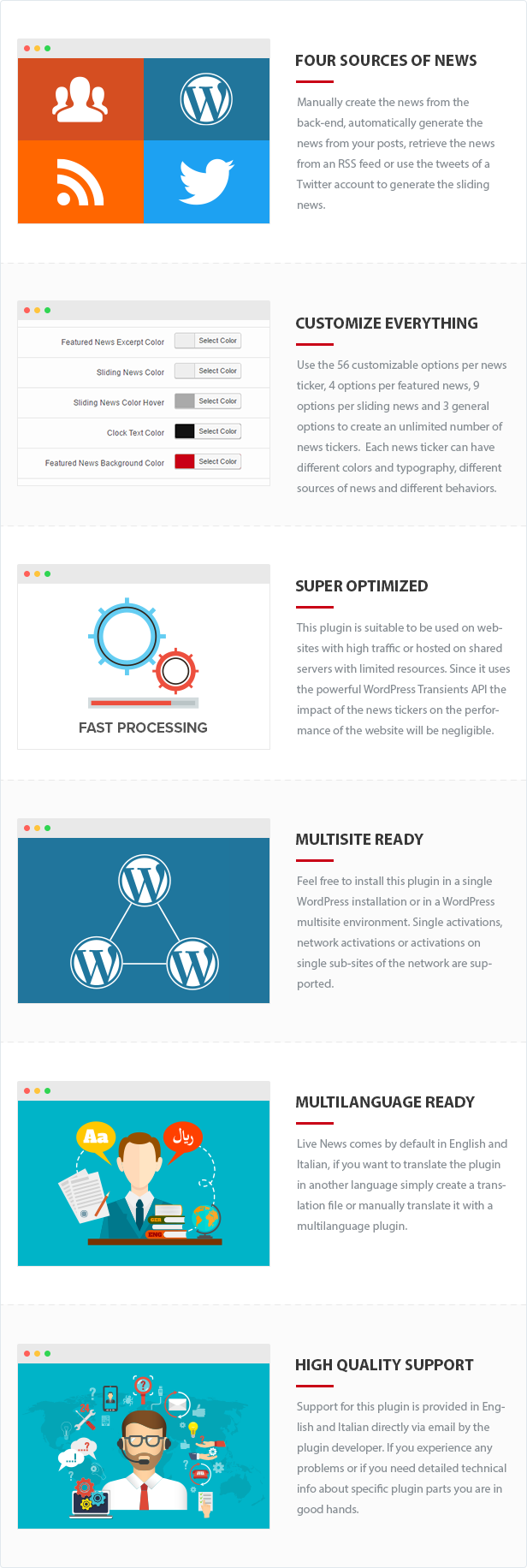
News Manually Added
You can use the Featured News menu and the Sliding News menu to manually create the news of your news tickers. This allows you to have a complete control over the content of the displayed news and the maximum level of customizability on the sliding news. Feel free to select you favorite color for each sliding news and include custom image before and after each sliding news.
For example the news of the Sliding News with Stock Market Data demo page have been manually added, and the increase/decrease icons have been uploaded and associated with the sliding news.
News from WordPress
Use the WordPress posts as the source to create news tickers based on the titles, excerpts and permalinks of your posts (all the posts or only the posts of a specific category).
News from an RSS feed
With RSS as the source of your news you will be able to generate the news ticker based on the information included in your favorite RSS feed, which might be your own WordPress RSS feed, the RSS feed of a tv channel, the RSS feed of a radio, etc.
For example in the BBC News demo the news ticker is generated based on the news included in this RSS feed provided by BBC News.
Before importing content from an RSS feed please make sure that you are authorized to do so, the BBC News page used in the plugin demo is a non-indexed page created only for demonstration purposes.
News from Twitter
Use Twitter as the source of your news so you can show the latest tweets of your Twitter account to your visitors and increase the number of your follower.
Alternatively you can also decide display the tweets of other accounts, for example in the Sliding News from Pope Francis page the news ticker retrieves the news from the @Pontifex account.
Customize Everything
This plugin comes with 56 customizable options per news ticker, 4 options per featured news, 9 options per sliding news and 3 general options.
To give you an idea of the level of customizability consider that you will be able to:
- Apply the news ticker to the entire website or to a specific URL
- Temporarily enable or disable each news ticker
- Retrieve the news from your favorite source (Manually Added, WordPress posts, RSS feed, Twitter)
- Decide which category of posts should be considered (in case the WordPress posts are the source)
- Enter the username of the user for which you want to retrieve the tweets (in case Twitter is the source)
- Automatically remove links, hashtags and usernames from the tweets (in case Twitter is the source)
- Display the time based on the server time or on the user time, and also to assign a positive or negative offset
- Use the news ticker with LTR languages or also with RTL languages like Arabic, Hebrew, Urdu, etc.
- Enable or disable the news ticker with mobile devices
- Display or hide the featured news area (the big red area on top of the sliding news)
- Display the news ticker in open or closed status
- Enable or disable the links associated with the featured news title and with the sliding news
- Open the links in the same tab or in new tabs
- Show or hide the clock
- Set the update time of the clock
- Set the number of sliding news available for each cycle of news
- Set the speed of the sliding news
- Determine the number of cycles performed by the news ticker without updating the news
- Set the transient expiration in seconds
- Set the maximum length of the featured news title
- Set the maximum length of the featured news excerpt
- Set the maximum length of the sliding news
- Set the font size of the featured news title
- Set the font size of the featured news excerpt
- Set the font size of the sliding news
- Set the font size of the text displayed in the clock
- Set the margin between the sliding news
- Set the padding of the sliding news
- Enter a custom font family that will be used for all the textual elements of the news ticker
- Load a custom font family from Google Fonts
- Set the featured news title color
- Set the featured news title color in hover state
- Set the featured news excerpt color
- Set the sliding news color (for all the sliding news of a news ticker or also for specific sliding news if needed)
- Set the sliding news color in hover state (for all the sliding news of a news ticker or also for specific sliding news if needed)
- Set the background color of each sliding news
- Upload and choose an image displayed on the left of the sliding news
- Upload and choose an image displayed on the right of the sliding news
- Set the color of the text displayed in the clock
- Set the background color of the featured news area
- Set the background color opacity of the featured news area
- Set the background color of the sliding news area
- Set the background color opacity of the sliding news area
- Upload and choose a custom image for the open button
- Upload and choose a custom image for the close button
- Upload and choose a custom image for the background of the clock
Super Optimized
With the Live News plugin you are free to create an unlimited number of news tickers in websites hosted in shared servers, VPS or dedicated servers without any issue. This plugin make use of the WordPress Transients API, so you will be able to limit (based on your needs) the number of queries performed on your database to retrieve the news, the number of HTTP requests sent to the RSS sources and the number of requests sent to the Twitter API.
Controlling the number of requests sent to the provider of your news is very important because this allows you to avoid problems like exceeding the Twitter limits or having an RSS feed which refuses to responds to the server IP.
Multisite Ready
This plugin can be used on a WordPress Network, and supports both a Network Activation (the plugin will be activated on all the sites of your WordPress Network in a single step) and a Single Site Activation (your plugin will be manually activated on single sites of the network).
Multilanguage Ready
Live News comes by default in English and Italian, if you want to translate the plugin in another language simply create a translation file or manually translate it with a multilanguage plugin.
High Quality Support
Support for this plugin is provided in English and Italian directly via email by the plugin developer. If you experience any problems or if you need detailed technical info about specific plugin parts you are in good hands.
Documentation
The official plugin documentation, including references to the video tutorials and the FAQs, is available in the documentation page published on our website.
Credits
This plugin makes use of the following resources:
- Chosen licensed under the MIT License
- Twitter API PHP licensed under the MIT License
- Mobile Detect licensed under the MIT License
- The json2xml JavaScript function (available in the live-news/public/assets/js/general.js file) is licensed under the Creative Commons GNU LGPL License
For each library you can find the actual copy of the license inside the folder used to store the library files. The license information of the json2xml JavaScript function are available just above the function code.
Updates
05.08.2022 - v2.16
  - The "Import", "Export", and "Maintenance" menus have been added
  - Minor back-end improvements
  - New access control options have been added
16.05.2022 - v2.15
  - Added .pot file
10.03.2021 - v2.14
  - The "Target URL" option now supports multiple URLs
  - The "Target URL Mode" option has been added
  - The open/close button is now included in the news ticker when the featured news are not displayed
  - Minor back-end improvements
20.08.2020 - v2.11
  - Removed deprecated jQuery methods
19.12.2019 - v2.10
  - Fixed CSS issues caused by the changes applied in WordPress 5.3
31.07.2018 - v2.09
  - Improved the way transients are stored and parsed
29.07.2018 - v2.08
  - The "Twitter" source now supports 280 characters for the tweets
  - A custom time format can now be specified by using the "Clock Format" option of the news ticker
  - Other minor improvements
23.11.2017 - v2.05
  - Fixed a color picker style issue caused by style changes implemented in WordPress 4.9
  - The font family stack of WordPress is now used
  - Improved back-end style and functionalities
  - Added a search field on the Tickers, Featured News and Sliding News menus
  - Added the "Detect URL Mode" option
  - The "Sliding News Font Size" option has now the correct CSS specificity to be properly applied in the front-end
  - Updated the default values of the "Cached Cycles" (from 0 to 5) and "Transient Expiration" (from 0 to 60) ticker parameters
  - Other minor improvements
16.12.2016 - v2.04
  - The plugin has been rewritten with an OOP approach
  - Backend interface revamp
  - It's now possible to create multiple news tickers
  - The number of AJAX requests required to retrieve the news ticker data has been reduced from 3 to 1
  - The news ticker data can now be stored using the Transient API
  - It's now possible to set the number of cycles performed by the news ticker without updating the news
  - The news can now be retrieved from Twitter
  - Images can now be added before and after each sliding news
  - The Mobile Detect class has been updated
  - Multilanguage support has been added
  - Support for WordPress multisite
  - Many other options have been added and the overall number of options has been increased from 21 (v1.47) to 72 (v2.04)
14.03.2015 - v1.47
  - The Mobile Detect class has been updated
16.09.2014 - v1.46
  - The AJAX requests now use the WordPress native actions
  - Added an edit button in the Featured News menu and in the Sliding News menu
25.03.2014 - v1.45
  - Renamed the Mobile Detect class to avoid conflicts with other plugins that make use of the same class
13.09.2013
  - Initial release
Do you care about your website’s SEO?
Improve your internal links structure and get more visits on your WordPress website with the Interlinks Manager plugin.

Try now the powerful UberChart plugin
Create high-quality charts and graphs with UberChart, probably the most advanced WordPress chart plugin ever created.

Categories
Tags
External listing. code.market does not sell this product and does not process payment for it. Pricing, payment, delivery, licensing, refunds, and support are handled by the third-party merchant on its own website. We may earn an affiliate commission from a referral. Details.
Products of the Week.
Submit#1

upvote.club
Free Social Media Engagement that Helps Boost Your Content. Upvote Club supports 19 social networks with 100+ engagement actions in one dashboard. Add links to your posts and get free engagement from real users.
SaaS · 15,895 views · 96 clicksSaaS · Week 42 · 15,895 views · 96 clicks
#2

Seenshot App
Free, Fast, MacOS Screenshot app. Make Screenshot cmd+shift+2 and send it via link
Desktop App · 4,940 views · 109 clicksDesktop App · Week 42 · 4,940 views · 109 clicks
#3

Conversational Backlinks for Busy Founders
Place Backlink Relevant Conversation for your domain across Forums and Conversations
Website · 16,767 views · 195 clicksWebsite · Week 42 · 16,767 views · 195 clicks
#4

Substack Posting API
Onboard your Agent to Substack. Write Publish on Substack via API
SaaS · 35,762 views · 184 clicksSaaS · Week 42 · 35,762 views · 184 clicks
#5

codester.com
SocialDesk+: Omnichannel Social Commerce & Business Management Platform This is stronger than simply “Social Commerce and Messaging” because it tells buyers this is a complete business platform, not just a messaging script. Turn Social Conversations Into Sales SocialDesk+ is a complete omnichannel social commerce and business management platform built for businesses that sell and communicate with customers through social media. Instead of switching between WhatsApp, Facebook, Instagram and TikTok, businesses can manage customer conversations, comments, products, leads, follow-ups, automation, teams and business reports from one professional workspace. And because the full source code is included, developers, agencies and entrepreneurs can customize, rebrand and launch SocialDesk+ as their own business solution or SaaS platform. 🚀 Build Your Own Social Commerce Business SocialDesk+ gives you the foundation to launch: - Your own SaaS platform - A white-label social CRM - A social-commerce management system - A customer communication platform - A business messaging solution - A custom solution for clients - A multi-business subscription platform 💬 Connect Your Customers Supported social channels include: WhatsApp • Facebook • Instagram • TikTok Bring supported conversations into one centralized workspace and help businesses respond faster without constantly switching between platforms. 🛍️ More Than a Messaging Platform SocialDesk+ combines communication with the tools businesses need to manage customer opportunities: Inbox Manage customer conversations from connected channels. Comments Monitor and respond to social-media comments. Customers & Leads Organize customer information and potential buyers. Products & Catalog Manage products and give your team quick access to product information. Follow-Ups Make sure potential customers don't get forgotten. Automation Automate repetitive customer questions and responses. AI Assistant Provide AI-assisted communication when configured. Team Management Give managers and staff access to the business workspace. Reports & Analytics Track activity using business reports and analytics. The current product listing already includes these capabilities. 🔥 Why Buyers Will Want It Launch Faster Start with an already-built business platform instead of developing the entire system from zero. Customize Everything The full source code is included, allowing developers to change branding, features, workflows and integrations. Build a SaaS Create multiple business workspaces and offer SocialDesk+ as a subscription-based service. Sell to Businesses Offer it to retailers, restaurants, service businesses, online sellers, agencies and other businesses that communicate with customers through social media. Mobile + Web + Backend This isn't just a mobile UI template. It includes: - Flutter mobile application - Python / FastAPI backend - Web interface - Administration tools - Database infrastructure - API-based architecture - SQLite / PostgreSQL support - Android and iOS project structure 💼 One Platform. Multiple Business Opportunities. For SaaS Entrepreneurs Launch your own subscription platform and allow multiple businesses to operate inside separate workspaces. For Software Agencies Customize and rebrand the platform for clients instead of building an omnichannel business system from scratch. For Developers Use the complete source code as a foundation for your own social-commerce or customer-management product. For Businesses Deploy a dedicated version for your own customer-service and social-commerce operations. 🧩 What's Included Mobile - Flutter / Dart - Android - iOS project Backend - Python - FastAPI - SQLAlchemy - Alembic Database - SQLite - PostgreSQL Web - HTML5 - CSS3 - JavaScript Deployment - Docker - Docker Compose - Production configuration Business Platform - Multi-workspace architecture - Authentication - Teams - Customers - Products - Messaging - Comments - Automation - Reports - Subscriptions - Administration The current listing also documents third-party integrations such as Meta, TikTok, Stripe, Firebase, SMTP and optional OpenAI configuration. ⚡ What Makes SocialDesk+ Different? You're not buying a simple: ❌ Chat UI ❌ WhatsApp clone ❌ Flutter template ❌ Admin dashboard ❌ Basic CRM You're getting a complete business platform foundation that can be customized, branded and commercialized. Connect. Automate. Manage. Grow. SocialDesk+ Omnichannel Social Commerce & Business Management Platform One important change I'd make to the current listing The current page starts with: “A simple guide to managing your social conversations, customers, products and business activity.”
Other · 3,174 views · 30 clicksOther · Week 42 · 3,174 views · 30 clicks
#6

sandbook.app
Sandbook reads EPUB, PDF, web pages and scanned pages aloud with Kokoro TTS, an open neural voice model that runs on your iPhone, free and offline. Choose from 41 natural voices in English, Spanish, French, Italian, Brazilian Portuguese and Hindi and follow each word as it is spoken. Try the same voices in your browser first with the free Kokoro TTS online demo.
Other · 3,178 views · 13 clicksOther · Week 42 · 3,178 views · 13 clicks