IControl - Control Center OS16 APK - iControl Center iOS 15 - iCenter OS17 - Control Center - iNoty
Description









IControl – Control Center OS16 APK – iControl Center iOS 15 – iCenter OS17 – Control Center – iNoty
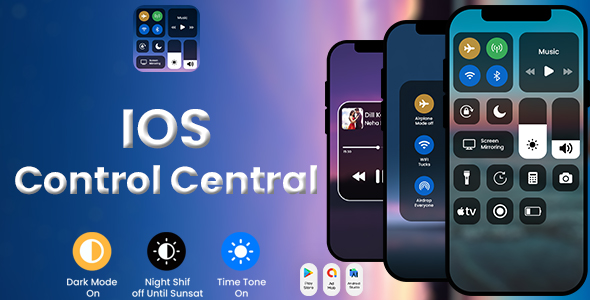
Control Center gives you instant access to the things you do the most. You can use Control Center to quickly take a picture, turn on Wi-Fi, screen recorder, and more. iControl – Control center iOS 16 for android is very easy to use, everyone can use quick.
Main features of iControl – Control Center OS16 app: -tSimple interface, easy to use, without hanging -tEasy to resize the notch of control panel -tSupport to change color of the notch -tSupport Night Shift mode: Night shift automatically shifts the colors of your display to the warmer end of the color spectrum after dark. This may help you get a better night’s sleep. -tEasy to customize the Control Center to your liking with Control Center for Android, you can quick settings and quickly access multiple settings and apps. -tAirplane Mode: Use Airplane Mode to instantly turn off Bluetooth, Wi-Fi, and cellular connections on your android device. -tWi-Fi: Turn on/ turn off Wi-Fi -tBluetooth: Turn on/ turn off Bluetooth -tDo Not Disturb: Silence calls, alerts, and notifications that you receive while your device is locked. -tPortrait Orientation Lock: Keep your screen from rotating when you move your device. -tAdjust brightness: Adjust the brightness of your display from any screen. -tFlashlight: The LED flash on your camera doubles as a flashlight, so you can get extra light when you need it. -tAlarms and Timer: Set an alarm, timer, or stopwatch, or check the time in another country or region. -tMobile hotspot: easy to make a personal hotspot and share your internet. -tVolume controller: change volume ringtone, music, alarm, notification, and system sound. -tControl audio/Music Player: From Control Center you can quickly play, pause and control volume of your favorite songs -tPin favorite application in Control panel, the maximum is 12 controls.
How to open and close Control Center? -tTo open Control Center, swipe down from the top-right corner of your screen. -tTo close Control panel, swipe up from the bottom of the screen or tap the screen.
Edit iControl on your Android phone You can customize Control Center by adding controls for apps, settings, and features like Camera, Music Recognition, Dark Mode, and more.
How to customize what you see in Control Center You need to add a control for some apps, settings, and features in order to use them from Control Center.
How to add a control Go to Control Center -> Custom Controls Tap the Add button. The maximum is 12 controls.
How to remove a control Go to Control Center -> Custom Controls Tap the Remove button, then tap Remove.
How to rearrange a control Go to Control Center -> Custom Controls Touch and hold the gray lines icon and move the controls in the order that you want.
NOTE ACCESSIBILITY SERVICE This app uses ACCESSIBILITY SERVICE To enable Control Center, please allow Accessibility services. The service is only used to allow this app to draw on phone’s home screen and status bar.
Categories
Tags
External listing. code.market does not sell this product and does not process payment for it. Pricing, payment, delivery, licensing, refunds, and support are handled by the third-party merchant on its own website. We may earn an affiliate commission from a referral. Details.
Products of the Week.
Submit#1

Substack Posting API
Onboard your Agent to Substack. Write Publish on Substack via API
29,107 views · 174 clicksWeek 41 · 29,107 views · 174 clicks
#2

appstackbuilder.com
appstackbuilder solves the problem of scattered, time-consuming tech research by helping users generate tailored tech stacks and discover relevant AI, SaaS, and developer tools in one place. It’s built for founders, developers, indie hackers, and startup teams planning new products or comparing software options.
Other · 12,957 views · 37 clicksOther · Week 41 · 12,957 views · 37 clicks
#3

productshotai.app
Create ecommerce product photos from one upload with ProductShot AI. Make white-background, studio, lifestyle, and marketplace images for Amazon, Shopify, and Etsy.
Other · 13,103 views · 25 clicksOther · Week 41 · 13,103 views · 25 clicks
#4

aiproductads.app
AIProductAds is an AI Product Ad Generator that turns product photos into video ads and product images for ecommerce on aiproductads.app.
Other · 12,853 views · 24 clicksOther · Week 41 · 12,853 views · 24 clicks