Gravity Forms Schedule Entries Export
Description
Gravity Forms Schedule Entries Export
This plugin is the add-on for the Gravity Forms plugin. With the add-on, you can set a scheduled task and export any Gravity Forms entries to the CSV file. Also, the file can be sent to the given email address list.
So if you have a form collecting user submissions, the add-on can send exported entries automatically to your email (by a schedule).
How it works?
Create a form on your website (using the Gravity Forms plugin), then just collect information submitted by your customers. All users data are saved as entries.
In the following screenshot you can see the Test form and the form’s entries.
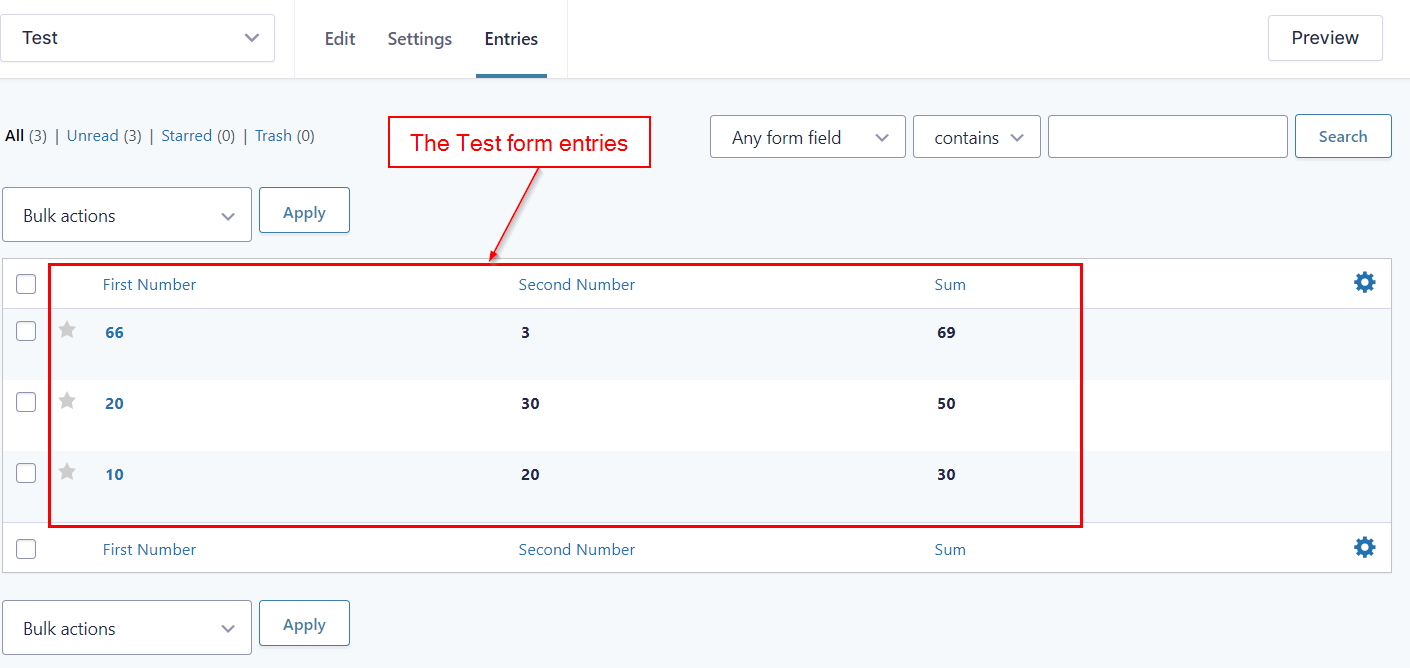
The example form has just three records. However, in the real form, you can get a lot of entries daily. Therefore you may want to schedule an email and receive it automatically with the attached file that includes the entries.
To do that just go to the Form Setting page and click on “ Schedule Export Entries” tab.
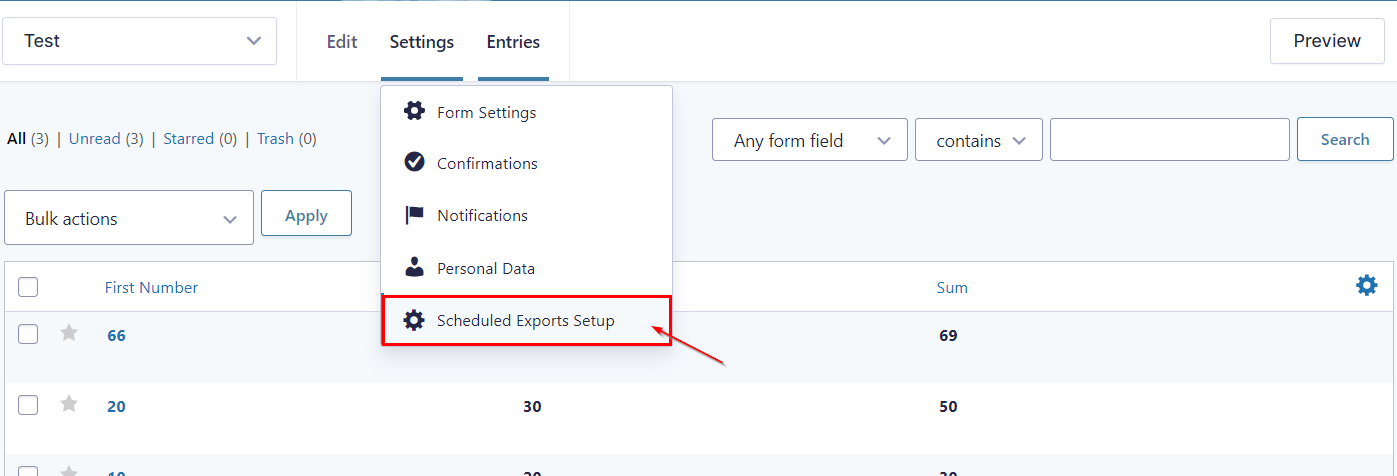
You will see “Schedule Export Entries Feeds” page for the form. Just click on a “Add New” button and create a new task to export the entries automatically. Also, you can see the “Current time” value on this page. It should help you to create task, because the website’s current time and your local time on the computer can be different. The plugin works with website time.
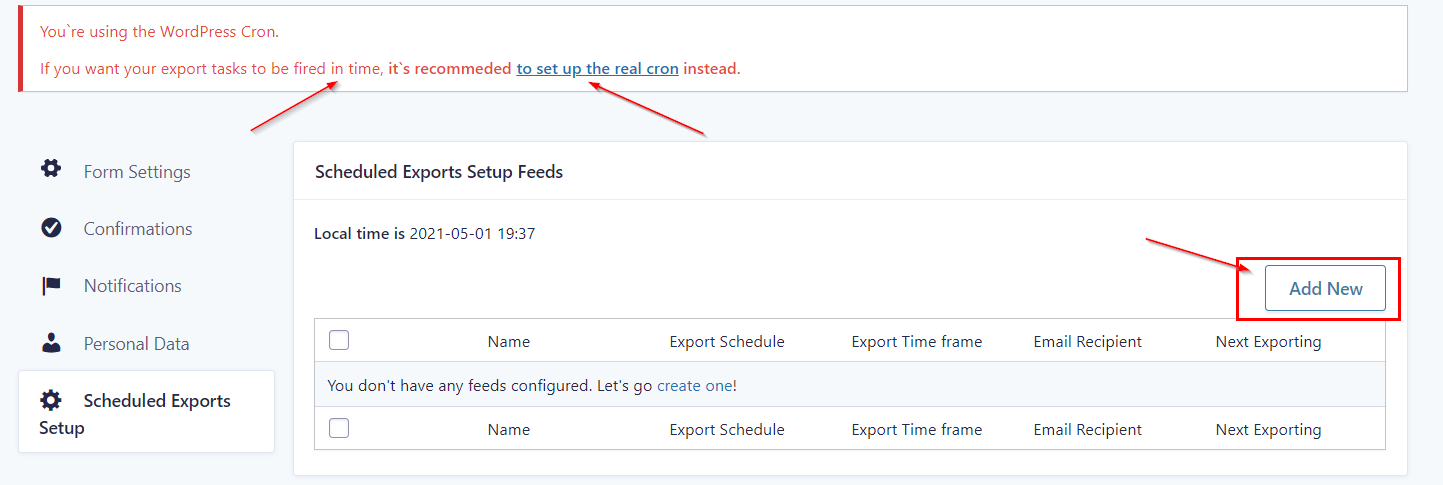
Please look at screenshots below there is an example of the new task Setting page.
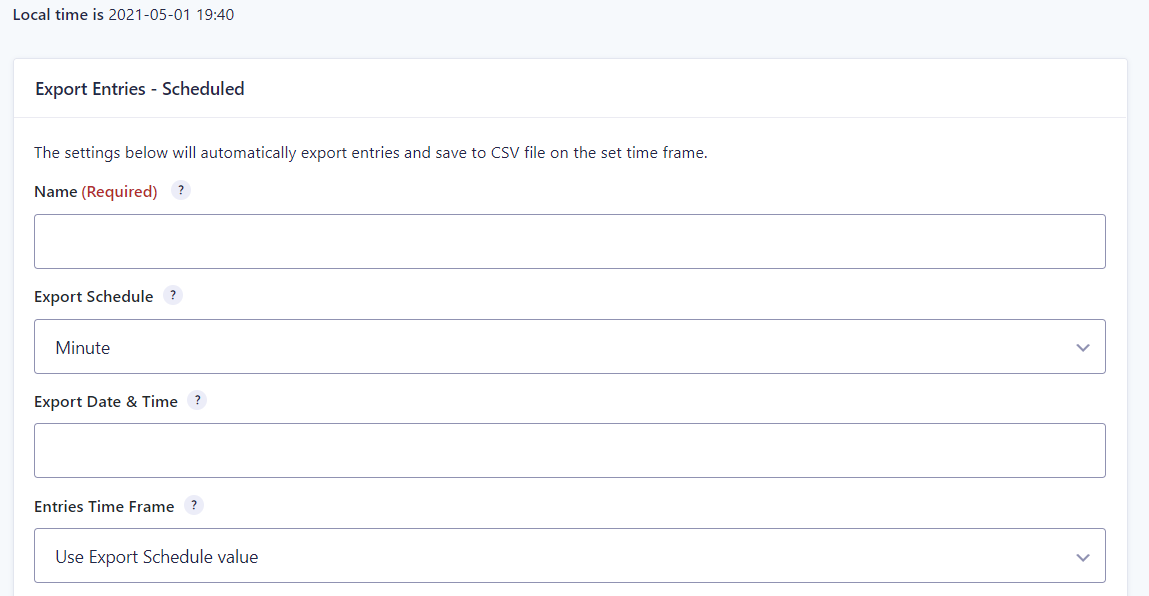
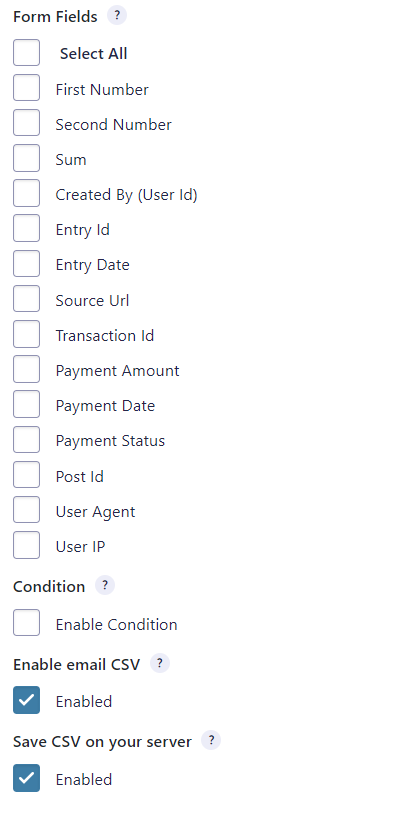
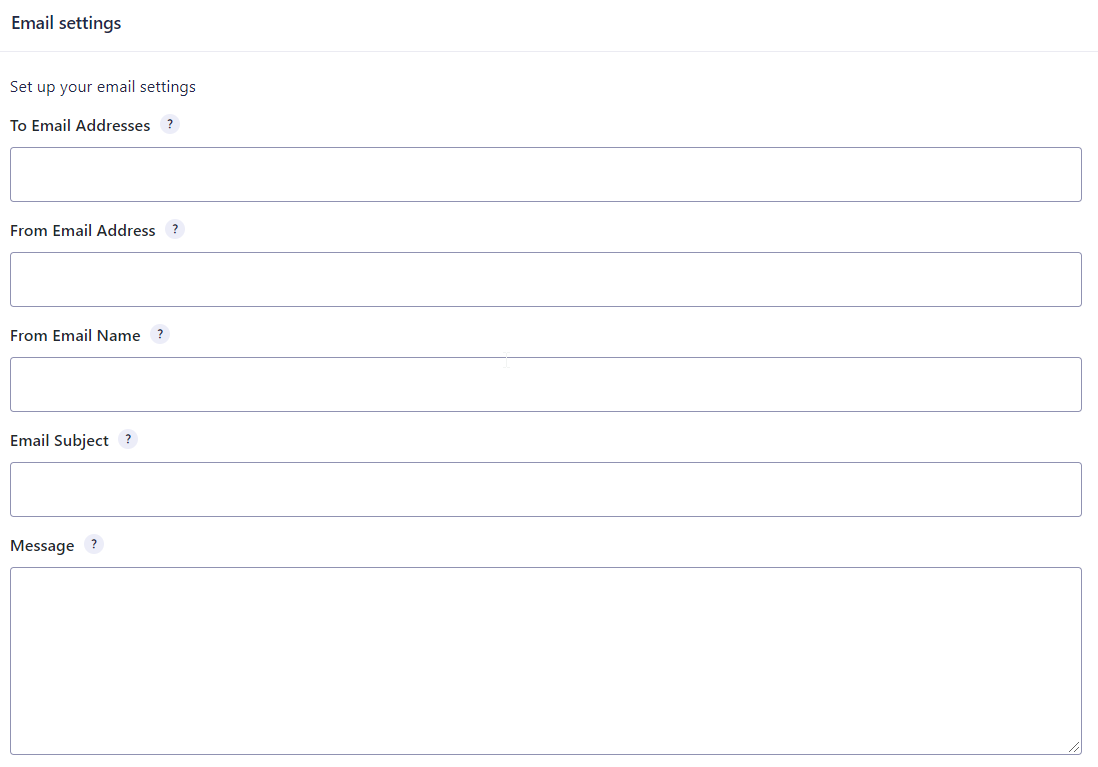
You can set up to get the exports to your email. Also It’s possible to set several email addresses.
Also it’s possible to allow saving the export file on your server. Tod do that just set a export folder. By default plugin use the website root folder. You can change it. Once you save the changes, the plugin checks whether the folder is writable.
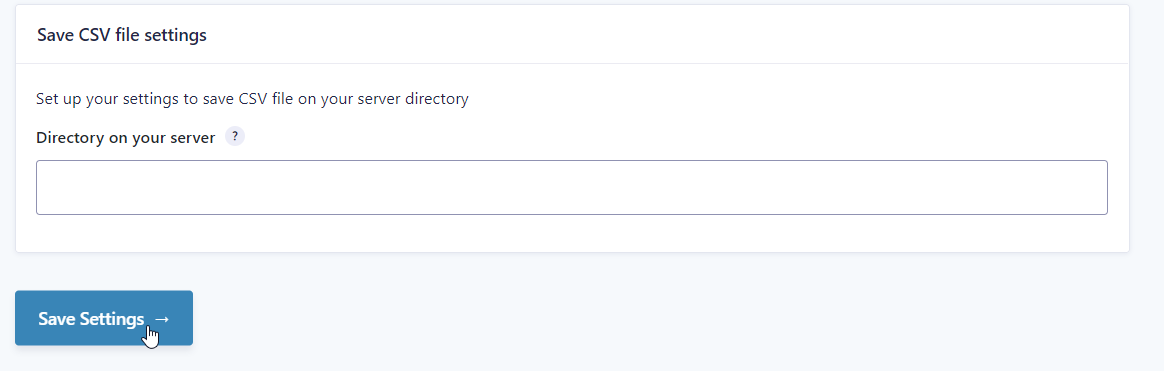
Please note you need save your task. After that you are done and your task will be executed on a schedule.
The new task Setting page Fields
As you can see in the previous screenshots, there are different fields to configure your task. Lets dicuss each one:
- Name – required field, enter some unique name to identify your task.
- Export Schedule – required field, set how frequently the entries are exported and emailed..
- Custom Start Date – Set the custom start date when the first export should be done (for a minute, hourly and daily schedules only)
- Export Time Frame – required field, set a time frame within which the entries should be selected..
- To Email Addresses – enter a comma-separated list of email addresses you would like to receive the exported entries file.
- From Email Address – enter the email address you would like the exported entries to file sent from.
- From Email Name – Enter the email name you would like the exported entries to file sent from. You can leave it empty to use the default name.
- Message – enter a message for the export email.
- Form Fields – required field, select the fields you would like to include in the export.
- Condition – set conditional logic that must be met before sending the export.
- Enable email CSV – send the email after the export is done.
- Save CSV on your server – save the export data on the server in a file
- Directory on your server – set a directory on your server when the export file should be saved; the path should be relative to your website root.
Linux Cron Job vs. WP-Cron
Have you ever noticed that your scheduled posts in WordPress are missing? Though WordPress has its own cron feature that dictates the scheduling of your blog’s posts and events, WP-cron is not a literal cron job.
Linux cron jobs can be controlled by the user, making certain that the items constrained by schedule are run appropriately. Also, for a high-traffic WordPress site, a Linux cron job can assist with reducing the chances of downtime by lowering the bandwidth on the server, thus using less server resources.
WP-cron is a virtual cron that only works when the page is loaded. WP-cron is first loaded by WordPress when a page is requested on the front or backend of a site at which point WP-cron displays the necessary page to the site visitor.
How to Replace WP-Cron With a Linux Cron Job
The best way to optimize the efficiency of your WordPress cron jobs is to disable WP-cron and set up a normal cron job through cPanel which will run every hour.
- Disable wp-cron.php
You can disable WP-cron by modifying the wp-config.php (located in the folder where WordPress is installed). Open the wp-config.php file, add a new line after <?php, then add the following code on the new line:
define('DISABLE_WP_CRON', true); - Disable wp-cron.php
- To set up a Linux cron job:
- Log into your cPanel.
- In the Advanced section, click Cron jobs.
- Under Add New Cron Job, select the time interval. We recommend that you do not set the interval lower than 15 minutes.
- Set the cron command to the following, replacing yourwebsite.com with your actual domain name:
wget -q -O - >/dev/null 2>&1 - Click Add New Cron Job to set the cron.
When exporting to CSV, I do not receive the emails? Why?
If you have problem with getting the emails, please make sure you have enabled the Enable email CSV option. Also note the email will be sent if the export includes at least one entry. If you have checked all options, but emails are not received, please send the request to your hosting/server provider and ask why the default WordPress email function doesn’t work on your account. They often able to solve your issue very fast.
Change Log
Version 1.5.3 - 22 Dec 2022
## Add compatibility with Gravity Form 2.6.*;
## Refactor plugin code;
Version 1.5.1 - 08 May 2021
## Fixed; wrong calculation of the next export date if monthly or yearly periods are set in Export Schedule
Version 1.5.0 - 01 May 2021
## Added support for Gravity Forms v2.5
## Fixed code bugs related to PHP 7.1+
## Code refactoring
## Simplified date & time schedule for export tasks
## Replace datetimepicker library with a more maintained version
Version 1.4.7 - 04 July 2020
## Fixed a bug occurring when the export start date is set for such schedules as weekly, monthly, or yearly.
## Fixed a bug occurring when the next export date calculation is done wrong if the next export data is set as less than the current date.
## Fixed a bug with the export toggle button.
Version 1.4.4 - 15 June 2020
## Fixed the bug causing receiving of the empty export file
External listing. code.market does not sell this product and does not process payment for it. Pricing, payment, delivery, licensing, refunds, and support are handled by the third-party merchant on its own website. We may earn an affiliate commission from a referral. Details.
Products of the Week.
Submit#1

upvote.club
Free Social Media Engagement that Helps Boost Your Content. Upvote Club supports 19 social networks with 100+ engagement actions in one dashboard. Add links to your posts and get free engagement from real users.
SaaS · 16,193 views · 96 clicksSaaS · Week 42 · 16,193 views · 96 clicks
#2

Seenshot App
Free, Fast, MacOS Screenshot app. Make Screenshot cmd+shift+2 and send it via link
Desktop App · 5,210 views · 109 clicksDesktop App · Week 42 · 5,210 views · 109 clicks
#3

Conversational Backlinks for Busy Founders
Place Backlink Relevant Conversation for your domain across Forums and Conversations
Website · 17,038 views · 195 clicksWebsite · Week 42 · 17,038 views · 195 clicks
#4

Substack Posting API
Onboard your Agent to Substack. Write Publish on Substack via API
SaaS · 36,029 views · 184 clicksSaaS · Week 42 · 36,029 views · 184 clicks
#5

codester.com
SocialDesk+: Omnichannel Social Commerce & Business Management Platform This is stronger than simply “Social Commerce and Messaging” because it tells buyers this is a complete business platform, not just a messaging script. Turn Social Conversations Into Sales SocialDesk+ is a complete omnichannel social commerce and business management platform built for businesses that sell and communicate with customers through social media. Instead of switching between WhatsApp, Facebook, Instagram and TikTok, businesses can manage customer conversations, comments, products, leads, follow-ups, automation, teams and business reports from one professional workspace. And because the full source code is included, developers, agencies and entrepreneurs can customize, rebrand and launch SocialDesk+ as their own business solution or SaaS platform. 🚀 Build Your Own Social Commerce Business SocialDesk+ gives you the foundation to launch: - Your own SaaS platform - A white-label social CRM - A social-commerce management system - A customer communication platform - A business messaging solution - A custom solution for clients - A multi-business subscription platform 💬 Connect Your Customers Supported social channels include: WhatsApp • Facebook • Instagram • TikTok Bring supported conversations into one centralized workspace and help businesses respond faster without constantly switching between platforms. 🛍️ More Than a Messaging Platform SocialDesk+ combines communication with the tools businesses need to manage customer opportunities: Inbox Manage customer conversations from connected channels. Comments Monitor and respond to social-media comments. Customers & Leads Organize customer information and potential buyers. Products & Catalog Manage products and give your team quick access to product information. Follow-Ups Make sure potential customers don't get forgotten. Automation Automate repetitive customer questions and responses. AI Assistant Provide AI-assisted communication when configured. Team Management Give managers and staff access to the business workspace. Reports & Analytics Track activity using business reports and analytics. The current product listing already includes these capabilities. 🔥 Why Buyers Will Want It Launch Faster Start with an already-built business platform instead of developing the entire system from zero. Customize Everything The full source code is included, allowing developers to change branding, features, workflows and integrations. Build a SaaS Create multiple business workspaces and offer SocialDesk+ as a subscription-based service. Sell to Businesses Offer it to retailers, restaurants, service businesses, online sellers, agencies and other businesses that communicate with customers through social media. Mobile + Web + Backend This isn't just a mobile UI template. It includes: - Flutter mobile application - Python / FastAPI backend - Web interface - Administration tools - Database infrastructure - API-based architecture - SQLite / PostgreSQL support - Android and iOS project structure 💼 One Platform. Multiple Business Opportunities. For SaaS Entrepreneurs Launch your own subscription platform and allow multiple businesses to operate inside separate workspaces. For Software Agencies Customize and rebrand the platform for clients instead of building an omnichannel business system from scratch. For Developers Use the complete source code as a foundation for your own social-commerce or customer-management product. For Businesses Deploy a dedicated version for your own customer-service and social-commerce operations. 🧩 What's Included Mobile - Flutter / Dart - Android - iOS project Backend - Python - FastAPI - SQLAlchemy - Alembic Database - SQLite - PostgreSQL Web - HTML5 - CSS3 - JavaScript Deployment - Docker - Docker Compose - Production configuration Business Platform - Multi-workspace architecture - Authentication - Teams - Customers - Products - Messaging - Comments - Automation - Reports - Subscriptions - Administration The current listing also documents third-party integrations such as Meta, TikTok, Stripe, Firebase, SMTP and optional OpenAI configuration. ⚡ What Makes SocialDesk+ Different? You're not buying a simple: ❌ Chat UI ❌ WhatsApp clone ❌ Flutter template ❌ Admin dashboard ❌ Basic CRM You're getting a complete business platform foundation that can be customized, branded and commercialized. Connect. Automate. Manage. Grow. SocialDesk+ Omnichannel Social Commerce & Business Management Platform One important change I'd make to the current listing The current page starts with: “A simple guide to managing your social conversations, customers, products and business activity.”
Other · 3,441 views · 30 clicksOther · Week 42 · 3,441 views · 30 clicks
#6

sandbook.app
Sandbook reads EPUB, PDF, web pages and scanned pages aloud with Kokoro TTS, an open neural voice model that runs on your iPhone, free and offline. Choose from 41 natural voices in English, Spanish, French, Italian, Brazilian Portuguese and Hindi and follow each word as it is spoken. Try the same voices in your browser first with the free Kokoro TTS online demo.
Other · 3,445 views · 13 clicksOther · Week 42 · 3,445 views · 13 clicks