Freshmail, Responsive Email with Template Editor
Description


Freshmail, Responsive Email with Template Editor
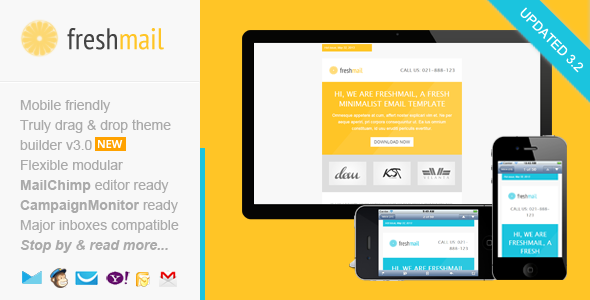
Freshmail is a fresh, responsive, email marketing template designed with minimalist style in mind. Free online template builder / editor, MailChimp ready templates, Campaign Monitor & MyMail ready templates are also included. Freshmail comes with flexible and repeatable modular, you can arrange the layout and build your own unique template easily. More than that, it’s also packed detailed help documentation, along with video tutorials. Whether for newsletter campaign, sponsorship email, even lead nurturing, Freshmail suitable for all of email marketing type. We’re about preparing important updates on our online template editor! Improvements & added some more useful features for our lovely users Make sure to subscribe to our newsletter, we’ll let you know when it’s ready

 Freshmail in MailChimp powerful editor
Freshmail in Campaign Monitor powerful editor
Freshmail in Mailster plugin powerful editor
Short video – Freshmail in iPhone inbox
Freshmail in MailChimp powerful editor
Freshmail in Campaign Monitor powerful editor
Freshmail in Mailster plugin powerful editor
Short video – Freshmail in iPhone inbox

Drag and Drop Theme Builder / Editor
Drag & drop, add, remove, arrange modules easily. Customize the color schemes, edit both text and image content. Download it in .zip file contain regular HTML and image files

MailChimp Ready
Add & remove modules or hide elements, easily with MailChimp editor. You can also set the theme color directly via MailChimp editor. There’s a detailed insruction from how to upload and setup template in to your MailChimp account, customize it, up to sending & testing email.

Campaign Monitor Ready
Add or remove modules easily with Campaign Monitor editor. There’s also a detailed insructions (including video) from how to upload and setup template in to your Campaign Monitor account,customize it, up to sending & testing email.

MyMail WP Plugin Ready
Add or remove modules easily with MyMail plugin editor. You can also set the theme color directly via the editor. There’s also a detailed insructions (including video) from how to upload and setup template in to your WordPress website, customize it, up to sending & testing email.


- Free access to our new, simple, easy-to-use Template Builder. Customize the template easily, add, remove, arrange modules as your needs. Edit color scheme, edit text and image content.
- Maximum clients compatibily, in all major email clients. From old Outllook 2010 up to the most used clients like Apple iPhone.
- Mobile friendly, coded with media query CSS
- Well-commented codes
- Ready for Campaign Monitor, MailChimp, and MyMail plugin powerful template editor!
- Flexible modular that you can very easy to remix them to create your own layout.
- Flexible button with inline CSS (guide to create your own button, see next section). Very easy to make your own button and flexible to place it as your needs.
- On-going support along with detailed help documentation files (including the videos) – (cover how to work with PSD file, work with the HTML file, up to sending email with most popular email marketing services like MailChimp, GetResponse, Campaign Monitor, AWeber, MyMail plugin, and how to create your own button).
- Major email inbox compatible (test both direct and tool). Direct test on my Android 4.1.2 phone, iPhone mail, Gmail (IE, Chrome, Firefox, Safari), Yahoo Mail (Chrome, Firefox, Safari), Outlook 2010, Windows Live Mail. Online test using Inbox inspector from Getresponse
- Easy to copy, add or remove modules with clear comments in codes. Even you can mix and create your own layout variations while everything is still working properly. For MailChimp and Campaign Monitor users, add, remove, move, edit blocks content via their powerful editor.
- Sliced PSD files included.


What you’ll get in the download package:
- Total 10 HTML files, with 1 mixed modules variations.
- 2 HTML files for MailChimp templates (in separated folder)
- 2 HTML files for Campaign Monitor templates (in separated folder)
- 4 HTML files for MyMail WP plugin templates (in separated folder)
- and 2 other for regular HTML templates
- 6 PSD files
- Image files, in the “images” folder in each of layout and color variations.
- Help Docs – Including videos.
Compatible Browsers:
- Android
- AOL Mail Chrome
- AOL Mail Explorer
- AOL Mail Firefox
- Apple Mail
- Gmail
- Hotmail
- iPad
- iPhone 3, 4 and 5
- Mozilla Thunderbird
- Opera Mail
- Outlook 2010
- Outlook 2013
- Outlook.com
- Windows Live Mail
- And mostly all clients that render valid HTML
Notes
- Background image in the featured area is using bulletproof codes, so it’s working in most major clients, including Outlook.
Update history
Version 3.1 – May 15 2015
- Updated error codes in all templates version that causing issue in Outlook
Version 3.0 – April 7 2015
- Updated theme builder. Added more useful features.
- Major template code updates
- Improved MailChimp template version
Update 2.1 December 2, 2014
- Added new full width image block on all template versions
- Fixed responsive issue on MailChimp templates version
- Fixed code issue on MyMail templates version
Update 2.0 October 22, 2014
- Major code updates on all template version
- Added a free access to our new template builder / editor
Update 1.5 / November 12 2013:
- Improved MyMail templates version. Added the ability to automatic grab the blog post to newsletter content.
Update 1.4 / November 08 2013:
- Fix minor issue on MyMail templates version
Update 1.3 November 06 2013:
- Added MyMail plugin ready templates
Update 1.2 – October 28, 2013
- Major codes update for email clients compatibility and mobile responsive.
pdate 1.1 – July 24, 2013
- Added better MailChimp and Campaign Monitor integration (with their powerful editor)
- Improved codes for responsive target
Support requests
For support related, please send me your support request / question, or any advice via this contact form. I will respond you usually within 24 hours in Monday – Friday.Credits
Font awesome icons Thanks to CanYigit for allowing me use his portfolio images in live preview. Images on the demo are not included on the download package, replaced with placeholder images.Categories
Tags
External listing. code.market does not sell this product and does not process payment for it. Pricing, payment, delivery, licensing, refunds, and support are handled by the third-party merchant on its own website. We may earn an affiliate commission from a referral. Details.
Products of the Week.
Submit#1

upvote.club
Free Social Media Engagement that Helps Boost Your Content. Upvote Club supports 19 social networks with 100+ engagement actions in one dashboard. Add links to your posts and get free engagement from real users.
SaaS · 17,249 views · 96 clicksSaaS · Week 42 · 17,249 views · 96 clicks
#2

Seenshot App
Free, Fast, MacOS Screenshot app. Make Screenshot cmd+shift+2 and send it via link
Desktop App · 6,184 views · 109 clicksDesktop App · Week 42 · 6,184 views · 109 clicks
#3

Conversational Backlinks for Busy Founders
Place Backlink Relevant Conversation for your domain across Forums and Conversations
Website · 18,000 views · 197 clicksWebsite · Week 42 · 18,000 views · 197 clicks
#4

Substack Posting API
Onboard your Agent to Substack. Write Publish on Substack via API
SaaS · 36,987 views · 185 clicksSaaS · Week 42 · 36,987 views · 185 clicks
#5

codester.com
SocialDesk+: Omnichannel Social Commerce & Business Management Platform This is stronger than simply “Social Commerce and Messaging” because it tells buyers this is a complete business platform, not just a messaging script. Turn Social Conversations Into Sales SocialDesk+ is a complete omnichannel social commerce and business management platform built for businesses that sell and communicate with customers through social media. Instead of switching between WhatsApp, Facebook, Instagram and TikTok, businesses can manage customer conversations, comments, products, leads, follow-ups, automation, teams and business reports from one professional workspace. And because the full source code is included, developers, agencies and entrepreneurs can customize, rebrand and launch SocialDesk+ as their own business solution or SaaS platform. 🚀 Build Your Own Social Commerce Business SocialDesk+ gives you the foundation to launch: - Your own SaaS platform - A white-label social CRM - A social-commerce management system - A customer communication platform - A business messaging solution - A custom solution for clients - A multi-business subscription platform 💬 Connect Your Customers Supported social channels include: WhatsApp • Facebook • Instagram • TikTok Bring supported conversations into one centralized workspace and help businesses respond faster without constantly switching between platforms. 🛍️ More Than a Messaging Platform SocialDesk+ combines communication with the tools businesses need to manage customer opportunities: Inbox Manage customer conversations from connected channels. Comments Monitor and respond to social-media comments. Customers & Leads Organize customer information and potential buyers. Products & Catalog Manage products and give your team quick access to product information. Follow-Ups Make sure potential customers don't get forgotten. Automation Automate repetitive customer questions and responses. AI Assistant Provide AI-assisted communication when configured. Team Management Give managers and staff access to the business workspace. Reports & Analytics Track activity using business reports and analytics. The current product listing already includes these capabilities. 🔥 Why Buyers Will Want It Launch Faster Start with an already-built business platform instead of developing the entire system from zero. Customize Everything The full source code is included, allowing developers to change branding, features, workflows and integrations. Build a SaaS Create multiple business workspaces and offer SocialDesk+ as a subscription-based service. Sell to Businesses Offer it to retailers, restaurants, service businesses, online sellers, agencies and other businesses that communicate with customers through social media. Mobile + Web + Backend This isn't just a mobile UI template. It includes: - Flutter mobile application - Python / FastAPI backend - Web interface - Administration tools - Database infrastructure - API-based architecture - SQLite / PostgreSQL support - Android and iOS project structure 💼 One Platform. Multiple Business Opportunities. For SaaS Entrepreneurs Launch your own subscription platform and allow multiple businesses to operate inside separate workspaces. For Software Agencies Customize and rebrand the platform for clients instead of building an omnichannel business system from scratch. For Developers Use the complete source code as a foundation for your own social-commerce or customer-management product. For Businesses Deploy a dedicated version for your own customer-service and social-commerce operations. 🧩 What's Included Mobile - Flutter / Dart - Android - iOS project Backend - Python - FastAPI - SQLAlchemy - Alembic Database - SQLite - PostgreSQL Web - HTML5 - CSS3 - JavaScript Deployment - Docker - Docker Compose - Production configuration Business Platform - Multi-workspace architecture - Authentication - Teams - Customers - Products - Messaging - Comments - Automation - Reports - Subscriptions - Administration The current listing also documents third-party integrations such as Meta, TikTok, Stripe, Firebase, SMTP and optional OpenAI configuration. ⚡ What Makes SocialDesk+ Different? You're not buying a simple: ❌ Chat UI ❌ WhatsApp clone ❌ Flutter template ❌ Admin dashboard ❌ Basic CRM You're getting a complete business platform foundation that can be customized, branded and commercialized. Connect. Automate. Manage. Grow. SocialDesk+ Omnichannel Social Commerce & Business Management Platform One important change I'd make to the current listing The current page starts with: “A simple guide to managing your social conversations, customers, products and business activity.”
Other · 4,400 views · 32 clicksOther · Week 42 · 4,400 views · 32 clicks
#6

sandbook.app
Sandbook reads EPUB, PDF, web pages and scanned pages aloud with Kokoro TTS, an open neural voice model that runs on your iPhone, free and offline. Choose from 41 natural voices in English, Spanish, French, Italian, Brazilian Portuguese and Hindi and follow each word as it is spoken. Try the same voices in your browser first with the free Kokoro TTS online demo.
Other · 4,394 views · 13 clicksOther · Week 42 · 4,394 views · 13 clicks