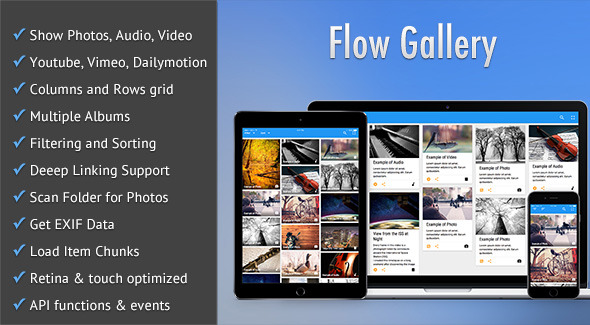
Flow Gallery - HTML5 Multimedia Gallery
Description
Experience Multimedia like never before with Flow Gallery
Showcase your photography/audio/video work with ‘Flow Gallery’; the ultimate professionally developed jQuery plugin based HTML5 Multimedia Gallery.
Choose from column or row layouts and present your best work in style with this epic gallery plugin. Flow Gallery supports YouTube, Vimeo and DailyMotion as well as any stock footage and other self-hosted video/audio making it perfect for almost every occasion.
What are you waiting for – take a look for yourself!

Select how to display your multimedia with support for multiple albums, deep linking, filtering and sorting. Your best work has never looked better.
Stunning CSS3 animations make transitions mesmerising to watch and creates that ‘sticky’ experience for your users.
Award Winning Material Design!

2015 Envato Winner: Material Design on CodeCanyon
Material Design is an interactive design language developed by Google, and Flow Gallery was voted best Material Design item on CodeCanyon, Envato Market in 2015. It is designed with best practice coding techniques to provide the most modern design available in market today.
Of course Flow Gallery gives you more pixels per square inch meaning it is ready for your Retina Ready devices, featuring a thoroughly Responsive design which is optimised for touchscreen devices.
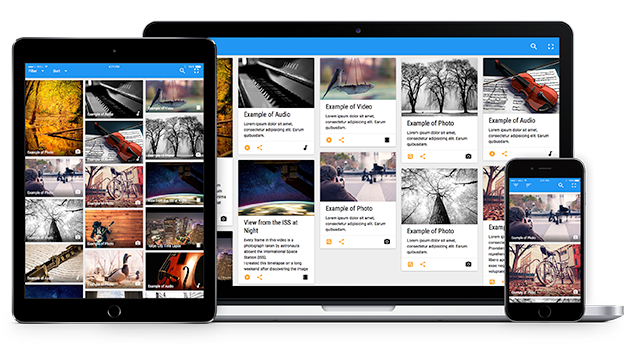
It displays beautifully across all types of devices, mobile/cell phones, Tablets and all desktop browsers while providing the unique feel of a native app.
You can pass an mp4 file for video, and mp3 file for audio, or pass all the necessary formats for the widest possible support of native HTML5 playback. Flow Gallery plays audio/video using HTML5 in supported browsers and Flash in older browsers.
Still not convinced? Explore the Demos Now!
Whatever you choose to do Flow Gallery will work in both modern and old browsers (with suitable fallbacks where necessary).
Not a jQuery genius? Not experienced enough to implement on your WordPress site? Good news then! We have also developed a hassle free WordPress Plugin with all of the same amazing features without the need for any coding. Flow Gallery for WordPress is available separately here.
Extended Functionality with Purpose Built Extensions
Still want more? Of course you do, and we’ve got you covered. Developed by the same team that brought you Flow Gallery are a range of extremely powerful add-ons (extensions) that give you increased functionality and bring further options to this already extensive Plugin.
Photo Feed
Designed in conjunction with Flow Gallery, Photo Feed provides you the ability to pull feeds from Flickr and Picasa – save valuable time without duplicating uploads! Complete compatibility guaranteed. Available here (sold separately)
Video Feed
Already have an extensive collection of video assets that you don’t want to recreate in Flow Gallery? Video Feed is a purpose built extension for you! Video Feed provides you the ability to pull feeds from YouTube, Vimeo and Dailymotion to build your gallery in just a few clicks. Available here (sold separately)
Social Feed
You’ve got a gazillion followers on Instagram, Facebook, Pinterest & Dribble and you want to use them in Flow Gallery, right? Social Feed is the solution, providing you the options to pull feeds automatically from these Social Media giants, all 100% compatible with Flow Gallery. Available here (sold separately)
Feature List:
- Display photography, audio and video including self hosted multimedia.
- All gallery data is passed either as JSON or as a javascript object.
- Choose columns or rows to display your work
- Plays audio and video natively in modern HTML5 browsers and switches over to Flash/Silverlight for older browsers.
- Can embed Youtube, Vimeo and Dailymotion videos.
- Supports multiple gallery albums or sets.
- Items can be shown as cards or as tiles. Also albums can be shown with stacked effect or as tiles.
- Items can have titles and/or descriptions with various options of showing them based on item display style.
- There are numerous options of animating item/album entrances, titles, descriptions and the lightbox.
- Filter items by file type or custom categories.
- Sort items by title, type or custom sort parameters, both numeric and alphabetic and in either ascending or descending order.
- Show/hide the various menu bar components, fix the menu bar on page scroll, or even hide it completely. Also the option to provide custom labels for the various menu bar components
- True HTML5 Fullscreen option in supported browsers.
- Deep-linking feature which provides links to individual items, with album support, allowing you to bookmark/share them.
- Load items in chunks which can either be loaded manually or automatically as the page is scrolled.
- Allow sharing of items to popular social media sites from within the gallery.
- Option to build your gallery by scanning a folder of photos or videos, with support for albums.
- Display your photos’ EXIF data as item descriptions.
- Enable caching of data to have faster loading. Useful for Youtube/Vimeo/Dailymotion, folder scanning, EXIF extraction.
- The gallery items can also act as links to external pages.
- Several useful developer friendly API functions and events have been provided.
Don’t forget we have the same beautiful Flow Gallery Plugin available in WordPress!
Special Notes
- Autoplay option will not work in mobile devices. This is disabled by device manufactures.
- Player volume setting will not show up or work in Android devices. You have to control the volume through the device’s own volume buttons.
- Also some of the modern HTML5 features such as Fullscreen will only work in modern browsers.
- The plugin uses Youtube API v3 for which an API key needs to be obtained from Youtube
- The gallery script has been tested and is fully compatible with jQuery 1.9+. and also jquery 2.0+.
- If you have any query regarding any feature of the gallery before purchasing then please post your query in the comments section and I will get back to you as soon as possible.
Installation Documentation
This item is a jQuery plugin so a basic knowledge of jQuery/JavaScript is required in order to install it successfully, along with some basic HTML and CSS knowledge. Flow Gallery comes complete with detailed walk through and installation documentation.
Support
We manage support Mon – Fri through the Comments section on each item page. Support means:
- Availability of the author to answer questions.
- Answering technical questions about item’s features.
- Assistance with reported bugs and issues.
- Help with included 3rd party assets.
Reviews
Changelog
Version 2.0.2 (3 February, 2021)
• Fixed an issue with parsing the response from the Vimeo API
Version 2.0.1 (24 May, 2016)
• Fixed a video size issue in Chrome.
Version 2.0.0 (10 February, 2016)
• Added the ability to create a gallery instance by scanning a folder of videos.
• Custom categories can be now specified when scanning a folder of photos/videos.
• Provided the ability to specify custom labels for the various components in the gallery menu bar.
• Added the option to specify the maximum video width inside the lightbox.
• Added the option to hide the names of categories in the Filter menu for which there are no galley items present.
• Thumbnails in the gallery are now provided with alt tags containing the item titles.
• Fixed an issue with the playing of audio and videos in mobile devices.
Version 1.6.3 (13 January, 2016)
• Fixed a problem with deep linking of items and social media sharing when the shuffle option was enabled.
Version 1.6.2 (30 November, 2015)
• Fixed an automatic chunk loading bug when the gallery was made fullscreen.
• Fixed a bug that prevented the "columns" mode from working when the gallery container did not have an id attribute.
• Added a css fix to prevent animation flickers in Chrome.
Version 1.6.1 (30 July, 2015)
• Fixed a bug with onscroll chunk loading that showed a brief flash of extra padding.
• Fixed a bug with chunk loading when albums were present in the gallery.
• Fixed an item height issue in "rows" style grid.
• Fixed a video fullscreen bug.
Version 1.6 (5 May, 2015)
• Fixed an issue with jQuery.extend() that was happening when plugin parameters contained arrays.
• Added two events related to the overlay or lightbox of the gallery.
• Added six new API methods.
Version 1.5 (27 April, 2015)
• Fixed a bug with the filtering/sorting animation.
• Fixed a bug with the menubar navigation when there were albums.
• Added better support for HTML5 Fullscreen in IE11.
• When the lightbox/overlay is open then items can now be browsed by swiping in touch-screen devices.
Version 1.4 (15 April, 2015)
• The plugin now uses Youtube API v3.
• Fixed a bug with items layout when the browser window was resized.
• Minor js tweaks.
Version 1.3 (3 April, 2015)
• Significant performance improvement in filtering and sorting animations.
• The plugin now shows the index number of the visible item in the modal overlay.
• Some styling tweaks.
Version 1.2 (22 March, 2015)
• Added a new API event that fires when the plugin loads the contents of an album.
• Made some minor tweaks to the plugin's js and css files.
Version 1.1 (16 March, 2015)
• Gallery items/thumbnails can now act as links to external pages with the option of opening those links in new windows/tabs.
Version 1.0.1 (13 March, 2015)
• Fixed some minor bugs.
More Items by CosmoCoder
Categories
Tags
External listing. code.market does not sell this product and does not process payment for it. Pricing, payment, delivery, licensing, refunds, and support are handled by the third-party merchant on its own website. We may earn an affiliate commission from a referral. Details.
Products of the Week.
Submit#1

upvote.club
Free Social Media Engagement that Helps Boost Your Content. Upvote Club supports 19 social networks with 100+ engagement actions in one dashboard. Add links to your posts and get free engagement from real users.
SaaS · 17,473 views · 96 clicksSaaS · Week 42 · 17,473 views · 96 clicks
#2

Seenshot App
Free, Fast, MacOS Screenshot app. Make Screenshot cmd+shift+2 and send it via link
Desktop App · 6,388 views · 109 clicksDesktop App · Week 42 · 6,388 views · 109 clicks
#3

Conversational Backlinks for Busy Founders
Place Backlink Relevant Conversation for your domain across Forums and Conversations
Website · 18,203 views · 197 clicksWebsite · Week 42 · 18,203 views · 197 clicks
#4

Substack Posting API
Onboard your Agent to Substack. Write Publish on Substack via API
SaaS · 37,188 views · 185 clicksSaaS · Week 42 · 37,188 views · 185 clicks
#5

codester.com
SocialDesk+: Omnichannel Social Commerce & Business Management Platform This is stronger than simply “Social Commerce and Messaging” because it tells buyers this is a complete business platform, not just a messaging script. Turn Social Conversations Into Sales SocialDesk+ is a complete omnichannel social commerce and business management platform built for businesses that sell and communicate with customers through social media. Instead of switching between WhatsApp, Facebook, Instagram and TikTok, businesses can manage customer conversations, comments, products, leads, follow-ups, automation, teams and business reports from one professional workspace. And because the full source code is included, developers, agencies and entrepreneurs can customize, rebrand and launch SocialDesk+ as their own business solution or SaaS platform. 🚀 Build Your Own Social Commerce Business SocialDesk+ gives you the foundation to launch: - Your own SaaS platform - A white-label social CRM - A social-commerce management system - A customer communication platform - A business messaging solution - A custom solution for clients - A multi-business subscription platform 💬 Connect Your Customers Supported social channels include: WhatsApp • Facebook • Instagram • TikTok Bring supported conversations into one centralized workspace and help businesses respond faster without constantly switching between platforms. 🛍️ More Than a Messaging Platform SocialDesk+ combines communication with the tools businesses need to manage customer opportunities: Inbox Manage customer conversations from connected channels. Comments Monitor and respond to social-media comments. Customers & Leads Organize customer information and potential buyers. Products & Catalog Manage products and give your team quick access to product information. Follow-Ups Make sure potential customers don't get forgotten. Automation Automate repetitive customer questions and responses. AI Assistant Provide AI-assisted communication when configured. Team Management Give managers and staff access to the business workspace. Reports & Analytics Track activity using business reports and analytics. The current product listing already includes these capabilities. 🔥 Why Buyers Will Want It Launch Faster Start with an already-built business platform instead of developing the entire system from zero. Customize Everything The full source code is included, allowing developers to change branding, features, workflows and integrations. Build a SaaS Create multiple business workspaces and offer SocialDesk+ as a subscription-based service. Sell to Businesses Offer it to retailers, restaurants, service businesses, online sellers, agencies and other businesses that communicate with customers through social media. Mobile + Web + Backend This isn't just a mobile UI template. It includes: - Flutter mobile application - Python / FastAPI backend - Web interface - Administration tools - Database infrastructure - API-based architecture - SQLite / PostgreSQL support - Android and iOS project structure 💼 One Platform. Multiple Business Opportunities. For SaaS Entrepreneurs Launch your own subscription platform and allow multiple businesses to operate inside separate workspaces. For Software Agencies Customize and rebrand the platform for clients instead of building an omnichannel business system from scratch. For Developers Use the complete source code as a foundation for your own social-commerce or customer-management product. For Businesses Deploy a dedicated version for your own customer-service and social-commerce operations. 🧩 What's Included Mobile - Flutter / Dart - Android - iOS project Backend - Python - FastAPI - SQLAlchemy - Alembic Database - SQLite - PostgreSQL Web - HTML5 - CSS3 - JavaScript Deployment - Docker - Docker Compose - Production configuration Business Platform - Multi-workspace architecture - Authentication - Teams - Customers - Products - Messaging - Comments - Automation - Reports - Subscriptions - Administration The current listing also documents third-party integrations such as Meta, TikTok, Stripe, Firebase, SMTP and optional OpenAI configuration. ⚡ What Makes SocialDesk+ Different? You're not buying a simple: ❌ Chat UI ❌ WhatsApp clone ❌ Flutter template ❌ Admin dashboard ❌ Basic CRM You're getting a complete business platform foundation that can be customized, branded and commercialized. Connect. Automate. Manage. Grow. SocialDesk+ Omnichannel Social Commerce & Business Management Platform One important change I'd make to the current listing The current page starts with: “A simple guide to managing your social conversations, customers, products and business activity.”
Other · 4,603 views · 32 clicksOther · Week 42 · 4,603 views · 32 clicks
#6

sandbook.app
Sandbook reads EPUB, PDF, web pages and scanned pages aloud with Kokoro TTS, an open neural voice model that runs on your iPhone, free and offline. Choose from 41 natural voices in English, Spanish, French, Italian, Brazilian Portuguese and Hindi and follow each word as it is spoken. Try the same voices in your browser first with the free Kokoro TTS online demo.
Other · 4,593 views · 13 clicksOther · Week 42 · 4,593 views · 13 clicks