
Essential Grid Magento Extension
Description
THIS EXTENSION DOES NOT WORK WITH WORDPRESS! It is “Magento Community Edition” extension.

Essential Grid Magento Extension The all-purpose grid building solution!
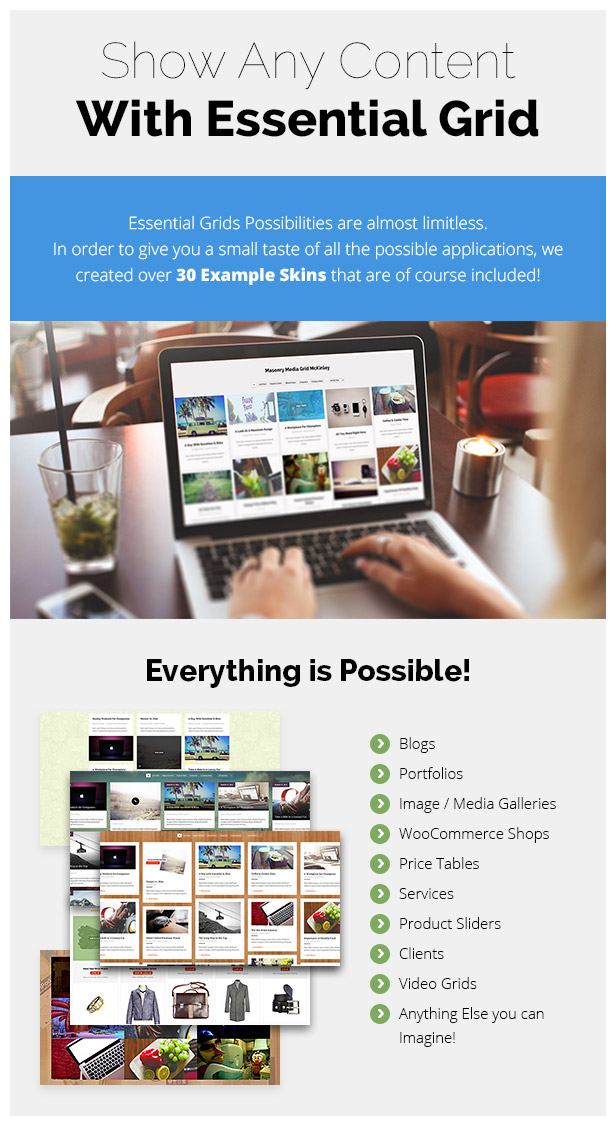
Essential Grid is a premium extension for Magento that allows you to display various content formats in a highly customizable grid. Possible applications range from portfolios, blogs, galleries, product listings, price tables, services, product sliders, testimonials and anything else you can imagine.
- Version 2.2.5 Release Date 13.09.2018

- Dedicated Video Tutorials Channel for Beginners
- All-Purpose Usage
- Boxed, Full-Width, Full-Screen Layouts
- Adjustable Rows/Columns/Spacings
- Images, Youtube & Vimeo Video, HTML5 Self-Hosted Video, iFrame Content
- Content Sources: Post, Custom Post, Pages, WooCommerce, Gallery
- Various Animation Types & Preloaders
- 25+ Example Skins Included
- Responsive & Mobile Optimized
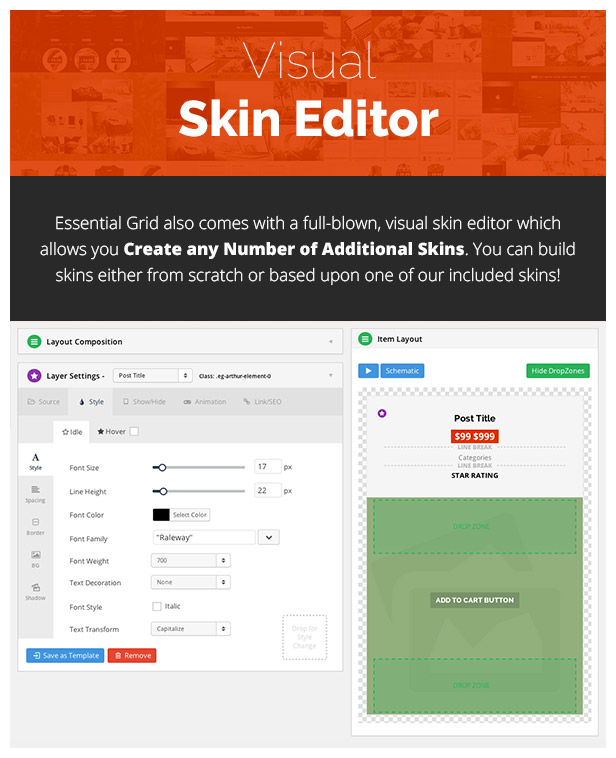
- Visual Skin Editor: Build and Customize own Skins easily
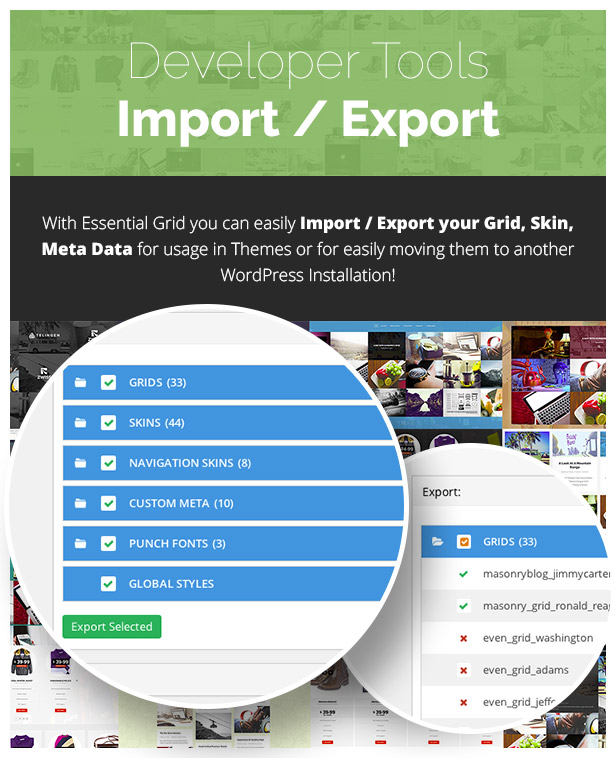
- Easily Import / Export Skins
- Include Custom Skins with extension Install, One-Click Installer
- Custom Metas: Additional Options for Posts
- Custom Post Based Skin Modifications: Special rules for Posts
- Extensive Documentation & Tutorial Videos
- Customizable Transition Speed (Individual / Global)
 If you want to use the Essential Grid extension in your Theme on ThemeForest please purchase
1 extended license for each theme (as long as there is no Developer License available) you put on the marketplace! If you have questions about this agreement please contact us:here
If you want to use the Essential Grid extension in your Theme on ThemeForest please purchase
1 extended license for each theme (as long as there is no Developer License available) you put on the marketplace! If you have questions about this agreement please contact us:here

Version 2.2.5 Artemis (13th September 2018)
NEW FEATURES
- Added Global Option for usage YouTube NoCookie URLs
- Added the ability disable the initial “start” animation
- Added new “start” animation options
- Added new option to animate the grid when scrolled it’s into view
- Added new option to convert inline filters to dropdown on mobile
- Upgraded default Lightbox to FancyBox 3 which includes:
- Ability to display a Slider Revolution, Essential Grid, SoundCloud & iFrame
- Improved Mobile Display and Mobile Usability
- Deep Linking for sharing Lightbox content
- Ability to zoom/pan images at their original size
- New button option to allow for image downloads
- New content display animations
- Upgraded Instagram Integration
- Added new Instagram Searches Tag(s), Location/Places
- Added new Instagram Mix Search Results
- Added new Instagram possibility to add multiple users, tags, places
- Added new optional Icon Fonts Font-Awesome, PE Stroke 7
- Added funtionality to complete the sentence in the excerpt/content after x minumum words
- Added share links for Facebook, Twitter, Google Plus and Pinterest (Skin Editor)
- Added Featured Grid Meta Option to replace the Featured Image of Posts with an Essential Grid
- Added Filter Deeplinking Functionality (
- Added “No Filter Match” Text Global Option
- Added Max Products in Preview option for large blogs
- Added Button to find downloadable skins in Import/Export page
- Added option to include or exclude out of stock products in product based grid
CHANGES
- Reorganized custom grid item dialog for better usability
- “Hide markups before load” option is now deprecated
- Start and filter animation options are now separated
- Improved “esskill” API cleanup
- Media Filters can now be turned off to clean up the backend (via Global Settings)
- String links in Social Stream Contents are now converted to real HTML links
- Icon Font loading is now optional
- FullScreen button added to embedded YouTube videos
- Not usable Filter/Search fields not in the frontend output (for Stream and Gallery sources)
- Not usable Filter/Search fields not in the backend “Available Modules” (for Stream and Gallery sources)
- Removed admin page redirect on new grid creation
- Moved admin/images controller to admin/esgimages controller
BUGFIXES
- Fixed “Overwrite Existing” option for imported grids
- Fixed Layers missing for split items with video
- Fixed issue with Cookies when multiple grids are used
- Fixed custom meta not working as navigation filters
- Multi-select custom meta now sanitized for navigation filters
- Fixed alternative image size issue for lightbox
- Fixed Pagination Arrows for multiple grids
- Fixed “Content Push” option not working in some cases
- Fixed Facebook Stream lightbox image sizing
- Fixed lightbox preview
- Adapted to new Instagram API result format
- Fixed Lightbox Post Content special character issue
- Fixed “TypeError: e.container.find(...).esgbox is not a function”
- Fixed Lightbox “Content Gallery” option
- Fixed Grid Creation Ajax Error message upon multiple save
- Fixed older PHP compatability (“Fatal Error” messages)
- Fixed HTML5 Audio source compatibility for Safari
- Fixed Disable Lightbox option in Global Settings
- Fixed missing essgrid_get_posts filter
- Fixed Limited Custom Grid Items
- Fixed Twitter image / text issues with extended tweets
- Fixed Instagram dates displaying current system date instead of photo creation date
- Fixed links over layers getting broken when HTML Link was inside this layer’s content
- Removed create_function() calls to gain compatibility with latest PHP version
- Fixed issue with mailto links in Meta fields
- Fixed Video Media Poster fetching non-https images
- Fixed Custom CSS class names for skins
- Fixed some imported grids missing a default source type
- Fixed double-lightbox issue
- Fixed hover animation for McKinley and Taft skins
- Fixed Instagram Title issue
- Fixed Skin Editor Styling issue
- Fixed Color Picker Styling issue
- Fixed Load More feature on front end
- Fixed preview of product based grids in admin panel
- Fixed bug with default sorting by price
- Fixed problem with display of loading animation when filtering items
- Fixed custom grid images display with http protocol on front end
- Fixed adding bulk images to Custom Grid
- Fixed images url in multistore installation
Version 2.1.0.1 Artemis (14th July 2016)
BUGFIXES- Fixed filter shortcode not showing filters
- Fixed google font backend issue, which could create an JavaScript error
- Fixed a bug where new Grids would not show the preview until they were saved one time and reloaded
- Fixed Custom Grid’s Load More if an order other than default order is selected
- Fixed Grids not showing up if added through Widgets
- Fixed “T_STRING in …./RestApi.php on line 8” bug
Version 2.1.0 Artemis (8th July 2016)
NEW FEATURES- Added Media Filter for Images in Grid Settings
- Added new Item Skins for Social Streams
- Added option in import, to import Demo Grids for Social Streams
- Added support for only selecting a Post Type without Category or Tag
- Added Option to add Filter that are not selected as an taxonomy
- Added support for all common qTranslate extensions
- Added filters and actions in the whole extension
- Added option to change the Custom Post Type name/handle through filters
- Added new Source Type “Streams” (fetch YouTube, Vimeo, Instagram, flickr, Twitter, Facebook content)
- Added option to display standard magento Galleries as Essential Grids
- Added option to turn on/off the Essential Grid Example Posttype
- Added support for recommended “Post Types Order” extension
- Added sorting by title, date and more for Custom Grids
- Added YouTube/Vimeo/HTML5 Default Poster Options in Poster Orders Tab
- Added option for Lazy Load, to show blurred thumbnails before loading the actual image
- Added option for infinite scroll, to remove the “Load More” button
- Added confirm message in Item Skin Editor if an element is deleted
- Added option to show element only if LightBox is loading a Video
- Added option to add Image Ratio also to Masonry Grids
- Added new Skins and example grids
- Added Align Vertical and Horizontal options for Grid Elements
- Added Image Draw Options like Cover and Contain Mode, and Repeat, Repeat-x, Repeat-Y and No-Repeat Mode for Grid Elements
- Added new option to set Minimum Height of Masonry Content containers per Grid
- Added option to choose background-fit for Skins and for each Item
- Added option to choose background-position for Skins and for each Item
- Added option to choose background-repeat for Skins and for each Item
- Improved Grid Drawing processes to get smoother and quicker results
- Improved Lazy Load Speed and Processes
- Added Width, Height, MinWidth, MinHeight, MaxWidth and MaxHeight options for Lightbox Elements
- Added new Item Skins and Default Grids
- Lightbox AutoPlay, AutoPlaySpeed and Preload Image Amount options added
- General overhaul of the Documentations at
- Opening the LightBox will no longer set the scrollposition to 0. This can be changed again through a new option in the LightBox tab.
- Enabled Link Meta and all type of metas from Ess. Grid to be used with the filters.
- Reduced database queries up to 80%
- Renamed Essential Grid Example Post Type from “Ess. Grid Posts” to “Ess. Grid Example Posts” (Slug remains the same so no posts are lost)
- Backend Ajax Request Visualisation
- Moved Media Poster Settings next to Media Source for Better Understanding
- Moved Global Settings to an own SubMenu
- Highly improved loading speed for big amounts of elements in Grid
- Added a few fixes which will prevent the extension from beeing broken if invalid HTML markup is added to Item Skins
- Fixed a bug where the search may not work in Custom Based Grids
- Fixed a bug where WPML could not translate the widget title
- Lightbox will now work properly if global caching is enabled
- Fixed a bug where the AND relation for posts may not work properly
- Fixed WooCommerce Add To Cart bug
- Fixed a bug in ShortCode Generator where in a Custom Grid, it did not work properly if you select an existing Grid for predefined settings
- Changed database creation to fix most of the “Empty Ajax Response” issues
- Fixed advanced filter issues
- Removed tags that were shown using the Cat. List element
- Fixed an UTF8 bug fetching the excerpt
- Fixed import issues with Navigation Skin and Global Styles
- Fixed JavaScript error occuring in magento comment edit page
- Fixed bug in Custom Grids not beeing able to set Cover Meta link
- Fixed cyrillic characters not working with filters
- Fixed Lightbox Gallery Filter Based on Current page and Filter Based on All Pages issue, where Gallery Mode without adding Filters was not working well.
- Fixed DropDown zIndex issues where Dropdown buttons was overlapping each other
- Fixed DropDown Click Event handling on Mobile Devices
- Fixed Media Zoom Effect Bug where Media disappears after Mouse Leave Event
- Fixed offset not working if used in “Additional Parameters”
- Fixed a bug where the custom class was missing the Post ID for custom CSS rules
- Fixed a bug where removing the image in Custom Grids was not possible
- Fixed a bug where multiple Quick Grids would not show up
- Fixed a bug with loading ajax content in combination with Visual Composer
- Removed title attributes from Backend Input fields to prevent conflicts with other extensions
- Fixed WooCommerce bug introduced in latest WooCommerce version
- Infinity Scroll issue fixed after swapping between Filters
- Fixed Bug where Videos disappeared after Sorting the sinle Items in Grid
- Essential Grid in Ajax Container fails to navigate between Contents due a Sector Failure has been fixed
- Fixed Bugs in Video API where Videos were not stopping / playing based on user Interactions
- Fixed disappearing Video Contents during Playback and Filter callbacks
- Fixed Gallery, Content, Product based Detail Lightbox
- Fixed HTML5 videos for lightbox
- Fixed HTMl5 Video Sizing Issues in LightBox
- Fixed Cobbles Jumping Effect on Filter change
- Fixed Gallery Height issues on Filter Change by Cobbles and Masonry Elements
- Fixed issue with showing similiar elements Multipe times in Lightbox
- Fixed Thumbnail Size Issues in Lightbox
- Fixed FullScreen Slide Out Skin issues
- Fixed missing thumbnails in Lightbox for HTML5 videos
Getting started with Essential Grid is incredibly easy!
Lets take a look at the fastest way to create a grid: First you have to decide which source you would like to use for your grid entries. Your grid can consist of magento blog posts, custom posts, WooCommerce products or a regular image gallery. You may also fine tune your selection by specifiying categories or tags. Then, customize the grid to your liking by selecting a boxed, full-width or fullscreen layout, adjusting the displayed number of columns and rows and setting item spacings. Navigation can easily be added to your grid using our drag & drop system. In the next step, you can select one of over 25 skins included with the extension to determine the look of individual grid items. Your finished grid can be added to any area of your magento site using a simple shortcode. Yes, it’s that easy!Categories
Tags
External listing. code.market does not sell this product and does not process payment for it. Pricing, payment, delivery, licensing, refunds, and support are handled by the third-party merchant on its own website. We may earn an affiliate commission from a referral. Details.
Products of the Week.
Submit#1

upvote.club
Free Social Media Engagement that Helps Boost Your Content. Upvote Club supports 19 social networks with 100+ engagement actions in one dashboard. Add links to your posts and get free engagement from real users.
SaaS · 19,664 views · 97 clicksSaaS · Week 42 · 19,664 views · 97 clicks
#2

Seenshot App
Free, Fast, MacOS Screenshot app. Make Screenshot cmd+shift+2 and send it via link
Desktop App · 8,339 views · 109 clicksDesktop App · Week 42 · 8,339 views · 109 clicks
#3

Conversational Backlinks for Busy Founders
Place Backlink Relevant Conversation for your domain across Forums and Conversations
Website · 20,125 views · 197 clicksWebsite · Week 42 · 20,125 views · 197 clicks
#4

Substack Posting API
Onboard your Agent to Substack. Write Publish on Substack via API
SaaS · 39,106 views · 186 clicksSaaS · Week 42 · 39,106 views · 186 clicks
#5

codester.com
SocialDesk+: Omnichannel Social Commerce & Business Management Platform This is stronger than simply “Social Commerce and Messaging” because it tells buyers this is a complete business platform, not just a messaging script. Turn Social Conversations Into Sales SocialDesk+ is a complete omnichannel social commerce and business management platform built for businesses that sell and communicate with customers through social media. Instead of switching between WhatsApp, Facebook, Instagram and TikTok, businesses can manage customer conversations, comments, products, leads, follow-ups, automation, teams and business reports from one professional workspace. And because the full source code is included, developers, agencies and entrepreneurs can customize, rebrand and launch SocialDesk+ as their own business solution or SaaS platform. 🚀 Build Your Own Social Commerce Business SocialDesk+ gives you the foundation to launch: - Your own SaaS platform - A white-label social CRM - A social-commerce management system - A customer communication platform - A business messaging solution - A custom solution for clients - A multi-business subscription platform 💬 Connect Your Customers Supported social channels include: WhatsApp • Facebook • Instagram • TikTok Bring supported conversations into one centralized workspace and help businesses respond faster without constantly switching between platforms. 🛍️ More Than a Messaging Platform SocialDesk+ combines communication with the tools businesses need to manage customer opportunities: Inbox Manage customer conversations from connected channels. Comments Monitor and respond to social-media comments. Customers & Leads Organize customer information and potential buyers. Products & Catalog Manage products and give your team quick access to product information. Follow-Ups Make sure potential customers don't get forgotten. Automation Automate repetitive customer questions and responses. AI Assistant Provide AI-assisted communication when configured. Team Management Give managers and staff access to the business workspace. Reports & Analytics Track activity using business reports and analytics. The current product listing already includes these capabilities. 🔥 Why Buyers Will Want It Launch Faster Start with an already-built business platform instead of developing the entire system from zero. Customize Everything The full source code is included, allowing developers to change branding, features, workflows and integrations. Build a SaaS Create multiple business workspaces and offer SocialDesk+ as a subscription-based service. Sell to Businesses Offer it to retailers, restaurants, service businesses, online sellers, agencies and other businesses that communicate with customers through social media. Mobile + Web + Backend This isn't just a mobile UI template. It includes: - Flutter mobile application - Python / FastAPI backend - Web interface - Administration tools - Database infrastructure - API-based architecture - SQLite / PostgreSQL support - Android and iOS project structure 💼 One Platform. Multiple Business Opportunities. For SaaS Entrepreneurs Launch your own subscription platform and allow multiple businesses to operate inside separate workspaces. For Software Agencies Customize and rebrand the platform for clients instead of building an omnichannel business system from scratch. For Developers Use the complete source code as a foundation for your own social-commerce or customer-management product. For Businesses Deploy a dedicated version for your own customer-service and social-commerce operations. 🧩 What's Included Mobile - Flutter / Dart - Android - iOS project Backend - Python - FastAPI - SQLAlchemy - Alembic Database - SQLite - PostgreSQL Web - HTML5 - CSS3 - JavaScript Deployment - Docker - Docker Compose - Production configuration Business Platform - Multi-workspace architecture - Authentication - Teams - Customers - Products - Messaging - Comments - Automation - Reports - Subscriptions - Administration The current listing also documents third-party integrations such as Meta, TikTok, Stripe, Firebase, SMTP and optional OpenAI configuration. ⚡ What Makes SocialDesk+ Different? You're not buying a simple: ❌ Chat UI ❌ WhatsApp clone ❌ Flutter template ❌ Admin dashboard ❌ Basic CRM You're getting a complete business platform foundation that can be customized, branded and commercialized. Connect. Automate. Manage. Grow. SocialDesk+ Omnichannel Social Commerce & Business Management Platform One important change I'd make to the current listing The current page starts with: “A simple guide to managing your social conversations, customers, products and business activity.”
Other · 6,516 views · 32 clicksOther · Week 42 · 6,516 views · 32 clicks
#6

sandbook.app
Sandbook reads EPUB, PDF, web pages and scanned pages aloud with Kokoro TTS, an open neural voice model that runs on your iPhone, free and offline. Choose from 41 natural voices in English, Spanish, French, Italian, Brazilian Portuguese and Hindi and follow each word as it is spoken. Try the same voices in your browser first with the free Kokoro TTS online demo.
Other · 6,506 views · 13 clicksOther · Week 42 · 6,506 views · 13 clicks