Easy 3D Model Viewer
Description
What is Easy 3D Model Viewer
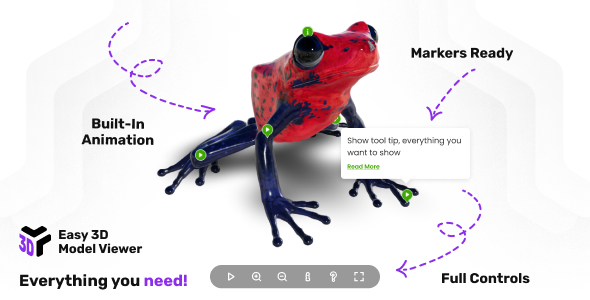
3D responsive model viewer that supports gltf, glb, glTF-Embedded, and compressed DRACO formats, delivering stunning realism with realistic lights, environment maps, shadows and more. Take your models to the next level by adding markers/hotspots that can play/control built-in animation, show tooltips and detailed info windows, animate custom camera postions and much more!
Take your models to the next level by adding markers/hotspots that can play/control built-in animation, show tooltips and detailed info windows, animate custom camera postions and much more
Main features
Responsive Layout – Fully responsive and adaptable regardless of which device is used.
Lightbox Support – Easy 3D Model Viewer can be opened in a lightbox when the page is ready or triggered by an external action, such as clicking a button. The lightbox layout is fully responsive, and the viewer size can be customized as needed, example here.
Customizable Size – Easy 3D Model Viewer can be set to any width or height and can be added anywhere in your page or app.
Desktop & Mobile Optimized – Easy 3D Model Viewer will adapt to any screen size and any device, whether you are using a mobile phone (IOS, Iphone, Android) or on your desktop browser.
Vector Skin – Everything is vector based this will make the viewer look sharp on all devices mobile or desktop.
Customizable Color Theme – The color theme of all viewer elements can be easily customized to suit your preferences.
Lazy Scrolling/Loading – Option to initialize Easy 3D Model Viewer on scroll when the viewer is visible in the page, this way for example if the viewer is in a section that is not visible it will not be initialized, instead the viewer will be initialized only when the user will scroll to the section in which the viewer is added.
Preloader – Customizable preloader that not only displays loading progress but also features a poster. You have the flexibility to set the preloader’s size and position according to your preferences, example here.
Buttons Controller – Customizable controller featuring play, zoom in, zoom out, info, help, and fullscreen buttons. The controller automatically hides itself after a designated period of user inactivity.
Orbital Controls – Customizable 3D orbital controls that allows to zoom and move the camera.
Orbital Controls Ranges – The camera rotation can be selectively constrained both horizontally and vertically, alongside customizable minimum and/or maximum zoom settings, adjusting parameters such as zoom factor, damping factor, zoom speed, pan speed, and more, example here.
Auto-rotation – The 3D model can be configured for automatic rotation, with the option to customize the rotation speed to suit individual preferences, example here.
Keyboard Pan – Navigate the model effortlessly with keyboard shortcuts, using the intuitive W A S D keys or your preferred custom key setup, the pan speed can be adjusted as well.
Enviroment Map – Eenhanced environmental mapping support with .exr files, offering nuanced control. Choose to display the environment map as a background, utilize it solely for reflections and lighting in a specific mode, or apply it subtly as a color-toned gradient color.
Lights – Effortlessly customize directional and ambient lighting to suit your model perfectly. Easily set the light intensity and position according to your preferences, with added support for tone mapping to extend the luminance range for a richer visual experience.
Contact Shadow – Achieve authentic contact shadows with a defined contact plane. Tailor the shadow’s blur, darkness, and opacity to your exact specifications for a seamless and customizable visual experience.
Default Built-in Animation Control – Play a 3D model built-in animation at your preferred time once the model is ready for display. Adjust the animation speed to your liking and fine-tune parameters such as clamping at the end and loop count for a tailored and dynamic presentation.
Markers/Hotspots – Enhance your 3D model with customizable markers/hotspots. These versatile feature can open pages/links, enable control over built-in animations or camera positions and can display tooltips and/or detailed info windows, enriched with full HTML and CSS support.
Two Marker Types – Easy 3D Model Viewer introduces support for two marker types. The 2D markers type manifests as an HTML element added over the 3D canvas, it dynamically hides or shows based on the angle value between the camera and the marker’s intersection point face normal. Meanwhile, the 3D markers type seamlessly integrates into the scene, sharing a visual similarity with its 2D counterpart.
Markers Built-in Animation Control – Clicking on a marker empowers you to control a built-in animation with a myriad of options at your fingertips. Define parameters such as animation loop count, speed/time scale, and choose whether to animate the marker along with the model or maintain a fixed position. Customize post-animation actions, including playing the animation in reverse, animation clamping, and toggling the display of tooltips or info windows.
Markers Camera Animations – Establish personalized positions on a model with custom names. Upon clicking a marker, seamlessly transition the camera to the personalized location using smooth tweening, allowing you to set the duration and easing to match your preferences. This versatile feature can be integrated with the built-in animations, akin to the functionality observed in the photo camera demo when clicking the larger play marker.
Markers Camera Animations Menu – Navigate your personalized marker camera animations effortlessly with a dedicated menu. This intuitive interface not only showcases but also grants control over the displayed markers and their corresponding camera animations, example here.
Direct Support From The Developer – Once you buy the Easy 3D Model Viewer you will also receive direct support and attention from the video player developer, Tibi @ FWD.
External listing. code.market does not sell this product and does not process payment for it. Pricing, payment, delivery, licensing, refunds, and support are handled by the third-party merchant on its own website. We may earn an affiliate commission from a referral. Details.
Products of the Week.
Submit#1

upvote.club
Free Social Media Engagement that Helps Boost Your Content. Upvote Club supports 19 social networks with 100+ engagement actions in one dashboard. Add links to your posts and get free engagement from real users.
SaaS · 15,800 views · 96 clicksSaaS · Week 42 · 15,800 views · 96 clicks
#2

Seenshot App
Free, Fast, MacOS Screenshot app. Make Screenshot cmd+shift+2 and send it via link
Desktop App · 4,851 views · 109 clicksDesktop App · Week 42 · 4,851 views · 109 clicks
#3

Conversational Backlinks for Busy Founders
Place Backlink Relevant Conversation for your domain across Forums and Conversations
Website · 16,678 views · 195 clicksWebsite · Week 42 · 16,678 views · 195 clicks
#4

Substack Posting API
Onboard your Agent to Substack. Write Publish on Substack via API
SaaS · 35,673 views · 184 clicksSaaS · Week 42 · 35,673 views · 184 clicks
#5

codester.com
SocialDesk+: Omnichannel Social Commerce & Business Management Platform This is stronger than simply “Social Commerce and Messaging” because it tells buyers this is a complete business platform, not just a messaging script. Turn Social Conversations Into Sales SocialDesk+ is a complete omnichannel social commerce and business management platform built for businesses that sell and communicate with customers through social media. Instead of switching between WhatsApp, Facebook, Instagram and TikTok, businesses can manage customer conversations, comments, products, leads, follow-ups, automation, teams and business reports from one professional workspace. And because the full source code is included, developers, agencies and entrepreneurs can customize, rebrand and launch SocialDesk+ as their own business solution or SaaS platform. 🚀 Build Your Own Social Commerce Business SocialDesk+ gives you the foundation to launch: - Your own SaaS platform - A white-label social CRM - A social-commerce management system - A customer communication platform - A business messaging solution - A custom solution for clients - A multi-business subscription platform 💬 Connect Your Customers Supported social channels include: WhatsApp • Facebook • Instagram • TikTok Bring supported conversations into one centralized workspace and help businesses respond faster without constantly switching between platforms. 🛍️ More Than a Messaging Platform SocialDesk+ combines communication with the tools businesses need to manage customer opportunities: Inbox Manage customer conversations from connected channels. Comments Monitor and respond to social-media comments. Customers & Leads Organize customer information and potential buyers. Products & Catalog Manage products and give your team quick access to product information. Follow-Ups Make sure potential customers don't get forgotten. Automation Automate repetitive customer questions and responses. AI Assistant Provide AI-assisted communication when configured. Team Management Give managers and staff access to the business workspace. Reports & Analytics Track activity using business reports and analytics. The current product listing already includes these capabilities. 🔥 Why Buyers Will Want It Launch Faster Start with an already-built business platform instead of developing the entire system from zero. Customize Everything The full source code is included, allowing developers to change branding, features, workflows and integrations. Build a SaaS Create multiple business workspaces and offer SocialDesk+ as a subscription-based service. Sell to Businesses Offer it to retailers, restaurants, service businesses, online sellers, agencies and other businesses that communicate with customers through social media. Mobile + Web + Backend This isn't just a mobile UI template. It includes: - Flutter mobile application - Python / FastAPI backend - Web interface - Administration tools - Database infrastructure - API-based architecture - SQLite / PostgreSQL support - Android and iOS project structure 💼 One Platform. Multiple Business Opportunities. For SaaS Entrepreneurs Launch your own subscription platform and allow multiple businesses to operate inside separate workspaces. For Software Agencies Customize and rebrand the platform for clients instead of building an omnichannel business system from scratch. For Developers Use the complete source code as a foundation for your own social-commerce or customer-management product. For Businesses Deploy a dedicated version for your own customer-service and social-commerce operations. 🧩 What's Included Mobile - Flutter / Dart - Android - iOS project Backend - Python - FastAPI - SQLAlchemy - Alembic Database - SQLite - PostgreSQL Web - HTML5 - CSS3 - JavaScript Deployment - Docker - Docker Compose - Production configuration Business Platform - Multi-workspace architecture - Authentication - Teams - Customers - Products - Messaging - Comments - Automation - Reports - Subscriptions - Administration The current listing also documents third-party integrations such as Meta, TikTok, Stripe, Firebase, SMTP and optional OpenAI configuration. ⚡ What Makes SocialDesk+ Different? You're not buying a simple: ❌ Chat UI ❌ WhatsApp clone ❌ Flutter template ❌ Admin dashboard ❌ Basic CRM You're getting a complete business platform foundation that can be customized, branded and commercialized. Connect. Automate. Manage. Grow. SocialDesk+ Omnichannel Social Commerce & Business Management Platform One important change I'd make to the current listing The current page starts with: “A simple guide to managing your social conversations, customers, products and business activity.”
Other · 3,085 views · 30 clicksOther · Week 42 · 3,085 views · 30 clicks
#6

sandbook.app
Sandbook reads EPUB, PDF, web pages and scanned pages aloud with Kokoro TTS, an open neural voice model that runs on your iPhone, free and offline. Choose from 41 natural voices in English, Spanish, French, Italian, Brazilian Portuguese and Hindi and follow each word as it is spoken. Try the same voices in your browser first with the free Kokoro TTS online demo.
Other · 3,089 views · 13 clicksOther · Week 42 · 3,089 views · 13 clicks