DZS jQuery Mini Events Calendar
Description


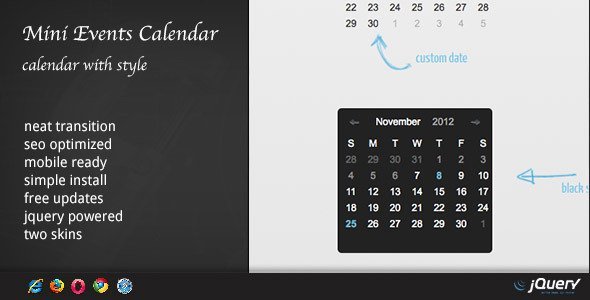
Need a neat way to present your events in a calendar? This is the plugin for you.
Features
- easy install – purchase, download the zip, read the docs
- sample setup included - a sample setup with the plugin to show an example on how it can be configured
- dzs tooltips included - a tooltip plugin from our portfolio is included to provide rich experience to your users
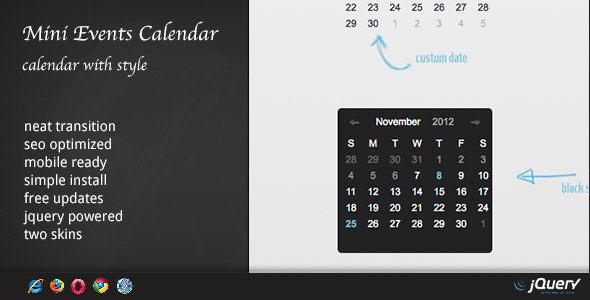
- two skins - default and black
- iPhone/iPad compatible – this plugin is compatible with iToys, even Android works
- major browsers support – IE7, IE8, IE9, IE10, Chrome, Opera, Safari and Firefox fully tested
- html supported – inline content is no problem for this plugin
WordPress Version
Updates
UPDATE 3.94 [ 07/24/2016 ]
- links now allowed in description
- multiple stability fixes
- preview updated
- bug where events would duplicate
UPDATE 3.70 [ 07/03/2014 ]
- instructions on how to change cover photos for skin-responsive-galileo in documentation
- instructions on how to set tags on events
- polished skin-aurora
UPDATE 3.60 [ 01/30/2014 ]
- blog events mode ( check preview )
- final fix for the single date bug , should work fine now
- another fix for the single date bug – ( ie. events from Feb were transmuted to Jan – now fixed )
- number of days bug – should be right now
- number of days bug
- start day bug
UPDATE 3.40 [ 10/14/2013 ]
- improved slide transition
- startdate and enddate for applying events
- various bugs
UPDATE 3.00 [ 07/27/2013 ]
- made all skins responsive ( still compact skins look best in 193px width )
- state of the art skin-responsive-galileo
- various bugs
UPDATE 2.01 [ 02/10/2013 ]
- fixed a fatal bug – calendar of past month showing one day en plus
UPDATE 2.00 [ 02/10/2013 ]
- new – option to be responsive
- new skin – skin-responsive
- added markup option for events – instead of data-date=”2-10-2013” you can now use data-day=”10” data-month=”2” data-year=”2013”
- added day range for events
- added repeat every month for events
- added jQuery noConflict mode
UPDATE 1.30 [ 11/21/2012 ]
- fixed a major bug the day not being correct
- added a new skin
UPDATE 1.20 [ 11/21/2012 ]
- added start_weekday variable ( choose between Sunday / Monday start of the week )
UPDATE 1.10 [ 11/10/2012 ]
- added a new description transition ( check 3rd example )
- updated docs
- fixed font in preview and package
What do you get?
- calendar jquery plugin – get creative!
- sample setup – a sample setup with the plugin to show an example on how it can be configured in the source folder
- documentation – extensive documentation on how to install & configure the plugin in the readme folder
- free updates – even if the value of this gallery increases with upcoming updates, you will get them for free
- free support – for installation via my forum -> https://digitalzoomstudio.net/groups/
FAQ
I am interested in including your Calendar script (DZS jQuery Mini Events Calendar) in one of my works. I would like to ask, that is there an (easy) option to display my own data in the calendar?
Can you explain your data ? You can place events on any day, and can have any html there ( videos, youtube embeds, headings, anything ) .
The events are very easy to add.How do I select a range of days on one calendar? I want to select 4 consecutive days. It wouldn’t be in the data-date attribute correct?
Very easy. This is the format for a range<div class="event-tobe" data-startdate="12-25-2013" data-enddate="12-29-2013">
<div style="width:200px;">
<h5>Meeting at Palace</h5>
<span class="label">Date</span> 11-8-2012 at 6PM<br />
<span class="label">Location</span> Bremen, Germany<br />
<br />Ana is meeting with you in the town square.
</div>
</div>
Can i use jquery 1.9.1 or above? and How many jquery files are needed to use the script? don’t know whether I will get the answer as most of the comments not yet addressed.
Perfectly 1.9.1 compatibleEvents do not show up
This is the correct form 1-8-2013 ( not 01-08-2013 )Credits
- jquery
- xperia skin
Categories
Tags
External listing. code.market does not sell this product and does not process payment for it. Pricing, payment, delivery, licensing, refunds, and support are handled by the third-party merchant on its own website. We may earn an affiliate commission from a referral. Details.
Products of the Week.
Submit#1

Substack Posting API
Onboard your Agent to Substack. Write Publish on Substack via API
29,891 views · 176 clicksWeek 41 · 29,891 views · 176 clicks
#2

appstackbuilder.com
appstackbuilder solves the problem of scattered, time-consuming tech research by helping users generate tailored tech stacks and discover relevant AI, SaaS, and developer tools in one place. It’s built for founders, developers, indie hackers, and startup teams planning new products or comparing software options.
Other · 13,566 views · 40 clicksOther · Week 41 · 13,566 views · 40 clicks
#3

productshotai.app
Create ecommerce product photos from one upload with ProductShot AI. Make white-background, studio, lifestyle, and marketplace images for Amazon, Shopify, and Etsy.
Other · 13,695 views · 27 clicksOther · Week 41 · 13,695 views · 27 clicks
#4

aiproductads.app
AIProductAds is an AI Product Ad Generator that turns product photos into video ads and product images for ecommerce on aiproductads.app.
Other · 13,443 views · 26 clicksOther · Week 41 · 13,443 views · 26 clicks