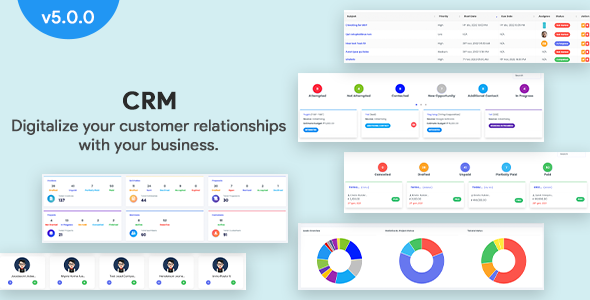
CRM - Laravel CRM with Project Management, Tasks, Leads, Invoices, Estimates and Goals
Description
Demo:
Login URL:
Admin Login : admin@infycrm.com / 123456
The goal of InfyCRM is to manage & digitize the relationship of your customers with your business. InfyCRM is a perfect solution to manage your Customers, Contracts, Projects, Products, Leads, Invoices, and much more.

Version Updates:
Support




Features:
Features Description:
Multi-languages Support
We are supporting 9 languages,
- English
- Spanish
- French
- German
- Russian
- Portuguese
- Arabic
- Chinese
- Turkish
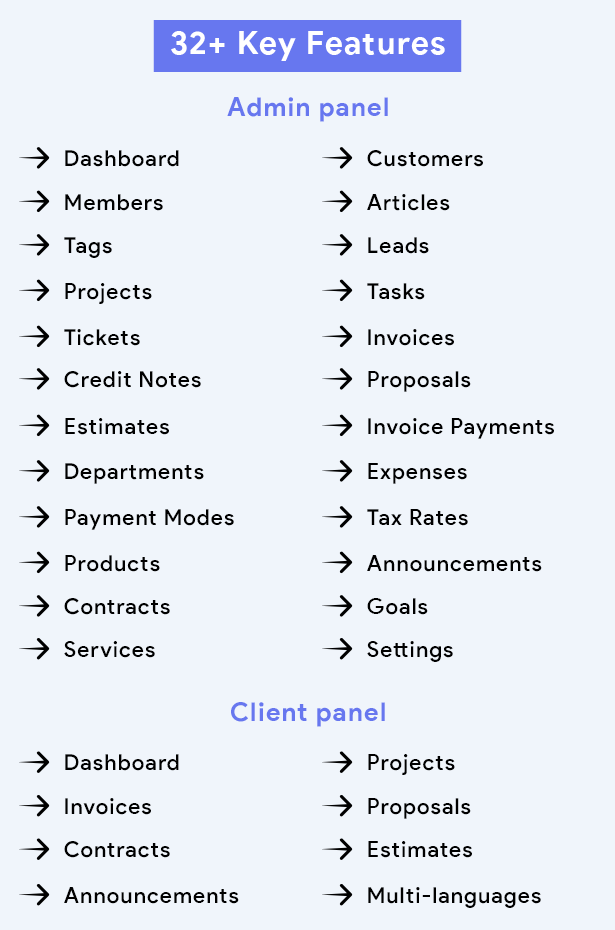
Admin panel
Dashboard
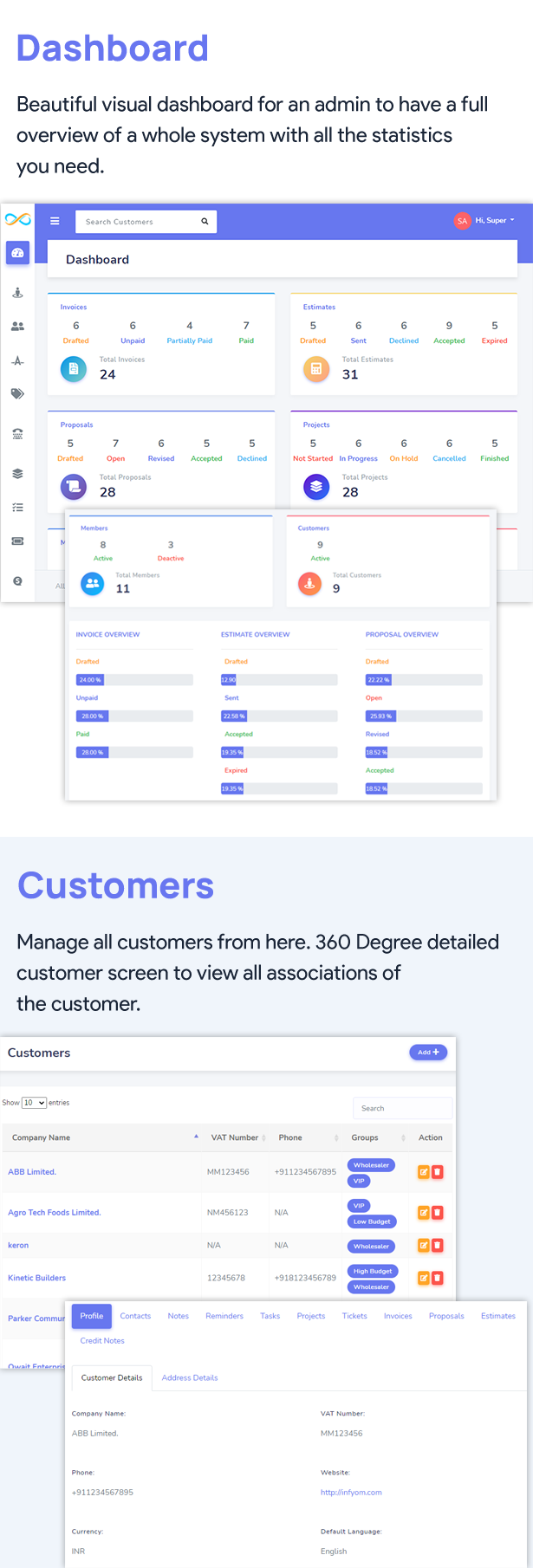
Beautiful visual dashboard for an admin to have a full overview of a whole system with all the statistics you need.
- Invoices – How many invoices drafted, unpaid, paid, etc.
- Estimates – How many estimates were sent, declined, accepted, etc.
- Proposals – How many proposals open, revised, accepted, etc.
- Projects – How many projects started, not-started, finished, etc.
- Members – Active members of the system.
Customers
Customers are actually a company, they can manage their personal details like,
- Contacts
- Notes
- Reminders
- Tasks
- Projects
- Tickets
- Invoices
- Proposals
- Estimates
- Credit notes
Members
Members in CRM are the users who are responsible to lead the conversation and many other activities. Admin can create members with different permissions.
Articles
Admin or users who have permission to create Articles can create articles. Admin should be able to edit/delete all articles while the other users can see only his articles.
Tags
You can see the list of all tags used in all projects, proposals, estimates, tasks, etc. You can create new tags from here and can edit and delete existing ones.
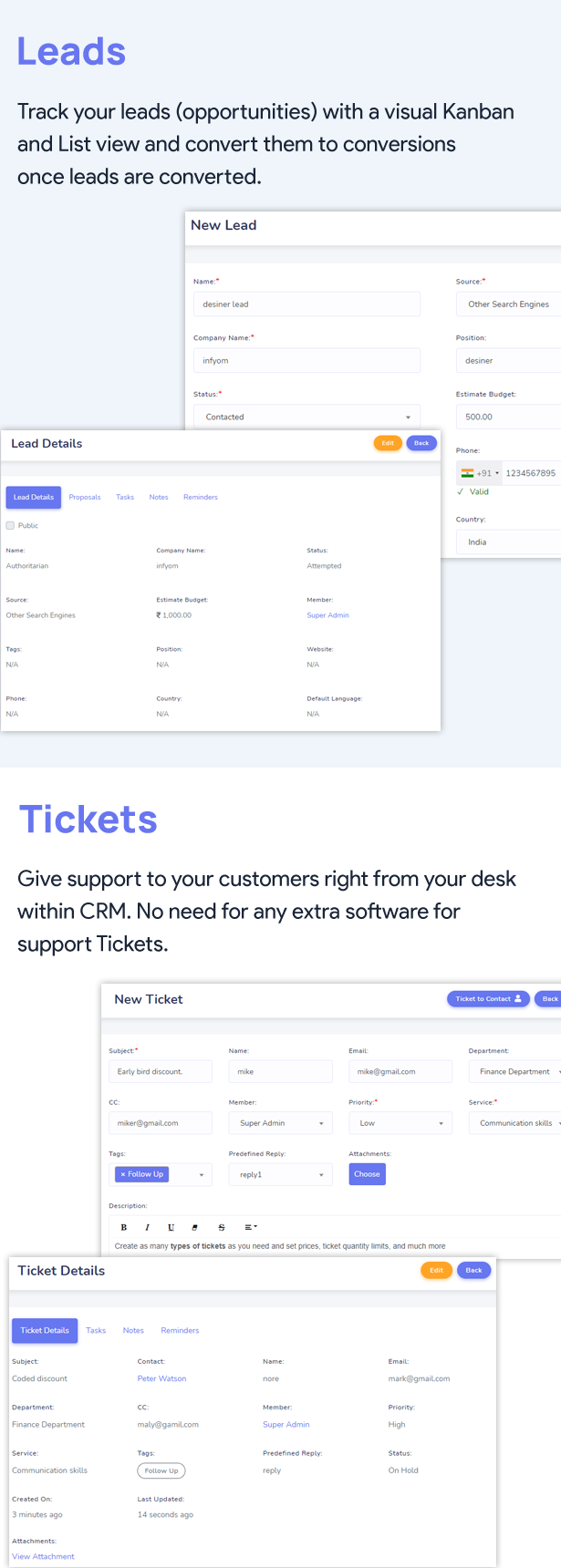
Leads
Leads are actually the opportunity of customers who not yet did any deal with the company.
You can see the lead through the Kanban view and move that lead from one status to another status. Lead can also be filtered according to lead status. Lead can be assigned to any member.
Once Lead is ready to deal with a company you can convert a lead to a customer.
Projects
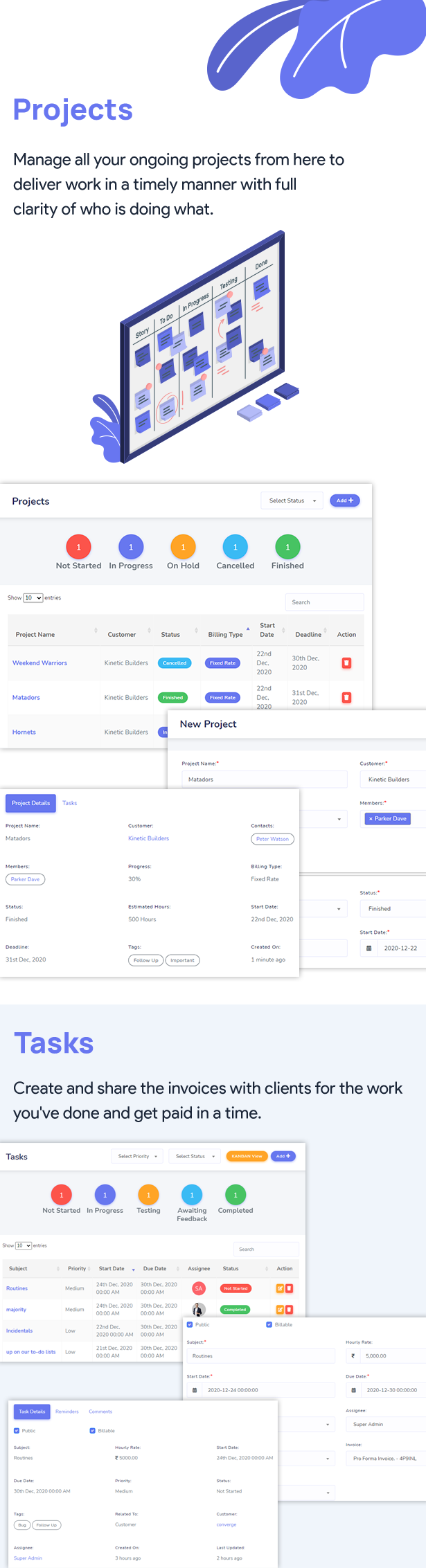
Each Project must have associated with the customer and members. You can create a new project from this section and can edit and delete existing ones. You can create a project by giving the billing type option, an option like Fixed Rate, project hours, task hours.
Tasks
Once the project is started, all we need to do is define tasks. The task may have,
- Subject
- Hourly rate
- Assigned Date
- Due Date
- Priority
- Related to
- Tags
- Description
You can also assign a task to team members if you need them. You can select the option which has a related task such as invoice, customer, ticket, project, lead, proposal, etc.
Tickets
Admin or user who has permission to create tickets can manage the tickets module. You can create a ticket to track customer requests.
Tickets without Contact and Ticket to Contact, these two options can be used to create a ticket. You can assign tickets to your member priority-wise, and the user also able to attach files to the ticket.
Invoices
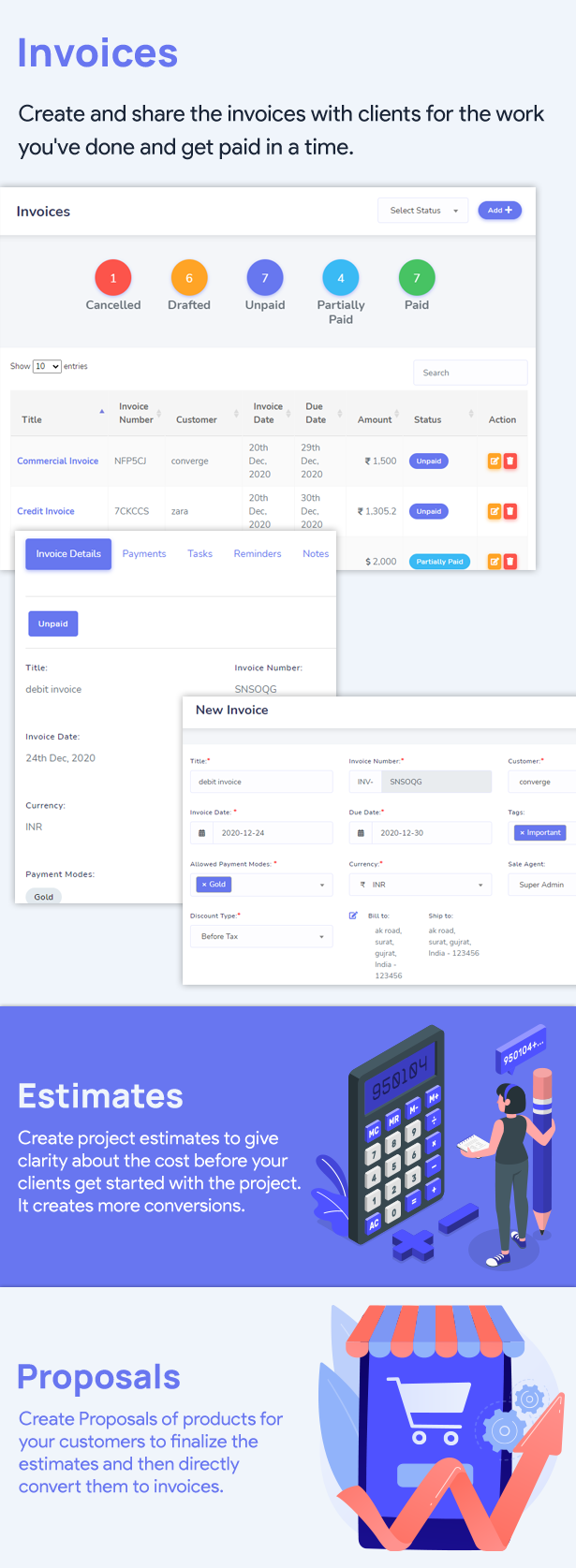
You can create an invoice from the product you have added to the product module. Also, you can directly assign the invoice to the client. You can manually add the item to the invoice and also download it as a PDF send it to the client.
There are many options available for invoice creation. One of them is the Discount type. We are supporting 2 discount type options.
- Before Tax
- After-Tax
By using the before tax option, your discount will be applied to invoice subtotal before applying the tax of the item.
By using the after-tax option, your discount will be applied to invoice subtotal which is actually included the tax too.
You can also change the invoice status to paid by paying the full amount. If you don’t want to pay the full amount then it will be considered as partially paid.
Credit Notes
You can create a credit note from the product you have added to the product module. You can manually add the item to the credit note.
Proposals
You can create a proposal from the product you have added to the product module. you can manually add the item to the proposal. You can also convert the proposal directly into an invoice and estimate.
Estimates
You can create an estimate from the product you have added to the product module. You can manually add the item to the estimate. you can directly assign the invoice to the client. You can also convert the estimate directly into an invoice.
Invoice Payments
Invoice data show invoices you have paid and invoices that have been partially paid.
Departments
Departments are useful when you need to divide tickets department-wise. Like the Finance Department, Marketing Department, Purchase Department, etc. You can create a new department from here and can edit and delete existing ones.
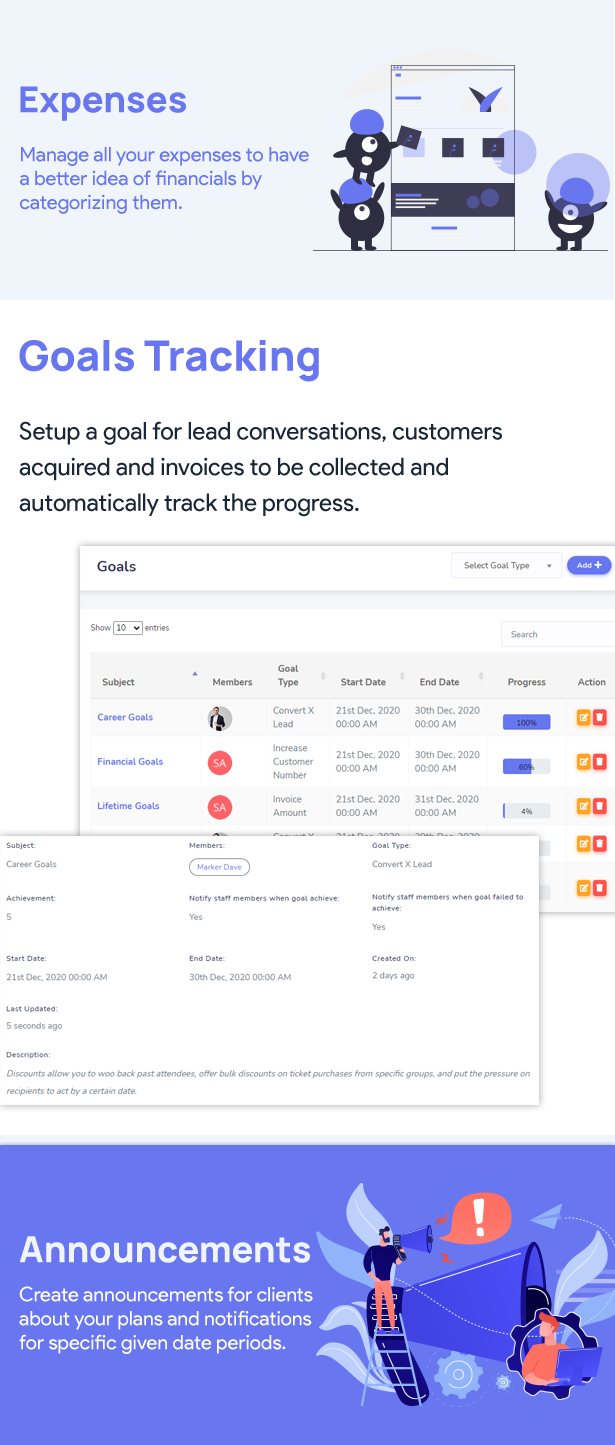
Expenses
By using this module you can record your expense category and amount. You can store it with a specific customer, currency, payment mode, expense date, and attach a document related to it.
Payment Modes
When you pay for an invoice, you can easily make a payment using the payment mode. You can create a new payment mode from here and also can edit and delete existing ones.
Tax Rates
Taxes are used while creating invoices, estimates, proposals, products. You can create taxes with its amount here.
Products
Create and manage your business products from here. You will be able to create invoices, proposals, and estimates from the created product and you can also manage that product group wise.
Announcements
Create the announcement that you want to show to the client-side, and you can also change the status of that announcement if you do not want to show the announcement.
We have added cron for announcements, so it will be auto-published at a given time.
Contracts
You can create a contract with the contract type and contract amount. And also assign the contract to the customer. You can also create a contract from here and also can edit and delete existing ones.
Goals
Once a goal has been created, the goal is dynamically tracked and the goal will be tracked based on the goal type you have selected. Goals will be fully tracked from the start date and end date.
We are supporting some default goal types. e.g Convert x Leads, Paid x Invoices, etc.
Services
You can create a new service from here and can edit and delete existing ones.
Settings
InfyCRM provides various settings to control your branding and other general items.
- Application Name
- Term & Conditions
- Company Logo
- Favicon Icon
- Company Name
- Company Email
- Company Phone
- Company Address
- Company City, State
- Admin Note
- Client Note
Client panel
Dashboard
Dashboard for the client has a full view of their own information & usage. The client can visualize their own project status, total amount counts for Invoices, Proposals & Estimates with its needed statuses.
Invoices
The client can visualize their own created invoices and see their invoice details, invoices statuses & can visualize the paid/unpaid, invoices progress bar, which is created by Admin.
Proposals
The client can visualize their own created proposals and see their proposals in detail, proposals statuses & can visualize the open/revised/accepted, proposals progress bar, which is created by Admin.
Contracts
The client can visualize their own contracts in which he/she can see the detailing of contract information which is created by Admin.
Estimates
The client can visualize their own created estimates and see their estimates detail, estimates statuses & can visualize the sent /accepted/ declined/expired estimates progress bar, which is created by Admin.
Announcements
The client can visualize announcements which are created by Admin with date and time.
Tags
- laravel crm
- customer relation software
- leads management
- project management
- tasks
- invoices
- payments
- estimates
- proposals
- announcement calendar
- support tickets
- articles
- expenses
- customer relationship management
- reminders
Categories
Tags
External listing. code.market does not sell this product and does not process payment for it. Pricing, payment, delivery, licensing, refunds, and support are handled by the third-party merchant on its own website. We may earn an affiliate commission from a referral. Details.
Products of the Week.
Submit#1

upvote.club
Free Social Media Engagement that Helps Boost Your Content. Upvote Club supports 19 social networks with 100+ engagement actions in one dashboard. Add links to your posts and get free engagement from real users.
SaaS · 15,930 views · 96 clicksSaaS · Week 42 · 15,930 views · 96 clicks
#2

Seenshot App
Free, Fast, MacOS Screenshot app. Make Screenshot cmd+shift+2 and send it via link
Desktop App · 4,972 views · 109 clicksDesktop App · Week 42 · 4,972 views · 109 clicks
#3

Conversational Backlinks for Busy Founders
Place Backlink Relevant Conversation for your domain across Forums and Conversations
Website · 16,799 views · 195 clicksWebsite · Week 42 · 16,799 views · 195 clicks
#4

Substack Posting API
Onboard your Agent to Substack. Write Publish on Substack via API
SaaS · 35,794 views · 184 clicksSaaS · Week 42 · 35,794 views · 184 clicks
#5

codester.com
SocialDesk+: Omnichannel Social Commerce & Business Management Platform This is stronger than simply “Social Commerce and Messaging” because it tells buyers this is a complete business platform, not just a messaging script. Turn Social Conversations Into Sales SocialDesk+ is a complete omnichannel social commerce and business management platform built for businesses that sell and communicate with customers through social media. Instead of switching between WhatsApp, Facebook, Instagram and TikTok, businesses can manage customer conversations, comments, products, leads, follow-ups, automation, teams and business reports from one professional workspace. And because the full source code is included, developers, agencies and entrepreneurs can customize, rebrand and launch SocialDesk+ as their own business solution or SaaS platform. 🚀 Build Your Own Social Commerce Business SocialDesk+ gives you the foundation to launch: - Your own SaaS platform - A white-label social CRM - A social-commerce management system - A customer communication platform - A business messaging solution - A custom solution for clients - A multi-business subscription platform 💬 Connect Your Customers Supported social channels include: WhatsApp • Facebook • Instagram • TikTok Bring supported conversations into one centralized workspace and help businesses respond faster without constantly switching between platforms. 🛍️ More Than a Messaging Platform SocialDesk+ combines communication with the tools businesses need to manage customer opportunities: Inbox Manage customer conversations from connected channels. Comments Monitor and respond to social-media comments. Customers & Leads Organize customer information and potential buyers. Products & Catalog Manage products and give your team quick access to product information. Follow-Ups Make sure potential customers don't get forgotten. Automation Automate repetitive customer questions and responses. AI Assistant Provide AI-assisted communication when configured. Team Management Give managers and staff access to the business workspace. Reports & Analytics Track activity using business reports and analytics. The current product listing already includes these capabilities. 🔥 Why Buyers Will Want It Launch Faster Start with an already-built business platform instead of developing the entire system from zero. Customize Everything The full source code is included, allowing developers to change branding, features, workflows and integrations. Build a SaaS Create multiple business workspaces and offer SocialDesk+ as a subscription-based service. Sell to Businesses Offer it to retailers, restaurants, service businesses, online sellers, agencies and other businesses that communicate with customers through social media. Mobile + Web + Backend This isn't just a mobile UI template. It includes: - Flutter mobile application - Python / FastAPI backend - Web interface - Administration tools - Database infrastructure - API-based architecture - SQLite / PostgreSQL support - Android and iOS project structure 💼 One Platform. Multiple Business Opportunities. For SaaS Entrepreneurs Launch your own subscription platform and allow multiple businesses to operate inside separate workspaces. For Software Agencies Customize and rebrand the platform for clients instead of building an omnichannel business system from scratch. For Developers Use the complete source code as a foundation for your own social-commerce or customer-management product. For Businesses Deploy a dedicated version for your own customer-service and social-commerce operations. 🧩 What's Included Mobile - Flutter / Dart - Android - iOS project Backend - Python - FastAPI - SQLAlchemy - Alembic Database - SQLite - PostgreSQL Web - HTML5 - CSS3 - JavaScript Deployment - Docker - Docker Compose - Production configuration Business Platform - Multi-workspace architecture - Authentication - Teams - Customers - Products - Messaging - Comments - Automation - Reports - Subscriptions - Administration The current listing also documents third-party integrations such as Meta, TikTok, Stripe, Firebase, SMTP and optional OpenAI configuration. ⚡ What Makes SocialDesk+ Different? You're not buying a simple: ❌ Chat UI ❌ WhatsApp clone ❌ Flutter template ❌ Admin dashboard ❌ Basic CRM You're getting a complete business platform foundation that can be customized, branded and commercialized. Connect. Automate. Manage. Grow. SocialDesk+ Omnichannel Social Commerce & Business Management Platform One important change I'd make to the current listing The current page starts with: “A simple guide to managing your social conversations, customers, products and business activity.”
Other · 3,206 views · 30 clicksOther · Week 42 · 3,206 views · 30 clicks
#6

sandbook.app
Sandbook reads EPUB, PDF, web pages and scanned pages aloud with Kokoro TTS, an open neural voice model that runs on your iPhone, free and offline. Choose from 41 natural voices in English, Spanish, French, Italian, Brazilian Portuguese and Hindi and follow each word as it is spoken. Try the same voices in your browser first with the free Kokoro TTS online demo.
Other · 3,210 views · 13 clicksOther · Week 42 · 3,210 views · 13 clicks