ChopItUp Live Chat with Firebase
Description
ChopItUp Live Chat with Firebase
is a premium widget that enables fast, stable and intuitive live chat for WordPress posts using the powerful Firebase service. Live chat can be installed VERY EASILY on your site via any new or old Firebase backend. It serves as a way to enable open-ended and free flowing communication in order to create communities around a post, a site or blog. Not only is it easy to setup and easy to use, it taps into the way people already use real-time communication as a way of creating online communities around ideas and interests. We guarantee great support to help with installation or operational issues. Simply install the plugin and drag the widget to your desired position; then viola! – you now have live chat.NEW FEATURE:
- SHORT CODE FUNCTIONALITY: a short code can now be inserted in a post to determine whether that particular post will have chat or not
- NUMEROUS bug fixes and updates pertaing to Firebase backend.
IMPORTANT:
ChopItUp Live Chat with Firebase only works for WordPress 4.1 and later versions.
FEATURES:
- Very intuitive, fast and stable chat built on modern mainstream technology
- Desktop and mobile enabled
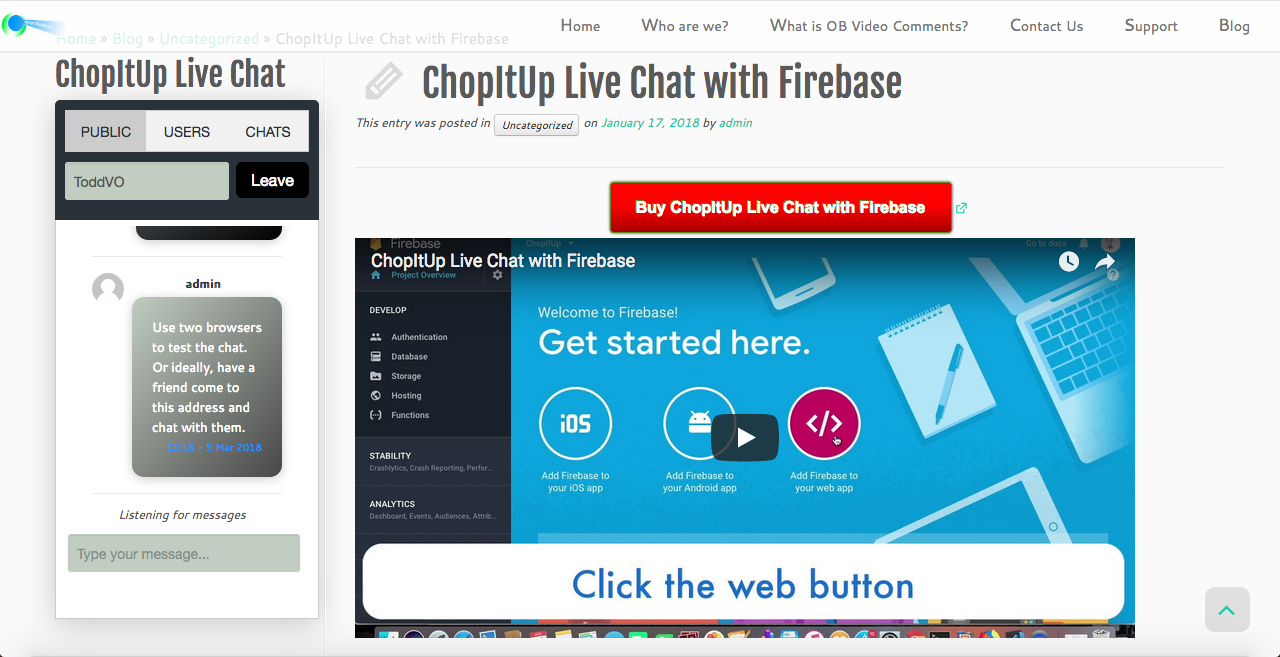
- Live-chat for posts – tabs for users and chats are used to navigate a very easy to use widget
- Public and private chat features
- Typing indicator available
- The widget can be positioned on the sidebar or at the bottom (footer) like a traditional chat box
- User search available
- Can work fine with a free Firebase account
- Automatic anonymity unless user signs in on site
- Online/Offline indicator for users
- User search available
- Compatible with WordPress 4.1 and later
- Very clean and well documented code
- User names with join and leave capability
- Notifications – sounds and badges
- Currenty online users are grouped together and easy to find
Limitations
Although the plugin works well on both positions (in the sidebar and at the bottom of a page as a traditional chat box), there have been situations where: a) A theme’s sidebar is thin and the widget is not very aesthetically pleasing. b) When positioned at the bottom, the chat box’s colors may be off. This situation, where one positioning option is better than another, is a rarity – generally, the plugin works well in both positions.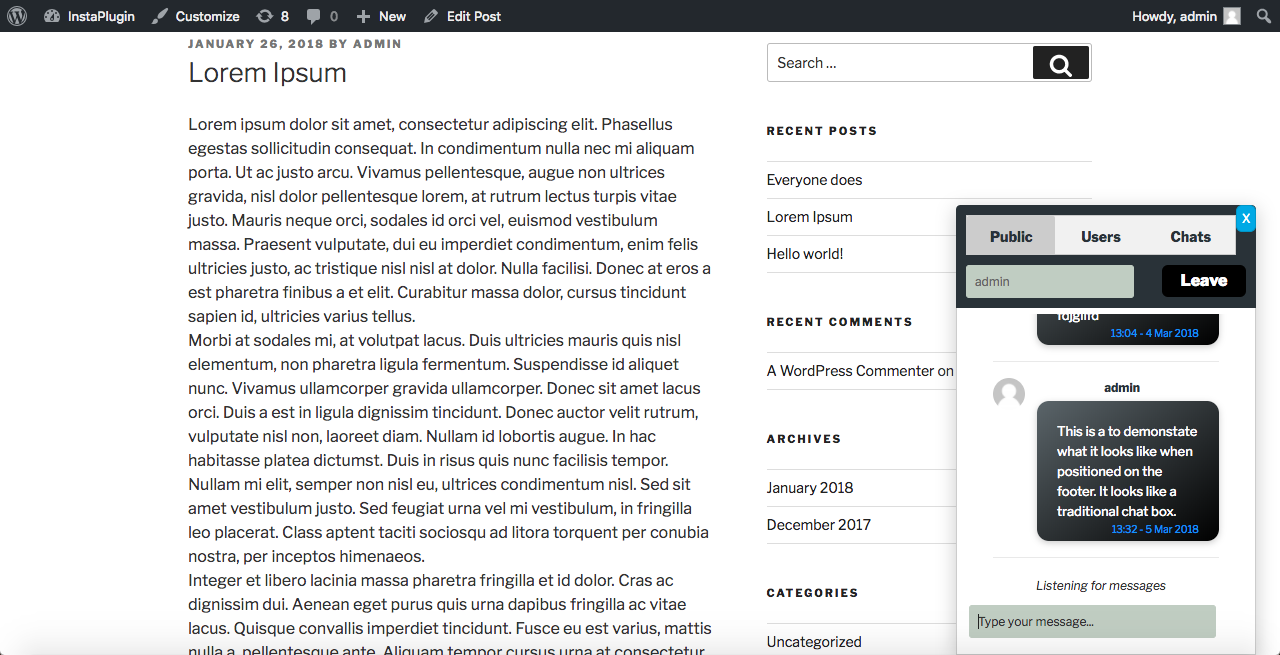
How it works
This plugin links your Firebase application to your Wordpress backend. Once the linking has been done (installation, positioning and inserting configuration data), the widget will appear in posts. Chat (public and private) messages are linked to the current post’s ID – and the conversations can then center around that post and it’s ideas.Intuitive installation and functionality
Installation of the plugin is a straightforward affair: activate the “ChopItUp Live Chat with Firebase” plugin and then go to “ChopItUp Live Chat Settings”. Enter your Firebase application’s settings. That is it, you are done with installation and you and your users/visitors can starting on posts.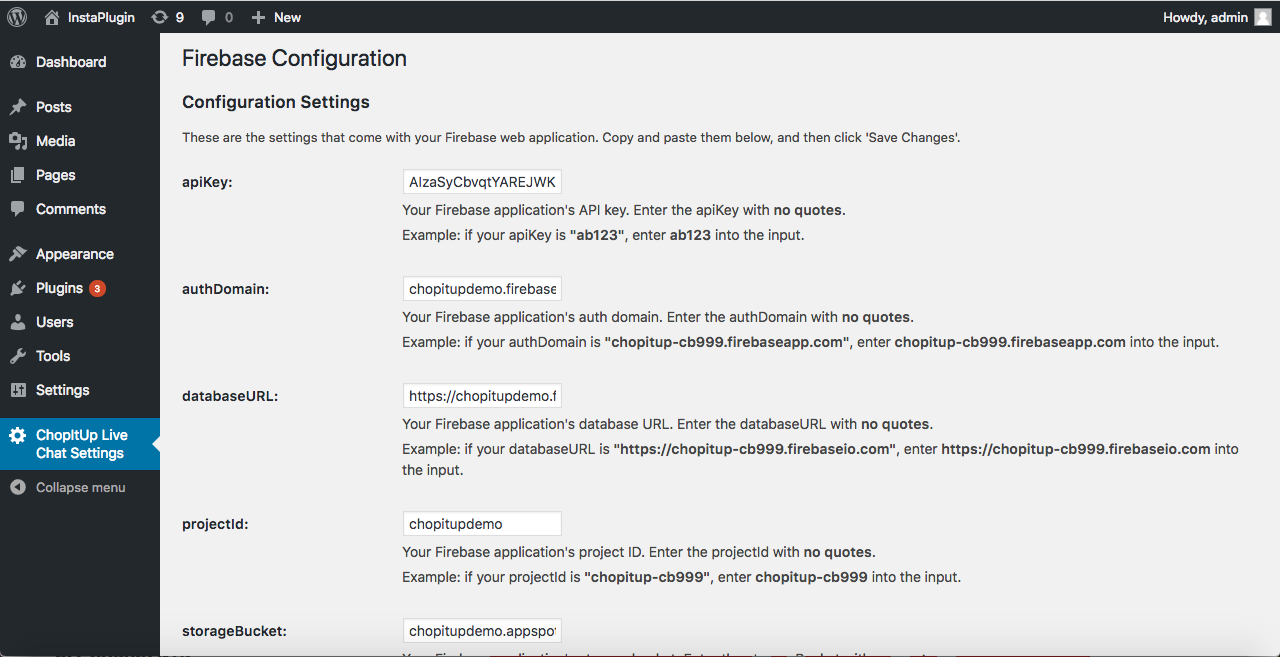
What tech do we use?
The plugin itself is very light because the heavy lifting is done by the Firebase backend. The plugin uses a combination of jQuery and traditional javascript to navigate through the tabs – tabs that enable private and public chat. Javascript-enabled input is sanitized to avoid cross-site attacks and malicious injections. A free Firebase account comes with a maximum of 100 concurrent connections – to get more capacity, one would have to go premium. This plugin uses Firebase, DOMPurify and the WordPress API in conjunction with our custom PHP and Javascript. This plugin is VERY light.The thinking behind ChopItUp Live Chat with Firebase
Chat has been a staple of web-based communication since the rise of usage of the internet by the general public in the early 1990s – earlier implementations were naturally a lot cruder, most centering around applets or getting the browser to recognize a new mime type in order to support an external implementation of chat. Browsers nowadays come with incredible capabilities and support out the box and as such, some of the most advanced, light and stable implementations of chat can be done fairly quickly and easily. The rise of cloud services has also lightened the load so that developers can work on creative aspects of products and leave the basic functionality to cloud services. The fact that heavy duty logic happens on the the cloud means that small sites don’t have to deal with the heavy duty stuff dedicated to the cloud. Javascript has become a mature language that is capable of doing things that had long been ascribed to other compiled programming languages – this maturity has given leeway to create better products. Wordpress is now running on 30% of all websites – in a way, it has become a kind of web operating system. This means that it has become unavoidable and thinking about creating new products and dedicated implementations of existing products for WordPress is imperative. The combination of better browsers, cloud, mature Javascript and a web dominated by a very powerful WordPress was fertile soil to create ChopItUp Live Chat with Firebase – a product that we believe is not only extremely utilitarian but timely as well.PLEASE NOTE:
This plugin is designed to work with Firebase – without it, it cannot function.Categories
Tags
External listing. code.market does not sell this product and does not process payment for it. Pricing, payment, delivery, licensing, refunds, and support are handled by the third-party merchant on its own website. We may earn an affiliate commission from a referral. Details.
Products of the Week.
Submit#1

upvote.club
Free Social Media Engagement that Helps Boost Your Content. Upvote Club supports 19 social networks with 100+ engagement actions in one dashboard. Add links to your posts and get free engagement from real users.
SaaS · 17,083 views · 96 clicksSaaS · Week 42 · 17,083 views · 96 clicks
#2

Seenshot App
Free, Fast, MacOS Screenshot app. Make Screenshot cmd+shift+2 and send it via link
Desktop App · 6,027 views · 109 clicksDesktop App · Week 42 · 6,027 views · 109 clicks
#3

Conversational Backlinks for Busy Founders
Place Backlink Relevant Conversation for your domain across Forums and Conversations
Website · 17,844 views · 197 clicksWebsite · Week 42 · 17,844 views · 197 clicks
#4

Substack Posting API
Onboard your Agent to Substack. Write Publish on Substack via API
SaaS · 36,831 views · 185 clicksSaaS · Week 42 · 36,831 views · 185 clicks
#5

codester.com
SocialDesk+: Omnichannel Social Commerce & Business Management Platform This is stronger than simply “Social Commerce and Messaging” because it tells buyers this is a complete business platform, not just a messaging script. Turn Social Conversations Into Sales SocialDesk+ is a complete omnichannel social commerce and business management platform built for businesses that sell and communicate with customers through social media. Instead of switching between WhatsApp, Facebook, Instagram and TikTok, businesses can manage customer conversations, comments, products, leads, follow-ups, automation, teams and business reports from one professional workspace. And because the full source code is included, developers, agencies and entrepreneurs can customize, rebrand and launch SocialDesk+ as their own business solution or SaaS platform. 🚀 Build Your Own Social Commerce Business SocialDesk+ gives you the foundation to launch: - Your own SaaS platform - A white-label social CRM - A social-commerce management system - A customer communication platform - A business messaging solution - A custom solution for clients - A multi-business subscription platform 💬 Connect Your Customers Supported social channels include: WhatsApp • Facebook • Instagram • TikTok Bring supported conversations into one centralized workspace and help businesses respond faster without constantly switching between platforms. 🛍️ More Than a Messaging Platform SocialDesk+ combines communication with the tools businesses need to manage customer opportunities: Inbox Manage customer conversations from connected channels. Comments Monitor and respond to social-media comments. Customers & Leads Organize customer information and potential buyers. Products & Catalog Manage products and give your team quick access to product information. Follow-Ups Make sure potential customers don't get forgotten. Automation Automate repetitive customer questions and responses. AI Assistant Provide AI-assisted communication when configured. Team Management Give managers and staff access to the business workspace. Reports & Analytics Track activity using business reports and analytics. The current product listing already includes these capabilities. 🔥 Why Buyers Will Want It Launch Faster Start with an already-built business platform instead of developing the entire system from zero. Customize Everything The full source code is included, allowing developers to change branding, features, workflows and integrations. Build a SaaS Create multiple business workspaces and offer SocialDesk+ as a subscription-based service. Sell to Businesses Offer it to retailers, restaurants, service businesses, online sellers, agencies and other businesses that communicate with customers through social media. Mobile + Web + Backend This isn't just a mobile UI template. It includes: - Flutter mobile application - Python / FastAPI backend - Web interface - Administration tools - Database infrastructure - API-based architecture - SQLite / PostgreSQL support - Android and iOS project structure 💼 One Platform. Multiple Business Opportunities. For SaaS Entrepreneurs Launch your own subscription platform and allow multiple businesses to operate inside separate workspaces. For Software Agencies Customize and rebrand the platform for clients instead of building an omnichannel business system from scratch. For Developers Use the complete source code as a foundation for your own social-commerce or customer-management product. For Businesses Deploy a dedicated version for your own customer-service and social-commerce operations. 🧩 What's Included Mobile - Flutter / Dart - Android - iOS project Backend - Python - FastAPI - SQLAlchemy - Alembic Database - SQLite - PostgreSQL Web - HTML5 - CSS3 - JavaScript Deployment - Docker - Docker Compose - Production configuration Business Platform - Multi-workspace architecture - Authentication - Teams - Customers - Products - Messaging - Comments - Automation - Reports - Subscriptions - Administration The current listing also documents third-party integrations such as Meta, TikTok, Stripe, Firebase, SMTP and optional OpenAI configuration. ⚡ What Makes SocialDesk+ Different? You're not buying a simple: ❌ Chat UI ❌ WhatsApp clone ❌ Flutter template ❌ Admin dashboard ❌ Basic CRM You're getting a complete business platform foundation that can be customized, branded and commercialized. Connect. Automate. Manage. Grow. SocialDesk+ Omnichannel Social Commerce & Business Management Platform One important change I'd make to the current listing The current page starts with: “A simple guide to managing your social conversations, customers, products and business activity.”
Other · 4,244 views · 32 clicksOther · Week 42 · 4,244 views · 32 clicks
#6

sandbook.app
Sandbook reads EPUB, PDF, web pages and scanned pages aloud with Kokoro TTS, an open neural voice model that runs on your iPhone, free and offline. Choose from 41 natural voices in English, Spanish, French, Italian, Brazilian Portuguese and Hindi and follow each word as it is spoken. Try the same voices in your browser first with the free Kokoro TTS online demo.
Other · 4,239 views · 13 clicksOther · Week 42 · 4,239 views · 13 clicks