Cart to Quote for Woocommerce
Description
Woocommerce version 7+ compatible!
The most complete quoting or “Request a Quote” plugin for Woocommerce and WordPress. Max your sales NOW!
Let your customers request a quote OR create a quote and send it to them via wp-admin
Engage your customers by creating special offers or discounts for them on WordPress and Woocommerce.
Please read the plugin description. If you are not sure about anything, please ask and we are here to answer your questions
Videos
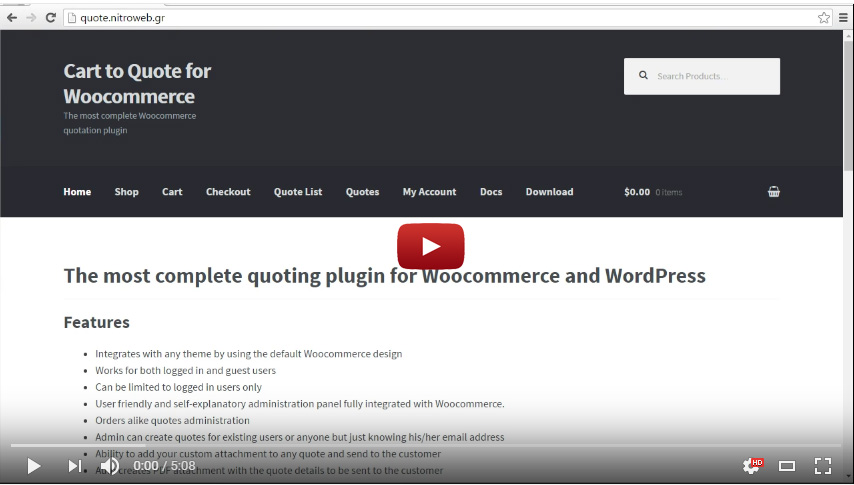
FRONTEND
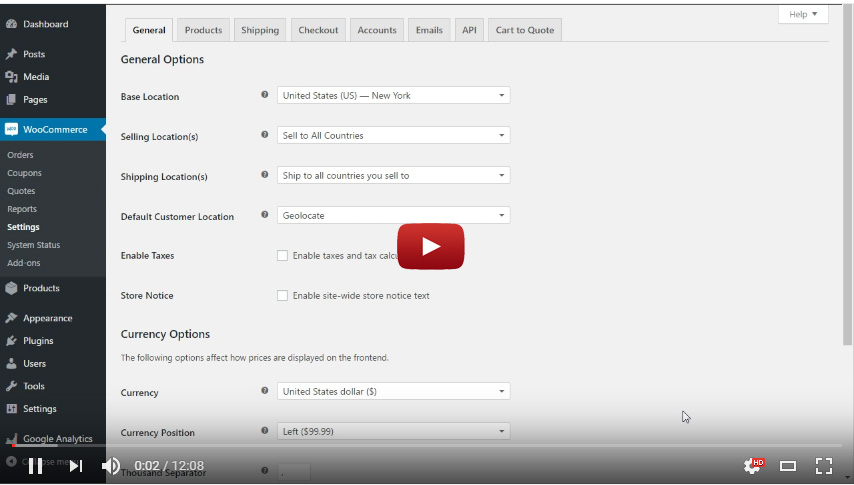
BACKEND
How it works
FRONTEND
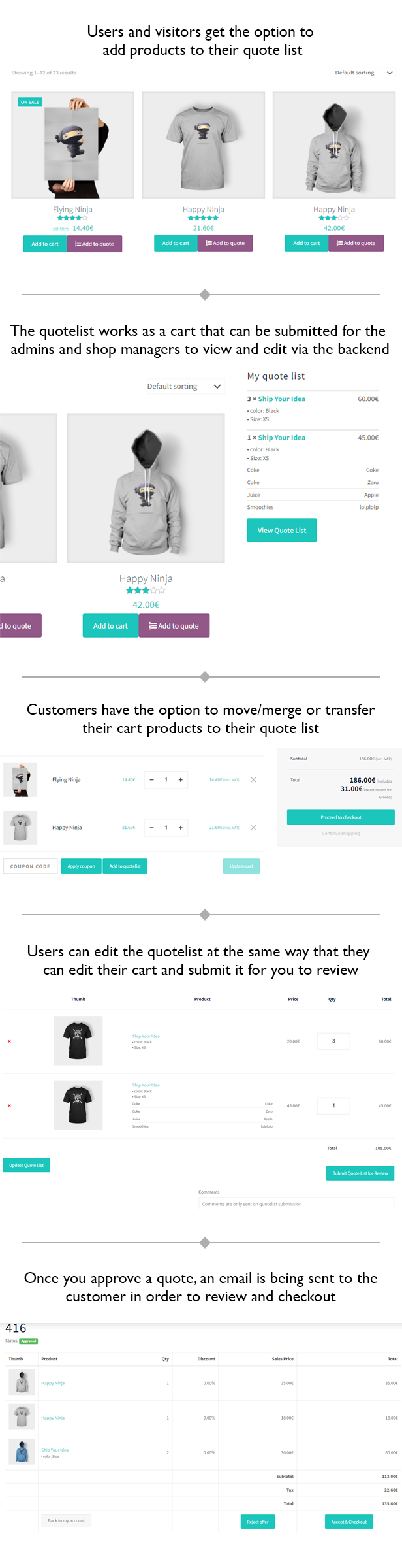
User has the ability to add products in the quote list. It works like a cart (adding, removing, overview etc). After he has added all the desired products he can submit the list for quoting. At submission, a quote is created on the backend for the shop manager to review and the shop manager also receives an email notification.
BACKEND
1st case: The shop manager can review the quotes that have been submitted by the customers. He can add new prices to each item for this quote and approve OR can cancel, decline etc. Many statuses are available. The customer can get notifications on the update status and then go ahead and buy the new quote as normal via woocommerce checkout, with all the changes and new prices that were made by the shop manager.
2nd case: You (the shop manager) get a call from your VIP customer asking you for a nice price on a long products list. You get on the backend, go to quotes, and create a new one with all the items he asked. Here you can tweak the prices and add some discount to make your VIP customer happy. After the quote is done, you can save it and your customer will receive an email notification with all the quote details, the prices he, exclusively gets and a link to review and accept the quote so he can checkout.
NOTE: The cart and the checkout are functioning as normal. The “add to quote” button will be added along with the “add to cart” button, however there is an option to hide the “add to cart” button.
Features
- Integrates with any theme by using the default Woocommerce design
- Supports “Woocommerce Product Add-Ons” plugin

- Works for both logged in and guest users
- Per user role access to the “add to quote” button
- Can be limited to logged in users only
- User friendly and self-explanatory administration panel fully integrated with Woocommerce.
- Orders alike quotes administration; native WordPress plugin. Quotes is a custom post type
- Admin can create quotes for existing users or anyone but just knowing his/her email address
- Ability to add your custom attachment to any quote and send to the customer
- Auto creates PDF attachment with the quote details to be sent to the customer
- The admin can edit and approve or decline any quote request
- Quote expiry, reminder and follow up date can be set per quote
- Easily edit the content of each email via the plugin options
- No need for another plugin; it works out of the box with WordPress and Woocommerce
- Compatible with Woocommerce Variations to Table – Grid
- Easily translatable via .po / .mo files.
- Available translations: English, Greek
Requirements
- WordPress 4.0+
- Woocommerce 4+
- PHP 7+
Usage
Plugin Settings
In order to setup the Cart to Quote for Woocommerce plugin navigate from your WordPress administration panel to “Woocommerce -> Settings” and click on the Cart to Quote Tab.
Settings
- Always prompt for log in: Disallow access to guests and prompt for log in even in single quotes.
- Require account: Allow access to the plugin functionality, but require login to submit quote list.
- Add quotes list on my account: Add the quotes list before the orders list on Woocommerce my account page.
- Remove add to quote button on product: Removes the “add to quote” button on the single product page.
- Remove add to quote button from product archives: Removes the “add to quote” button on the product archives list/loop page.
- Disallow user remarks: Users will not be able to add remarks (notes) to quotes, if you check this.
- Empty cart before adding quote items: The cart will be emptied before adding quote items to it when the user accepts a quote.
- Days to remember user’s quote list: How many days should the plugin remember the users quote list when the user is logged out (default is 100). Basically is the cookie life.
- New quote email notification: Here you may insert an email address to receive new quote requests notification, eg. the shop manager email address.
- Email user on frontend new quote: Email quote details to the user that is submitting the new quote from the frontend.
- Text before the quote list on the reminder email: Here you may enter any custom text that will be inserted before the quote list on the quote reminder email that is sent to the customer.
- Text after the quote list on the reminder email: Here you may enter any custom text that will be inserted after the quote list on the quote reminder email that is sent to the customer.
- Text before the quote list on the follow up email: Here you may enter any custom text that will be inserted before the quote list on the quote follow up email that is sent to the customer.
- Text after the quote list on the follow up email: Here you may enter any custom text that will be inserted after the quote list on the quote follow up email that is sent to the customer.
- PDF Logo: Drag and drop or “Add Media” to the editor in order to customize the logo on the PDF that is sent as attachment to the customer on the quote list creation.
- PDF Company Address: The address of your company that you may want to display on the PDF with the quote details.
- PDF Text Before Product’s Table: Any text that you want to be displayed on the PDF, before the table with the list of the quoted products.
- PDF Page Footer: Any text that you want to be displayed on the PDF footer.
- PDF Headers Background Color: Any color that you would like as background in the PDF (table) headers.
- PDF Links Color: Any color that you would like for any links on the PDF.
- PDF Style: Here you may enter any CSS rules to be applied to the PDF (do NOT include <style></style>).
- You are ready to go! * Save Changes *
Quotes Administration
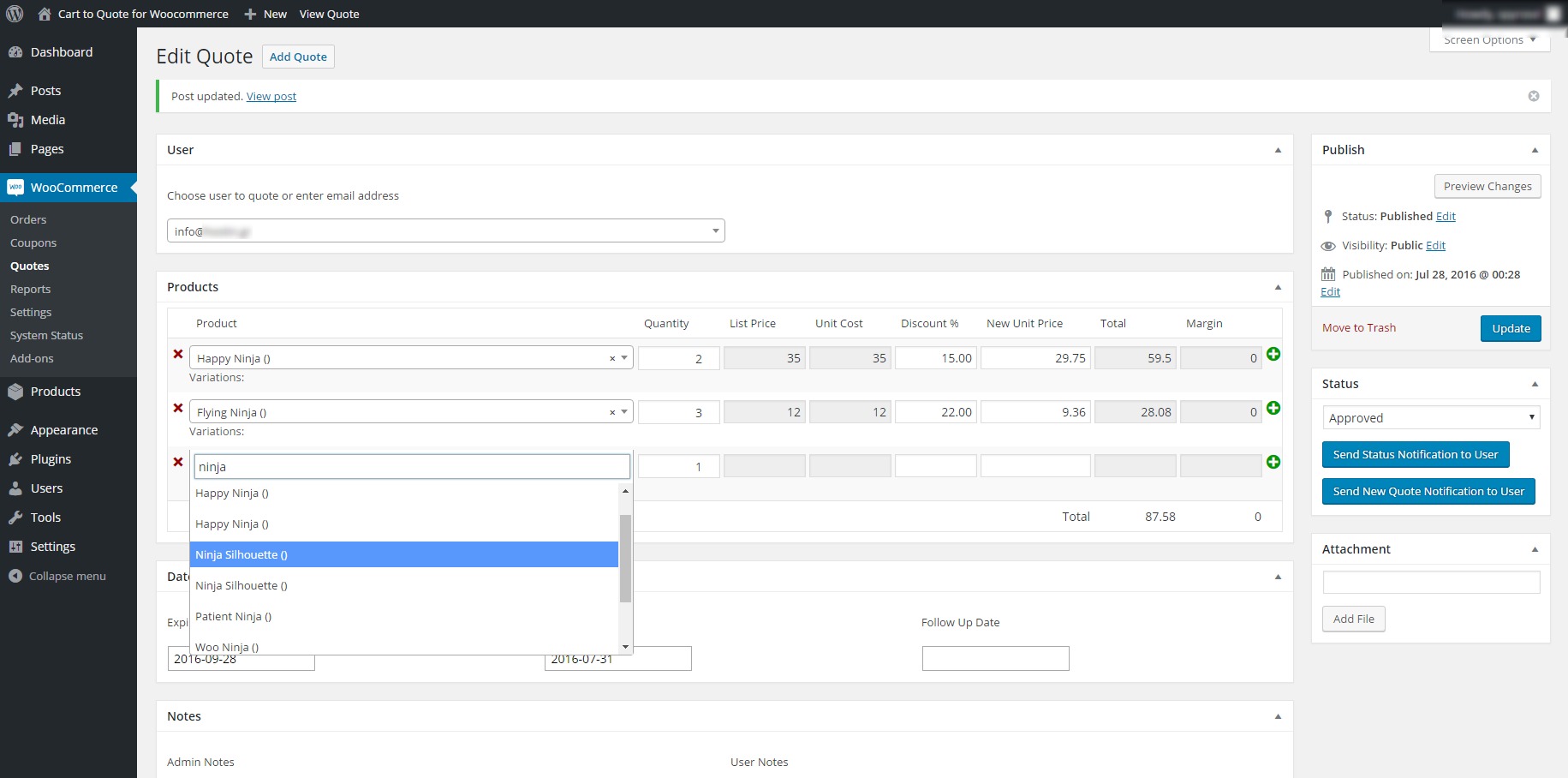
In order to create or edit any quote navigate from your WordPress administration panel to “Woocommerce ? Quotes”. The functionality is the same as any WordPress Custom Post Type.
Quotes Management
- Add a quote buy clicking on the “add Quote” button
- If you already have quotes created you may edit, quick edit, trash or view any quote. Just hover on the quote title for the links to show up.
Quotes Editing
- User: You may add a user by start typing on the User field. An AJAX search will be ran on the background for already registered users and you will be prompt to select one if anyone is found. If the user does not exist you may type his email and the select it. YOu will be prompt to fill in his/her details. It is not obligatory to add the details of the user.
- On the next area you may select the products you want to add to the quote or edit the existing ones. In the same way start typing the title or SKU of the product and you will be prompt to select on of the results that are found. All fields bu the quantity will be autofilled for you after you select a product.
- You may enter the profit margin by editing each individual product. Look for the “Unit Cost” field.
- To add more product click on the plus (+) sign on the end of each row.
- To remove a product click on the (x) sign on the start of each row.
- To enter an expiry, reminder and follow up date click on any of the three fields. A calendar will pop up.
- You may keep notes for admins only on the “Admin Notes” textarea.
- If the quote was submitted bya user and the user added some remarks (notes), those will be displayed on the “User Notes” textarea.
- On the sidebar you may select nad/or change the status of the quote.
- You may add an attachment to the quote by clicking on the “Add File” button. The default WordPress media manager will pop up. This attachment will be sent to the user on quote submission.
- If you are editing a quote then you will have two additional options.
- “Send status notification to user” (self explanatory).
- “Send New Quote Notification to USer” in case you want to resend the email that was sent to him/her when the quote was first created.
Quotes Frontend
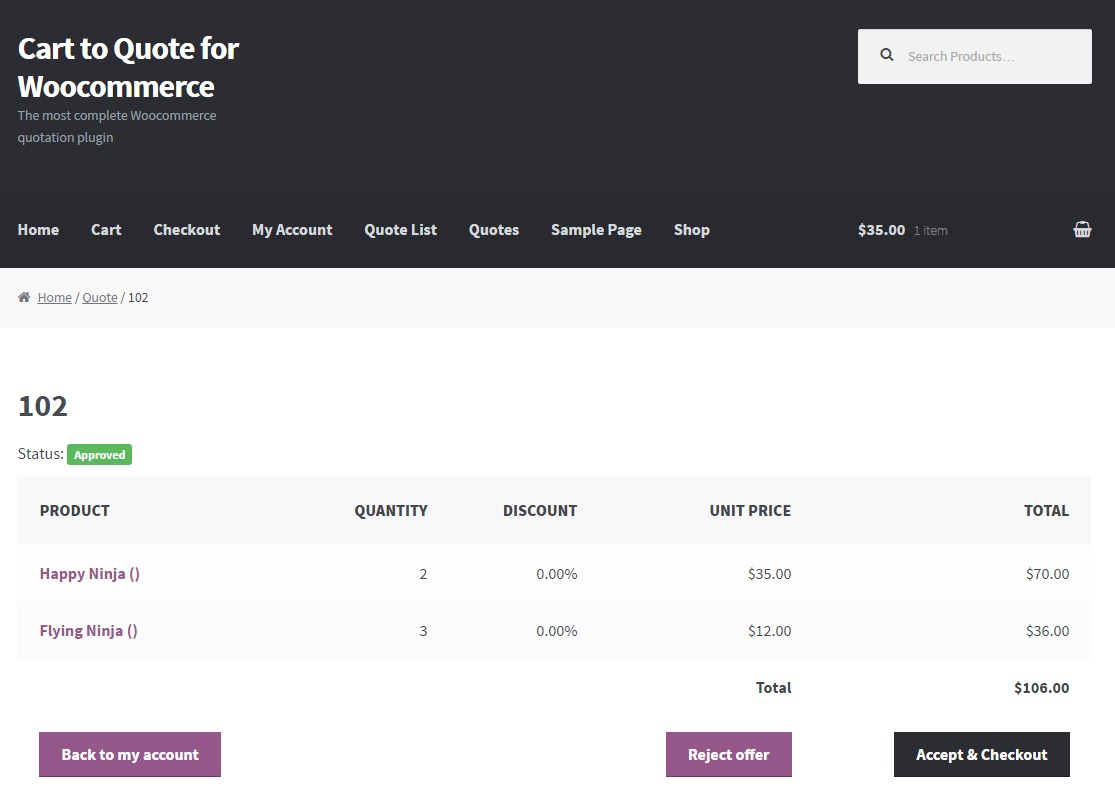
Users, depending on your settings, will be able to add products in their quotes list and ask for quotes. They will be able to ask for a quote and see their quotes on the “My Account” page.
For Developers
Templating
You may override any of the plugin templates in the same way you do for woocommerce. Just copy the file in “your-theme-directory/c2q/”.
eg. if you want to override the single-quote.php and your theme is “storefront-child” then create a folder named “c2q” in ”/wp-content/themes/storefront-child/” and copy the file “single-quote.php” in there. Now you may edit it as preferred.
Hooks
Many hooks are in place. Please search the code for a full list. A list is also available in the documentation.
Frequently Asked Questions
Are variable products supported?
Yes, they are.
Will it work with this (any not tested by us) plugin?
Please ask!
I need this change on the plugin. Will you do it for me?
If this is a change that will benefilt all buyers, we may consider it. If it is a customization, then we are sorry, but this is not included on the support.
How many quotes can it handle?
This really depends on the server and site optimization.
Changelog
1.0.15 11/24/2021
- Fix: Resolved conflict with “Google Doc Embedder” plugin
1.0.14 11/22/2021
- Feature: Added PDF comment per quote
- Feature: Added button on the cart page to merge or transfer the cart contents to the user’s quote list
1.0.13 11/05/2019
- Fix: In some cases the plugins’ setting would not save
1.0.12 02/14/2019
- Fix: In some cases displaying prices with tax would display a warning creating a wsod on post
- Fix: Fixed JS error if the email does not exist in the user DB
- Feature: Update select2 to latest version
1.0.11 09/06/2018
- Fix: On some DB setups the product would not be added to the quotelist
1.0.10 08/01/2018
- Fix: Added several checks in order to avoid errors from popping up
1.0.9 10/20/2017
- Feature: Woocommerce v3.2 compatibility
- Feature: Quote thank you message override
1.0.8 04/30/2017
- Feature: Woocommerce v3.0 compatibility
- Feature: Per product disable “add to cart” button
- Feature: New quotes option to CC email to the quote author
1.0.7 01/19/2017
- Feature: Added the option to customize the text on the email headers
- Feature: Added the option to customize the footer of the emails
- Fix: Fixed quotelist widget link on WPML sites
- Fix: Quote PDF in some occasions was not attached due to server lag
1.0.6 01/03/2017
- Feature: Added “Woocommerce Product Addons” plugin support
- Feature: Added description per product on quotes via backend
- Feature: Better Avada theme compatibility
- Feature: Added image on quote lists
- Feature: SKU search on backend
- Feature: Made the list price and cost editable on backend
- Fix: Prevent last product row deleting on admin
- Fix: PDF was not attached if the user was not registered
- Fix: Some text was not translatable
1.0.5 10/23/2016
- Feature: Added the option to remove prices from your site
- Feature: Added the option to remove add to cart button from your site
- Feature: Made compatible with Woocommerce Variations to Table – Grid
- Feature: Added per user role access to the “add to quote” button
- Feature: Quick custom button text field via the settings page
- Feature: added quote list table on status update emails
- Fix: Fixed quote not saving in wp-admin in some cases
- Fix: Fixed notices not being displayed after quotelist submition
1.0.4 09/13/2016
- Feature: Added compatibility with additional popular themes
- Feature: Better button enabling checks on variable products
- Bug: Force Font Awesome load if missing
1.0.3 09/09/2016
- Feature: Added support for ajax refreshing of the quotelist widget
- Bug: Fixed some PHP warnings
1.0.2 08/23/2016
- Feature: Enable/disable “add to quote” functionality per product
- Feature: Made easier to understand that adding a user during the quote creation is optional
- Bug: In some installations, woocommerce select2 version was conflicting when editing or creading quotes
- Bug: Fixed some typos
1.0.1 08/19/2016
- Bug: Missing comma was preventing DB table from being created
- Bug: Added some checks to remove warnings for undifined indexes
1.0.0 08/15/2016
- Initial release
Sources and Credits
This plugin uses the following libraries
- Select2
- mPDF
Categories
Tags
External listing. code.market does not sell this product and does not process payment for it. Pricing, payment, delivery, licensing, refunds, and support are handled by the third-party merchant on its own website. We may earn an affiliate commission from a referral. Details.
Products of the Week.
Submit#1

upvote.club
Free Social Media Engagement that Helps Boost Your Content. Upvote Club supports 19 social networks with 100+ engagement actions in one dashboard. Add links to your posts and get free engagement from real users.
SaaS · 16,852 views · 96 clicksSaaS · Week 42 · 16,852 views · 96 clicks
#2

Seenshot App
Free, Fast, MacOS Screenshot app. Make Screenshot cmd+shift+2 and send it via link
Desktop App · 5,809 views · 109 clicksDesktop App · Week 42 · 5,809 views · 109 clicks
#3

Conversational Backlinks for Busy Founders
Place Backlink Relevant Conversation for your domain across Forums and Conversations
Website · 17,629 views · 197 clicksWebsite · Week 42 · 17,629 views · 197 clicks
#4

Substack Posting API
Onboard your Agent to Substack. Write Publish on Substack via API
SaaS · 36,615 views · 185 clicksSaaS · Week 42 · 36,615 views · 185 clicks
#5

codester.com
SocialDesk+: Omnichannel Social Commerce & Business Management Platform This is stronger than simply “Social Commerce and Messaging” because it tells buyers this is a complete business platform, not just a messaging script. Turn Social Conversations Into Sales SocialDesk+ is a complete omnichannel social commerce and business management platform built for businesses that sell and communicate with customers through social media. Instead of switching between WhatsApp, Facebook, Instagram and TikTok, businesses can manage customer conversations, comments, products, leads, follow-ups, automation, teams and business reports from one professional workspace. And because the full source code is included, developers, agencies and entrepreneurs can customize, rebrand and launch SocialDesk+ as their own business solution or SaaS platform. 🚀 Build Your Own Social Commerce Business SocialDesk+ gives you the foundation to launch: - Your own SaaS platform - A white-label social CRM - A social-commerce management system - A customer communication platform - A business messaging solution - A custom solution for clients - A multi-business subscription platform 💬 Connect Your Customers Supported social channels include: WhatsApp • Facebook • Instagram • TikTok Bring supported conversations into one centralized workspace and help businesses respond faster without constantly switching between platforms. 🛍️ More Than a Messaging Platform SocialDesk+ combines communication with the tools businesses need to manage customer opportunities: Inbox Manage customer conversations from connected channels. Comments Monitor and respond to social-media comments. Customers & Leads Organize customer information and potential buyers. Products & Catalog Manage products and give your team quick access to product information. Follow-Ups Make sure potential customers don't get forgotten. Automation Automate repetitive customer questions and responses. AI Assistant Provide AI-assisted communication when configured. Team Management Give managers and staff access to the business workspace. Reports & Analytics Track activity using business reports and analytics. The current product listing already includes these capabilities. 🔥 Why Buyers Will Want It Launch Faster Start with an already-built business platform instead of developing the entire system from zero. Customize Everything The full source code is included, allowing developers to change branding, features, workflows and integrations. Build a SaaS Create multiple business workspaces and offer SocialDesk+ as a subscription-based service. Sell to Businesses Offer it to retailers, restaurants, service businesses, online sellers, agencies and other businesses that communicate with customers through social media. Mobile + Web + Backend This isn't just a mobile UI template. It includes: - Flutter mobile application - Python / FastAPI backend - Web interface - Administration tools - Database infrastructure - API-based architecture - SQLite / PostgreSQL support - Android and iOS project structure 💼 One Platform. Multiple Business Opportunities. For SaaS Entrepreneurs Launch your own subscription platform and allow multiple businesses to operate inside separate workspaces. For Software Agencies Customize and rebrand the platform for clients instead of building an omnichannel business system from scratch. For Developers Use the complete source code as a foundation for your own social-commerce or customer-management product. For Businesses Deploy a dedicated version for your own customer-service and social-commerce operations. 🧩 What's Included Mobile - Flutter / Dart - Android - iOS project Backend - Python - FastAPI - SQLAlchemy - Alembic Database - SQLite - PostgreSQL Web - HTML5 - CSS3 - JavaScript Deployment - Docker - Docker Compose - Production configuration Business Platform - Multi-workspace architecture - Authentication - Teams - Customers - Products - Messaging - Comments - Automation - Reports - Subscriptions - Administration The current listing also documents third-party integrations such as Meta, TikTok, Stripe, Firebase, SMTP and optional OpenAI configuration. ⚡ What Makes SocialDesk+ Different? You're not buying a simple: ❌ Chat UI ❌ WhatsApp clone ❌ Flutter template ❌ Admin dashboard ❌ Basic CRM You're getting a complete business platform foundation that can be customized, branded and commercialized. Connect. Automate. Manage. Grow. SocialDesk+ Omnichannel Social Commerce & Business Management Platform One important change I'd make to the current listing The current page starts with: “A simple guide to managing your social conversations, customers, products and business activity.”
Other · 4,028 views · 32 clicksOther · Week 42 · 4,028 views · 32 clicks
#6

sandbook.app
Sandbook reads EPUB, PDF, web pages and scanned pages aloud with Kokoro TTS, an open neural voice model that runs on your iPhone, free and offline. Choose from 41 natural voices in English, Spanish, French, Italian, Brazilian Portuguese and Hindi and follow each word as it is spoken. Try the same voices in your browser first with the free Kokoro TTS online demo.
Other · 4,028 views · 13 clicksOther · Week 42 · 4,028 views · 13 clicks