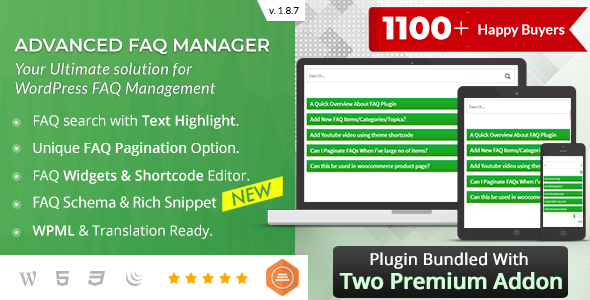
BWL Advanced FAQ Manager
Description










Get Premium Addons For FREE:


BWL Advanced FAQ Manager is a powerful & premium WordPress plugin that allows you to create and display an unlimited number of FAQ posts on any WordPress website. Advanced FAQ Manager plugin comes with approximately Zero Configuration requirement specialty. So, you do not need to worry about any custom and complicated configuration to use this Plugin. Just upload and install the Plugin, and you are ready to go.
The Plugin has a built-in Shortcode Editor panel with TinyMCE Editor and works fine within the Gutenberg editor. So, you can quickly insert shortcodes and display the FAQ items inside any pages, posts, and website widget areas.
FAQ Plugin comes with an extensive options panel that contains useful features such as customized FAQ display settings, Font settings, Theme settings, and much more. From the back end of the FAQ plugin, you can easily Add, Edit, Delete and Sort FAQ items. Additionally, the Custom FAQ widget feature allows displaying FAQs in sidebar areas.
Create Unlimited FAQs:
Compose and save FAQ posts in a single place.
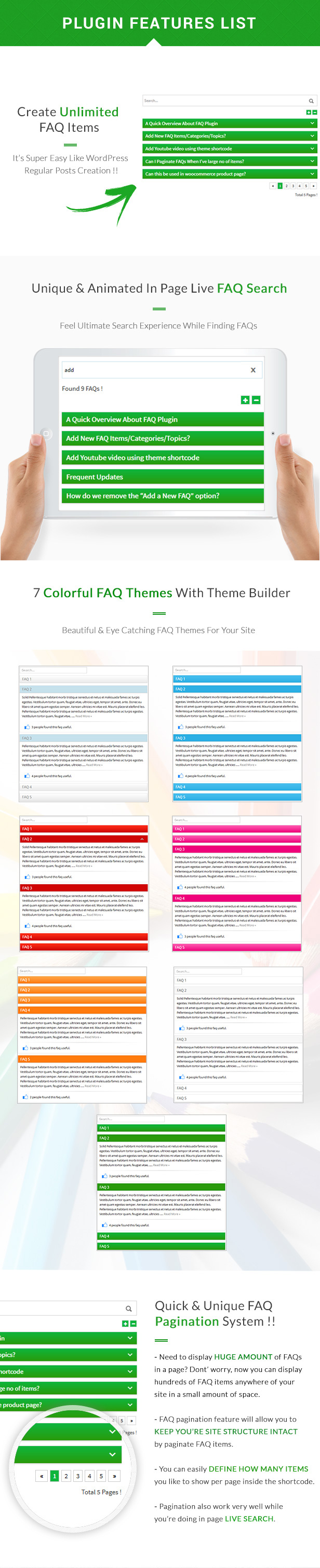
With the Advanced FAQ Manager plugin, you can store all your important FAQ content in one place without worrying about performance issues. Furthermore, you can classify FAQs into FAQ categories and topics, allowing you to manage all the FAQ posts efficiently. The FAQ plugin uses the custom post-type feature of WordPress to create & store FAQ content. So, it does not require starting any custom table, and it avoids conflict with the other Plugin’s data.
FAQ Search & Suggestion Box:
Instantly get answers from the FAQ listings.
An intuitive search system makes your customer feel comfortable getting their answers quickly with minimal effort. It provides the fastest result and ensures your site users a supreme experience while looking for their answers. This way, customers need to spend less time on long FAQ lists, and they can decide soon to purchase your product. Also, you will get fewer customer support messages on the same subject repeatedly.
FAQ Pagination System:
Manage Large FAQ Lists In a Small Space.
Do you need to create a large no of FAQ items and worry about how to display that long lists? Don’t worry! It is easy to showcase hundreds of FAQ items anywhere on your site within a small space. FAQ pagination feature will allow you to keep the site structure intact by paginating FAQ items. Moreover, you can easily set the number of posts you like to show per page inside the shortcode.
FAQ Rating System:
Get User’s Opinion About FAQ Contents.
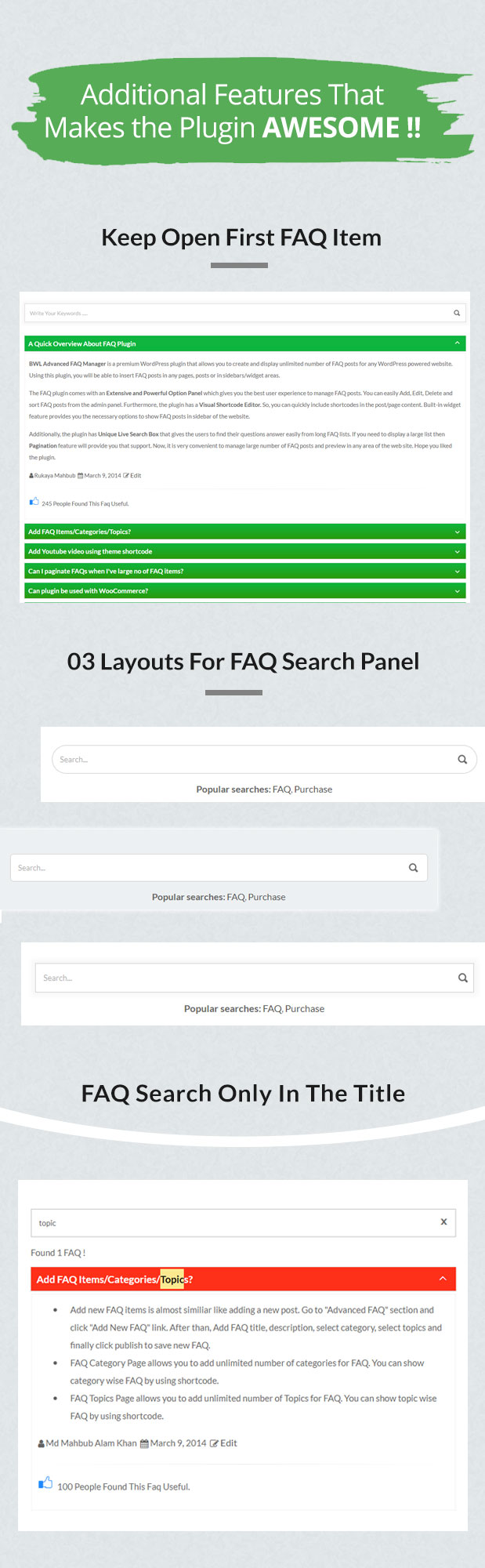
Now, it is super easy to identify which FAQ items are most useful for the users. The Plugin added a custom column in the WordPress admin section that displays the total no of likes for every FAQ item. Moreover, you can quickly get an overview and improve your FAQ content based on user ratings. We use the IP address filtering method to avoid repeat or fake votes from the same users.
FAQ Tab Layout For Categories:
Access Multiple Categories FAQ In One Place.
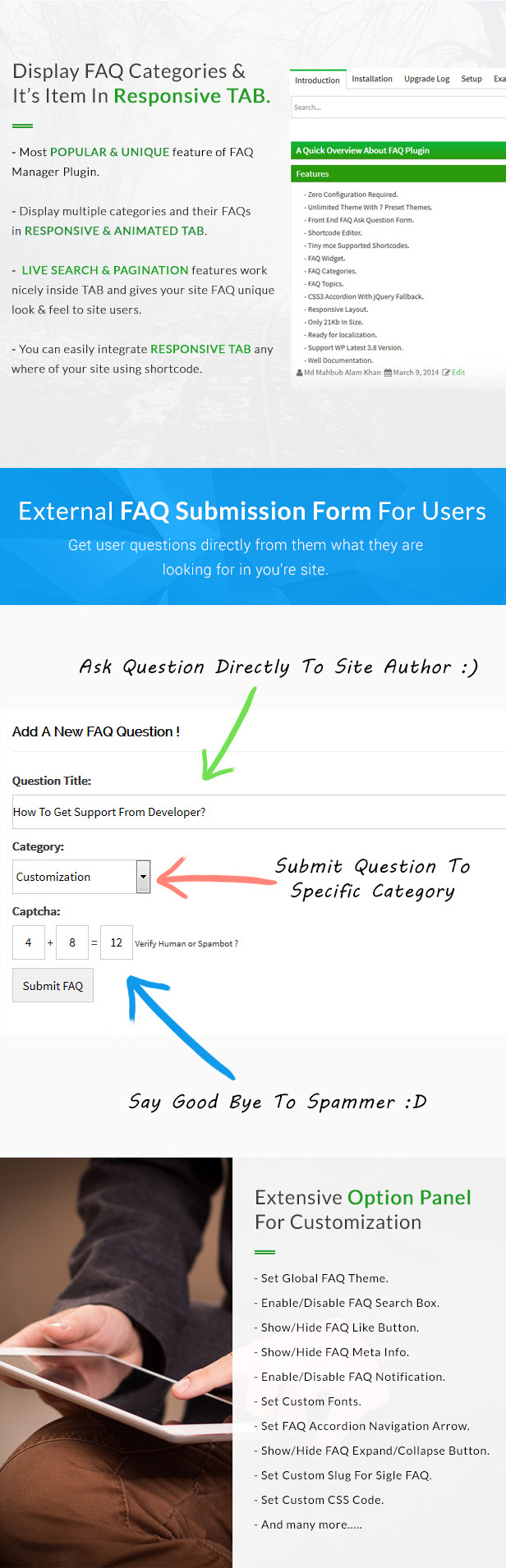
Tab layout is one of the FAQ Manager plugin’s most popular and unique features. The custom tab allows you to display multiple categories and their corresponding FAQ posts in animated Tab format. Additionally, you can add a search box within each tab content, which undoubtedly helps site users search and speed up to get their answers. You also display the tab in vertical format.
FAQ Submission Form:
Get Questions Directly From The Users.
You can also receive FAQ questions from the site users. This feature helps the site author collect user queries regarding any product. Once a user submits an issue, the Plugin will notify the site administrator about the new query. After that, the administrator can verify the question and add the answer. Finally, inform that user about the update. That way, you can enrich the FAQ contents of your site.
Single FAQ Page:
Display FAQ Post In A Single Page.
The Plugin allows you to display FAQ posts on a single page for SEO purposes. The Plugin uses the currently activated theme category.php or archive.php template file to view the FAQ posts. However, you can create and customize those template files to present FAQ posts according to the site’s requirements. Also, in the options panel, you can set custom permalinks for a single page.
Built-in FAQ Widget:
Display FAQ Posts In Sidebar.
You can view FAQ categories, top-voted FAQs, and Random FAQs in the sidebar. FAQ Plugin comes with three built-in widgets. This widget allows you to display FAQ content on any sidebar and available site widget areas.
Extensive Options Panel:
Customize FAQ Layout According To Your Need.
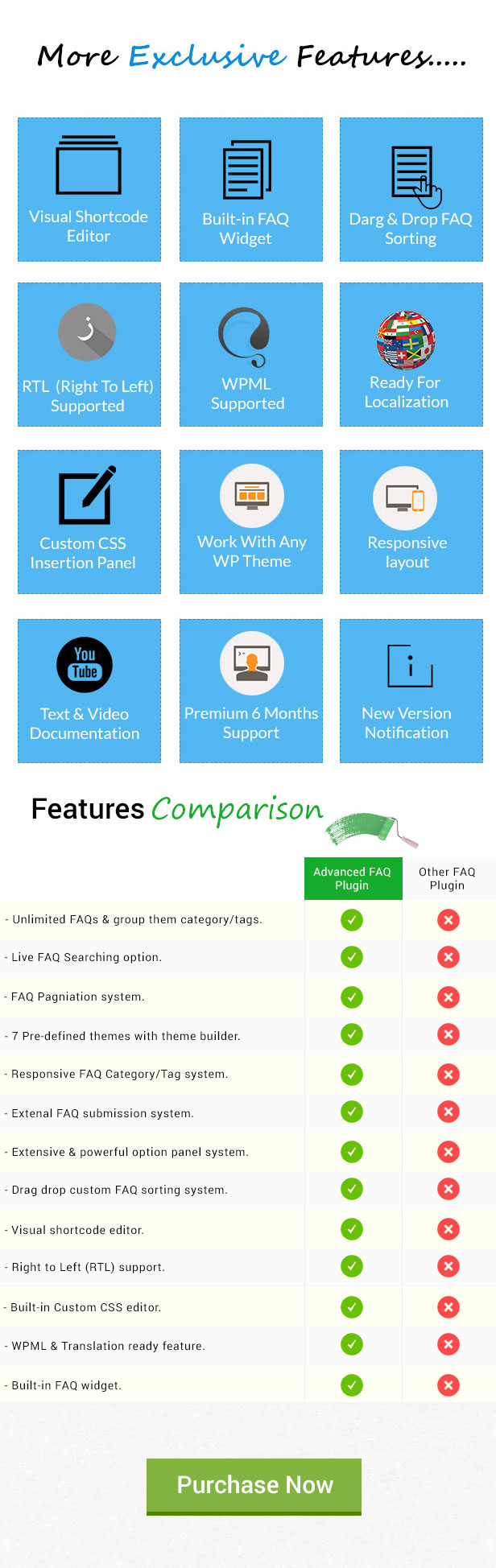
The advanced FAQ Manager plugin has a full-featured options panel to customize the FAQ contents according to site requirements. You can choose FAQ themes, create a custom theme, change font sizes, set up a custom slug, and add custom style sheet code. FAQ Plugin packaged with seven built-in colorful themes and a custom theme builder section. So, you can create custom themes according to the site color scheme.
RTL Support:
Automatically Switches FAQ Text Direction.
You can effortlessly install and use the FAQ plugin on RTL language-based site. FAQ plugin automatically identifies the RTL version and changes the text direction according to the site language. So, you do not need to go for any custom settings to enable the RTL feature.
Visual Shortcode Editor:
TinyMCE Integrated Powerful Shortcode Generator.
FAQ Plugin has a user-friendly visual shortcode panel integrated with the TinyMCE editor. So you do not need to copy & paste the shortcode over and over. Just select options from the visual shortcode editor and click the insert button and custom shortcodes will be generated and automatically inserted into TinyMCE Editor. That feature allows you to add shortcodes inside a page or post.
Drag & Drop FAQ Sorting:
Re-order The FAQ Posts That Suites Best.
Using the Drag & Drop sort option, you can implement custom orders on the FAQ posts. Although you can order FAQ posts by their ID, title, or date; however, drag-and-drop re-ordering gives you the best flexibility to change the position of FAQ content according to the site requirements.
Localization & WMPL:
Translate FAQ Plugin Into Any Language.
FAQ Plugin offers an impressive translation feature, including .mo& .po files. So, besides English, you can easily translate the theme text for other languages. That allows you to localize FAQ plugin texts into your language. Moreover, the Plugin supports the WPML plugin to create faqs for multiple languages.
Support From The Developers:
Access Top Notch & Premium Assistance.
Advanced FAQ Manager WordPress Plugin offers Six (06) months of premium support directly from the developer. We are committed to assisting our buyers, and most of the time, it takes less than 24 hours to reply to the support message. If you face any particular issue regarding the FAQ plugin, then the developer will assist you in fixing the problem.

- Zero configuration is required.
- Create an unlimited number of FAQs.
- FAQ live search to find FAQ posts quickly.
- FAQ pagination system.
- Seven different FAQ themes with a custom theme builder.
- Display FAQs in tabs.
- Front-end FAQ asks form.
- Captcha validation for FAQ submission.
- The custom slug for a single FAQ.
- Extensive FAQ option panel.
- Visual shortcode editor.
- Accordion and toggle mode.
- Expand All/ Collapse All Buttons.
- Font-awesome up/down Arrow for FAQ Collapse Navigation.
- RTL support.
- 3 Types of Built-in FAQ Widgets.
- FAQ sorting option.
- FAQ rating option.
- FAQ categories & topics.
- FAQ Filtering by categories and topics in the admin panel.
- Display Single FAQ Anywhere on Site.
- Pure CSS3 Accordion with jQuery Fallback.
- Responsive Layout.
- Ready for localization.
- WPML compatible.
- Support WordPress’s latest version.
- Well documentation
- Automatic notification for the new version.
- Get Premium and quick support from the developer.

 2023, January, 03 - v 1.8.7
    - Fixed: Plugin shortcode issue.
    - Updated: Plugin styles and javascript.
    - Updated: Plugin language/translation file.
    - Updated: Plugin documentation.
Please check this link for the complete change log information about the Plugin.
Categories
Tags
External listing. code.market does not sell this product and does not process payment for it. Pricing, payment, delivery, licensing, refunds, and support are handled by the third-party merchant on its own website. We may earn an affiliate commission from a referral. Details.
Products of the Week.
Submit#1

upvote.club
Free Social Media Engagement that Helps Boost Your Content. Upvote Club supports 19 social networks with 100+ engagement actions in one dashboard. Add links to your posts and get free engagement from real users.
SaaS · 16,442 views · 96 clicksSaaS · Week 42 · 16,442 views · 96 clicks
#2

Seenshot App
Free, Fast, MacOS Screenshot app. Make Screenshot cmd+shift+2 and send it via link
Desktop App · 5,433 views · 109 clicksDesktop App · Week 42 · 5,433 views · 109 clicks
#3

Conversational Backlinks for Busy Founders
Place Backlink Relevant Conversation for your domain across Forums and Conversations
Website · 17,256 views · 195 clicksWebsite · Week 42 · 17,256 views · 195 clicks
#4

Substack Posting API
Onboard your Agent to Substack. Write Publish on Substack via API
SaaS · 36,248 views · 184 clicksSaaS · Week 42 · 36,248 views · 184 clicks
#5

codester.com
SocialDesk+: Omnichannel Social Commerce & Business Management Platform This is stronger than simply “Social Commerce and Messaging” because it tells buyers this is a complete business platform, not just a messaging script. Turn Social Conversations Into Sales SocialDesk+ is a complete omnichannel social commerce and business management platform built for businesses that sell and communicate with customers through social media. Instead of switching between WhatsApp, Facebook, Instagram and TikTok, businesses can manage customer conversations, comments, products, leads, follow-ups, automation, teams and business reports from one professional workspace. And because the full source code is included, developers, agencies and entrepreneurs can customize, rebrand and launch SocialDesk+ as their own business solution or SaaS platform. 🚀 Build Your Own Social Commerce Business SocialDesk+ gives you the foundation to launch: - Your own SaaS platform - A white-label social CRM - A social-commerce management system - A customer communication platform - A business messaging solution - A custom solution for clients - A multi-business subscription platform 💬 Connect Your Customers Supported social channels include: WhatsApp • Facebook • Instagram • TikTok Bring supported conversations into one centralized workspace and help businesses respond faster without constantly switching between platforms. 🛍️ More Than a Messaging Platform SocialDesk+ combines communication with the tools businesses need to manage customer opportunities: Inbox Manage customer conversations from connected channels. Comments Monitor and respond to social-media comments. Customers & Leads Organize customer information and potential buyers. Products & Catalog Manage products and give your team quick access to product information. Follow-Ups Make sure potential customers don't get forgotten. Automation Automate repetitive customer questions and responses. AI Assistant Provide AI-assisted communication when configured. Team Management Give managers and staff access to the business workspace. Reports & Analytics Track activity using business reports and analytics. The current product listing already includes these capabilities. 🔥 Why Buyers Will Want It Launch Faster Start with an already-built business platform instead of developing the entire system from zero. Customize Everything The full source code is included, allowing developers to change branding, features, workflows and integrations. Build a SaaS Create multiple business workspaces and offer SocialDesk+ as a subscription-based service. Sell to Businesses Offer it to retailers, restaurants, service businesses, online sellers, agencies and other businesses that communicate with customers through social media. Mobile + Web + Backend This isn't just a mobile UI template. It includes: - Flutter mobile application - Python / FastAPI backend - Web interface - Administration tools - Database infrastructure - API-based architecture - SQLite / PostgreSQL support - Android and iOS project structure 💼 One Platform. Multiple Business Opportunities. For SaaS Entrepreneurs Launch your own subscription platform and allow multiple businesses to operate inside separate workspaces. For Software Agencies Customize and rebrand the platform for clients instead of building an omnichannel business system from scratch. For Developers Use the complete source code as a foundation for your own social-commerce or customer-management product. For Businesses Deploy a dedicated version for your own customer-service and social-commerce operations. 🧩 What's Included Mobile - Flutter / Dart - Android - iOS project Backend - Python - FastAPI - SQLAlchemy - Alembic Database - SQLite - PostgreSQL Web - HTML5 - CSS3 - JavaScript Deployment - Docker - Docker Compose - Production configuration Business Platform - Multi-workspace architecture - Authentication - Teams - Customers - Products - Messaging - Comments - Automation - Reports - Subscriptions - Administration The current listing also documents third-party integrations such as Meta, TikTok, Stripe, Firebase, SMTP and optional OpenAI configuration. ⚡ What Makes SocialDesk+ Different? You're not buying a simple: ❌ Chat UI ❌ WhatsApp clone ❌ Flutter template ❌ Admin dashboard ❌ Basic CRM You're getting a complete business platform foundation that can be customized, branded and commercialized. Connect. Automate. Manage. Grow. SocialDesk+ Omnichannel Social Commerce & Business Management Platform One important change I'd make to the current listing The current page starts with: “A simple guide to managing your social conversations, customers, products and business activity.”
Other · 3,659 views · 31 clicksOther · Week 42 · 3,659 views · 31 clicks
#6

sandbook.app
Sandbook reads EPUB, PDF, web pages and scanned pages aloud with Kokoro TTS, an open neural voice model that runs on your iPhone, free and offline. Choose from 41 natural voices in English, Spanish, French, Italian, Brazilian Portuguese and Hindi and follow each word as it is spoken. Try the same voices in your browser first with the free Kokoro TTS online demo.
Other · 3,663 views · 13 clicksOther · Week 42 · 3,663 views · 13 clicks